Outline ·
[ Standard ] ·
Linear+
Pwnagetool/Quickpwn & "yellowsn0w" 3G Unlock, »2G/3G Fw 2.2.1 Unlocking&Jailbreaking«
|
Rinyuu
|
 Jan 20 2009, 09:41 PM Jan 20 2009, 09:41 PM
|
Getting Started


|
Got question bout fw 2.2...... i am using 2g iphone 2.1 fw. i downloaded pwnage tool 2.2 and iPhone1,1_2.2_5G77_Restore.ipsw. Everytime i use pwnageTool it keep saying i have wrong fw bundle.Anyone has ideas? i had downloaded 3 ipsw from 3 different sources.Still the same. Had no problem jailbreak since 1.1.4. This post has been edited by Rinyuu: Jan 20 2009, 09:45 PM Attached thumbnail(s)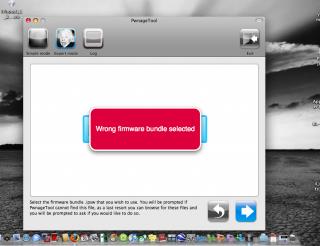
|
|
|
|
|
|
Rinyuu
|
Jan 21 2009, 12:01 AM
|
Getting Started
|
QUOTE(TripleH @ Jan 20 2009, 09:57 PM) Huh? Never encounter this kinda error. It's super simple wan ma. Maybe get an update of the pwnagetool? Version now is 2.2.1 i am using pwnagetool 2.2.1! |
|
|
|
|
|
Rinyuu
|
Jan 21 2009, 01:51 AM
|
Getting Started
|
QUOTE(frozzbyte @ Jan 21 2009, 01:36 AM) @Rinyuu Maybe becoz you're using the wrong firmware as stated in pwnagetool? iPhone 1,1_2.2_5G77_Restore.ipsw firmware is for 1st generation iphone. If yours is the 2nd generation as in iPhone 3G then it should be iPhone 1,2_2.2_5G77_Restore.ipsw. The warning is sooooo obvious as it state that you are using the wrong firmware bundle. My bad bro....actually im using 1st Gen iphone. i thought first iphone is 2g confusing cos new iphone they called 3g. ok is it still wrong fw? i've been googling for 4 hrs still same fw for first gen iPhone1,1_2.2_5G77_Restore.ipsw This post has been edited by Rinyuu: Jan 21 2009, 02:02 AM |
|
|
|
|
|
Rinyuu
|
Jan 21 2009, 02:09 AM
|
Getting Started
|
QUOTE(frozzbyte @ Jan 21 2009, 01:58 AM) @Rinyuu Where did u download the firmware? Apple webpage as in here?Try to put the pwnagetool in a folder on the desktop and with that firmware.
Added on January 21, 2009, 1:59 amp/s - make sure the file size is 245.6 MB for the firmware. i followed from david link iclarified n also from MMI. I think i will try in windows. Is it becos of my OSX 10.5.6? i just formatted then install new leopard then i upgraded to 10.5.6. I also installed OSX DFU Fix, but it got nothin to do if im not in DFU mode .  |
|
|
|
|
|
Rinyuu
|
Jan 21 2009, 02:18 AM
|
Getting Started
|
QUOTE(frozzbyte @ Jan 21 2009, 02:12 AM) I'm using pwnagetool 2.2.1 in 10.5.6 and did not face any problem. Maybe u want to try downloading the firmware again and make sure the size it correct. From the looks of it, yours failed the file(hash) check. BTW ... you want to make a custom firmware or just jailbreak? If just jailbreak then why not use Quickpwn? ok i will try quickpwn! here snapshot that i got everythings,fw,bl,pwnagetool. Attached thumbnail(s)
|
|
|
|
|
|
Rinyuu
|
Jan 21 2009, 02:26 AM
|
Getting Started
|
QUOTE(frozzbyte @ Jan 21 2009, 02:22 AM) That should be correct. The pwnagetool itself maybe the culprit? Thx frozz for tutorial. i will continue tomorrow bro...will let u know if success. After read i have to restore using itunes,i need to download another 245mb fw. LOL!!!!! 4 times for tonite. This post has been edited by Rinyuu: Jan 21 2009, 02:35 AM |
|
|
|
|
|
Rinyuu
|
Jan 21 2009, 10:08 PM
|
Getting Started
|
QUOTE(Edoras @ Jan 21 2009, 08:58 AM) I have a similar problem and the OSX DFU Fix does not solve the problem. In fact, it does more harm to my MBP. The reason being, its 10.5.6 bug ... and the easiest solution is to use a USB Hub to connect your iPhone to the Mac. Hope this helps.. I TOTALLY AGREE WITH U. N again today i have to reinstall leopard. At first i thought maybe my macbook never reformat since i bought it. Sympton were after i installed OSX DFU Fix then i restart few times suddenly it hang. I cant use my mouse n keyboard. I thought maybe crash with other programs but last nite it was fresh leopard after restart it happen again. i realised that OSX DFU Fix didnt reboot after i installed it. It just dissapear after it closed some other programs.Suppose it will reboot as i read in instruction. Any ideas bro? Eerrr...just normal usb hub?no need special hub? |
|
|
|
|
|
Rinyuu
|
Feb 11 2009, 11:28 PM
|
Getting Started
|
QUOTE(shaunsupra86 @ Feb 11 2009, 10:19 PM) Bros out there, I'm also experiencing the same problem as begong... Have tried to QuickPWN a few times following the instructions given. I'm able to JB my iPhone 3G, and its running on firmware 2.2 now. Able to use the springboard, but unable to detect my SIM card. I noticed that my modem firmware is currently at version 02.30.03. Is this preventing me from unlocking my network? Same as begong, my carrier is (null) (null). I currently can use all the programs, safari, cydia, installer, 3rd party apps & etc except for making calls, receiving, and sms. HeeeeEEeeeEEEllllpppppp!!! Pls.... if locked unit just enjoy ur ipod touch for awhile...jk jk  ..anyway im also having problems. My 3g iphone locked unit i managed to unlock & jb. But the reception not really as good as my 2g iphone. Half bar in my 3g unit, full bar in my 2g unit. Anyone encounter this? n anyone knows if ispaziorepo are dead or down? |
|
|
|
|
|
Rinyuu
|
Apr 23 2009, 04:47 AM
|
Getting Started
|
To All Sifu,
My iphone is unlocked set running on 2.2 firmware with baseband 2.28. Now the problem is...i got itchy hand wants to upgrade to firmware 2.2.1. The reasons want to upgrade cos many tempting apps only works with that firmware.
Question is....is it a bad idea for me to upgrade the 2.2.1 firmware?
i had jb my friend's iphone bought from maxis running on 2.2.1 firmware with 2.30 basebahd, Seems like no problem in future.
|
|
|
|
|
|
Rinyuu
|
Apr 23 2009, 01:11 PM
|
Getting Started
|
QUOTE(g3n0c|d3 @ Apr 23 2009, 10:31 AM) i just upgraded from 2.2FW to 2.2.1FW yesterday... for most, ive seen good result which is less lagging and less crashing... the SMS getting flawless everytime.... so if ure iphone is officially unlock, i guess there is no harm like @teikwing said... happy JBing! ok thx..cant wait to go back home ugrading 2.2.1!!! Lets Gooolf its my reason to upgrade! Look like Pangya Sea online! |
|
|
|
|
|
Rinyuu
|
Apr 23 2009, 01:25 PM
|
Getting Started
|
QUOTE(nokia2003 @ Apr 23 2009, 01:18 PM) and if you are overly anxious, you can perhaps start downloading the new firmware first? that way, it is merely an upgrade away on the iTunes when you do get home. look over here; first post bro...i tried aptbackup before., but seem like not working. How to use? |
|
|
|
|



 Quote
Quote

 0.0232sec
 0.49
0.49
 7 queries
 GZIP Disabled