Welcome Guest ( Log In | Register )

Bump Topic Topic Closed RSS Feed

Outline · [ Standard ] · Linear+

 Valum ram vs performance ram, effect on overclocking the FSB

views
     
TSboon.fong
post Sep 9 2008, 11:55 AM, updated 18y ago

Getting Started
**
Junior Member
199 posts

Joined: Jan 2008
From: Klang, Selangor


Hi all, my rig is as below. one question, currently i am have difficulty overclock my intel e4600 to 3.0ghz (stable at 2.85ghz) on stock vcore. I am using value ram, is it holding me back? is it possible if i am changing to performance ram my rig can overclock pass 2.9-3.0ghz? thanks
serigala
post Sep 9 2008, 12:04 PM

CurSedWolf
******
Senior Member
1,439 posts

Joined: Jan 2008
From: Dungeons of the Wolves


get a 1066 ram..yes..it is holding u back..get a higher clock Ram...
goldfries
post Sep 9 2008, 12:05 PM

40K Club
Group Icon
Forum Admin
44,415 posts

Joined: Jan 2003


not your RAM issue.

the E4600 runs at 800Mhz FSB. means at 1:1 FSB to RAM ratio, it's only running the RAM at DDR2 400 speed.

your RAM has more than enough headroom.

my E2140 also 800Mhz FSB and using DDR2 667 only but can do 3.2ghz also, with the 667 running at 800. smile.gif

just make sure you have the RAM setting to 1:1 (yes, your P5K has the option) and

your processor is running 12x200 = 2.4ghz.

to reach 3ghz, you just have to run it at 12x250. with 1:1, your RAM is only operating at DDR2 500 speed, which your DDR2 800 can more than handle it. smile.gif


Added on September 9, 2008, 12:06 pm
QUOTE(serigala @ Sep 9 2008, 12:04 PM)
get a 1066 ram..yes..it is holding u back..get a higher clock Ram...


sweat.gif please explain how his DDR2 800 is holding his processor back when a the same pair of RAM also can be used by E2140 / E2160 / E2180 to go beyond 3Ghz.


This post has been edited by goldfries: Sep 9 2008, 12:06 PM
cloudwan
post Sep 9 2008, 12:06 PM

- Knob -
*******
Senior Member
8,525 posts

Joined: Jan 2003
From: The Jungle Of Pahang


Yup, do just as goldfries says...
serigala
post Sep 9 2008, 12:10 PM

CurSedWolf
******
Senior Member
1,439 posts

Joined: Jan 2008
From: Dungeons of the Wolves


happy.gif
Exquisite
post Sep 9 2008, 12:18 PM

Getting Started
**
Junior Member
124 posts

Joined: Feb 2006


Maybe a bit out of topic here...
Can somebody sugggest me performance ram for notebook.
Where can I buy it?
Planning to upgrade asus F6V
goldfries
post Sep 9 2008, 12:22 PM

40K Club
Group Icon
Forum Admin
44,415 posts

Joined: Jan 2003


QUOTE(serigala @ Sep 9 2008, 12:10 PM)
happy.gif
*
first you post a reply that is with wrong information.

now you post single emoticon post.

please, don't spam. and don't post if you don't know the matter.

QUOTE(Exquisite @ Sep 9 2008, 12:18 PM)
Maybe a bit out of topic here...
Can somebody sugggest me performance ram for notebook.
Where can I buy it?
Planning to upgrade asus F6V
*
notebook section would be better for you but why would you want performance RAM for notebook? smile.gif
TSboon.fong
post Sep 9 2008, 12:26 PM

Getting Started
**
Junior Member
199 posts

Joined: Jan 2008
From: Klang, Selangor


QUOTE(goldfries @ Sep 9 2008, 12:05 PM)
not your RAM issue.

the E4600 runs at 800Mhz FSB. means at 1:1 FSB to RAM ratio, it's only running the RAM at DDR2 400 speed.

your RAM has more than enough headroom.

my E2140 also 800Mhz FSB and using DDR2 667 only but can do 3.2ghz also, with the 667 running at 800. smile.gif

just make sure you have the RAM setting to 1:1 (yes, your P5K has the option) and

your processor is running 12x200 = 2.4ghz.

to reach 3ghz, you just have to run it at 12x250. with 1:1, your RAM is only operating at DDR2 500 speed, which your DDR2 800 can more than handle it. smile.gif
Hi goldfries, I had tried to set the fsb at 250x12=3.0ghz and disable the C1E option and leave the rest to default or auto. but it can get pass POST, when come to windows initialize page it will then reboot. only manage to get it stable at 2.82ghz (235x12). If not the ram problem, is it the power problem? also in the bios for my mobo the ram can set in different divider, can i set it as close to 800 mhz as possible, not 1:1.
goldfries
post Sep 9 2008, 12:31 PM

40K Club
Group Icon
Forum Admin
44,415 posts

Joined: Jan 2003


1. not RAM issue cos at 12x235, your RAM is only running at 470, which is far from your 800 limit.

2. looks like your processor could use some vcore boost. try upping the vcore.

3. yes you can set the RAM to beyond 1:1 but i suggest you do that only after you're settled with your OCed speed.


Added on September 9, 2008, 12:32 pm4. see if you can lower your multiplier, which based on your board. i think you can. try 8x300, then 350, then 400.

and yes, vcore boost might be needed. and what i usually do is unplug the HDD from power. only plug HDD power in when i really want it to enter the OS.

This post has been edited by goldfries: Sep 9 2008, 12:32 PM
coolice
post Sep 9 2008, 12:46 PM

Team OCD!
******
Senior Member
1,857 posts

Joined: Sep 2004
From: ocdrift.com


try 5:8 memory ratio
Alienwarez
post Sep 9 2008, 01:13 PM

Protégé
****
Senior Member
546 posts

Joined: May 2008
what i know,e4xxx series not overclockable compared e2xxx series...
TSboon.fong
post Sep 9 2008, 01:22 PM

Getting Started
**
Junior Member
199 posts

Joined: Jan 2008
From: Klang, Selangor


thank you all for the advises
goldfries
post Sep 9 2008, 01:24 PM

40K Club
Group Icon
Forum Admin
44,415 posts

Joined: Jan 2003


QUOTE(Alienwarez @ Sep 9 2008, 01:13 PM)
what i know,e4xxx series not overclockable compared e2xxx series...


yes but still can go quite far.

anyway, my E2140 died after 1 year of 100% OC brows.gif now my E7200 from 2.53 can go ~3.6 smile.gif so I'm happy.

hilmiangah
post Sep 9 2008, 01:31 PM

Kongsi Gelap Elite Ramadass
Group Icon
Elite
5,602 posts

Joined: Jul 2007
From: The Holiest Of Hole


yep i read the review and im intrigued too get it but hoping on some extra budget 1st.
TSboon.fong
post Sep 9 2008, 02:08 PM

Getting Started
**
Junior Member
199 posts

Joined: Jan 2008
From: Klang, Selangor


hi goldfries, do you think now is the right time to go for the C2Q, or E8xxx series?
Alienwarez
post Sep 9 2008, 02:32 PM

Protégé
****
Senior Member
546 posts

Joined: May 2008
QUOTE(boon.fong @ Sep 9 2008, 02:08 PM)
hi goldfries, do you think now is the right time to go for the C2Q, or E8xxx series?
*
go for E8XXX..some proc can push untill 4ghz..
goldfries
post Sep 9 2008, 02:38 PM

40K Club
Group Icon
Forum Admin
44,415 posts

Joined: Jan 2003


QUOTE(boon.fong @ Sep 9 2008, 02:08 PM)
hi goldfries, do you think now is the right time to go for the C2Q, or E8xxx series?


personally if i were to play games, I go for E8xxx

if i were to do A LOT of video encoding (yes, meaning almost daily basis. huge files. not your once a while family holiday type) then yes, C2Q.

TSboon.fong
post Sep 9 2008, 02:48 PM

Getting Started
**
Junior Member
199 posts

Joined: Jan 2008
From: Klang, Selangor


Hi goldfries, I read your review on Window vista, thinking about upgrading myself, i am more towards gaming, do you think wise to upgrade to vista now, or should wait after sp2 come out.
hilmiangah
post Sep 9 2008, 02:55 PM

Kongsi Gelap Elite Ramadass
Group Icon
Elite
5,602 posts

Joined: Jul 2007
From: The Holiest Of Hole


well im using vista now.
no problem on gaming whatsoever.just make sure 2gb or above ram.i run mercenaries 2,spore and bioshock on it now and no lag or framerate issue and im just using e2180 and 9800gt.
XaVieRGizmo
post Sep 9 2008, 02:58 PM

Getting Started
**
Junior Member
96 posts

Joined: Oct 2005
i have 4gb and vista ultimate detects as 3.25,

anyone have any idea if vista 64 detects 4gb?

This post has been edited by XaVieRGizmo: Sep 9 2008, 03:01 PM
hilmiangah
post Sep 9 2008, 03:05 PM

Kongsi Gelap Elite Ramadass
Group Icon
Elite
5,602 posts

Joined: Jul 2007
From: The Holiest Of Hole


yes it will detect 4gb.
TSboon.fong
post Sep 9 2008, 03:12 PM

Getting Started
**
Junior Member
199 posts

Joined: Jan 2008
From: Klang, Selangor


Is there any different using ram 2 x 1GB, or 1 x 2GB, i saw most branded performance ram comes in 2 x 1GB
E-J@1
post Sep 9 2008, 03:38 PM

Capital Eâ„¢
*******
Senior Member
2,603 posts

Joined: Sep 2006
QUOTE(boon.fong @ Sep 9 2008, 03:12 PM)
Is there any different using ram 2 x 1GB, or 1 x 2GB, i saw most branded performance ram comes in 2 x 1GB
*
OCing with 2 sticks is easier than OCing with 4 sticks of ram
goldfries
post Sep 9 2008, 03:48 PM

40K Club
Group Icon
Forum Admin
44,415 posts

Joined: Jan 2003


QUOTE(boon.fong @ Sep 9 2008, 02:48 PM)
Hi goldfries, I read your review on Window vista, thinking about upgrading myself, i am more towards gaming, do you think wise to upgrade to vista now, or should wait after sp2 come out.
*
not a review la. mine is just to complain.

for me, Vista is fine on my gaming rig. just that work rig, donno why not recognizing most of my USB stuff (on gaming rig, same OS but ok wor) but somehow can recognize Nokia N81 straight. biggrin.gif

i think going Vista is fine. just be prepared for crap, in case it happens.
TSboon.fong
post Sep 9 2008, 04:52 PM

Getting Started
**
Junior Member
199 posts

Joined: Jan 2008
From: Klang, Selangor


hi, would like to check, since value ram also can used in overclocked, what is the advantages of having performance ram? is the performance differences that big between value ram and performance ram
zer0hour
post Sep 9 2008, 06:55 PM

Unlike Any Other
******
Senior Member
1,864 posts

Joined: Jun 2008
Sigh ok looks like time for a technical explanation.
Intel processor speed is a function of two things:
1. Front Side Bus (FSB) speed
2. Clock multiplier.

Intel quoted FSB numbers are quad pumped, thus to derive the actual FSB speed of your processor, you need to divide by 4.

Non Extreme Edition processors have their clock multiplier locked, so overclocking is achieved by increasing the processor FSB.

Now very important: The lowest speed you can run your RAM is 1:1 with the FSB. (I think so, has anyone seen 0.9:1 divider?)

Every processor model is different. For example, your E4600 has FSB800/4 = FSB200. Thus at stock, your RAM is at DDR2-400 (DDR is double pumped), as Goldfries has explained. Thus you have a lot of headroom, as your RAM can reach DDR2-800, or FSB400. Your processor will not reach 12x400.

Now, your question. Performance RAM is used for processors that have higher stock FSBs or lower multipliers. As an example, I'm using a q9300 that is native 333x7.5. Now i know that my chip can reach 3.5Ghz, but to get there I would need 467FSB = DDR2-934. Your RAM would not be able to reach that, thus I need to use DDR2-1066.

Also, performance RAM has tighter timings. Typically ValueRAM has latencies of 5-5-5-18 ot 5-5-5-15. Performance RAM can go to 4-4-4-12 or better.

This post has been edited by zer0hour: Sep 9 2008, 06:56 PM
OC4/3
post Sep 9 2008, 07:58 PM

.
Group Icon
Elite
4,746 posts

Joined: Dec 2007
From: Speed rule


QUOTE(zer0hour @ Sep 9 2008, 06:55 PM)
Sigh ok looks like time for a technical explanation.
Intel processor speed is a function of two things:
1. Front Side Bus (FSB) speed
2. Clock multiplier.

Intel quoted FSB numbers are quad pumped, thus to derive the actual FSB speed of your processor, you need to divide by 4.

Non Extreme Edition processors have their clock multiplier locked, so overclocking is achieved by increasing the processor FSB.

Now very important: The lowest speed you can run your RAM is 1:1 with the FSB. (I think so, has anyone seen 0.9:1 divider?)

Every processor model is different. For example, your E4600 has FSB800/4 = FSB200. Thus at stock, your RAM is at DDR2-400 (DDR is double pumped), as Goldfries has explained. Thus you have a lot of headroom, as your RAM can reach DDR2-800, or FSB400. Your processor will not reach 12x400.

Now, your question. Performance RAM is used for processors that have higher stock FSBs or lower multipliers. As an example, I'm using a q9300 that is native 333x7.5. Now i know that my chip can reach 3.5Ghz, but to get there I would need 467FSB = DDR2-934. Your RAM would not be able to reach that, thus I need to use DDR2-1066.

Also, performance RAM has tighter timings. Typically ValueRAM has latencies of 5-5-5-18 ot 5-5-5-15. Performance RAM can go to 4-4-4-12 or better.
*
There are some gem value ram out there laugh.gif
Heard of FPY5 1300mhz?
Heard of Team Value 1100mhz and good latency? laugh.gif
It is a matter of chip and what it bin to do

zer0hour
post Sep 9 2008, 08:15 PM

Unlike Any Other
******
Senior Member
1,864 posts

Joined: Jun 2008
Aha yeah true, but those are the exceptions to the rule =p
I've seen cheap HP RAM using Micron D9s too..
tkh_1001
post Sep 9 2008, 08:30 PM

Look at all my stars!!
*******
Senior Member
2,547 posts

Joined: Oct 2007


QUOTE(OC4/3 @ Sep 9 2008, 07:58 PM)
There are some gem value ram out there laugh.gif
Heard of FPY5 1300mhz?
Heard of Team Value 1100mhz and good latency? laugh.gif
It is a matter of chip and what it bin to do
*
A-data d9gmh brows.gif
sniper69
post Sep 9 2008, 08:52 PM

.: One Shot One Kill :. .+|Level 9 Type Shit|+.
*******
Senior Member
7,173 posts

Joined: Jan 2003
From: PCH


ValueRAM vs High Performance RAM... easy, get the one with known good overclocking chip one brows.gif whistling.gif
CHiNO730
post Sep 9 2008, 10:57 PM

On my way
****
Senior Member
526 posts

Joined: Aug 2008


zer0hour pretty much nailed it with his explanation.


There are many leagues of 'performance RAM' too, and while my OCZ Reaper HPC DDR2 800 might look good, and have low latencies out of the box, I have been unsuccessful running it at 1000MHz or more, stable.

Better to get something with D9GMH chipset.


Added on September 9, 2008, 11:00 pm
QUOTE(boon.fong @ Sep 9 2008, 03:12 PM)
Is there any different using ram 2 x 1GB, or 1 x 2GB, i saw most branded performance ram comes in 2 x 1GB
*
The reason why they come packaged like that is because for whatever amount of RAM you need (1GB, 2GB, 4GB, 8GB, etc.), it is best to divide the amount and run them in two, to get the best performance out of your 'dual channel' setup.

If you just by one DIMM, you won't get the advantage of the setup, and if you buy four, you're still only getting dual channel, only now your system has to work with two separate threads of data for each channel to get the information held in the RAM.

It has nothing to do with 'being better for OC'ing.'


This post has been edited by CHiNO730: Sep 9 2008, 11:00 PM
OC4/3
post Sep 9 2008, 11:20 PM

.
Group Icon
Elite
4,746 posts

Joined: Dec 2007
From: Speed rule


QUOTE(tkh_1001 @ Sep 9 2008, 08:30 PM)
A-data d9gmh brows.gif
*
300 per pair lah sweat.gif
Can get Xtreem 1066 for a little more icon_idea.gif
hilmiangah
post Sep 10 2008, 02:46 AM

Kongsi Gelap Elite Ramadass
Group Icon
Elite
5,602 posts

Joined: Jul 2007
From: The Holiest Of Hole


with my value ram i can get 19 seconds on 1mb superPI.its aeneon 667 somemore.
fesick
post Sep 10 2008, 09:32 AM

Serious mode
*******
Senior Member
2,009 posts

Joined: Oct 2006
From: My house
with that ram 13sec also can do
goldfries
post Sep 10 2008, 10:03 AM

40K Club
Group Icon
Forum Admin
44,415 posts

Joined: Jan 2003


QUOTE(OC4/3 @ Sep 9 2008, 07:58 PM)
There are some gem value ram out there laugh.gif
Heard of FPY5 1300mhz?
Heard of Team Value 1100mhz and good latency? laugh.gif
It is a matter of chip and what it bin to do
well those are exceptions.

what zer0hour mentioned are the general cases.

most time, HP RAM is only when
1. you know what to do it
2. you know how to get the max out of it

or else, it just works same with ValueRAM.

eg. running E4600 on stock. put in HP or VALUE RAM - also performance same. if the timing is better by default, then you can get some boost.

not all HP RAM comes with great timings. my OCZ Reaper 4GB kit - 5-5-5-15 by default. i could push it to 4-4-4-12 though.

@meno
post Sep 10 2008, 10:58 AM

It's "A Meh Noh" not Meno!!!
*******
Senior Member
2,386 posts

Joined: Jan 2003
From: Many calls it "Hell"


QUOTE(OC4/3 @ Sep 9 2008, 07:58 PM)
There are some gem value ram out there laugh.gif
Heard of FPY5 1300mhz?
Heard of Team Value 1100mhz and good latency? laugh.gif
It is a matter of chip and what it bin to do
*
As what many have mentioned here, it's the chipset that matters on how far the rams can go basically.
The other factors would be the PCB Layer count. Many value rams tend to use less layer PCBs while HP Rams have higher number of PCB layers.
I'm not too sure specifically how will it help in overclocking, but from what i heard, the higher the number of layers, the better the rams will withstand extra voltage pumped into it.

FP-Y5 doing 1300, thats only 1 revision of it if i've not mistaken. Used to know the specific revision when i was still selling rams.
While for the team values, yes i can confirm such rams do exist. I have a pair which can do 1200Mhz at 5-5-5-15 2.1v.
The team values were relabeled, so no way of telling what chips are those under the disguise, but best bet will be either D9 or Promos. From the shape of the chips, they do resemble D9, but the pain it causes when i try to run it on CL4 indicates the other way round.

QUOTE(zer0hour @ Sep 9 2008, 08:15 PM)
Aha yeah true, but those are the exceptions to the rule =p
I've seen cheap HP RAM using Micron D9s too..
*
There are many D9s out there.
Stating only D9 is very general.
D9DPN will not clock as good as a D9GCT/D9GMH/D9GKX.
Only D9Gs are known to be good at clocking.

So please beware when you try to purchase rams and only ask if they are D9s. D9s are everywhere, but not GMH,GKX and GCT.
Please also take note that the current Crucial Ballistix and Ballistix Tracers which are available for a good price does not use D9G. D9Gs will not come at such a price.


QUOTE(tkh_1001 @ Sep 9 2008, 08:30 PM)
A-data d9gmh brows.gif
*
Ya, Rm300 per pair confirmed D9GMH.
Slap HR-07s on them and they fly.
Some will be willing to pay for them considering the fact that, it's guaranteed D9GMH and you won't need to void your warranty to check it out.
While for other HP rams, you'll need to rip off your Ram Sink which in most cases will void the warranty.

TSboon.fong
post Sep 10 2008, 11:45 AM

Getting Started
**
Junior Member
199 posts

Joined: Jan 2008
From: Klang, Selangor


Wow, thanks a lot, now i have a clearer picture. will try to learn the timing setting now..... notworthy.gif
coolkwc
post Sep 12 2008, 09:45 PM

Fall in love with audio again.
*******
Senior Member
3,112 posts

Joined: Jul 2006
QUOTE(goldfries @ Sep 9 2008, 01:24 PM)
yes but still can go quite far.

anyway, my E2140 died after 1 year of 100% OC brows.gif now my E7200 from 2.53 can go ~3.6 smile.gif so I'm happy.
*
died after 1 year of 100% OC? Bro, don't threaten me, now my E2160 OC at 3.3Ghz@ 1.55Vcore...i know my Vcore 'quite high'... sweat.gif

Anyway, i'm using value ram DDR2 667 as well, after set to 1:1 ratio, now run at 734Mhz @5-5-5-15-20...i'm sure not the ram hold me back...
k!nex
post Sep 13 2008, 01:15 AM

Restless stars
*******
Senior Member
3,389 posts

Joined: Mar 2007
From: KL


if u're mentioning D9GMH,its only limited to 1GB sticks.Why? coz D9GMH chips are only available in 64Mb per chip. 1 DDR2 stick maximum can hold 16 chips.total 1gb on a stick for D9GMH. the current 1gb stick crucial ballistix , if its single sided,means its not D9GMH, its actually D9HNL.D9HNL is 128Mb per chip.so its used to make 2gb sticks nowadays to overcome density limitation by D9GMH.but D9HNL cant OC well.too bad.
till now, i dunno wat other 2gb per stick RAM tht can do good OC above 1Ghz wif good timings.
goldfries
post Sep 13 2008, 01:17 AM

40K Club
Group Icon
Forum Admin
44,415 posts

Joined: Jan 2003


QUOTE(coolkwc @ Sep 12 2008, 09:45 PM)
died after 1 year of 100% OC? Bro, don't threaten me, now my E2160 OC at 3.3Ghz@ 1.55Vcore...i know my Vcore 'quite high'... sweat.gif


aiyah different usage mah. yours may last longer leh.
bryanyeo87
post Sep 13 2008, 02:46 AM

Below the Belt
*******
Senior Member
3,175 posts

Joined: May 2006
QUOTE(k!nex @ Sep 13 2008, 01:15 AM)
if u're mentioning D9GMH,its only limited to 1GB sticks.Why? coz D9GMH chips are only available in 64Mb per chip. 1 DDR2 stick maximum can hold 16 chips.total 1gb on a stick for D9GMH. the current 1gb stick crucial ballistix , if its single sided,means its not D9GMH, its actually D9HNL.D9HNL is 128Mb per chip.so its used to make 2gb sticks nowadays to overcome density limitation by D9GMH.but D9HNL cant OC well.too bad.
till now, i dunno wat other 2gb per stick RAM tht can do good OC above 1Ghz wif good timings.
*
the answer is non. all 2gb sticks will not do tight timings at more then 1000mhz without excessively insane voltage (like 2.6 or 2.7)
bryanyeo87
post Sep 13 2008, 02:48 AM

Below the Belt
*******
Senior Member
3,175 posts

Joined: May 2006
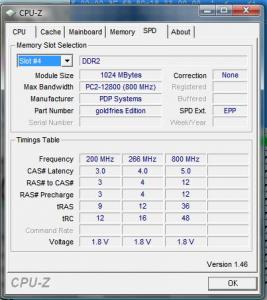
failing that,

how about goldfries edition rams? world fastest ddr2 rams lol! laugh.gif


Attached thumbnail(s)
Attached Image
goldfries
post Sep 13 2008, 02:50 AM

40K Club
Group Icon
Forum Admin
44,415 posts

Joined: Jan 2003


i don't recall mid september has September Fools day. smile.gif but would be nice if i can make $$$ out of RAM chips.
Hoodlums
post Sep 13 2008, 09:39 PM

On my way
****
Senior Member
598 posts

Joined: Sep 2004


QUOTE(boon.fong @ Sep 9 2008, 11:55 AM)
Hi all, my rig is as below. one question, currently i am have difficulty overclock my intel e4600 to 3.0ghz (stable at 2.85ghz) on stock vcore. I am using value ram, is it holding me back? is it possible if i am changing to performance ram my rig can overclock pass 2.9-3.0ghz? thanks
*
My previos KVR DDR667 stable OC E4400 @ 3.2GHz (320MHz*10, 2:3 Ratio), RAM running @ 960MHz laugh.gif

OC4/3
post Sep 14 2008, 01:00 AM

.
Group Icon
Elite
4,746 posts

Joined: Dec 2007
From: Speed rule


QUOTE(bryanyeo87 @ Sep 13 2008, 02:48 AM)
failing that,

how about goldfries edition rams? world fastest ddr2 rams lol! laugh.gif
*
Someone is nuts on playing SPD sweat.gif
memkingdom
post Sep 15 2008, 07:42 AM

On my way
****
Senior Member
529 posts

Joined: Dec 2007
From: +(6016)-2329987


commonly performance ram had more low CL value than value ram, so the access time will be faster than value ram. But I didn't really feel much different between them.
k!nex
post Sep 15 2008, 06:07 PM

Restless stars
*******
Senior Member
3,389 posts

Joined: Mar 2007
From: KL


QUOTE(memkingdom @ Sep 15 2008, 07:42 AM)
commonly performance ram had more low CL value than value ram, so the access time will be faster than value ram. But I didn't really feel much different between them.
*
maybe bcoz u're using Intel system which is frequency more effect compare to latency.if u're using an AMD,different story already.
CHiNO730
post Sep 15 2008, 09:53 PM

On my way
****
Senior Member
526 posts

Joined: Aug 2008


QUOTE(k!nex @ Sep 15 2008, 06:07 PM)
maybe bcoz u're using Intel system which is frequency more effect compare to latency.if u're using an AMD,different story already.
*
Can you elaborate on this?
zer0hour
post Sep 15 2008, 11:33 PM

Unlike Any Other
******
Senior Member
1,864 posts

Joined: Jun 2008
Yup I'd like to know why you say that too.
k!nex
post Sep 16 2008, 02:08 AM

Restless stars
*******
Senior Member
3,389 posts

Joined: Mar 2007
From: KL


intel chips can overclock high FSB.high FSB needs high RAM frequency to cope wif the overclock.i believe the current C2D is fast becoz of the cache .high RAM frequency and high FSB assists the cache further.but intel platform need access the NB for the memory controller.thts latency already.intel is going for higher frequency in order to overcome the weakness in latency.
AMD chips cant clock the bus speed high.but AMD memory bandwidth much higher than intel now coz of built in memory controller inside the processor itself.Intel platform memory controller is inside the chipset.low latency much benefit AMD coz data need not access the NB for the memory controller (shorter path).

this is wat i understand from articles i read across the websites. correct me if i'm wrong.my english might not be perfect.
CHiNO730
post Sep 17 2008, 12:42 AM

On my way
****
Senior Member
526 posts

Joined: Aug 2008


I'm not sure I understand.

You can find low latency memory and use it on Intel boards with better results compared to higher latency chips - thus low latency also improves performance on Intel chipsets.

The memory speed is also important because it determines how fast the cycle can be completed and the information delivered.
TSboon.fong
post Sep 17 2008, 11:10 AM

Getting Started
**
Junior Member
199 posts

Joined: Jan 2008
From: Klang, Selangor


Hi All, currently i managed to get my proc oced to 2.88ghz (320 x9). So is there any different if i set my memory to 1:1 which is (640mhz) or as close to 800mhz as possible. In the bios i can set beyond 800mhz, if i set it will it overload my ram.

thanks
ne0cz
post Sep 17 2008, 06:09 PM

Zoom Zoom
*******
Senior Member
5,372 posts

Joined: May 2008
From: Nokia HQ


400 cannot ah boon? Why dont u up the Vcore? I not sure about E4600... I never had a C2D
zer0hour
post Sep 17 2008, 10:51 PM

Unlike Any Other
******
Senior Member
1,864 posts

Joined: Jun 2008
QUOTE(boon.fong @ Sep 17 2008, 11:10 AM)
Hi All, currently i managed to get my proc oced to 2.88ghz (320 x9). So is there any different if i set my memory to 1:1 which is (640mhz) or as close to 800mhz as possible. In the bios i can set beyond 800mhz, if i set it will it overload my ram.

thanks
*
Set your memory to as close to 800 as possible if you're going to stop at 320x9. If you're going to overclock further, leave it at 1:1 first.
TSboon.fong
post Sep 17 2008, 11:51 PM

Getting Started
**
Junior Member
199 posts

Joined: Jan 2008
From: Klang, Selangor


QUOTE(ne0cz @ Sep 17 2008, 06:09 PM)
400 cannot ah boon? Why dont u up the Vcore? I not sure about E4600... I never had a C2D
*
my vcore (bios) already set at 1.35v, vcore idle is around 1.31 and vcore load is around 1.26-1.28v. the idle temp is 40c and full load in prime 95 can go up to 66c-68c. don't dare to set the vcore higher anymore....

zer0hour
post Sep 18 2008, 12:16 AM

Unlike Any Other
******
Senior Member
1,864 posts

Joined: Jun 2008
Hmm those temps are a bit too hot for the Hyper 212. According to this chart it only loses to the CCF by 20%..so should be cooler. My QX@4.2Ghz loads at 60ish C.

I'd say reseat HSF or lapping time.

http://www.frostytech.com/articleview.cfm?...eid=2271&page=5

wen9x88
post Sep 20 2008, 07:11 PM

Look at all my stars!!
*******
Senior Member
2,933 posts

Joined: Nov 2007
From: Kuala lumpur


is there any different if i change my 667 value ram to performance ram?
2x2GB 667 change to 4 Crucial Ballistix Tracer DDR2 PC2-8500 1066MHz
hilmiangah
post Sep 20 2008, 07:33 PM

Kongsi Gelap Elite Ramadass
Group Icon
Elite
5,602 posts

Joined: Jul 2007
From: The Holiest Of Hole


QUOTE(wen9x88 @ Sep 20 2008, 07:11 PM)
is there any different if i change my 667 value ram to performance ram?
2x2GB 667 change to  4 Crucial Ballistix Tracer DDR2 PC2-8500 1066MHz
*
when youre surfing and do word processing it deosnt feel any faster.
in gaming maybe.
Golden
post Sep 20 2008, 07:38 PM

Casual
***
Senior Member
499 posts

Joined: Oct 2005


Actually the difference isn't that much and hardly noticeable.

Performance RAM = marketing gimmick
wen9x88
post Sep 20 2008, 07:42 PM

Look at all my stars!!
*******
Senior Member
2,933 posts

Joined: Nov 2007
From: Kuala lumpur


QUOTE(hilmiangah @ Sep 20 2008, 07:33 PM)
when youre surfing and do word processing it deosnt feel any faster.
in gaming maybe.
*
hmm...many anot ?
darude87
post Sep 20 2008, 07:48 PM

hhhoooiii!!!
******
Senior Member
1,412 posts

Joined: Jun 2005


QUOTE(Golden @ Sep 20 2008, 07:38 PM)
Actually the difference isn't that much and hardly noticeable.

Performance RAM = marketing gimmick
*
performance ram doesn't mean marketing gimmick, some they really provide good chipset so that we can overclock to a better extend

QUOTE(wen9x88 @ Sep 20 2008, 07:42 PM)
hmm...many anot ?
*
normal usage such as surf net, chatting, word processing i doubt u can feel any difference
wen9x88
post Sep 20 2008, 07:56 PM

Look at all my stars!!
*******
Senior Member
2,933 posts

Joined: Nov 2007
From: Kuala lumpur


@darude87 i mean gaming.
OC4/3
post Sep 20 2008, 09:29 PM

.
Group Icon
Elite
4,746 posts

Joined: Dec 2007
From: Speed rule


QUOTE(wen9x88 @ Sep 20 2008, 07:56 PM)
@darude87 i mean gaming.
*
Not helping,only help in look and benchmarking

Cyclone87
post Sep 20 2008, 09:32 PM

Regular
******
Senior Member
1,254 posts

Joined: Jan 2003
From: Penang


I just downgrade my rig from Crucial Balistic tracer 4gb running at DDR1066 @ 15-5-5-5.0 to Kingston value ram 8gb running at DDR960 @ 12-5-5-5.0.

Honestly i cant feel any different at all. Even my 3dmark2005/06 score not affect at all.

This post has been edited by Cyclone87: Sep 20 2008, 09:32 PM
michealelsie
post Sep 22 2008, 02:37 PM

On my way
****
Junior Member
507 posts

Joined: Apr 2005
From: Kuala Lumpur
hmm, i would like to ask some help from u all here.

Currently i am running this rig:

Intel E2160 M0 rev
Gigabyte 965P DS3 rev3.3 F12
TEAM Elite DDR800 2x1GB

I tired to OC my system @ 9x400 and CPU:RAM ratio = 1:1 @ stock Vcore and Vdimm, it failed me at any timing also.

Then, i tried to lower my RAM speed to 9x350, CPU:RAM ratio remained 1:1, Vcore and Vdimm remained stock, it still failed me.

After that, I tried to increase the Vcore +0.1V and Vdimm +0.1V, it still failed me.

Then, I tried to lower my RAM speed to 9x320, CPU:RAM ratio remained 1:1, Vcore and Vdimm remained stock, finally succeed.

However, my system seems like unstable. Means within 1-2 days, my PC will auto restart itself without any sign. I had checked the temperature using Core Temp, seems like No problem (32-36C)

So, till now, i am still running my rig @ stock speed and stock Voltage.

I don't know why my CPU cant go further. Is it my CPU FSB wall hold me back? or my motherboard? If it is really the CPU FSB wall problem, should I go for BSEL mod? worth it?

Hope I can get some help here. Any help will be appreciate. Thank you.

IcEMoCHa
post Sep 22 2008, 02:40 PM

~本田~
******
Senior Member
1,988 posts

Joined: Aug 2005
From: Puchong, Selangor


i think u need to add more vcore.. also add some vtt for stability.. as for vdimm stock voltage is enough since its running at 800mhz only...
michealelsie
post Sep 22 2008, 02:46 PM

On my way
****
Junior Member
507 posts

Joined: Apr 2005
From: Kuala Lumpur
QUOTE(IcEMoCHa @ Sep 22 2008, 02:40 PM)
i think u need to add more vcore.. also add some vtt for stability.. as for vdimm stock voltage is enough since its running at 800mhz only...
*
i see. But is it my processor got FSB wall? coz it keep failed me after 9x320. even i lower my multiplier also cant pass 320 RAM speed.

I dont know why.
IcEMoCHa
post Sep 22 2008, 02:48 PM

~本田~
******
Senior Member
1,988 posts

Joined: Aug 2005
From: Puchong, Selangor


don't think its the fsb wall.. e2160 can easily run 400fsb..
michealelsie
post Sep 22 2008, 02:59 PM

On my way
****
Junior Member
507 posts

Joined: Apr 2005
From: Kuala Lumpur
think I should try to OC again. smile.gif

thanks for the suggestion ya~
zer0hour
post Sep 22 2008, 05:05 PM

Unlike Any Other
******
Senior Member
1,864 posts

Joined: Jun 2008
QUOTE(michealelsie @ Sep 22 2008, 02:37 PM)
hmm, i would like to ask some help from u all here.

Currently i am running this rig:

Intel E2160 M0 rev
Gigabyte 965P DS3 rev3.3 F12
TEAM Elite DDR800 2x1GB

I tired to OC my system @ 9x400 and CPU:RAM ratio = 1:1 @ stock Vcore and Vdimm, it failed me at any timing also.

Then, i tried to lower my RAM speed to 9x350, CPU:RAM ratio remained 1:1, Vcore and Vdimm remained stock, it still failed me.

After that, I tried to increase the Vcore +0.1V and Vdimm +0.1V, it still failed me.

Then, I tried to lower my RAM speed to 9x320, CPU:RAM ratio remained 1:1, Vcore and Vdimm remained stock, finally succeed.

However, my system seems like unstable. Means within 1-2 days, my PC will auto restart itself without any sign. I had checked the temperature using Core Temp, seems like No problem (32-36C)

So, till now, i am still running my rig @ stock speed and stock Voltage.

I don't know why my CPU cant go further. Is it my CPU FSB wall hold me back? or my motherboard? If it is really the CPU FSB wall problem, should I go for BSEL mod? worth it?

Hope I can get some help here. Any help will be appreciate. Thank you.
*
You're going too fast. To ensure maximum system stability what you should do is increase FSB in 5 or 10Mhz increments at a time.
Now you probably need more Vcore like Icemocha said. Go back to 9x320 but increase Vcore by +0.1. Run IBT 10 loops to test if stable. If pass, increase FSB by 10Mhz, run IBT, repeat.
If at any time you fail IBT, increase Vcore +0.1.
OC4/3
post Sep 22 2008, 09:03 PM

.
Group Icon
Elite
4,746 posts

Joined: Dec 2007
From: Speed rule


QUOTE(IcEMoCHa @ Sep 22 2008, 02:48 PM)
don't think its the fsb wall.. e2160 can easily run 400fsb..
*
Not really,my E2160 is walled at 390 laugh.gif
clawhammer
post Sep 22 2008, 10:39 PM

///M
Group Icon
VIP
8,788 posts

Joined: Jan 2003
From: Kuala Lumpur


Sometimes it can also be the motherboard, not the CPU wall. A lot of factors, you just have to find out so that's the challenge and fun biggrin.gif
Silverfire
post Sep 22 2008, 11:04 PM

Cruxiaer
*******
Senior Member
4,947 posts

Joined: Nov 2007


doh.gif

This post has been edited by Silverfire: Sep 30 2008, 06:01 PM
OC4/3
post Sep 23 2008, 01:47 AM

.
Group Icon
Elite
4,746 posts

Joined: Dec 2007
From: Speed rule


QUOTE(Silverfire @ Sep 22 2008, 11:04 PM)
I only know new revisions of Corsair Dominators DDR2 works like crap doh.gif
*
Sure lah laugh.gif
1066mhz rev1.2 is good rclxm9.gif
TSboon.fong
post Oct 8 2008, 12:04 PM

Getting Started
**
Junior Member
199 posts

Joined: Jan 2008
From: Klang, Selangor


Would like to check, which type of ram setup is recommended: 2 x 2GB or 4 x 1GB?
syahirax
post Oct 8 2008, 06:27 PM

anomie!
****
Senior Member
562 posts

Joined: Mar 2006
From: hell
QUOTE(boon.fong @ Oct 8 2008, 12:04 PM)
Would like to check, which type of ram setup is recommended: 2 x 2GB or 4 x 1GB?
*
I think 2 gb x 2 would be better compare to 4 x 1 gb
cscheat
post Oct 10 2008, 09:12 AM

V.V.I.P member
******
Senior Member
1,262 posts

Joined: Aug 2005
From: Mars


some value ram rocks too !!! only they dont have good heat sink
syahirax
post Oct 10 2008, 09:49 AM

anomie!
****
Senior Member
562 posts

Joined: Mar 2006
From: hell
QUOTE(cscheat @ Oct 10 2008, 09:12 AM)
some value ram rocks too !!! only they dont have good heat sink
*
well,if they have a decent chip biggrin.gif
zim_civil
post Nov 11 2008, 02:08 AM

Getting Started
**
Junior Member
93 posts

Joined: Jul 2008


early this year, im using VALUE RAM for my rig..
im using 2Gb of RAM and my PC gone hang when
using SOLIDWORKS for hours.. doh.gif

but when i change to PERFORMANCE RAM, the
PC going smoothly for SOLDWORKS... thumbup.gif

why this happen?
any one can help me for explaination? icon_question.gif
OC4/3
post Nov 11 2008, 02:34 AM

.
Group Icon
Elite
4,746 posts

Joined: Dec 2007
From: Speed rule


QUOTE(zim_civil @ Nov 11 2008, 02:08 AM)
early this year, im using VALUE RAM for my rig..
im using 2Gb of RAM and my PC gone hang when
using SOLIDWORKS for hours.. doh.gif

but when i change to PERFORMANCE RAM, the
PC going smoothly for SOLDWORKS... thumbup.gif

why this happen?
any one can help me for explaination?  icon_question.gif
*
Could be a lot of factor.
Lack of vdimm,timing is too tight for value ram or you get bad luck and get some defective ram(Always memtest for 1st night of ram)
Pewufod
post Nov 11 2008, 06:52 PM

Regular
******
Senior Member
1,537 posts

Joined: Jul 2008


how to check the FBS and everythig for the ram ah.xD
mugen89
post Nov 11 2008, 07:02 PM

Getting Started
**
Junior Member
173 posts

Joined: Oct 2008
QUOTE(Pewufod @ Nov 11 2008, 06:52 PM)
how to check the FBS and everythig for the ram ah.xD
*
Check it under BIOS or using CPU-Z.
Pewufod
post Nov 11 2008, 07:17 PM

Regular
******
Senior Member
1,537 posts

Joined: Jul 2008


how do i go to CPU-Z
apis
post Nov 11 2008, 07:19 PM

Regular
******
Senior Member
1,175 posts

Joined: Jun 2006
From: Borneo Island


U have to download it first..google it first..there's a lot of website to download..
Pewufod
post Nov 11 2008, 07:57 PM

Regular
******
Senior Member
1,537 posts

Joined: Jul 2008


Thanks alot smile.gif
zim_civil
post Nov 11 2008, 10:26 PM

Getting Started
**
Junior Member
93 posts

Joined: Jul 2008

QUOTE(OC4/3 @ Nov 11 2008, 02:34 AM)
Could be a lot of factor.
Lack of vdimm,timing is too tight for value ram or you get bad luck and get some defective ram(Always memtest for 1st night of ram)
*
tenkiu2
...i'll memtest for my upcoming rig
fathir
post Nov 12 2008, 06:23 PM

New Member
*
Junior Member
39 posts

Joined: Aug 2008
From: ampang


boon.fong
me used value ram also..
overclock my HTT to 250mhz
and timing 4-4-4-12
still not get errors in memtest, orthos, prime95, bla3
but beyond 250mhz, cannot boot smile.gif
luyut
post Nov 13 2008, 05:03 AM

Getting Started
**
Junior Member
178 posts

Joined: Jan 2006


just want to ask is it possible to pair hi performance with value one?cause mine cant boot..aish..
yemz88
post Nov 14 2008, 11:59 PM

Getting Started
**
Junior Member
189 posts

Joined: Jun 2008
From: Selangor


wanna ask every body bout my probs... hehe...
i oc my proc e8400 stepping C0.. actually i wanna oc to 4.0ghz but i fail... the highest i get only 3.7ghz... stable until here on orthos test...
here my status at 3.7ghz and my rig spec :
@ 3.7 GHz FSB 413mhz : vcore, 1.28v.. vdimm, 2.20v.. vMCH (NB), 1.30v....
FSB:DRAM = 1:1....
MCH multiplyer : 2
ram timing : 4.4.4.10
cpu multiplyer : highest 9X..


my rig spec as in siggy..
gigabyte ep45-ds3 ( BIOS F9)... latest BIOS...
ram kingston hyperX performance ddr2 800mhz
i think this 2 things most important part in oc...

my question :
1. it is bcoz my mobo or my proc not so good??
2. it is my ram holding it back??
or
3. not so lucky in this thing?? sweat.gif


overclockalbert
post Nov 15 2008, 02:33 AM

Regular
******
Senior Member
1,058 posts

Joined: Apr 2006
From: Penang , Malaysia


try to change multi to X8 and fsb to 500.
add abit Vnb to 1.35v and Vcore to 1.3V
1:1 for fsb:dram ratio.

see what happen
goldfries
post Nov 15 2008, 02:38 AM

40K Club
Group Icon
Forum Admin
44,415 posts

Joined: Jan 2003


up your vcore. i use 1.36 for my E7200.

btw this is not OCing help thread. smile.gif your RAM could be alright, may need to pump up vdimm too if you intend to push it much further.
yemz88
post Nov 15 2008, 05:20 AM

Getting Started
**
Junior Member
189 posts

Joined: Jun 2008
From: Selangor


hehe.. sori if a bit off from the topic... just wanna check if my ram get any prob or not... neway, i will try & post the result.. thanks sifus... thumbup.gif
goldfries
post Nov 15 2008, 06:36 AM

40K Club
Group Icon
Forum Admin
44,415 posts

Joined: Jan 2003


try 400mhz where 1:1 results in 800mhz RAM. see if stable at that speed, which is 3.6ghz.
yemz88
post Nov 15 2008, 01:11 PM

Getting Started
**
Junior Member
189 posts

Joined: Jun 2008
From: Selangor


QUOTE(goldfries @ Nov 15 2008, 06:36 AM)
try 400mhz where 1:1 results in 800mhz RAM. see if stable at that speed, which is 3.6ghz.
*
now, i'm at 3.6ghz and it so stable 24 hours... but when i reach 3.7ghz, like in 24 hours it will reboot... at this clock speed, the ram value is 826mhz ( 9 x 413 )... and ratio is 1:1 FSB:DRAM... i only can push +26mhz more than stock speed... even at 827mhz, it not pass the orthos test for 5 min...
cstkl1
post Nov 15 2008, 01:39 PM

Look at all my stars!!
Group Icon
Elite
6,799 posts

Joined: Jan 2003

QUOTE(yemz88 @ Nov 15 2008, 01:11 PM)
now, i'm at 3.6ghz and it so stable 24 hours... but when i reach 3.7ghz, like in 24 hours it will reboot... at this clock speed, the ram value is 826mhz ( 9 x 413 )... and ratio is 1:1 FSB:DRAM... i only can push +26mhz more than stock speed... even at 827mhz, it not pass the orthos test for 5 min...
*
hmmm

do this and post the result
http://forum.lowyat.net/index.php?showtopi...post&p=21038827

and also the voltages and settings u used which are relevant

vcore
vdimm
fsb/vtt
nb
sb
pll
gtl


Added on November 15, 2008, 1:44 pmhmm pretty good bios
http://www.xbitlabs.com/articles/mainboard...ep45-ds3_9.html

This post has been edited by cstkl1: Nov 15 2008, 01:44 PM
yemz88
post Nov 15 2008, 04:27 PM

Getting Started
**
Junior Member
189 posts

Joined: Jun 2008
From: Selangor


thanks for the guide bro cstkl1... look like biostar t45 has quite diff in bios setting than gigabyte but i'll try it... there is one diff in my bios than yours... it's GTL... what is gtl?? in my bios dun have this thing... maybe it in diff name i guess.. here what it give in the bios...

cpu PLL, cpu termination, cpu ref, cpu core.....
DRAM voltage, DRAM termination, Channel A ref, Channel B ref......
MCH core, MCH/DRAM ref, MCH ref, ICH I/O....
cstkl1
post Nov 15 2008, 09:24 PM

Look at all my stars!!
Group Icon
Elite
6,799 posts

Joined: Jan 2003

for ure mobo
cpu termination = fsb = vtt voltage
cpu ref = cpu gtl
mch = nb
mch ref = nb gtl
mch/dram ref = nb/ddr2 gtl
i/o= SB

for the skews for channel A and B.. leave it on auto..doesnt make a difference unless ure doing high mhz on the cpu with high speed rams
especially when go above 4.4ghz..

gtl calculation for u is this
cpu gtl = 0.667 = cpu ref/cpu termination
nb gtl = 0.64 = nb ref/cpu termination


so i would try this for 3.6ghz
set cpu ref to 1.12 what ever the lowest but not lower than this
cpu vcore for starters set to the stock vcore for ure proc at 3ghz when u boot..
nb set to 1.212v
nb gtl = 0.64
cpu gtl = 0.667 or 0.635
doesnt really matter until u go above 4.25ghz
set ure pll to 1.5 and ure sb to 1.5 lowest...

ok pll voltage for c2d not really usefull unless ure clocking 4dimms.
and always set the pll= i/o volages

vdimm leave it at ure rams highest rated vdimm.

ok whats the safest vdimm for 24/7 use

if ure using a 6 pcb layer .. 2.2v
if ure ram is 8 pcb layer 2.3-2.3
because of the unknown factor of ure cable management and airflow in ure casing i advise always use ram coolers...
get the dominator ram kit cooler.. its cheap and damn good quality
but make sure it doesnt hit ure cpu cooler. as it is quite high.

one thing i have noticed with ure mobo is the lowest vtt voltage is 1.2v

dont leave any of these voltages on auto
pll, cpu, nb, vdimm, sb vtt...

vtt dont go further than 1.4v
pll dont go further than 1.7v

good luck..


oh yeah also forgot ure rams
whats the performance level u should set

google anandtech rampage formula... good read http://www.anandtech.com/mb/showdoc.aspx?i=3208

performance level = tRD = Static tREAD value (biostar and gaygay)

for p45 is + 1 to that of x48/p35..
400fsb should be this
ram at
1200mhz 5-5-5-15 tRD = 6
800mhz 3-3-3-8 tRD = 7
and so on
1066mhz 5-5-5-15 tRD = 6/7 ( ok for this need a bit advance ram clocking with strap 400.. u need to run a pull phase and run some skewing)


This post has been edited by cstkl1: Nov 15 2008, 09:37 PM

yemz88
post Nov 15 2008, 11:22 PM

Getting Started
**
Junior Member
189 posts

Joined: Jun 2008
From: Selangor


wah.... so complicated.. rclxub.gif anyway, i'll try it... must understand one by one first... hehe... erm, one thing wanna ask... what safe temp for cpu and mobo (system) include on load?? i on my pc 24/7 non stop.... now, at 3.6ghz on load (when in stress test) can reach 65C....
OC4/3
post Nov 15 2008, 11:40 PM

.
Group Icon
Elite
4,746 posts

Joined: Dec 2007
From: Speed rule


QUOTE(yemz88 @ Nov 15 2008, 11:22 PM)
wah.... so complicated..  rclxub.gif  anyway, i'll try it... must understand one by one first... hehe... erm, one thing wanna ask... what safe temp for cpu and mobo (system) include on load?? i on my pc 24/7 non stop.... now, at 3.6ghz on load (when in stress test) can reach 65C....

*
TJmax is 100 C so it is ok icon_rolleyes.gif
yemz88
post Nov 16 2008, 01:58 AM

Getting Started
**
Junior Member
189 posts

Joined: Jun 2008
From: Selangor


QUOTE(OC4/3 @ Nov 15 2008, 11:40 PM)
TJmax is 100 C so it is ok icon_rolleyes.gif
*
ouh... if more than 100C then what happen?? maybe my proc get burn?? explode?? sweat.gif
hilmiangah
post Nov 16 2008, 02:59 AM

Kongsi Gelap Elite Ramadass
Group Icon
Elite
5,602 posts

Joined: Jul 2007
From: The Holiest Of Hole


QUOTE(yemz88 @ Nov 16 2008, 01:58 AM)
ouh... if more than 100C then what happen?? maybe my proc get burn?? explode??  sweat.gif
*
its start throttling and if the temp still climbing ur pc will shutdown.
king99
post Nov 21 2008, 07:20 PM

Regular
******
Senior Member
1,188 posts

Joined: Dec 2004


Guys, i'm using a value corsair 667 Ram...

It reached 800mhz with my OC set up and could it go any higher ?

Does a PC800 ram helps if i want to go beyond 800 ?
chchyong89
post Nov 22 2008, 05:14 PM

shittie mittie
******
Senior Member
1,293 posts

Joined: Mar 2005
From: Ladang


as i know PC800 is rambus ram.. not DDR2.

DDR2-800Mhz called PC2-6400

king99
post Nov 22 2008, 06:41 PM

Regular
******
Senior Member
1,188 posts

Joined: Dec 2004


QUOTE(chchyong89 @ Nov 22 2008, 05:14 PM)
as i know PC800 is rambus ram.. not DDR2.

DDR2-800Mhz called PC2-6400
*
sry..my mistake..

Mine is PC667 DDR2 VALUE.

Issit possible to reach above 800mhz
Silverfire
post Nov 29 2008, 04:40 PM

Cruxiaer
*******
Senior Member
4,947 posts

Joined: Nov 2007


AFAIK, 1GB DDR667 stick should be able to reach above 800mhz and above without any hassle providing that you can let the latency looser.

Like my KVR800 2GB stick can go 960mhz 5-7-7-22 @ 2.0vdimm without any errors.

This post has been edited by Silverfire: Nov 29 2008, 04:41 PM
iBenQ
post Dec 3 2008, 09:38 AM

Regular
******
Senior Member
1,550 posts

Joined: Aug 2008


QUOTE(Silverfire @ Nov 29 2008, 04:40 PM)
AFAIK, 1GB DDR667 stick should be able to reach above 800mhz and above without any hassle providing that you can let the latency looser.

Like my KVR800 2GB stick can go 960mhz 5-7-7-22 @ 2.0vdimm without any errors.
*
wohhh.. so high the timing @@...
yemz88
post Dec 4 2008, 05:38 AM

Getting Started
**
Junior Member
189 posts

Joined: Jun 2008
From: Selangor


QUOTE(iBenQ @ Dec 3 2008, 09:38 AM)
wohhh.. so high the timing @@...
*
yea.. we must loose ram timing a bit bcoz his stock speed is 800mhz and he oc to 960mhz... we can either tight the timing or set high speed as it can go at certain voltage... it depend on ram capability... icon_rolleyes.gif
iBenQ
post Dec 5 2008, 05:30 PM

Regular
******
Senior Member
1,550 posts

Joined: Aug 2008


QUOTE(yemz88 @ Dec 4 2008, 05:38 AM)
yea.. we must loose ram timing a bit bcoz his stock speed is 800mhz and he oc to 960mhz... we can either tight the timing or set high speed as it can go at certain voltage... it depend on ram capability...  icon_rolleyes.gif
*
mine can do 5-5-5-12 even at 960mhz whistling.gif
standard 800mhz i can go as low as 5-4-4-9 tongue.gif
yemz88
post Dec 6 2008, 04:42 AM

Getting Started
**
Junior Member
189 posts

Joined: Jun 2008
From: Selangor


QUOTE(iBenQ @ Dec 5 2008, 05:30 PM)
mine can do 5-5-5-12 even at 960mhz  whistling.gif
standard 800mhz i can go as low as 5-4-4-9 tongue.gif
*
hmmm, nice timing you have there.. can you share with me?? how much volt you pump??
iBenQ
post Dec 6 2008, 05:24 AM

Regular
******
Senior Member
1,550 posts

Joined: Aug 2008


hehe... quite high =.=" 2.2v to ensure stability @@ currently at 5-4-4-9 800mhz 1.9v... maybe can go 1.8 but dun reli bother stress testing that much liao @@
yemz88
post Dec 6 2008, 05:34 AM

Getting Started
**
Junior Member
189 posts

Joined: Jun 2008
From: Selangor


QUOTE(iBenQ @ Dec 6 2008, 05:24 AM)
hehe... quite high =.=" 2.2v to ensure stability @@ currently at 5-4-4-9 800mhz 1.9v... maybe can go 1.8 but dun reli bother stress testing that much liao @@
*
wah.. quite high.. but, this kingston ram can do until 2.2v rite?? hehe.. maybe your ram life time will so short... mine, use 2.08v to get 4.4.4.10 stable at 860mhz... can't go higher... mybe my mobo not so well in oc... i'm using ep45-ds3... icon_rolleyes.gif
mADmAN
post Dec 6 2008, 05:45 AM

10k Club
********
All Stars
10,530 posts

Joined: Nov 2004
From: Petaling Jaya & Mid Valley


just wondering if anyone is using this ram??

PNY 2gb DDR-II 800

user posted image


hows the oc-ability??

currently using 1 stick for my htpc but since i dont have the patience nor do i know jack about OC-ing, i was just wondering hows far the ram can go...
iBenQ
post Dec 6 2008, 05:55 AM

Regular
******
Senior Member
1,550 posts

Joined: Aug 2008


QUOTE(yemz88 @ Dec 6 2008, 05:34 AM)
wah.. quite high.. but, this kingston ram can do until 2.2v rite?? hehe.. maybe your ram life time will so short... mine, use 2.08v to get 4.4.4.10 stable at 860mhz... can't go higher... mybe my mobo not so well in oc... i'm using ep45-ds3...  icon_rolleyes.gif
*
not until 2.2, until 2.7 to 2.8 oso can... tested b4, can boot up and so on, but nvr go stress test tongue.gif
but i cant put 4-4-4 even at 800mhz T_T... i can go up to 5-4-4 oni @@.... maybe cos using cheap mobo? ahahaha my mobo stated in my siggy tongue.gif

This post has been edited by iBenQ: Dec 6 2008, 05:56 AM
yemz88
post Dec 6 2008, 07:59 AM

Getting Started
**
Junior Member
189 posts

Joined: Jun 2008
From: Selangor


QUOTE(iBenQ @ Dec 6 2008, 05:55 AM)
not until 2.2, until 2.7 to 2.8 oso can... tested b4, can boot up and so on, but nvr go stress test tongue.gif
but i cant put 4-4-4 even at 800mhz T_T... i can go up to 5-4-4 oni @@.... maybe cos using cheap mobo? ahahaha my mobo stated in my siggy tongue.gif
*
I think asus better in oc what... some more, it famous with expensive mobo... hehehe... no wonder it can do better in oc...
Shah_15
post Dec 6 2008, 08:30 AM

~~Van Der Woodsen~~
*******
Senior Member
2,395 posts

Joined: Mar 2008
From: Up in the Sky
i want to ask you guys since i'm noob at this ram overclocking. my crucial ballistix tracer led currently running at 1000mhz 5-7-7-23. I think its can go further but i still don't understand what is this cas latency bla bla bla...anyone can help me?
iBenQ
post Dec 6 2008, 08:49 AM

Regular
******
Senior Member
1,550 posts

Joined: Aug 2008


QUOTE(yemz88 @ Dec 6 2008, 07:59 AM)
I think asus better in oc what... some more, it famous with expensive mobo... hehehe... no wonder it can do better in oc...
*
no lah... u c ur timing @ 800mhz is 4-4-4-10 ehhh.. mine just 5-4-4-9 lor T_T

QUOTE(Shah_15 @ Dec 6 2008, 08:30 AM)
i want to ask you guys since i'm noob at this ram overclocking. my crucial ballistix tracer led currently running at 1000mhz 5-7-7-23. I think its can go further but i still don't understand what is this cas latency bla bla bla...anyone can help me?
*
latency = how many ticks... the lower the better tongue.gif but from wat i see in benchmark results, id rather go for higher frequency than timing tongue.gif...
Shah_15
post Dec 6 2008, 08:51 AM

~~Van Der Woodsen~~
*******
Senior Member
2,395 posts

Joined: Mar 2008
From: Up in the Sky
QUOTE(iBenQ @ Dec 6 2008, 08:49 AM)
no lah... u c ur timing @ 800mhz is 4-4-4-10 ehhh.. mine just 5-4-4-9 lor T_T
latency = how many ticks... the lower the better tongue.gif but from wat i see in benchmark results, id rather go for higher frequency than timing tongue.gif...
*
at the ram label, it say 4-4-4-12...should i set it to that timing?
iBenQ
post Dec 6 2008, 08:53 AM

Regular
******
Senior Member
1,550 posts

Joined: Aug 2008


if it can y not tongue.gif... judging from that timing, its a 800mhz by stock rite?? performance ram should not have problem tweaking the timing at high freq anyway
Shah_15
post Dec 6 2008, 08:54 AM

~~Van Der Woodsen~~
*******
Senior Member
2,395 posts

Joined: Mar 2008
From: Up in the Sky
QUOTE(iBenQ @ Dec 6 2008, 08:53 AM)
if it can y not tongue.gif... judging from that timing, its a 800mhz by stock rite?? performance ram should not have problem tweaking the timing at high freq anyway
*
yup. its 800 stock but i oc-ed it to 1000.....if i increased the timing, will i receive some performance increase?
iBenQ
post Dec 6 2008, 08:56 AM

Regular
******
Senior Member
1,550 posts

Joined: Aug 2008


technically, yeah... but u wouldn't even be able to tell the differences, even in benchmark results from wat i experienced, its not even 2% improvement >"<
Silverfire
post Dec 6 2008, 07:03 PM

Cruxiaer
*******
Senior Member
4,947 posts

Joined: Nov 2007


After using VRs, I realised its really hard to overclock since VR can only achieve certain speeds & latencies which are really bugging me when it bottlenecks my proc's overclockablity.
iBenQ
post Dec 8 2008, 04:45 PM

Regular
******
Senior Member
1,550 posts

Joined: Aug 2008


at wat speed ure experiencing bottleneck?? aiming for 4ghz??? so far i tried up to 980mhz @ 5-5-5-15... still can boot up n do benchmark tests... but fails prime95 test after around 10 seconds of stressing ahahahaha... i was at 490*8 at that time >"<

reached 1001mhz before, but never get to load windows cos they say some data in ram not same with duno wat checksum >"<
@meno
post Dec 9 2008, 01:55 PM

It's "A Meh Noh" not Meno!!!
*******
Senior Member
2,386 posts

Joined: Jan 2003
From: Many calls it "Hell"


QUOTE(Silverfire @ Dec 6 2008, 07:03 PM)
After using VRs, I realised its really hard to overclock since VR can only achieve certain speeds & latencies which are really bugging me when it bottlenecks my proc's overclockablity.
*
Well, it very much depends on the ram chip itself rather than value rams or performance rams.
I had a pair of Team Value Rams which did 1200Mhz 5-5-5-18@2.1v.
And i've seen a lot of Crucial Values which comes with D9GMH chipsets doing pretty well.
It takes a lot of effort in finding a good pair of VR though. Those Kingstons which come with D9GMH/D9GKX are no longer seen on the market.
There are gems everywhere actually, just how u manage to discover it and unleash. Dun be surprised that under the relabellings, some of those are actually GMH/GKX.
DeVGF
post Dec 16 2008, 01:00 PM

Getting Started
**
Junior Member
291 posts

Joined: May 2008
Performance ram .. cause they have better cooling, better efficiency and better Mhz
hilmiangah
post Dec 16 2008, 04:29 PM

Kongsi Gelap Elite Ramadass
Group Icon
Elite
5,602 posts

Joined: Jul 2007
From: The Holiest Of Hole


QUOTE(DeVGF @ Dec 16 2008, 01:00 PM)
Performance ram .. cause they have better cooling, better efficiency and better Mhz
*
then why certain 'value ram' can reach even those level that even performance ram cant achieve.

its the certain chipset that important.wonder why kingston god stick can reach 1000mhz on stock vcore while Corsair XMS struggle to reach it.................do ur research 1st. shakehead.gif
iBenQ
post Dec 17 2008, 01:35 AM

Regular
******
Senior Member
1,550 posts

Joined: Aug 2008


is there a way to know what chipset my ram using?? heatsink blocking view, cannot peek at all >"<
mfcm
post Dec 17 2008, 01:38 AM

Look at all my stars!!
*******
Senior Member
2,765 posts

Joined: Nov 2005
From: **Hornbills**


myb u can put the model and rev of ur ram then others can help u if they got info bout it
iBenQ
post Dec 17 2008, 01:42 AM

Regular
******
Senior Member
1,550 posts

Joined: Aug 2008


CM2X2048-6400C5
version 3.1
mfcm
post Dec 17 2008, 01:57 AM

Look at all my stars!!
*******
Senior Member
2,765 posts

Joined: Nov 2005
From: **Hornbills**


iinm urs using PSC
SlayerXT
post Dec 17 2008, 06:18 PM

PRIDE!
*******
Senior Member
2,042 posts

Joined: Jan 2003
From: KL


They are just lucky when they bought VR at the time, furthermore the price were not as cheap as today as we can see midget RAM now(for sure no D9GMH/GKX here). Why bother on that, performance RAM getting very cheap lately. I am also getting my Crucial Racer RED 4GB kit DDR2, and it's damn nice.

Topic ClosedOptions
 

Change to:
| Lo-Fi Version
0.0483sec    0.46    6 queries    GZIP Disabled
Time is now: 10th December 2025 - 11:50 AM