

» Click to show Spoiler - click again to hide... «
Air Cooling Discussion Thread V3, Database, FAQ, Guides and Discussion!
Air Cooling Discussion Thread V3, Database, FAQ, Guides and Discussion!
|
|
 Jan 7 2009, 08:48 AM Jan 7 2009, 08:48 AM
Return to original view | Post
#1
|
 
Junior Member
43 posts Joined: Aug 2007   
|
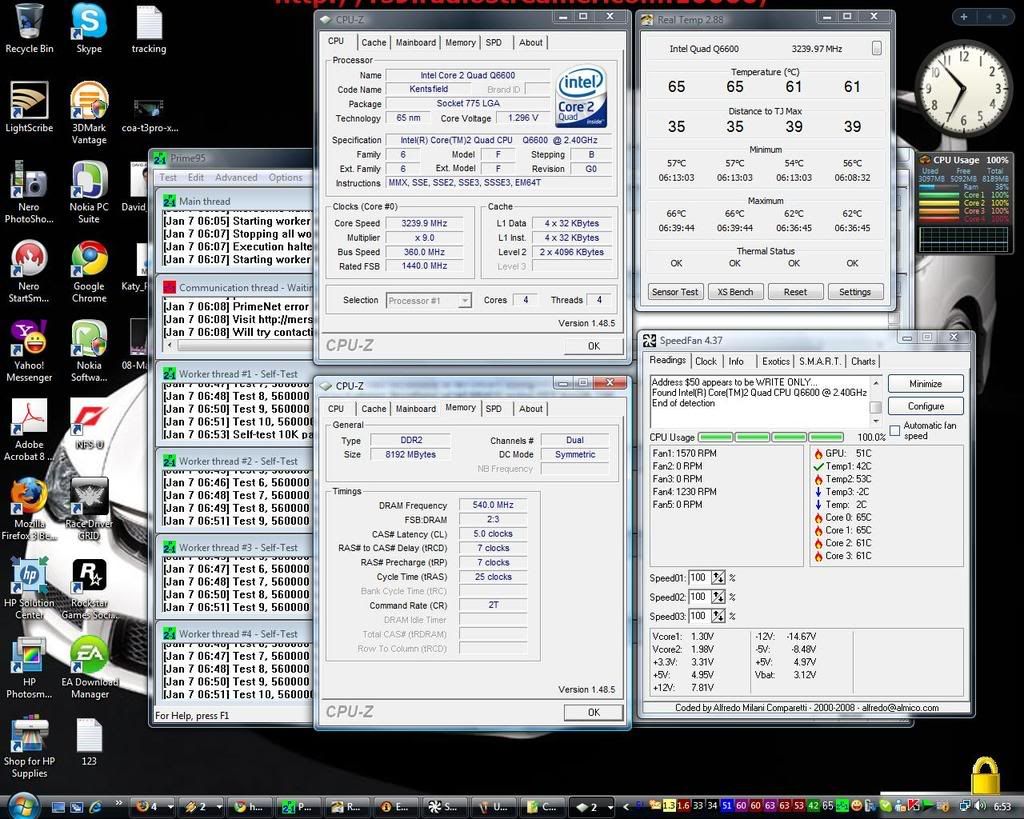
pie_86/Sunbeam CCF/Tuniq TX2/ Intel Core 2 Quad Q6600 @ 3.2ghz (35% Overclock)/1.33v/ Stock Fan/ 35c/ 65c/ Non-Airconditioned/ Prime95
» Click to show Spoiler - click again to hide... « |
|
|
|
|
|
Jan 7 2009, 01:46 PM
Return to original view | Post
#2
|
|
Junior Member
43 posts Joined: Aug 2007
|
QUOTE(Bonchi @ Jan 7 2009, 10:12 AM) Added on January 7, 2009, 9:14 am why not try fsb:ram 1:1 (set ram multiplier to X2) can go higher  ...but temps beware ...but temps beware   set ram multiplier to X2 mean bus width for ram gettin higher n ratio gettin higer than FSB too.. rite or not bro? how bout the temp bro.. hav try it b4? correct if me wrong... TQ  This post has been edited by pie_86: Jan 7 2009, 01:48 PM |
|
|
Jan 7 2009, 02:37 PM
Return to original view | Post
#3
|
|
Junior Member
43 posts Joined: Aug 2007
|
QUOTE(chyu89 @ Jan 7 2009, 03:14 PM) PSU not support? not RAM? use 4 stick HP ram bro... not support?huhh.. for temp, google Core temp or HWMonitor. PSU use CM extreme power 600W p/s: not find where button to setting multiplier ram bro at BIOS..huuu  This post has been edited by pie_86: Jan 7 2009, 02:38 PM |
|
|
Jan 7 2009, 06:47 PM
Return to original view | Post
#4
|
|
Junior Member
43 posts Joined: Aug 2007
|
QUOTE(Bonchi @ Jan 7 2009, 07:17 PM) most of the time...when i didnt do 1:1..sometimes the RAM mhz quite high....coz its following the FSB...lets say if 1:1, FSB is 380, ram also 380...so multiplier X2 makes your ram 760mhz...so that means you got more head room to increase your FSB higher without reaching the RAM mhz limit ^^ owh..like that ka?.. when i use Prime95... temp reach around 66-68`C... is that ok bro?ive tried OC Q6600 be4...not sure whats the TjMax..so i set to mobo to beep when core temp is more than 60C in bios.....when running orthos is stable at 3.5...temps showing around 68C...and the mobo is obviously beeping like mad |
|
|
Jan 7 2009, 08:35 PM
Return to original view | Post
#5
|
|
Junior Member
43 posts Joined: Aug 2007
|
QUOTE(Bonchi @ Jan 7 2009, 07:59 PM) honestly..i will try to avoid going beyond 65...if possible...below 60...and 40-50++ at normal utilization owh.. 3.6 @70`C? wah..so cold ma...heee..i dont want my processor life to get reduced lol...i think you know about it....heh...thats why i didnt push this baby (e4300) more...though it reach ed 3.6 before (70C beb) my normal usage temp around 40++ but when stress out it will reach around 60++..huuuuu |
|
|
Jan 7 2009, 08:44 PM
Return to original view | Post
#6
|
|
Junior Member
43 posts Joined: Aug 2007
|
haha.. tq 4 da info bro.. can i ask smething? what is 24/7?hmm.. don`t understand what is this mean
|
|
|
|
|
|
Jan 7 2009, 09:58 PM
Return to original view | Post
#7
|
|
Junior Member
43 posts Joined: Aug 2007
|
owh..like that ka?
 ... will appear blue screen after an our..huuuu:( ... will appear blue screen after an our..huuuu:( |
|
|
Jan 7 2009, 11:54 PM
Return to original view | Post
#8
|
|
Junior Member
43 posts Joined: Aug 2007
|
QUOTE(cdlim87 @ Jan 7 2009, 11:12 PM) non stable OC... it happen when i run Prime95  (stressing cpu) (stressing cpu)Added on January 7, 2009, 11:57 pm QUOTE(tkh_1001 @ Jan 8 2009, 12:14 AM) increase ur ram voltage a lil and see if it still hapens setting auto ram voltage... run average 1.9++-2.0Vdimmcrucial ballistix tracer max Vdimm is 2.0V rite or can add lil bit voltage?  This post has been edited by pie_86: Jan 8 2009, 12:35 AM |
|
|
Jan 8 2009, 12:34 AM
Return to original view | Post
#9
|
|
Junior Member
43 posts Joined: Aug 2007
|
QUOTE(tkh_1001 @ Jan 8 2009, 01:27 AM) erm...if its 2v then dont add anymore voltage.... i just killed mine mcm mana nk chek ram tu bro? BSOD?what its mean bro? btw, check if ur ram is stable.... cos last time i also keep on bsod when stressing cpu alone.... check check mana tau its my ram dying failed memtest even at 600mhz cl5 TQ  |
|
|
Jan 8 2009, 07:47 AM
Return to original view | Post
#10
|
|
Junior Member
43 posts Joined: Aug 2007
|
QUOTE(hilmiangah @ Jan 8 2009, 01:47 AM) BSOD = blue screen of death.........aka screen dump. owh... like that ka? i`ve test with OCCT and it is stable Added on January 8, 2009, 8:02 am QUOTE(tkh_1001 @ Jan 8 2009, 01:51 AM) bsod is when u get blue screen lol... owh..can use memtest 3.8 for all those 8GB ram bro?check the ram via memtest or blend..... google for memtest 3.4 and u shud be able to get it eh, just realised u got 8gb that one i really no idea how to stress liao Added on January 8, 2009, 8:03 am QUOTE(hilmiangah @ Jan 8 2009, 02:09 AM) take out 4gb of the tracer and stress only the DHX and when the test is finish take out the DHX and stress the tracer. ok..tq bro for that usefull advise... but not hav 2 change setting rite?This post has been edited by pie_86: Jan 8 2009, 08:03 AM |
|
|
Jan 8 2009, 12:46 PM
Return to original view | Post
#11
|
|
Junior Member
43 posts Joined: Aug 2007
|
QUOTE(Bonchi @ Jan 8 2009, 09:07 AM) hmm you have shared ram (diff brand sommore)..well...to be honest..rarely ppl do dual-dual channel rams... owh..ok..tq 4 ur sharing bro...regarding OC performance...i cant say much already...not really sure about your case.. are both ram the same latencies? and voltage?....there might be compatibility issues...(this is why its better to buy a 2x2GB ram set, which are proven compatible by manufacturer) anyways...try your memtest first and see how..if still fails..try use 2 sticks of ram instead and see still got memory dumping.. *edit* i think orthos also got function to stress ram... i`ve run 4Xmemtest 3.8 but dont know how 2 summarize it and after run it my ram got stress 100%  Added on January 8, 2009, 12:48 pm QUOTE(tkh_1001 @ Jan 8 2009, 12:21 PM) u cant do it that way actually.... different numbers of sticks of ram can give u different stability owh..okie.. i`ve tried to run multiple of memtest n dunno how to summarize it... i will try to check it out for u bro u can try running multiple instance of memtest to try and fully utilise the ram... but seriously, i am clueless on how 8gb works This post has been edited by pie_86: Jan 8 2009, 12:48 PM |
|
|
Jan 8 2009, 03:27 PM
Return to original view | Post
#12
|
|
Junior Member
43 posts Joined: Aug 2007
|
this is my latest result 4 this mornin


|
|
|
Jan 8 2009, 05:42 PM
Return to original view | Post
#13
|
|
Junior Member
43 posts Joined: Aug 2007
|
QUOTE(tkh_1001 @ Jan 8 2009, 05:50 PM) oh ya...forgot to tell u, just stress the rams untill it reaches 100%... after that u shud stop it already cos stressing longer might degrade ur ram..... TQ for those info dont stress to often with memtest tho...its heavy |
|
|
|
|
|
Jan 9 2009, 03:06 PM
Return to original view | Post
#14
|
|
Junior Member
43 posts Joined: Aug 2007
|
what brand hav a good pcb bro?and which model if can?
|
|
|
Jan 9 2009, 05:58 PM
Return to original view | Post
#15
|
|
Junior Member
43 posts Joined: Aug 2007
|
QUOTE(hiroki04030 @ Jan 9 2009, 06:48 PM) pcb used by each model could be different. But for overclocker corsair produces quality assured RAM. Team ram is not bad tooo. i`ve pair corsair 4GB kit..but..pluss with crucial 4GB too |
|
|
Jan 9 2009, 09:41 PM
Return to original view | Post
#16
|
|
Junior Member
43 posts Joined: Aug 2007
|
QUOTE(tkh_1001 @ Jan 9 2009, 10:21 PM) if u wana know who is better just put it at high voltage and see which one die faster waaa... like that ka bro?need some extra cash 2 buy new pair laaa... cant RMA rite?huuuuu   |
|
|
Jan 10 2009, 12:15 AM
Return to original view | Post
#17
|
|
Junior Member
43 posts Joined: Aug 2007
|
high voltage can make the pcb work more than usual then generate more heat than usual 2
Added on January 10, 2009, 12:16 am QUOTE(dro @ Jan 9 2009, 11:03 PM) actually......ive been told that even levin pcb used on 10th anny cannot last over prolong 1.9vdimm suggestion for best ram coolers bro high vdimm kapot faster.....low vdimm may kaput slower abit only in conclusion......get ram coolersssss This post has been edited by pie_86: Jan 10 2009, 12:16 AM |
| Change to: |  0.0503sec 0.0503sec
 0.63 0.63
 7 queries 7 queries
 GZIP Disabled GZIP Disabled
Time is now: 4th December 2025 - 10:19 PM |
 Quote
Quote