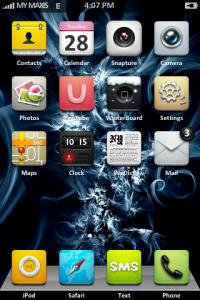
I don't know if anyone had mentioned this, but here's a comprehensive tutorial covering the use and features of Winterboard.
Themes for iPhone 2G-3G-3GS-4, »»» Share Your Themes (Non JB & JB) «««
Themes for iPhone 2G-3G-3GS-4, »»» Share Your Themes (Non JB & JB) «««
|
|
 Sep 7 2008, 10:39 AM Sep 7 2008, 10:39 AM
Return to original view | Post
#1
|
 
Senior Member
1,149 posts Joined: Jan 2007 
|
I don't know if anyone had mentioned this, but here's a comprehensive tutorial covering the use and features of Winterboard.
|
|
|
|
|
|
Sep 7 2008, 11:18 AM
Return to original view | Post
#2
|
|
Senior Member
1,149 posts Joined: Jan 2007
|
@davidgary73
I am actually running into the same trouble. I remove any settings using Erica's MIM and my carrier icon is now back to MYMAXIS. I created this directory: Library/Themes/Carrier Icons/Bundles/com.apple.Unknown And in this folder i have: Default_CARRIER_UNKNOWN.png FSO_CARRIER_UNKNOWN.png Applied using Winterboard and it didn't work. So i change the carrier text to AT&T using MIM, too and created the following directory: Library/Themes/Carrier Icons/Bundles/com.apple.ATT_US And i renamed the icons: Default_CARRIER_ATT.png FSO_CARRIER_ATT.png Didn't work either. Any idea? |
|
|
Sep 7 2008, 11:57 AM
Return to original view | Post
#3
|
|
Senior Member
1,149 posts Joined: Jan 2007
|
@Davidgary
I thought u do since from your screenies i can see it is replaced with the Maxis icon. |
|
|
Sep 7 2008, 12:15 PM
Return to original view | Post
#4
|
|
Senior Member
1,149 posts Joined: Jan 2007
|
Oh yeah, i'm not very fond on replacing it directly too. Because i like to switch back and forth.
|
|
|
Sep 7 2008, 04:39 PM
Return to original view | Post
#5
|
|
Senior Member
1,149 posts Joined: Jan 2007
|
QUOTE(zc_squash @ Sep 7 2008, 02:53 PM) So i change the carrier text to AT&T using MIM, too and created the following directory: Library/Themes/Carrier Icons/Bundles/com.apple.ATT_US And i renamed the icons: Default_CARRIER_ATT.png FSO_CARRIER_ATT.png  I quote this from my previous post. |
|
|
Sep 7 2008, 04:44 PM
Return to original view | Post
#6
|
|
Senior Member
1,149 posts Joined: Jan 2007
|
@frozz
Sorry, I wasn't trying to be pushy. But i thought you were directing that question to me  |
|
|
|
|
|
Sep 7 2008, 07:00 PM
Return to original view | Post
#7
|
|
Senior Member
1,149 posts Joined: Jan 2007
|
@frozz
I never really have experience with command line but with proper instructions i'm pretty sure i can follow them. I use SSH very often. |
|
|
Sep 7 2008, 11:58 PM
Return to original view | Post
#8
|
|
Senior Member
1,149 posts Joined: Jan 2007
|
Wheee! Mine is done! All thanks to Frozzbyte for guiding me over MSN. *Salute*
|
|
|
Sep 10 2008, 12:41 AM
Return to original view | Post
#9
|
|
Senior Member
1,149 posts Joined: Jan 2007
|
Frozzbyte was really kind to have spent time with me last week and guided me in changing the carrier icon on my iPhone 2.0.1. So i'm writing up a brief tutorial so the rest could refer. Before that, do take note that this guide is specifically tailored for MAXIS users. The steps are identical for other telcos users but u'll need to find/edit your own plist, etc. Perhaps those who are having them could provide the files. So, here goes:
1. Unzip MYMAXIS.bunlde.zip 2. Browse to System/Library/Carrier Bundles 3. Copy the unzipped folder here 4. Highlight MYMAXIS.bundle folder (single click) 5. Right click on an empty area 6. Select New -> Link 7. Create two new folders and name them 50212 and 50217 respectively 8. Check if you have properly created the symlinks. Double click them. 9. If they are correct, you should be directed to MYMAXIS.bundle 10. Reboot your phone and keep your fingers crossed 11. Enjoy~ This post has been edited by zc_squash: Oct 3 2008, 11:51 PM Attached File(s)  MYMAXIS.bundle.zip ( 9.96k )
Number of downloads: 68
MYMAXIS.bundle.zip ( 9.96k )
Number of downloads: 68 |
|
|
Sep 10 2008, 11:37 PM
Return to original view | Post
#10
|
|
Senior Member
1,149 posts Joined: Jan 2007
|
@Tek_Ken
I'm sure you can still do the mods if you are still one 1.x but the folders organization on 2.x is very different. |
|
|
Sep 21 2008, 12:57 AM
Return to original view | Post
#11
|
|
Senior Member
1,149 posts Joined: Jan 2007
|
@psyeo
That's a beautiful theme! Mind to share? |
|
|
Sep 28 2008, 04:14 PM
Return to original view | Post
#12
|
|
Senior Member
1,149 posts Joined: Jan 2007
|
My current them
 - Tenuis - Custom dock - Calibri system font » Click to show Spoiler - click again to hide... « One problem though, i don't seem to be able to change my telco icon (again!). Used the same way i've posted recently but don't seem to work. Have things changed on 2.1? I doubt so. But why isn't it working? Any idea? This post has been edited by zc_squash: Sep 28 2008, 04:46 PM |
|
|
Sep 29 2008, 11:26 AM
Return to original view | Post
#13
|
|
Senior Member
1,149 posts Joined: Jan 2007
|
@frozzbyte
i think i'm doing the exact same thing. In fact, i am referring to the post i wrote previously. Unless that itself is wrong, I am really not sure. Can you please check? |
|
|
|
|
|
Oct 1 2008, 02:36 AM
Return to original view | Post
#14
|
|
Senior Member
1,149 posts Joined: Jan 2007
|
@Tek_Ken
I don't seem to be able to change the logo too.  |
|
|
Oct 3 2008, 11:50 PM
Return to original view | Post
#15
|
|
Senior Member
1,149 posts Joined: Jan 2007
|
@Tek_ken
thanks for pointing out And sorry for the mistake too. I'll rectify the post. thanks again. |
|
|
Oct 22 2008, 01:55 PM
Return to original view | Post
#16
|
|
Senior Member
1,149 posts Joined: Jan 2007
|
Does anyone know if fonts prepared for 2.x and pre-2.x are different? Funny that whenever i try to change the lock screen clock font, i'm getting the infamous never-ending spinning wheel. The phone recovered soon i replace the original file back (the wifi is still connected when the spinning wheel thingy occur, thus i can still FTP into the phone).
Any idea? @david Awesomeness! This post has been edited by zc_squash: Oct 22 2008, 01:57 PM |
|
|
Oct 28 2008, 01:43 PM
Return to original view | Post
#17
|
|
Senior Member
1,149 posts Joined: Jan 2007
|
Wheeeee it's over!!!!
Since we are FINALLY done with all the flames and bickering, i want to say that the clock + weather widget is a nice mod Anymore screen shots, people?This post has been edited by zc_squash: Oct 28 2008, 01:46 PM |
|
|
Oct 31 2008, 01:59 PM
Return to original view | Post
#18
|
|
Senior Member
1,149 posts Joined: Jan 2007
|
@baretta
Can you share the status bar image bro? |
|
|
Nov 1 2008, 02:15 PM
Return to original view | Post
#19
|
|
Senior Member
1,149 posts Joined: Jan 2007
|
@baretta
Still waiting for your status bar. Or probably you should just share the theme, eh? Thanks  |
|
|
Nov 2 2008, 10:36 AM
Return to original view | Post
#20
|
|
Senior Member
1,149 posts Joined: Jan 2007
|
Thank you baretta. The mod is pretty wicked
This post has been edited by zc_squash: Nov 2 2008, 10:38 AM |
|
Topic ClosedOptions
|
| Change to: |  0.0435sec 0.0435sec
 0.40 0.40
 7 queries 7 queries
 GZIP Disabled GZIP Disabled
Time is now: 21st December 2025 - 12:58 AM |
 Quote
Quote