Welcome Guest ( Log In | Register )

Bump Topic Topic Closed RSS Feed
93 Pages « < 37 38 39 40 41 > » Bottom

Outline · [ Standard ] · Linear+

 Themes for iPhone 2G-3G-3GS-4, »»» Share Your Themes (Non JB & JB) «««

views
     
Maverick Wil
post Nov 26 2008, 02:48 AM

Casual
***
Junior Member
303 posts

Joined: Nov 2008


@ck0112
Hmm...looking at your past posts, you haven't actually mentioned what theme you're using. Some of the buttons look custom...

This post has been edited by Maverick Wil: Nov 26 2008, 02:49 AM
ck0112
post Nov 26 2008, 01:38 PM

New Member
*
Junior Member
28 posts

Joined: Oct 2005
QUOTE(Maverick Wil @ Nov 26 2008, 02:48 AM)
@ck0112
Hmm...looking at your past posts, you haven't actually mentioned what theme you're using. Some of the buttons look custom...
*
theme name "glaskart".. and ya those button some are customize.. drool.gif
Maverick Wil
post Nov 26 2008, 04:04 PM

Casual
***
Junior Member
303 posts

Joined: Nov 2008


Cool...might give glaskart a try. smile.gif
crystal_kit85
post Nov 26 2008, 05:02 PM

Regular
******
Senior Member
1,902 posts

Joined: Jan 2003
From: Kuala Lumpur
QUOTE(davidgary73 @ Sep 18 2008, 12:31 PM)
New

Saurik's new string to add text to AWAY_LOCK_LABEL (in Saurik's theme)
in your theme under Bundles/com.apple.springBoard/. Inside your SpringBoard.strings, you will want to map just that one string to a different value. The simplest format you can use is the string table format, which looks like this:
CODE
"AWAY_LOCK_LABEL" = "slide to saurik";


or
CODE
"AWAY_LOCK_LABEL" = "My iPhone";


No binary to text XML conversion needed for this string as this has been converted. Use a text editor in your current OS to edit the string.
*
---Deleted--. i've got it done.

This post has been edited by crystal_kit85: Nov 26 2008, 05:09 PM
ck0112
post Nov 26 2008, 06:27 PM

New Member
*
Junior Member
28 posts

Joined: Oct 2005
Moi New Theme

user posted image rclxm9.gif user posted image

This post has been edited by ck0112: Nov 26 2008, 06:47 PM
perfect10
post Nov 28 2008, 03:09 PM

Casual
***
Junior Member
416 posts

Joined: Nov 2005


hi i have a question for you guys...anyone using vlad + rotating pack?

I am wondering for hte lockscreen and wallpaper..is it must be .png ..can it be jpg aH?? cause i lazy to convert it
usa71
post Nov 28 2008, 03:18 PM

New Member
*
Junior Member
10 posts

Joined: Oct 2007


QUOTE(ck0112 @ Nov 26 2008, 06:27 PM)
Moi New Theme

user posted image  rclxm9.gif  user posted image
*
ck0112,

may I know where did you get the Moi New Theme?
ck0112
post Nov 28 2008, 03:53 PM

New Member
*
Junior Member
28 posts

Joined: Oct 2005
QUOTE(usa71 @ Nov 28 2008, 03:18 PM)
ck0112,

may I know where did you get the Moi New Theme?
*
brows.gif moi new theme mean my new theme la..hahaha
btw theme name tenuis rclxms.gif
Fighteden
post Nov 28 2008, 03:53 PM

Stark Industries
*****
Senior Member
976 posts

Joined: May 2008
From: My Chair


Moi new themes means my new theme.. Not the name of the theme..

ROTFL!
usa71
post Nov 28 2008, 04:16 PM

New Member
*
Junior Member
10 posts

Joined: Oct 2007


QUOTE(ck0112 @ Nov 28 2008, 03:53 PM)
brows.gif  moi new theme mean my new theme la..hahaha
btw theme name tenuis  rclxms.gif
*
Thanks. How about the background wallpaper? Is it customize?
twinkles
post Nov 28 2008, 04:32 PM

GOD behind You !
****
Senior Member
656 posts

Joined: Aug 2008


wah , 很美一下....
TSdavidgary73
post Nov 28 2008, 05:23 PM

Music Producer
Group Icon
VIP
4,903 posts

Joined: Jul 2008
QUOTE(twinkles @ Nov 28 2008, 04:32 PM)
wah , 很美一下....
*
Dude, not many here knows how to read chinese. If you wanna write chinese, write it in a chinese forum. Not here.
milky
post Nov 28 2008, 11:00 PM

- King -
*******
Senior Member
4,743 posts

Joined: Jan 2003
From: u noe EARTH ? wher all human being is there


QUOTE(ck0112 @ Nov 26 2008, 06:27 PM)
Moi New Theme

user posted image  rclxm9.gif  user posted image
*
bro.. the top beside maxis the "G" is quite nice.. do u noe wher can i get it?
Maverick Wil
post Nov 29 2008, 06:08 PM

Casual
***
Junior Member
303 posts

Joined: Nov 2008


I'm not exactly big on theming my phone for some reason but I had to share this with you guys... laugh.gif It's a fun looking theme.


user posted image

user posted image

You can get this Picnic Theme here.

A whole bunch of quality themes here from the same source as well. Remember to share any nice themes or your custom variations to the themes back to us.

This post has been edited by Maverick Wil: Nov 29 2008, 06:14 PM
curtlai
post Nov 30 2008, 12:52 AM

Getting Started
**
Junior Member
171 posts

Joined: Nov 2005


nice pinic theme!! very cute...

hmm if i wanna change other app icon...how to i know the name of other applications??
ularsawa
post Nov 30 2008, 11:17 AM

New Member
*
Junior Member
28 posts

Joined: Nov 2008


QUOTE(davidgary73 @ Sep 5 2008, 06:23 PM)
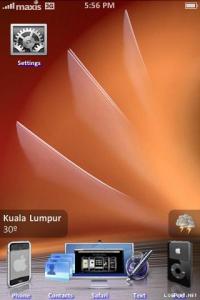
Weather widget for your phone. (credit to MacThemes)

[attachmentid=582224]

To change to your state and update interval time, go to Private folder and use text editor to view configureMe.js

Update interval:

Weather update interval every 35 minutes. (You can set any amount of time)

CODE
var updateInterval = ?? //Minutes


State:

CODE
var locale = "Petaling Jaya, Malaysia"


Change to your state. e.g: Penang, Malaysia, Selangor, Malaysia etc..

Save.

View Wallpaper.html with your browser and see if the weather widget works before you SSH to your phone.

*You have to be online to for the widget to work.

Donwload link at first post.

Cheers
*
i did follow the step but the things appear not like the screenshot (weather at right hand side n city and temp at the left hand side) instead it appear next to battery status and it just stated there Kuala Lumpur 29'C. Furthermore, it overwrite my previous theme installed.

did i miss something here?

This post has been edited by ularsawa: Nov 30 2008, 11:25 AM
TSdavidgary73
post Nov 30 2008, 11:49 AM

Music Producer
Group Icon
VIP
4,903 posts

Joined: Jul 2008
QUOTE(ularsawa @ Nov 30 2008, 11:17 AM)
i did follow the step but the things appear not like the screenshot (weather at right hand side n city and temp at the left hand side) instead it appear next to battery status and it just stated there Kuala Lumpur 29'C. Furthermore, it overwrite my previous theme installed.

did i miss something here?
*
You may have installed a theme diff than the theme i posted on the screenshot shown.

Attached Image

Anyway, here's the file: WeatherWidget

Cheers
ularsawa
post Nov 30 2008, 12:24 PM

New Member
*
Junior Member
28 posts

Joined: Nov 2008


hmm... the city and temp is loading until now and the weather is questionmark in the blue circle....

it still overite my picnic theme. or should i copy the private folder in weather widget theme and paste it inside the picnic theme?

This post has been edited by ularsawa: Nov 30 2008, 12:39 PM
TSdavidgary73
post Nov 30 2008, 12:52 PM

Music Producer
Group Icon
VIP
4,903 posts

Joined: Jul 2008
QUOTE(ularsawa @ Nov 30 2008, 12:24 PM)
hmm... the city and temp is loading until now and the weather is questionmark in the blue circle....

it still overite my picnic theme. or should i copy the private folder in weather widget theme and paste it inside the picnic theme?
*
You need internet connections for the widget to work.

What do you mean by overriding your theme? Any Screenshot?

If the widget is on top of your icons, move the botom icons to 2nd page of your homescreen.

This post has been edited by davidgary73: Nov 30 2008, 12:54 PM
ularsawa
post Nov 30 2008, 01:19 PM

New Member
*
Junior Member
28 posts

Joined: Nov 2008


like the screenshot u include. The background, the icons, is not 'standard' after u apply the weather widget. mine would like to stick with picnic theme (background, icons) but when i apply WW it back to 'standard' theme.

the temp, city n weather still won't load. just change 'Selangor, Malaysia' to 'Kuala Lumpur, Malaysia' only huhuhu....

93 Pages « < 37 38 39 40 41 > » Top
Topic ClosedOptions
 

Change to:
| Lo-Fi Version
0.0261sec    0.26    6 queries    GZIP Disabled
Time is now: 6th December 2025 - 07:19 PM