Welcome Guest ( Log In | Register )

3 Pages  1 2 3 >Bottom

Outline · [ Standard ] · Linear+

 Lagging problem

views
     
TSINA_ctive
post Aug 24 2008, 08:41 PM, updated 18y ago

New Member
*
Junior Member
5 posts

Joined: Dec 2005
I've been lagging really bad when playin WoW with ping around 700-900 ms and sometimes spike to 4k-5k ms.
And then i found this thread http://forum.lowyat.net/index.php?showtopic=504946 that list IP adresses for WoW Realm servers, so I tried to ping the server and it shows my ping around 294 ms
I dont really understand will the ping different with the one in server?? because like i said before my latency always at 700 ms.

shoduken
post Aug 24 2008, 09:48 PM

Regular
******
Senior Member
1,741 posts

Joined: Mar 2008
i think it's all about tmnet shitmyx problem... it occurs differently to different area.. sometimes when i'm lagging, my friend who live just 5 km from me isn't lagging and having good ping.. you should just call them up and complain about the connection problem you're having..
bazet
post Aug 24 2008, 11:50 PM

Casual
***
Junior Member
469 posts

Joined: Oct 2004


they use layer 7 packet sniffing ( to counter torrent dl )....hence every packet need to go into filtering server...that cause lag
ch@ich@i
post Aug 25 2008, 12:05 AM

Casual
***
Junior Member
330 posts

Joined: Nov 2007
lately so many lagging & latency issues threads...
TSINA_ctive
post Aug 25 2008, 12:25 AM

New Member
*
Junior Member
5 posts

Joined: Dec 2005
say i ping the server and get 300ms latency. Does this means when i play i should roughly get around 300ms latency also?

Because i tried to ping the frostmourne server and i got ~300ms, and when i actually logged in to WoW i got >1500ms :/

The weird thing is that in my apartment i have a friend living in the same block with me (just different floor) and i almost got no problem playing there (latency is mostly below 800ms).

This post has been edited by INA_ctive: Aug 25 2008, 12:26 AM
Madgeiser
post Aug 25 2008, 04:45 PM

Casual
***
Junior Member
433 posts

Joined: Jan 2003


QUOTE(INA_ctive @ Aug 25 2008, 12:25 AM)
say i ping the server and get 300ms latency. Does this means when i play i should roughly get around 300ms latency also?

Because i tried to ping the frostmourne server and i got ~300ms, and when i actually logged in to WoW i got >1500ms :/

The weird thing is that in my apartment i have a friend living in the same block with me (just different floor) and i almost got no problem playing there (latency is mostly below 800ms).
*
I used to get 250ms or so, and when logging into WoW server it usually hovering around 350ms.
Lately i notice something else is happening, i can no longer get a connection which ping to WoW server at sub 300ms. To make matter worst, all IP i dial, no matter what IP it is, will yield a ping time around 360ms. Certain IP spike up to 400ms-700ms on certain hops.

Logging on to WoW server will always goes about 500ms. I can no longer get sub 350ms in WoW. My conclusion, Suckmyx did something again. Live with it or switch ISP on first available opportunity. I am choosing the later, once there is another ISP in my area, i will jump ship faster than you can say "LOL WUT?"

This post has been edited by Madgeiser: Aug 25 2008, 04:45 PM
ch@ich@i
post Aug 25 2008, 05:31 PM

Casual
***
Junior Member
330 posts

Joined: Nov 2007
QUOTE(INA_ctive @ Aug 25 2008, 12:25 AM)
say i ping the server and get 300ms latency. Does this means when i play i should roughly get around 300ms latency also?

Because i tried to ping the frostmourne server and i got ~300ms, and when i actually logged in to WoW i got >1500ms :/

The weird thing is that in my apartment i have a friend living in the same block with me (just different floor) and i almost got no problem playing there (latency is mostly below 800ms).
*
i think your IP does the tricks...

try check your IP with your friend's IP...

there's only one working fine IP among so many... AFAIK...

so gluck IP hunting...
ijnek
post Aug 27 2008, 02:44 PM

On my way
****
Senior Member
566 posts

Joined: Feb 2008
From: JB


u need to know where u r pingin to?
if ur ping is rite to the WoW server, then the result should b ok.
but once in the game, other factors like graphics etc will only serve to increase the latency.
having a damn good pc can only improve latency to a certain extent as it also depends on the server response etc etc.
lots of factors.
myremi
post Aug 27 2008, 03:04 PM

Regular
******
Senior Member
1,846 posts

Joined: Feb 2006
From: Kuching, Sarawak


QUOTE(bazet @ Aug 24 2008, 11:50 PM)
they use layer 7 packet sniffing ( to counter torrent dl )....hence every packet need to go into filtering server...that cause lag
*
So many complaints and only one posted makes sense.

How does it work? This layer 7 packet sniffing?
ckong
post Aug 27 2008, 03:53 PM

New Member
*
Newbie
2 posts

Joined: Jul 2008
QUOTE(myremi @ Aug 27 2008, 03:04 PM)
So many complaints and only one posted makes sense.

How does it work? This layer 7 packet sniffing?
*
TM don't just start throttling torrent last month.. they have been doing it for 2yrs.

We used to get good ping to wow till somewhere end of July 08 i too noticing slowly increasing in ping till today even after the registry fix. From 300~ to now 450~ usual... even on the those few ip subnet that was once OK for wow...
neo_sabbath
post Aug 27 2008, 04:03 PM

Getting Started
**
Junior Member
116 posts

Joined: Jan 2003
From: Singapore now


past few days..i cant even play wow.. counted over 30% packet loss pinging to us.logon.worldofwarcraft.com .

dc every 10 secs while i was in hyjal..gave up after reconnecting the 10th time....

best thing is, i noticed that most US based sites/games are lagging bad. local sites and games (tested TF2) are all ok..superb ping.

looks like its time to quit the game. damn pointless to continue playin already with all this lag
Weelar
post Aug 27 2008, 04:38 PM

Getting Started
**
Junior Member
128 posts

Joined: Mar 2008
From: Klang
Hi Guys,

Just want to share what I have. I made tracert result to WoW Realm and then forward the result to Teleglobe.net support personnel.

They replied and mentioning that I should talk to TMNET to have better load balancing. Maybe we all can try this, and send the feedback to TMNET 2nd line support to request for improvement.

This is the tool that i use to make Trace Route to WoW Realm : http://winmtr.sourceforge.net/


==============================================

Hi,

It appears that one of TM NET interface with us is saturating while the other
is not. TM NET should be able to better load balance their traffic with us
to provide a better customer experience.

Best regards,

Charles.

> Hi Support,
>
> I am World of Warcraft online game player from Malaysia and recently I been un-pleased with high latency in game
>
> Following is my Trace Route Result and the bottleneck start from Teleglobe.net which hop number 12.
>
> Please do something to improve the network else we are suffer at here. I been contacting my broadband Internet ISP which is TM NET (or Telekom Malaysia) and according to their finding, the problem start from Global Internet line.
>
> Based on the result, I believe you can clearly see that the slow ping start from HOP 12 which is "12. hop: 216.6.84.49 (if-13-0-0.mcore3.LAA-LosAngeles.teleglobe.net): 291 ms"
>
>
>
> Host information for "12-129-225-14.attens.net":
> Host name: 12-129-225-14.attens.net
> IP address: 12.129.225.14
> Country: US (UNITED STATES)
>
> Trace route to "12.129.225.14" over a maximum of 30 hops:
>
> 1. hop: 192.168.1.1 (login.router): 0 ms
> 2. hop: 219.93.218.177: 13 ms
> 3. hop: 219.93.219.21: 7 ms
> 4. hop: 58.27.103.73: 7 ms
> 5. hop: 58.27.103.66: 7 ms
> 6. hop: 58.27.103.106: 7 ms
> 7. hop: 210.187.142.5: 8 ms
> 8. hop: 203.106.240.202: 8 ms
> 9. hop: 58.27.113.30: 166 ms
> 10. hop: 58.27.124.58: 8 ms
> 11. hop: 219.93.174.84: 8 ms
> 12. hop: 216.6.84.49 (if-13-0-0.mcore3.LAA-LosAngeles.teleglobe.net): 291 ms
> 13. hop: 216.6.84.114 (Vlan42.icore1.LAA-LosAngeles.teleglobe.net): 291 ms
> 14. hop: 192.205.35.129: 292 ms
> 15. hop: 12.122.90.66 (tbr2.la2ca.ip.att.net): 293 ms
> 16. hop: 12.127.3.189: 215 ms
> 17. hop: 12.122.255.74: 216 ms
> 18. hop: 12.129.193.242 (mdf001c7613r0003-gig-10-1.lax1.attens.net): 215 ms
> 19. hop: 12.129.209.99: 214 ms
> 20. hop: timed out.
> 21. hop: 12.129.225.14 (12-129-225-14.attens.net): 294 ms

============================================

Madgeiser
post Aug 27 2008, 04:54 PM

Casual
***
Junior Member
433 posts

Joined: Jan 2003


QUOTE(Weelar @ Aug 27 2008, 04:38 PM)
Hi Guys,

Just want to share what I have. I made tracert result to WoW Realm and then forward the result to Teleglobe.net support personnel.

They replied and mentioning that I should talk to TMNET to have better load balancing. Maybe we all can try this, and send the feedback to TMNET 2nd line support to request for improvement.

This is the tool that i use to make Trace Route to WoW Realm : http://winmtr.sourceforge.net/
==============================================

Hi,

It appears that one of TM NET interface with us is saturating while the other
is not. TM NET should be able to better load balance their traffic with us
to provide a better customer experience.

Best regards,

Charles.

> Hi Support,
>
> I am World of Warcraft online game player from Malaysia and recently I been un-pleased with high latency in game
>
> Following is my Trace Route Result and the bottleneck start from Teleglobe.net which hop number 12.
>
> Please do something to improve the network else we are suffer at here. I been contacting my broadband Internet ISP which is TM NET (or Telekom Malaysia) and according to their finding, the problem start from Global Internet line.
>
> Based on the result, I believe you can clearly see that the slow ping start from HOP 12 which is  "12. hop: 216.6.84.49 (if-13-0-0.mcore3.LAA-LosAngeles.teleglobe.net): 291 ms"
>
>
>
> Host information for "12-129-225-14.attens.net":
>   Host name:    12-129-225-14.attens.net
>   IP address:   12.129.225.14
>   Country:      US (UNITED STATES)
>
> Trace route to "12.129.225.14" over a maximum of 30 hops:
>
>    1. hop: 192.168.1.1 (login.router): 0 ms
>    2. hop: 219.93.218.177: 13 ms
>    3. hop: 219.93.219.21: 7 ms
>    4. hop: 58.27.103.73: 7 ms
>    5. hop: 58.27.103.66: 7 ms
>    6. hop: 58.27.103.106: 7 ms
>    7. hop: 210.187.142.5: 8 ms
>    8. hop: 203.106.240.202: 8 ms
>    9. hop: 58.27.113.30: 166 ms
>   10. hop: 58.27.124.58: 8 ms
>   11. hop: 219.93.174.84: 8 ms
>   12. hop: 216.6.84.49 (if-13-0-0.mcore3.LAA-LosAngeles.teleglobe.net): 291 ms
>   13. hop: 216.6.84.114 (Vlan42.icore1.LAA-LosAngeles.teleglobe.net): 291 ms
>   14. hop: 192.205.35.129: 292 ms
>   15. hop: 12.122.90.66 (tbr2.la2ca.ip.att.net): 293 ms
>   16. hop: 12.127.3.189: 215 ms
>   17. hop: 12.122.255.74: 216 ms
>   18. hop: 12.129.193.242 (mdf001c7613r0003-gig-10-1.lax1.attens.net): 215 ms
>   19. hop: 12.129.209.99: 214 ms
>   20. hop: timed out.
>   21. hop: 12.129.225.14 (12-129-225-14.attens.net): 294 ms

============================================
*
See the problem with the mail? TM blame Tele, and Tele blame TM. It is not gonna get fixed, but what the hell, i am willing to give it a try and push my luck with TM. Time to traceroute and spam TM with support request!

This post has been edited by Madgeiser: Aug 27 2008, 04:55 PM
smiley.kambing
post Aug 27 2008, 04:54 PM

Getting Started
**
Junior Member
97 posts

Joined: May 2006
From: Cyberjaya


well.. you can try sending those details to TM Net.. but i don't think they will care
Quazacolt
post Aug 27 2008, 05:04 PM

Riding couple
*******
Senior Member
5,369 posts

Joined: Jan 2007
From: KL Malaysia


QUOTE(myremi @ Aug 27 2008, 03:04 PM)
So many complaints and only one posted makes sense.

How does it work? This layer 7 packet sniffing?
*
not really. refer below:

QUOTE(ckong @ Aug 27 2008, 03:53 PM)
TM don't just start throttling torrent last month.. they have been doing it for 2yrs.

We used to get good ping to wow till somewhere end of July 08 i too noticing slowly increasing in ping till today even after the registry fix. From 300~ to now 450~ usual... even on the those few ip subnet that was once OK for wow...
*
now this one makes a lot better sense


Added on August 27, 2008, 5:05 pm
QUOTE(Weelar @ Aug 27 2008, 04:38 PM)
Hi Guys,

Just want to share what I have. I made tracert result to WoW Realm and then forward the result to Teleglobe.net support personnel.

They replied and mentioning that I should talk to TMNET to have better load balancing. Maybe we all can try this, and send the feedback to TMNET 2nd line support to request for improvement.

This is the tool that i use to make Trace Route to WoW Realm : http://winmtr.sourceforge.net/
==============================================

Hi,

It appears that one of TM NET interface with us is saturating while the other
is not. TM NET should be able to better load balance their traffic with us
to provide a better customer experience.

Best regards,

Charles.

> Hi Support,
>
> I am World of Warcraft online game player from Malaysia and recently I been un-pleased with high latency in game
>
> Following is my Trace Route Result and the bottleneck start from Teleglobe.net which hop number 12.
>
> Please do something to improve the network else we are suffer at here. I been contacting my broadband Internet ISP which is TM NET (or Telekom Malaysia) and according to their finding, the problem start from Global Internet line.
>
> Based on the result, I believe you can clearly see that the slow ping start from HOP 12 which is  "12. hop: 216.6.84.49 (if-13-0-0.mcore3.LAA-LosAngeles.teleglobe.net): 291 ms"
>
>
>
> Host information for "12-129-225-14.attens.net":
>  Host name:    12-129-225-14.attens.net
>  IP address:  12.129.225.14
>  Country:      US (UNITED STATES)
>
> Trace route to "12.129.225.14" over a maximum of 30 hops:
>
>    1. hop: 192.168.1.1 (login.router): 0 ms
>    2. hop: 219.93.218.177: 13 ms
>    3. hop: 219.93.219.21: 7 ms
>    4. hop: 58.27.103.73: 7 ms
>    5. hop: 58.27.103.66: 7 ms
>    6. hop: 58.27.103.106: 7 ms
>    7. hop: 210.187.142.5: 8 ms
>    8. hop: 203.106.240.202: 8 ms
>    9. hop: 58.27.113.30: 166 ms
>  10. hop: 58.27.124.58: 8 ms
>  11. hop: 219.93.174.84: 8 ms
>  12. hop: 216.6.84.49 (if-13-0-0.mcore3.LAA-LosAngeles.teleglobe.net): 291 ms
>  13. hop: 216.6.84.114 (Vlan42.icore1.LAA-LosAngeles.teleglobe.net): 291 ms
>  14. hop: 192.205.35.129: 292 ms
>  15. hop: 12.122.90.66 (tbr2.la2ca.ip.att.net): 293 ms
>  16. hop: 12.127.3.189: 215 ms
>  17. hop: 12.122.255.74: 216 ms
>  18. hop: 12.129.193.242 (mdf001c7613r0003-gig-10-1.lax1.attens.net): 215 ms
>  19. hop: 12.129.209.99: 214 ms
>  20. hop: timed out.
>  21. hop: 12.129.225.14 (12-129-225-14.attens.net): 294 ms

============================================
*
been there done that. but hey, i guess we can try again. tip: might wanna try MCMC too, provided they arent bribed to hell by tmnut, they should prove to be a better solution

This post has been edited by Quazacolt: Aug 27 2008, 05:05 PM
flushafteruse
post Aug 27 2008, 05:45 PM

New Member
*
Newbie
0 posts

Joined: Sep 2006
QUOTE(Quazacolt @ Aug 27 2008, 05:04 PM)
tip: might wanna try MCMC too, provided they arent bribed to hell by tmnut, they should prove to be a better solution
*
Muslim Center of Middlesex County?


Quazacolt
post Aug 27 2008, 07:51 PM

Riding couple
*******
Senior Member
5,369 posts

Joined: Jan 2007
From: KL Malaysia


QUOTE(flushafteruse @ Aug 27 2008, 05:45 PM)
Muslim Center of Middlesex County?
*
try googling/wiki for a change
flushafteruse
post Aug 27 2008, 09:25 PM

New Member
*
Newbie
0 posts

Joined: Sep 2006
QUOTE(Quazacolt @ Aug 27 2008, 07:51 PM)
try googling/wiki for a change
*
i did... thats what i got -.-
Quazacolt
post Aug 27 2008, 09:35 PM

Riding couple
*******
Senior Member
5,369 posts

Joined: Jan 2007
From: KL Malaysia


QUOTE(flushafteruse @ Aug 27 2008, 09:25 PM)
i did... thats what i got -.-
*
could prolly ask ur friends thats at least competant in typing MCMC in the google search form, and press enter. hint: the first result is it.
flushafteruse
post Aug 27 2008, 09:48 PM

New Member
*
Newbie
0 posts

Joined: Sep 2006
QUOTE(Quazacolt @ Aug 27 2008, 09:35 PM)
could prolly ask ur friends thats at least competant in typing MCMC in the google search form, and press enter. hint: the first result is it.
*
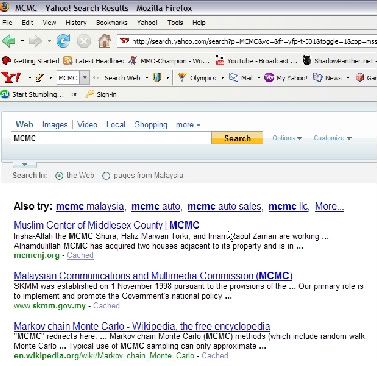
WTF IS YOUR PROBLEM? that is the 1st fckin result that I got, now go get some sense of humor for a change.


EDIT: Now, since I know you got something stuck up your arse given the fact that you're Mr Know It All Quaza All Mighty, I even inserted a screenie just because I give a flying fcuk

user posted image


Oh please do counter me again. Step yo game up.

This post has been edited by flushafteruse: Aug 27 2008, 10:08 PM

3 Pages  1 2 3 >Top
 

Change to:
| Lo-Fi Version
0.1147sec    0.80    6 queries    GZIP Disabled
Time is now: 13th December 2025 - 03:45 AM