Welcome Guest ( Log In | Register )

Outline · [ Standard ] · Linear+

 Shameless TV FAQs, Minor update 04/02/2010

views
     
TSgundamalpha
post Aug 22 2008, 11:52 AM, updated 14y ago

☆彡TITS☆彡
******
Senior Member
1,450 posts

Joined: Jun 2008
From: KK


I'm doing this FAQ since I realize many people here are still unsure of certain things regarding the single most important thing in our life. If this thread offend anyone my apology in advance unsure.gif

Please feel free to correct me if you see something not right please smile.gif

Types of general TVs currently in the market:
CRT - Full term is Cathode-Ray-Tube. This is the TV that's big and bulky, often cheaper too. The main advantage of CRTs are their flexibility in handling different resolutions. This kind of TV is best viewed in darker environment because it's screen is too reflective of external lightings.

LCD
- Everyone knows, it's Liquid Crystal Display. Its main advantage is it consumes less power and no radiation. Best viewed in very bright environment but long time viewing may cause discomfort to the viewer.

Plasma
- A 1964 technology that not fully utilized for display until recent years. Very wide color gamut, and usually accompanied by reasonable scaling regardless. Not recommended to be viewed in bright environment which can cause an artificial white layer coating. Limited life span and prone to screen burn-ins (leftover marks like the life bar on Street Fighter will stick on the screen after long playing session).

Types of definitions:
Standard Definition (SDTV) - Well, this is the most common TV we used to find in the shops.It display 480i (640 x480 interlaced resolution).

Enhanced Definition (EDTV)
- Display 640 x 480 progressive resolution (480p). Wii owners please note, this is the best you can get out from the console.

High Definition (HDTV) - This is where most people are interested in. Industry standard includes 720p, 1080i and 1080p, all 16:9 screen ratio (PC monitors normally uses 16:10 ratio). Can come in the form of either CRT, LCD or Plasma but since CRTs usually come in 4:3 you'd get black borders both on top and bottom. Note that HDTV comes in 2 kind, HD Ready and Full HD. HD Ready means the TVs native resolution isn't 1920 x 1080 and can display 720p and 1080i through scaling. Full HD TVs native is 1920 x 1080 and everything will be scaled unless displaying 1080i and 1080p. Some, normally older, Full HD TVs upscale 720p/1080i to display it as 1080p, so what you see is really 1080p (anything displayed is the 1080p anyway) but in reality you are not getting 1080p from the source itself.

As you can see, there's no rocket science in differentiating the different definitions of display. Only those marketers and sales persons make a big fuss of how godly and advance HDTVs are which in fact newer, bigger PC monitors are 1200p, even better than those >RM10,000 Full HD TVs except in size.

Defining specs:

Screen size - Although this is very general but your viewing distance plays a very important role here. It is suggested to view from 5 times the height of the TV to get the best PQ and view capture. A 32" is about 5 feet away.

Resolution - This is the TVs native resolution. Can't usually find this on CRT as their flexible to switch other resolution. LCDs either come in 1366 x 768 or 1920 x 1080, while plasmas 800 x 600, 1024 x 768 or 1920 x 1080. Any other resolution you plug to the TV will be scaled and displayed as the native resolution.

Contrast ratio - This is supposed to be a very important spec as contrast ration determines the difference of dark and bright objects. However there's no way to determine what's the real contrast ratio and manufacturers using this to exploit consumers by putting in very attractive numbers. Again, can't usually find this on CRT but they are certainly best even compared to a 3,000,000,000:1 contast TV.

Brightness
- Uses nit as denominator. The higher the number the brighter the screen can display naturally. Some people complain of discomfort watching brighter TVs.

Engine - This is the core translator of input to the screen. Different companies have different engines. Better engine can do better scaling and PQ.

Warranty
- Newer technologies are more prone to failures due to smaller and moving components. So the longer the warranty the better it is (duh). But one thing that hardly mention in the warranty is the dead pixel issues. Some companies offer better coverage for this as low as 20 dead pixels while some requires more to be able to claim warranty. Make sure to ask for this when buying.

So many cables:
Radio frequency (RF) - The first cable created to be mass produced for use on televisions and still commonly used for VCR or free air channels like RTM1. It incorporates mono sound and picture into one cable. Very low quality.

Composite - Usually comes in yellow, white and red, and composite is the yellow one while red and white are for the audio. Improves over RF but since it cramped all the visual details into one cable the quality is low. Main issue here is "dot crawling" or "color bleeding" where colors (especially red) doesn't stay where they are and "crawl" to other places thus blurring the image.

S-Video
- Another step towards better visual quality. This time, black & white and color are separated to get rid of "bleeding". This is the best you can get from viewing Astro unless you hack your Astro receiver (highly advanced skill).

Component - This is not RGB, I repeat, this is NOT RGB. A technology as old as RF, it was first introduced to the general market during the invention of DVDs. All forms of DVDs are optimized into component display (because they are using this method when making the DVD). Color is very accurate and capable of displaying 1080p image. Green color dominates other colors (but not noticeable unless compared with RGB since human eyes are more sensitive to green than red or blue) and thus purist like me doesn't like it as much. Consoles that uses DVD software can get the best out from this output method most of the time.

RGB
- RGB is a term for red, green and blue. This is the purest form of video and all colors are evenly distributed. There are many ways to get RGB. On computer you have 15 pin D-Sub, in Europe they have SCART, in Japan they have RGB cable and even the arcade machines are displaying RGB. This is a rarer display output found on local A/V products (close to none actually). Classic consoles, Dreamcast and before, have their best performance using this output.

DVI/HDMI
- Digital output. Don't think I need to say more on these. Best if supported.

That's all the output method I can think of.. If I miss any please let me know. Now to comment on cables, all analog cables will suffer signal loss and to reduce the loss is through gold plated cables (need not be those expensive ones, I bought my component cables for RM5.50, 3 meters long) and thicker if you need a really long one (more than 5 meters). For digital cables, screw those expensive cables. In digital world, it's either 1 or 0, yes or no. Thousand ringgit monster cables is performing the same as RM5 cable. Don't listen to those ridiculous comments "Oh you need this high performance cable for this and that", especially those selling Sony's HDMI cables. but then again, look for thicker ones if it's long.


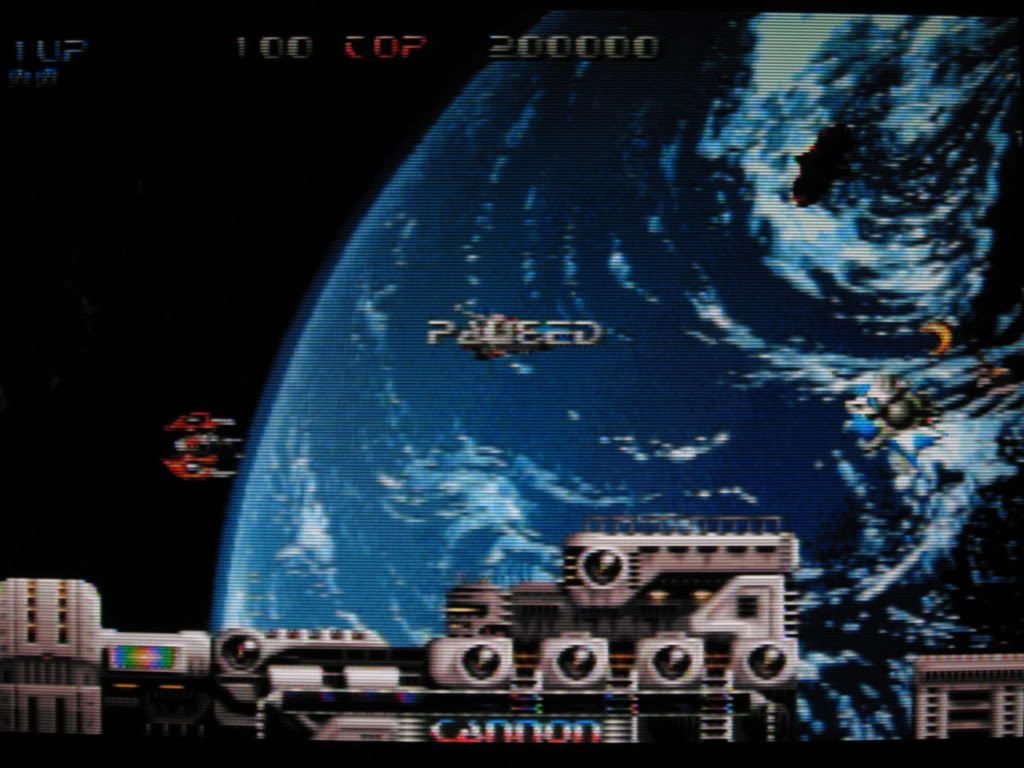
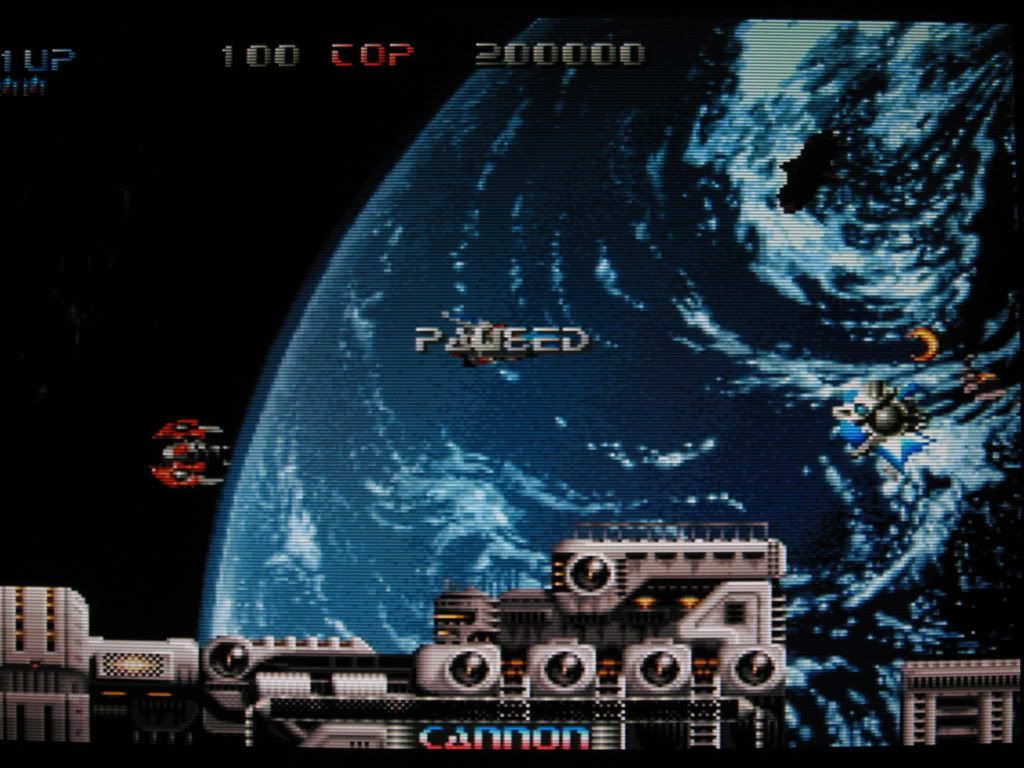
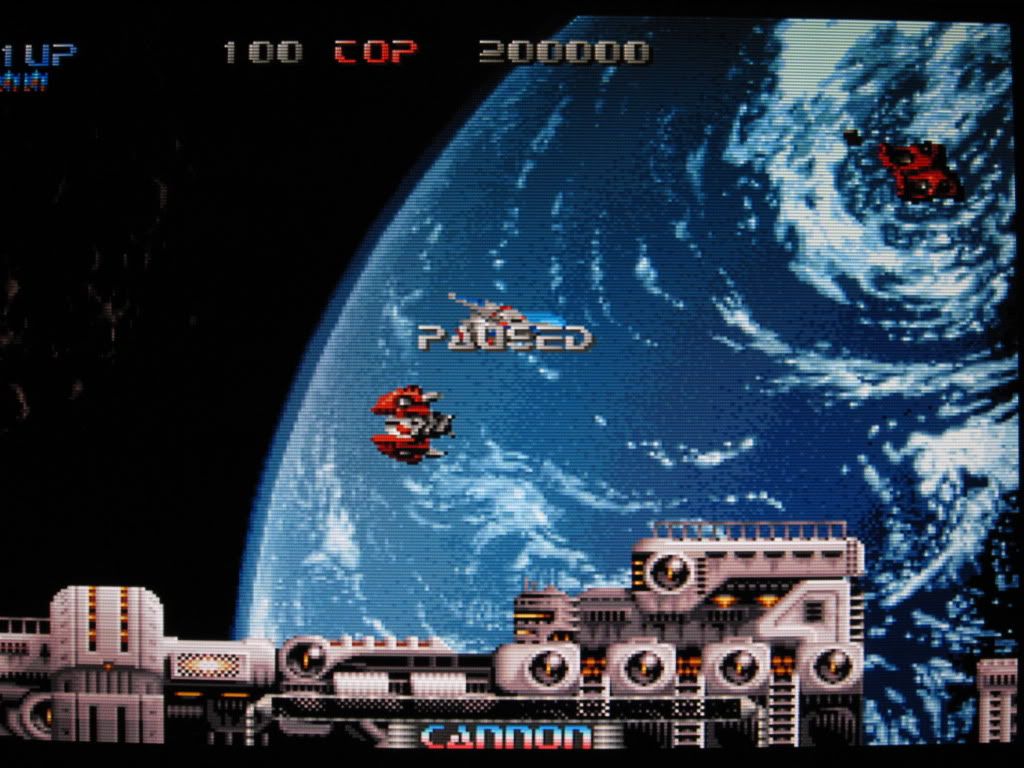
Composite VS S-Video VS RGB comparison

user posted image
user posted image
user posted image

user posted image
user posted image
user posted image

user posted image
user posted image
user posted image

This post has been edited by gundamalpha: Feb 4 2010, 10:07 AM
TSgundamalpha
post Nov 5 2008, 04:43 PM

☆彡TITS☆彡
******
Senior Member
1,450 posts

Joined: Jun 2008
From: KK


QUOTE(kkng77 @ Nov 5 2008, 04:34 PM)
Thanks for the explanation...

btw, I had just bought a 32" LCD, found that the picture quality is not good as my previous flat crt when watching dvd and astro...

as my dvd player doesn't support hdmi, so i had hook up with component cable, but the picture quality still not as nice as my flat crt... is there any setting need to be done?

for astro, is the s-video cable can solve my problem oso?

btw, how come those show room can display so sharp / nice  picture on the lcd?
*
Like I mentioned, the biggest advantage of CRT is its ability to switch resolution. Astro running on 224p (if not mistaken, but it will be displayed as 240p anyway), while DVDs either 480i or 480p, so images will be stretched to match the LCD's resolution. If you aren't satisfy with component, expect even worse PQ with S-Video.
TSgundamalpha
post Nov 5 2008, 05:27 PM

☆彡TITS☆彡
******
Senior Member
1,450 posts

Joined: Jun 2008
From: KK


Lightnings play a big part in the showroom, and also the source of display, plus settings and configurations etc.
TSgundamalpha
post Dec 26 2008, 05:44 PM

☆彡TITS☆彡
******
Senior Member
1,450 posts

Joined: Jun 2008
From: KK


I think so too but I need some motivation to get my ass up sleep.gif
TSgundamalpha
post Dec 26 2008, 05:55 PM

☆彡TITS☆彡
******
Senior Member
1,450 posts

Joined: Jun 2008
From: KK


Honestly my eyes can't see the difference of the refresh rates, so I can't comment on those. Will add more on response time when I get my butt up smile.gif
TSgundamalpha
post Jan 29 2009, 11:12 AM

☆彡TITS☆彡
******
Senior Member
1,450 posts

Joined: Jun 2008
From: KK


I can't really answer your TV question as of now, but I'll check on my 21" Trinitron when I get home later. For PS2, all games running on 50Hz will be switched to PAL and 60Hz display on NTSC mode only (even though the game is PAL region). I can't answer this for PS3 though since I don't have any PAL PS3 game to confirm this. For 360 it depends on the hardware (against PS2 depending of software), meaning a PAL 360 will display in PAL mode whether the games is running on 50Hz or 60Hz.

There's another way to get around the PAL/NTSC color display issue, but it's less common in our country. I'm talking about using RGB (not component), but since this kind of input is almost non existent in this country I'll refrain from going any further.
TSgundamalpha
post Jan 29 2009, 12:10 PM

☆彡TITS☆彡
******
Senior Member
1,450 posts

Joined: Jun 2008
From: KK


I haven't been bothered to play PS3 using CRT honestly, can't answer you that. But 360 on a 29" CRT is already a pain due to the small texts and borders. My CRTs are used strictly for DVDs and older games
TSgundamalpha
post Jan 29 2009, 06:13 PM

☆彡TITS☆彡
******
Senior Member
1,450 posts

Joined: Jun 2008
From: KK


Just did a quick serch on my TV, and yes, it's possible to set the color system without a remote. May be you'd want to change the settings manually. There are four choices:
1. B/G
2. I
3. D/K
4. M
TSgundamalpha
post Jan 31 2009, 02:56 PM

☆彡TITS☆彡
******
Senior Member
1,450 posts

Joined: Jun 2008
From: KK


I used to use the exact thing too, but only for PS1 blush.gif Oddly enough my modded PAL PS2 can display NTSC games with color without that.

This post has been edited by gundamalpha: Jan 31 2009, 02:56 PM
TSgundamalpha
post Feb 23 2009, 03:29 PM

☆彡TITS☆彡
******
Senior Member
1,450 posts

Joined: Jun 2008
From: KK


It's hard to be precise without actually seeing it myself, but my guess is lower your contrast, increase brightness, and set it to softer mode. See how it goes.
TSgundamalpha
post Apr 22 2009, 12:11 PM

☆彡TITS☆彡
******
Senior Member
1,450 posts

Joined: Jun 2008
From: KK


That's normal, most 360 games are 16:9 only. So far I only have Gears of War that can support 4:3 format.
TSgundamalpha
post Jun 10 2009, 11:48 AM

☆彡TITS☆彡
******
Senior Member
1,450 posts

Joined: Jun 2008
From: KK


QUOTE(hanz079 @ Jun 10 2009, 11:42 AM)
maybe someone here can help me,
my samsung LCD tv juz 8months old...
Playing SF4 halfway, the colour change...
Like film negative colour like that...
WTH man... ohmy.gif
For the past month, i've had my ps3 LYOD, my SE fighstick defective and now my TV pulak come period...
*
Call Samsung service centre.. there's nothing much else you can do. 8 months still under the warranty period nod.gif
TSgundamalpha
post Jun 18 2009, 10:46 AM

☆彡TITS☆彡
******
Senior Member
1,450 posts

Joined: Jun 2008
From: KK


QUOTE(sakos @ Jun 18 2009, 10:34 AM)
Sorry to ask, but I not sure where should I ask about this. With budget RM2K what can I get? I went to Ikano yesterday, there is a promotion from Harvey Norman for TV. The cheapest is Panasonic RM16xx and Samsung RM2099. Bot not full HD. So guys any suggestion? Any other brand?
*
I don't think you can get any Full HD with your budget.. top up another RM200 or so then it should be possible. I'm sorry I'm not up do date on pricing and models. More into the technical side blush.gif
TSgundamalpha
post Jun 18 2009, 11:03 AM

☆彡TITS☆彡
******
Senior Member
1,450 posts

Joined: Jun 2008
From: KK


If you don't mind the brand Haier's 32" Plasma selling for RM1,399.. Very tempted to get one myself mainly because I love the native resolution @ 852 x 480. If you are not looking for one for SD contents then it might not suit you.
TSgundamalpha
post Jun 18 2009, 11:21 AM

☆彡TITS☆彡
******
Senior Member
1,450 posts

Joined: Jun 2008
From: KK


Standard definition like Astro, VCR, DVD and older generation consoles (Wii included)
TSgundamalpha
post Jun 18 2009, 11:32 AM

☆彡TITS☆彡
******
Senior Member
1,450 posts

Joined: Jun 2008
From: KK


QUOTE(sakos @ Jun 18 2009, 11:30 AM)
I need it for astro, dvd and PS2 so it doest support izzit? Sorry to many q
*
Then the Haier plasma is a good alternative nod.gif I would choose a plasma over LCD any day for SD display
TSgundamalpha
post Jun 18 2009, 11:39 AM

☆彡TITS☆彡
******
Senior Member
1,450 posts

Joined: Jun 2008
From: KK


I already listed above, Haier's 32" plasma for RM1,399
TSgundamalpha
post Jun 22 2009, 11:32 AM

☆彡TITS☆彡
******
Senior Member
1,450 posts

Joined: Jun 2008
From: KK


QUOTE(sakos @ Jun 22 2009, 11:25 AM)
I bought the Panasonic already yesterday, anyway what is the S type cable for? Is it for better quality output? How much is the cable? Can the cable connect from astro decoder to TV?
*
I guess the Astro decoder would be the only device you'd need to hook up through S-Video, for anything else there's component/RGB/HDMI/DVI. Many have said otherwise but I find S-Video to have significant improvement over normal composite unsure.gif
TSgundamalpha
post Jun 22 2009, 11:55 AM

☆彡TITS☆彡
******
Senior Member
1,450 posts

Joined: Jun 2008
From: KK


QUOTE(sakos @ Jun 22 2009, 11:53 AM)
The S type comes with 3 separate cable like red, white and yellow or all in one cable
*
S-Video uses 4 pin DIN as standard, totally different from yellow, white and red (those connection plug are called RCA, composite is yellow, stereo through red & white). S-Video does not carry sound, so you'd still need those red & white for sound
TSgundamalpha
post Aug 10 2009, 03:20 PM

☆彡TITS☆彡
******
Senior Member
1,450 posts

Joined: Jun 2008
From: KK


QUOTE(chaegyeong @ Aug 9 2009, 07:53 PM)
which is better? full hd or hd ready? led or lcd?

i actually can't see the difference in picture quality between all the tvs on display at the shop. the only difference i can see is when they split the picture halfway on the same screen but i can't compare with pictures on a different tv set
*
Honestly what matters to your eyes is most important nod.gif

What's the point of getting an ultra high end TV if you can't spot any difference?

2 Pages  1 2 >Top
 

Change to:
| Lo-Fi Version
0.0204sec    0.27    7 queries    GZIP Disabled
Time is now: 15th December 2025 - 05:05 PM