Welcome Guest ( Log In | Register )

Outline · [ Standard ] · Linear+

 PSU guide, The basics of the Power Supply Unit

views
     
TSkmarc
post Jul 7 2008, 06:34 PM, updated 15y ago

The future is here - Cryptocurrencies!
Group Icon
Elite
14,576 posts

Joined: May 2006
From: Sarawak


Noob guide to the basics of a computer PSU (Power Supply Unit)

I myself knew nothing about PSUs and wanted to know more about it. So, in the quest to find out more about PSUs, I did my own reading, from whatever available sources on the net. As such, this guide was created to help other noobs (like me) who wants to understand more about the PSU.

All information was pulled from the net and references are listed at the end.

Any help/advice/comments are most welcomed, especially PSU gurus!

Index:

1st post
- The Power Supply Unit (PSU) - Definition
- The basics
- Before we begin - ATX form factor
- How to read the specification of a PSU
- The very very important 12v rail
- Multiple 12V rails vs. Single 12V rail

2nd post
- The basic components of a PSU
- Connectors
- Modular PSUs

3rd post
- Efficiency
- The "80 PLUS" standard
- Power Factor Correction (PFC)

4th post
- Which brand is a good brand?
- How much watt does my rig need anyway?
- Tips on buying a good PSU
- References

The Power Supply Unit (PSU) - Definition
Everybody knows what a PSU is but here’s a simple definition anyway:
A component that supplies power to a computer by converting AC power drawn from your main socket to usable low-voltage DC power for the internal components of your computer. The output of DC power are through rails (see below).

AC – Alternating current
DC – Direct current (no, I’m not going to explain this, google it up yourself! tongue.gif )

Take a look at this picture for better understanding:

Attached Image

The basics

Important terms

Watt – The accepted market rating for power supplies
- Watts = Volts(v) x Amps(A)
- This formula is important to calculate the wattage on each rail. Read on for further understanding

Rails – Every power supply has many rails. Each rail is rated for a specific voltage, and will always carry that voltage no matter how many devices are connected to it
- However, each rail has an AMPERE RATING (A). The more devices you connect to each rail, the lower the available amperage to the rest of your computer system will be on that specific rail.
- Examples of the rails available on a typical PSU:
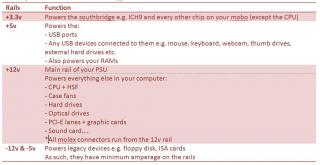
Attached Image


Before we begin - ATX form factor
Know that most common PSUs are build to conform to the ATX form factor @ standard (google this for more info). As such, the guide is based mainly on ATX power supplies unless stated otherwise.

ATX – Advanced Technology Extended

The ATX form factor has had 5 main power supply designs throughout its lifetime:

Attached Image


ATXv12 v2.2 is the current standard. However, there’s a new Intel ATX12V v2.3 specification.

Additional notes on the 24-pin main connector: PCI-E requires a 75-watt power requirement that was not capable with the older 20-pin connector. To handle this, 4 additional pins were added to the connector to supply the addition power through 12V rails

Most PSUs nowadays comes with a 24-pin connectors actually have pins arrange in a 20+4 setup….. The detachable 4-pins connector will allow the connector (20-pins) to fit into older motherboards that uses the ATX12V 1.0/1.3 specification (see the part on "connectors").


How to read the specification of a PSU
So, if you understand the basics, you should be able to read the specification of a PSU.
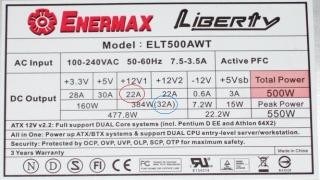
Take a look at the specs of my Enermax Liberty 500W:
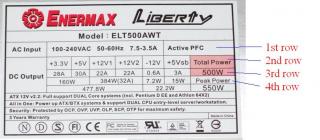
Attached Image

1st row - shows your AC input (your wall socket voltage i.e. 240v for Malaysia)

2nd row – shows the DC output to all the rails (i.e. +3.3v, +5v, dual 12v rail (+12V1 & +12V2), -12v, +5vsb)

3rd row – shows the Amperage (A) for each rail

4th row – shows the maximum wattage for the rails
- Note that the +3.3v rail and the +5v rail both comes under the maximum wattage of 160W.
- This means that the PSU cannot feed both the rails maximum amperage at once. It can feed the +3.3v rail to 28A, or it can feed the +5v rail to 30A. However, it cannot feed both the rails to their maximum at the same time i.e. (3.3v x 28A) + (5v x 30A) = 92.4 watts + 150 watts = 242.4 watts (which exceeds the 160 watt limit)

- Also note that this PSU has two 12V rails - +12V1 & +12V2
- Why 2 rails instead of 1?
--- +12V1 max Ampere is 22A and +12V2 max Ampere is also 22A
--- However, when added together, the maximum Ampere is 32A and NOT 22A + 22A = 44A

--- This is because this kind of PSU only has one set of circuitry inside the PSU which generates the 12 volts, capable of supplying 32A in total (32A x 12v = 384w). However, due to various reasons (see below on "Multiple 12V rails vs. Single 12V rail"), it is split into 2 separate 12 volt outputs each with its own current limit circuitry (i.e. +12V1 & +12V2), each capable of supplying 22A for each rail (22A x 12v = 264W). As such, if you try to draw more than 22 amps from either of the +12v rails, the PSU will shut down. If you try to draw more than 32 amps of total current from BOTH of the rails, the PSU will also shut down.

Note : So now you know why your rig keeps on shutting down!!! wink.gif

- In other words, just like the 3.3v and the 5v rails, the two +12v rails are also NOT additive. Peak power is for one or the other, but not both at the same time i.e. (12v x 22A) + (12v x 22A) = 264w + 264w = 528w. The peak power is indicated as 384w (32A) which is 12v x 32A = 384w.

Right most column – shows the:
Total power = 500w (which is what we commonly refer to as “True power” or equivalent)
Peak power = 550w (which can be deceiving……more on this later)

Note that when you buy a PSU, you want to see the amount of CONTINUOUS power that the PSU can supply. For my Enermax, it is 500w.
Some manufacturers provide PEAK power, to make it more attractive for buyers. However, peak power is considered as false advertising, trying to make users buy their product based on their cheap but falsely high PSU wattage.

The very very important 12V rail.....
From the table above, you can see that the 12V rails supply important components especially the CPU and the graphic card.

Nowadays, the graphic card needs more and more power and it is a must for you to check the requirements of a graphic card before you buy the graphic card or PSU. Manufacturers usually do state the PSU requirement on their website or on the product box.

Here are some examples of some graphic card power requirements:

Attached Image

Here's some examples of actual power consumptions at idle and load - GPU, CPU & mobo:
http://www.anandtech.com/casecoolingpsus/showdoc.aspx?i=3413
http://www.tomshardware.com/reviews/GeForc...ck,2028-22.html

Very good link on what PSU wattage is required for which card (updated 5/5/2010):
http://forum-en.msi.com/index.php?topic=104805.0

Example 1

Wait a second. Take a look at my Enermax Liberty specification:
Attached Image

If you look at the specification of my PSU, you'll notice that my +12V1 is only 22A (red circle) and my +12V2 is also 22A. So, how can I run my 8800GT (requiring 26A on the 12v rail) with this PSU????? hmm.gif

Well, the answer is that the rating on the 12v rail is the COMBINED amperage. For my Enermax, the combined rating on the 12v rail is actually 32A (blue circle), which would run the 8800GT just fine. Note that this PSU would not be recommended to run the GTX260 or GTX280 as their amperage rating is far higher.


Example 2

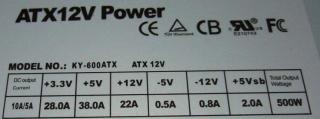
Take a look a this PSU:
Attached Image

From the specs, it is obvious that this PSU has only one 12v rail which is rated at 22A. As such, this PSU is not recommended to run any of the Nvidia GPU listed above!

For the above statement,Note the word "not recommended" as opposed to "cannot". I didn't say that this PSU CANNOT run, say, the 8800GT. What is important is that this PSU does not meet the requirements of the manufacturer and thus NOT recommended to run on that PSU. You might still be able to use it if you want, but might encounter instability, BSODs, reboots and worse of all, damage to your graphic card or your whole rig.


Example 3

Here's another example. It's a Cooler Master Real Power 550w PSU:

Attached Image

Let's concentrate on the +12v rails.

From the specs, you can see that the PSU as 3x +12v rails. It also states the "Peak" amperage and "continuous" amperage. Remember that the "continuous" amperage is the important one.

You can see that the total wattage on the +12v rails is 360W. Wait a second. There is no amperage stated!

That's easily solve by calculating the amperage as you already the the voltage and wattage.

Remember the formula : Watts = Voltage x Amperes

So, Amperes = Watts / Voltage = 360w / 12v = 30A

So, this PSU has 30A on it's 12v rails


Multiple 12V rails vs. Single 12V rail

I'm getting a BIG headache regarding this. Will try to summarize these issues if possible. In the meanwhile, take a look at some good references:
http://www.playtool.com/pages/psumultirail/multirails.html
http://www.hardwaresecrets.com/article/181/12
http://www.xcpus.com/forums/cases-psus/109...-101-102-a.html
http://www.silentpcreview.com/article28-page3.html

This post has been edited by kmarc: May 5 2010, 02:37 PM
TSkmarc
post Jul 7 2008, 06:34 PM

The future is here - Cryptocurrencies!
Group Icon
Elite
14,576 posts

Joined: May 2006
From: Sarawak


The basic components of a PSU
Note : So sorry about the pictures..... I can't take pictures of my Enermax Liberty which has nicer PSU box and fans as it is in my casing now.... icon_rolleyes.gif

PSU box
Usually a square metal box. Dimensions of an ATX PSU are usually 150 x 86 x 140mm although this can vary

Attached Image


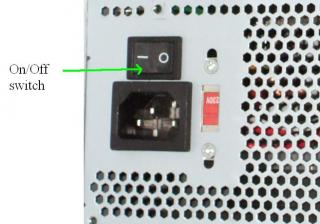
On-off switch
Many power supplies have a manual switch on the back to ensure that the computer is truly off and no power is being sent to the components. With this switch on, energy still flows to the components even when the computer appears to be “off” (mainly through the +3.3V and +5VSB ???). This is known as soft-off or standby and be used for remote wake up through Wake-on-Ring or Wake-on-LAN, but is generally used to power on the computer through a front switch….

Attached Image


Fan
PSU usually has either a 80mm or 120mm or even a 140mm fan to cool it’s components and exhaust the heat out the back.

Attached Image


Though not true in some cases, a 120mm fan is better compared to a 80mm fan because it:
- Produces less noise (at the same rpm as a 80mm)
- Pushes more air

A recognized disadvantage of a larger fan is that there is less space in the PSU for important internal electrical components (which might affect the final quality of PSU produced….)

In order to reduce noise, most power supplies use a circuit to control the fan speed according to the power supply internal temperature, so when the power supply is cold the fan spins at a lower speed, thus producing less noise.

Connectors
PSUs usually have the following connectors:

Main power connector (usually called P1, also called 20- or 24-pin ATX connector)
- the connector that goes to the motherboard to provide it with power
- has 20- or 24-pins
- some PSUs come with a 20+4 pin configuration (as in the picture below). The detachable 4-pin allows the PSU to be used in mobos with 20-pin connectors too....

Attached Image


ATX12V 4-pin power connector (also called “CPU power connector”)
- a 2nd connector that goes to the motherboard
- found in recent motherboards
- brings extra power to the CPU socket area
- As noted above, some power supply comes with an additional detachable 4-pin connector that allows for a 8-pin EPS12V compatibility

Attached Image


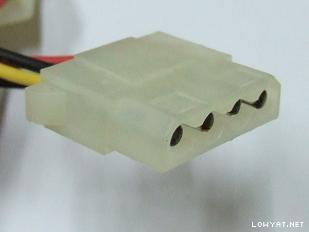
4-pin peripheral power connectors (also known as Molex connectors)
- for various drives e.g. Hard disk, CD/DVD-ROM

Attached Image


4-pin Berg power connectors (usually called Mini-molex or mini-connector)
- supplies the floppy drive
- in some cases, it can be used as an auxiliary connector for AGP video cards and also some mobos

Attached Image


Serial ATA (SATA) power connectors
- a 15-pin connector for components which use SATA power plugs e.g. SATA Harddisks

PCI-E power connector
- a 6-pin PCI-E connector for PCI-E graphic cards
- a newly introduced 8-pin connector should be seen on latest PSU models

Attached Image

Why is there a 6-pins or 8-pins PCIe connectors?
Initial PCIe 1.0 specification introduced a 6-pin PCIe connector that can supply 75 watts of additional power to the PCI-E card.
Later on, an additional 8-pin PCIe connector was introduced (PCIe 2.0 specification) to supply more power (150w) to power-hungry graphic card. The 8-pin usually comes as a 6+2 pin connector so that is can be used with any graphic card that only has a 6-pin connector

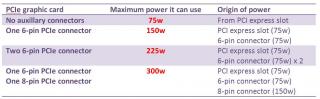
Here's a table showing the maximum power a PCIe graphic card can draw depending on the connectors....

Attached Image

Important : Do not mistaken the 8-pin PCIe connector with the 8-pin EPS12V connector for the motherboard. Though in theory you can’t insert an EPS12V connector into a graphic card, if you push really hard this connection becomes possible, which can lead to a massive short-circuit (fortunately all power supplies have a short-circuit protection and won’t turn on if you make this mistake).

Can I plug a 6-pin connector into my 8-pin PCIe graphic card?
It is usually possible to plug a 6-pin connector into a 8-pin connector on the graphic card. It’s designed to work that way but will limit the capability of the graphic card due to the lower wattage provided by the 6-pin connector. Some graphic cards can sense whether you have plugged a 6-pin or a 8-pin connector, so that the graphic card can impose some kind of restriction when running with only a 6-pin connector e.g. no overclocking.

However, read the manual before you decide to try plugging a 6-pin into an 8-pin connector….


What if your PSU does not have the correct connector for your new motherboard or graphic cards?
You can actually use adapters to adapt your PSU to work with your new components
20- to 24-pin adapter – for make your 20-pin main connector become a 24-pin connector
2x-molex to PCI-E connector – to use molex connector to supply current to the PCI-E connecto

Please note that you have to make sure your PSU can handle the new component

Important : I have never used these adapters before. May damage your rig? Better to buy new PSU?

Modular PSUs
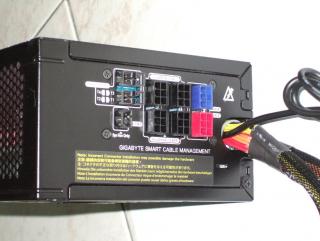
Modular PSUs are PSUs that provide connectors on the power supply, allowing users to only connect cables that they need. This is a relatively new approach to cabling that has become popular to many users.

This is in contrast to a conventional design that has numerous BIG bundle of permanently connected cables coming out of the PSU.

Here's my new Gigabyte Odin GT 550w PSU with the modular feature:

Attached Image

It produces less clutter in the casing, a neater appearance and less interference with airflow.

While modular cabling may seem advantages, they have been found to cause significant amounts of electrical resistance at the connectors. Some third party websites that do power supply testing have confirmed that the quality of the connector, the age of the connector, the amount of times it was inserted/removed, and various other variables such as dust can all raise resistance.

While eliminating the excess cables can improve the flow of cooling air inside the computer case, the modular connectors tend to reduce airflow inside the power supply itself.

Pros
- Less clutter in casing
- Neater appearance (especially for those who do casing designs)
- Less interference with airflow inside the casing

Cons
- Electrical resistance at the connectors
- Connectors may degrade or loosen if you frequent unplug/plug them
- Reduced airflow inside the PSU itself due to additional components
- Slightly more expensive due to extra connectors and special cables

This post has been edited by kmarc: Jul 26 2008, 07:02 AM
TSkmarc
post Jul 7 2008, 06:35 PM

The future is here - Cryptocurrencies!
Group Icon
Elite
14,576 posts

Joined: May 2006
From: Sarawak


Efficiency
Indicates how “efficient” a PSU is in converting AC power into DC.
Efficiency is the ratio between the power being pulled from the wall socket and the power actually being delivered to the PC.

It is calculated by : Efficiency = DC power / AC power


Expressed as:
- 0 to 1.0 i.e. 0.8 efficiency, or as
- Percentage 0% to 100% i.e. 80% efficiency

Take a look at the picture below (Drawn with microsoft word.... laugh.gif ):

Attached Image

The above diagram shows two rigs (one above and one below)
- Both rig needs 300w at load
- 1st rig has a PSU which is only 70% efficient
- 2nd rig has a better PSU which is 80% efficient

For the 1st rig, note that 428.6w AC power needs to be drawn from the wall socket to run the 300w rig
- 128.6w of power is loss as heat

For the 2nd rig, 375w AC power is drawn to supply the 300w rig
- 75w of power is loss as heat

From the picture above, when you run a 300w rig, it is clear that you use less power (375w) using a 80% efficient PSU as compared to more power (428.6w) using a 70% efficient PSU. This translates to HIGHER electric bill in the long run!!

As such, a more efficient PSU will use less power from the wall than one that is less efficient even if it produces the same amount of DC power for the rig.

A good PSU will provide an efficiency of at least 80%, the higher, the better. Higher efficiency has the advantage of:
1) Lower electricity bill (save energy)
2) Less heat being produced (as the loss of power when converting AC to DC is loss mainly as heat)
3) Lower noise from PSU fan
--- the PSU fan can operate at a lower speed as less heat is generated
4) Increase the lifespan of the PSU
--- High efficiency can reduce the heat generated and therefore increase its operating lifespan

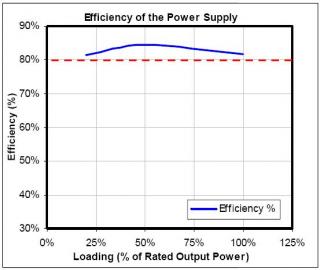
In addition, any PSU will usually have a range where it achieves its highest efficiency at a certain power band (usually 50-75% of it’s maximum load). They are much less efficient at low load, and somewhat less efficient at maximum load. Each PSU is different and it would be good to look at it’s individual efficiency curve vs load.

Here’s an example :

Attached Image

This picture is taken from the Silverstone website : http://www.silverstonetek.com/downloads/si...plus_report.pdf

As you can see, the efficiency is highest around the middle and falls off at lower and higher loads.

Different PSU will have different efficiency curve. Take a look at a couple of graphs so that you'll understand more regarding this.

The "80 Plus" websites has lots and lots of efficiency graph for you to look at : http://www.80plus.org/manu/psu/psu_join.aspx

Just click on the brand you wish to see, then click on the model you want to see.....

Here are more examples of PSU efficiency charts:
- Cooler master silent pro PSUs : http://www.anandtech.com/casecoolingpsus/s...aspx?i=3402&p=7
- Antec signature 650w : http://www.anandtech.com/casecoolingpsus/s...aspx?i=3422&p=7
- Corsair CMPSU-1000HX : http://www.xbitlabs.com/articles/coolers/d...roundup_10.html
- Super Flower Amazon 650w : http://www.anandtech.com/casecoolingpsus/s...aspx?i=3433&p=7
- Silverstone SST-ST70F : http://www.tomshardware.com/reviews/power-...ew,2043-13.html
- A few PSUs compared together : http://www.tomshardware.com/reviews/power-...ew,2043-22.html

The “80 Plus “ Standard Attached Image

A new standard for efficiency of a PSU
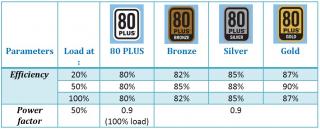
It is an initiative to promote more electrical energy efficient PSU. It certifies products that have more than 80% energy efficiency at 20%, 50% and 100% of rated load, and a power factor of 0.9 or greater at 100% load.

Efficiency Level certifications

Attached Image

* For the higher certification levels, the requirement of 0.9 or better power factor was extended to apply to 20% and 50% load levels, as well as at 100% load

Note : Those PSU that is 80 PLUS certified is sometimes simply written as "80+ certified"

What is the highest efficiency for a PSU for home-user?
- It is unlikely that there are PSUs with efficiency more than 90%.
- Even the best PSU for home use would probably have an efficiency of near 90%...... they would, not suprisingly, be expensive....

Update : A 85+% PSU (reaching up to 90%!!!) : Enermax Revolution 85+ : http://www.anandtech.com/casecoolingpsus/s...aspx?i=3452&p=7

Power Factor Correction (PFC)
This is another confusing term that is usually stressed on.

If you don't want to know much about this, just remember that for PFC:
1) It has no real advantage for home users
- it does not cause the PSU to be more efficiency
- it does not reduce your electricity bill
2) A PSU with PFC basically means that the manufacturer can sell it in Europe
3) A PSU with active PFC doesn't need a 110V/220V switch at the back of the PSU


If you want to know more, read on! smile.gif

PFC - Can be defined as..... naaaahhhh, not going to explain this... too technical... whistling.gif (Google if you want to know more)

There are 2 types of PFC circuits:

1) Passive PFC
- uses components that don't need power to operate e.g. ferrite core coils
- fits the power factor between 0.60-0.80 (60-80%)
- the AC input must be chosen i.e. 110v/230v at the back of the PSU

2) Active PFC
- uses electronic components such as integrated circuits, transistors and diodes
- able to generate a power factor of over 0.95 (95%)
- automatically adjusts for AC input voltage (thus no 110/230v switch)
- more costly to build

PSU with no PFC
- Power supplies with no PFC circuits have a power factor below 0.60 (60%)
- They will also general a considerable amount of harmonic distortion

PFC is NOT related to the efficiency of a PSU. It doesn't make your computer consume less electricity.

Oh, come on! There MUST be some advantage of a high PFC??!??!!

There is, but not for us home users! Direct quote from here : http://www.silentpcreview.com/article28-page5.html

QUOTE
The benefits of high PF for the user comes from the reduced AC current drawn by high PF PSUs, not in any savings from electricity bills, except in the case of commercial utility users who do pay for V(oltage) x A(mperes). There are two broad consequences:

1) Less stress on the AC electrical wiring: The lower current drawn by a high PF power supply means that there is less stress on the electrical wiring of the building. This can be a big plus in the case of older building with lower capacity AC wiring. It is certainly easy to see the benefits in a enterprise setting where dozens or hundreds of PCs are drawing power. If the total current load from the IT department could be reduced by 30% or more, this would be very signficant in direct electricity savings, reduced airconditioning cost, and possible avoidance of building AC re-wiring.

2) Lower UPS costs: Lower current draw also means that smaller capacity Uninterruptible Power Supply (UPS) units can be used. As UPS units are priced in direct proportion to their current capacity (VA), a PF of 0.98 versus one of 0.6 can traslate into a 40% reduction in purchase cost. Again, in an enterprise setting with hundreds or thousands of PCs, the savings can be very significant.


This post has been edited by kmarc: Nov 7 2008, 09:56 AM
TSkmarc
post Jul 7 2008, 10:45 PM

The future is here - Cryptocurrencies!
Group Icon
Elite
14,576 posts

Joined: May 2006
From: Sarawak


Which brand is a good brand?

Certain manufacturers are well-known for their PSU. However, the quality of the PSU should be assessed individually, and not in general. For example, it is wrong to say "Enermax PSUs are lousy" and "Silverstone PSUs are excellent".

In order to gauge the quality of PSUs, there is a system when PSUs are divided into tiers. These are:

Attached Image

So, which PSU is in which tier? You can look at these excellent references:
http://www.xtremesystems.org/forums/showthread.php?t=108088
http://www.overclock.net/power-supplies/15...de-updated.html

Here's another excellent link - PSU database. It links all available PSU review so that it is easy for you to find a particular PSU review:
http://www.overclock.net/power-supplies/73...w-database.html

How much watts does my rig need anyway?
To determine the amount of "watts" your rig need, you can use a watts calculator that are freely available on the net.

Please not that the calculator is only an approximation to the true power that your rig needs.

Here are some PSU calculators you can use:
Newegg PSU calculator (simple)
eXtreme PSU calculator (very detailed)
Aanet PSU calculator (very good)

Is there such a thing as a PSU for overclocking?
Nope.

Basically, the term "overclocking PSU" just means a good quality PSU with enough wattage to handle your overclocking.

Tier 1 and 2 PSUs are good examples....

So, how to get a good quality PSU? That's covered in the next section!

Tips on buying a good PSU:

1) Choose a power supply that will be working between 50-75% of its maximum load.

- There are many reason for that (see below). The general rule is to calculate your rig's requirement and then multiply it by a factor of 1.5 to 2.0.

Example :
Calculated requirement : 400w
PSU to get : 400w x 1.5 or 2.0 = 600 - 800w shocking.gif

Manufacturers don’t expect you to pull the full power from their units, but that you operate them around 50% load for a higher efficiency. The only disadvantage to this approach is the price of a higher wattage unit. But in the long run it is a good idea, as:
- You will save money on your electricity bill (as your PSU will run at it's highest efficiency)
- Your PSU will run cooler (and may even last longer as it is not exposed to constant high temperatures)
- Less noise from the PSU as the fan doesn’t have to run at full speed
- You have enough headroom for a future upgrade
- You won’t face any stability problems when you are overclocking your rig as you have enough headroom

So, does that mean you have to get a 1000W PSU? No! As most systems will consume power less than 450 W.


2) Buy PSU where the maximum capacity is on the +12V outputs (total wattage for all +12V rails) and not on the +5V/+3.3V rails

- Nowadays a typical PC pulls more power from the +12 V outputs. This is because the two most power-hunger components from the PC is the CPU and graphic card (which, if you remember the basics, are connected to the + 12 V outputs (thru the ATX12V/EPS12V connector and thru the PCIe connector, respectively).

- Also make sure that the 12v rails are enough for your graphic card (e.g. a 8800GTS needs at least 26A on the 12v rails)

- in summary, after wattage, look at the capabilities of the 12v rails of a PSU......


3) Find the latest ATX12V version - at the moment, it is v2.2 and v2.3

- All the v2.x version should work well with current rigs but shouldn't you get the latest version? wink.gif


4) Get a PSU with high efficiency

- at least 80%
- Even better if you can get a “80 PLUS certified" PSU
- As stated above, the advantages of high efficiency PSUs are:

a) Lower electricity bill (save energy)
b) Less heat being produced (as the loss of power when converting AC to DC is loss mainly as heat)
c) Lower noise from PSU fan
--- the PSU fan can operate at a lower speed as less heat is generated
d) Increase the lifespan of the PSU
--- High efficiency can reduce the heat generated and therefore increase its operating lifespan


5) Don’t buy a cheap PSU

- as in the long run, you will lose money due to various factors such as shorter warranty period, less efficient, easier to fail and not enough wattage for an upgrade!!!
- however, this does not apply if your rig is very basic, you don't overclock and you plan to donate your lousy rig next time.... laugh.gif
- this, of course, doesn't mean that you go out and buy the MOST EXPENSIVE PSU in it's class! sweat.gif


6) Don't buy modular PSU

- unless you are going for looks/aesthetics or easy cable management, don't buy modular PSU due to the resistance in the connectors (see topic on "Modular PSUs" for the pros and cons)


7) Low noise or no noise (Silent PSU)

- PSU's noise comes from the internal fan that helps to cool the PSU.
- If you are not careful, you may regret buying a cheap PSU which sounds like a mini-vacuum cleaner!!! laugh.gif
- There are a few options available when considering a more silent PSU:
--- Buy PSUs that are in the "Silent" category (Usually silent in general but not always!)
--- Buy PSUs with larger fans i.e. 12cm or 14cm. (However, see the section on PSU fan for the disadvantage)
--- Buy fanless PSU (although the PSU will be hotter than normal)


8) Go for Tier 1 or Tier 2 branded PSUs

- You should, however, assess each individual model separately

- see the section on "Which brand is a good brand?"


9) Longer warranty period

- PSUs has the habit of suddenly dying on you when you least expect it.....
- As with any PC parts, it is usually better to get one with a longer warranty period.


10) Do some research before you decide

- Sorry to say but some traders don't know much about PSUs (note the word "some"!)
- Throw them a simple question and they will give some funny answers
- Ask them something more technical and they are already lost
- So, it is better to do your own research, read reviews and also ask around before you decide on your final PSU


And finally.....

So, am I an expert in PSU? Nope. smile.gif

Do I know which PSU is the best for you if you ask me? Nope. wink.gif

The only good PSU I have used so far is the Enermax Liberty 500w, which I'm quite satisfied with. The rest is just cheap normal PSU that came with the casing.

Update : I have a new Gigabyte Odin GT 550w..... huhu..... biggrin.gif

After reading and doing this guide, I can at least say that I understand all the mumbo-jumbo written on the PSU and I can make a better decision on which PSU to buy. The key here is to do your own research, read reviews and follow the few tips provided before you buy one.

Just remember that any PSU you buy (that is compatible with your rig and has enough wattage) will probably run fine. I'm actually using a cheap (cost me about RM105) 350 watt M-Life PSU (chaplang brand) on my 2nd rig with these specs - E2160 OC to 3.0Ghz, 8400GS, 2x1Gb rams, x1 HDD, x1 DVD-RW and X3 fans. It has been running well for the past 6 months without any problems.

However, for various reasons as stated above, it is generally advisable to get a better PSU as the money you spent will probably be worth it in the long run.

It's the same as buying cars. A brand new Kancil will get you to work just like a brand new Honda Civic. Which one would you choose? smile.gif (I know, I know, poor example.... whistling.gif )

- The End -

Troubleshooting

This reference shows you a flow chart to troubleshoot your rig. Very good information!

http://www.fonerbooks.com/power.htm


References

Other excellent guides:
http://www.anandtech.com/casecoolingpsus/showdoc.aspx?i=3413
http://www.techjamaica.com/forums/showthread.php?t=52054
http://www.silentpcreview.com/article28-page1.html
http://www.pcpower.com/technology/myths/
http://www.scotsmist.co.uk/power_supply1.html
http://www.hardwaresecrets.com/article/181/1
http://www.jonnyguru.com/forums//showthread.php?t=1036
http://www.xcpus.com/forums/cases-psus/109...-101-102-a.html

Connectors:
http://www.playtool.com/pages/psuconnectors/connectors.html

Power supply myths (very good reference):
http://www.pcpower.com/technology/myths/

Efficiency:
http://www.anandtech.com/casecoolingpsus/s...aspx?i=3413&p=3
Many PSUs compared : http://www.tomshardware.com/reviews/power-...up,2062-30.html

All the technical jargons of a power supply e.g. SCP, OPP, OTP, OVP, UVP, ROHS
http://www.xbitlabs.com/articles/other/display/atx-psu5.html

Other references:
http://en.wikipedia.org/wiki/Power_supply_unit
http://en.wikipedia.org/wiki/ATX
http://www.helpwithpcs.com/courses/power-s...inc-pinouts.htm
http://en.wikipedia.org/wiki/Computer_power_supply
http://www.techarp.com/showarticle.aspx?artno=81&pgno=0
http://www.technibble.com/computer-technic...r-power-supply/
http://www.endpcnoise.com/cgi-bin/e/faqpsus.html
http://www.amdboard.com/psu.html
http://www.smps.us/computer-power-supply.html
http://www.svc.com/powersupplyguide.html
http://en.wikipedia.org/wiki/80_PLUS
http://www.silverstonetek.com/tech/wh_0216.php?area

PSU recommendations:
http://www.anandtech.com/casecoolingpsus/showdoc.aspx?i=3359

Power supply design:
http://www.formfactors.org/developer/specs..._public_br2.pdf
http://ssiforum.oaktree.com/pdfs/EPS12V%20Spec%202_92.pdf
http://www.formfactors.org/developer%5Cspecs%5Catx2_2.pdf
http://enermax.co.uk/fileadmin/contents/bi...orm_Rev_1_2.pdf

This post has been edited by kmarc: Jan 2 2011, 08:21 AM


Change to:
| Lo-Fi Version
0.0193sec    0.34    6 queries    GZIP Disabled
Time is now: 6th December 2025 - 05:35 PM