Welcome Guest ( Log In | Register )

9 Pages < 1 2 3 4 5 > » Bottom

Outline · [ Standard ] · Linear+

 Learning Hobbies Photography v1, Learn the ways from the Pro's~!

views
     
TSWolf516
post Jun 28 2008, 07:09 PM

On my way
****
Senior Member
589 posts

Joined: Jul 2007
From: The Reality Known As Hell


QUOTE(300078 @ Jun 28 2008, 07:02 PM)
wow nice! I been out for 2 days come back got tis thread liao!
I need some advice on where to search for those 6500k light bulb......cant seem to find them in normal shopping center or shops! Any advice?
*
I get mine from parkson smile.gif

@chriswoo - Usually I used paint or photoshop software to enchance the picture... but try to post the picture you snap here without any modification so we know how to improve the source itself brows.gif
Exiled_Gundam
post Jun 28 2008, 10:07 PM

On my way
****
Senior Member
550 posts

Joined: Jan 2007


QUOTE(chriswoo @ Jun 28 2008, 04:12 PM)
Wolf516  - nice really helpful

now i feel more like this thead biggrin.gif but hmm speaking of snaping good photo does this thread also allow teaching a basic editing software to enhance the photosnap ?  Vince any advice? yes or no ?
*
QUOTE(Wolf516 @ Jun 28 2008, 07:09 PM)
I get mine from parkson  smile.gif

@chriswoo - Usually I used paint or photoshop software to enchance the picture... but try to post the picture you snap here without any modification so we know how to improve the source itself  brows.gif
*
Then, let me begin.
All of my photo I posted here in LYN usually go through (in Photoshop):
- Auto Levels, followed by, if necessary
- Adjust the brightness and contrast accordingly, to suit your desired end result
Original pics (resized)
» Click to show Spoiler - click again to hide... «

Pic above are taken using Sony Cybershot DSC F717 camera(auto setting, macro mode), with sunlight as light source
After going through above steps
» Click to show Spoiler - click again to hide... «

However, you might want to adjust color balance, or use Auto Color if you find that your photo looks too blueish, greenish etc. For Auto Levels, if you find out that the original photo has already nice color, you may skip to adjust brightness and contrast step
valho
post Jun 28 2008, 11:31 PM

Look at all my stars!!
*******
Senior Member
4,967 posts

Joined: Jan 2003
From: somewhere, far far away


QUOTE(FirezZ @ Jun 28 2008, 06:13 AM)
goldfries, how u make the blur vision for the back ground ?

valho : i am using 850is too tongue.gif err can make the impact like goldfries did for the photo ...

user posted image
Anyway, just post the photo after reedited by photoshop (learnt in 3 hours for the effect  tongue.gif)
user posted image
*
PnS doesn't won't be able to create the background blur like a dslr due to the small sensor.
You can try shooting in macro mode and go as close as possible, to create an impact that's close to that

QUOTE(Wolf516 @ Jun 28 2008, 10:13 AM)
rclxms.gif  this is really something, the lighting's are beautiful and it feels like Rize is alive,

how you made that effect?  smile.gif
*
thanks, posted it right after I took the pic, so didn't post the settings I use.

The setup:
1. A piece of glass on top of the blue background paper and below it is thsoe foam that comes with LCD with a big hole cut in the middle.
2. Flash is place below the glass with the flash head tilted upwards, additional books are place under the foam to raise it and to prevent the flash from spilling out too much.
3. The usual main light and top light are use.
4. Flash is triggered using wireless trigger, and manual settings was use on the camera. White balance set to Auto.
5. Aperture varied from f/2.8 to f/16, shutter speed varied as well since I do tethered shooting (meaning the output are directly shown on my laptop), so I'll take a shot and make any adjustment necessary.
6. Shots done using Canon 400D with EF 100mm f/2.8 Macro USM and EF 50mm f/1.4 USM lens, and the flash is Speedlite 580exII.

Ok so how to do this with a PnS, well I think it's possible, but you'll probably need a PnS/Prosumer camera that allow adjustment to shutter speed and aperture. For the flash i place under the glass, u can replace it with a normal light, the light should be brighter than the other two light though. Well this is all in theory, so you can give it a try and see if it works smile.gif

goldfries
post Jun 29 2008, 02:56 AM

40K Club
Group Icon
Forum Admin
44,415 posts

Joined: Jan 2003


QUOTE(valho @ Jun 28 2008, 11:31 PM)
PnS doesn't won't be able to create the background blur like a dslr due to the small sensor.
You can try shooting in macro mode and go as close as possible, to create an impact that's close to that
thanks, posted it right after I took the pic, so didn't post the settings I use.


ehh. theoretically possible la.

some PnS have macro mode. so when the AF goes into the nearby object, hold it there and move around for the composition.

now if only i can find my C2-Zoom to prove it. LOL. my Fuji S7000 surely can do bokeh.
chriswoo
post Jun 29 2008, 03:36 AM

Getting Started
**
Junior Member
98 posts

Joined: Oct 2006


Wolf516 - oo thanks for the info

well noob at photosnaping but will learn in time so right now basicaly when i snap shot i just use an macro mode which gives more details but slidely blur due to i notice when i put stand it give more stable then my hand snap. and my room is quite small and lack of light maybe i go buy those lamp and some few cardboard to get clearer picture of it.

here 1 of the snap shot i have recently

user posted image

well currenty no setup nothing just pure snap hand shot.

so any comment to improve this without using any equipment ? rite now i too busy to buy it but for temp solution got any expert advice?
goldfries
post Jun 29 2008, 03:59 AM

40K Club
Group Icon
Forum Admin
44,415 posts

Joined: Jan 2003


aihh. time to introduce Gorillapod to you guys. biggrin.gif

anyway, try using plain background.

here's a VERY simple setup.

1 semi-transparent tray
1 standing light
1 toy

user posted image

well not the best pose or setup, but this picture is to illustrate how a simple lighting setup with a little post-processing can CREATE effects. smile.gif


Added on June 29, 2008, 4:00 am
QUOTE(chriswoo @ Jun 29 2008, 03:36 AM)
so any comment to improve this without using any equipment ? rite now i too busy to buy it but for temp solution got any expert advice?


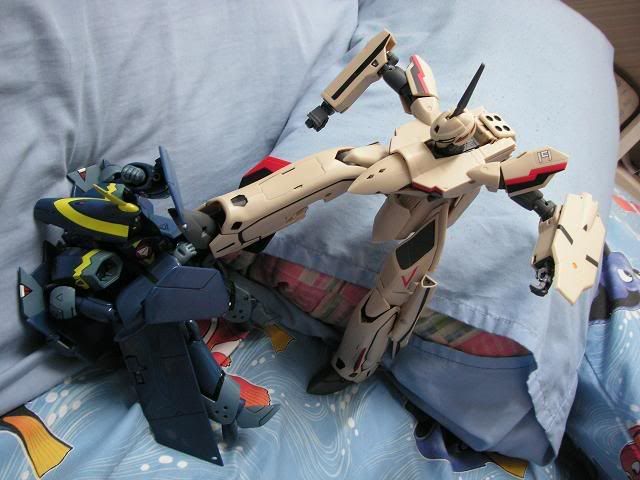
putting them on pillows look like fighting in toy land la.

if you want, try rocks instead. biggrin.gif they look better. then of course try lightings and areas that look more realistic if you want.


This post has been edited by goldfries: Jun 29 2008, 04:00 AM
TSWolf516
post Jun 29 2008, 11:01 AM

On my way
****
Senior Member
589 posts

Joined: Jul 2007
From: The Reality Known As Hell


QUOTE(chriswoo @ Jun 29 2008, 03:36 AM)
Wolf516 - oo thanks for the info

well noob at photosnaping but will learn in time so right now basicaly when i snap shot i just use an macro mode which gives more details but slidely blur due to i notice when i put stand it give more stable then my hand snap. and my room is quite small and lack of light maybe i go buy those lamp and some few cardboard to get clearer picture of it.

here 1 of the snap shot i have recently

user posted image

well currenty no setup nothing just pure snap hand shot.

so any comment to improve this without using any equipment ? rite now i too busy to buy it but for temp solution got any expert advice?
*
rolleyes.gif there are many things than you can use in your toys photograph , instead of making them look more toy-ish, giving them a realistic feel is also another way of shooting them, etc real world's background such as houses or rocks like what goldfries says


user posted image
user posted image

see how this small DIY house makes the eva looks real?
goldfries
post Jun 30 2008, 12:35 AM

40K Club
Group Icon
Forum Admin
44,415 posts

Joined: Jan 2003


hehe. just make sure Evangelion fans don't point out the size of the mecha and house are not in correct proportion! biggrin.gif
temptation1314
post Jun 30 2008, 12:39 AM

Specials : 1,000,000 Spam Post Attack
*******
Senior Member
2,287 posts

Joined: Jun 2007
From: Anno Domini Time Ultra: 1,000,000 Trans Am Attack!
haven't get my lightning set yet.. sad.gif Unable to go IKEA because the damn rain... doh.gif
goldfries
post Jun 30 2008, 12:44 PM

40K Club
Group Icon
Forum Admin
44,415 posts

Joined: Jan 2003


use sunlight cannot meh?
valho
post Jun 30 2008, 01:25 PM

Look at all my stars!!
*******
Senior Member
4,967 posts

Joined: Jan 2003
From: somewhere, far far away


if dun have lighting set yet find a window with sunlight coming in, nothing beats natura light smile.gif
goldfries
post Jun 30 2008, 01:34 PM

40K Club
Group Icon
Forum Admin
44,415 posts

Joined: Jan 2003


can use umbrella as reflector also. smile.gif don't have white color umbrella? use white shirt la? a bunch of underwear also can.

seriously. photography involves creativity in the setup too.
0300078
post Jun 30 2008, 01:36 PM

Regular
******
Senior Member
1,447 posts

Joined: Mar 2006


QUOTE(goldfries @ Jun 30 2008, 12:44 PM)
use sunlight cannot meh?
*
lol tat dude when got time also already deep night liao! All the other time he spent on spamming joh


Added on June 30, 2008, 7:31 pmdeng surfing the net and saw something like this! Temp if u kaya raya buy this lah
http://www.1999.co.jp/eng/10065301

This post has been edited by 300078: Jun 30 2008, 07:31 PM
Doomsday
post Jun 30 2008, 08:12 PM

keluarpattern dupe slayer
*******
Senior Member
2,491 posts

Joined: Dec 2004
From: initrd


Here is my Amazon Danboard Revoltech with Carbine M4

user posted image
user posted image
user posted image


Nothing much special setting, just some basic composition + macro shot. wink.gif
edwardgsk
post Jul 4 2008, 05:19 PM

I believe I can fly
*******
Senior Member
2,966 posts

Joined: Apr 2008
From: Macross Galaxy


hehe shot these with Sony DSC-T200. picture is taken with auto adjustment at outdoor.... any comments are welcome laugh.gif

user posted image

user posted image

the background i use an old polystrene board lol got a hell lot of scars haha tongue.gif (just try to ignore them)... planned to 'cure' them with photoshop but main pc spoiled so cant edit doh.gif (uploaded using laptop)...

This post has been edited by edwardgsk: Jul 4 2008, 05:20 PM
Doomsday
post Jul 5 2008, 01:47 AM

keluarpattern dupe slayer
*******
Senior Member
2,491 posts

Joined: Dec 2004
From: initrd


^ It just looks normal portrait.. try snap using "rules of third" composition to make ur Freedom Gundam look more attractive.

source : http://photoinf.com/General/KODAK/guidelin..._of_thirds.html
kurz
post Jul 5 2008, 02:16 AM

Getting Started
**
Junior Member
176 posts

Joined: Sep 2006
From: KL


QUOTE(Wolf516 @ Jun 29 2008, 11:01 AM)
rolleyes.gif  there are many things than you can use in your toys photograph , instead of making them look more toy-ish, giving them a realistic feel is also another way of shooting them, etc real world's background such as houses or rocks like what goldfries says
*
like this? biggrin.gif

user posted image

This post has been edited by kurz: Jul 11 2008, 05:42 PM
valho
post Jul 9 2008, 11:54 AM

Look at all my stars!!
*******
Senior Member
4,967 posts

Joined: Jan 2003
From: somewhere, far far away


Interesting use of the barn door effect for figure shoot. Barn door effect are actually use in normal photography as well where you control the amount of light that hit your subject

Figure On Cheap Lighting II: Blocking Light
TSWolf516
post Jul 9 2008, 03:32 PM

On my way
****
Senior Member
589 posts

Joined: Jul 2007
From: The Reality Known As Hell


QUOTE(valho @ Jul 9 2008, 11:54 AM)
Interesting use of the barn door effect for figure shoot. Barn door effect are actually use in normal photography as well where you control the amount of light that hit your subject

Figure On Cheap Lighting II: Blocking Light
*
hmm.gif I've been wanting to ask you something

has anyone tried to shoot figurines during night?

It might be nice as some figures blends well in night view
raptor_cZn
post Jul 11 2008, 12:02 AM

Regular
******
Senior Member
1,404 posts

Joined: Feb 2006
From: KL


QUOTE(Wolf516 @ Jun 29 2008, 11:01 AM)
rolleyes.gif  there are many things than you can use in your toys photograph , instead of making them look more toy-ish, giving them a realistic feel is also another way of shooting them, etc real world's background such as houses or rocks like what goldfries says
user posted image
user posted image

see how this small DIY house makes the eva looks real?
*
How did you set up those props? You really DIYed all that and what parts or stuff can you use to do that?

9 Pages < 1 2 3 4 5 > » Top
 

Change to:
| Lo-Fi Version
0.0195sec    0.51    6 queries    GZIP Disabled
Time is now: 15th December 2025 - 06:34 AM