Welcome Guest ( Log In | Register )

9 Pages « < 4 5 6 7 8 > » Bottom

Outline · [ Standard ] · Linear+

 Learning Hobbies Photography v1, Learn the ways from the Pro's~!

views
     
Helldiver
post Aug 22 2008, 10:38 PM

Casual
***
Junior Member
460 posts

Joined: Aug 2008


How you guys just focus on the subject only and not the background ? Using DLSR?

I using a Cannon Digital IXUS 55. Is it a good camera?


Also want to ask, how to prevent 'noise' from appearing from the photos? I use my camera take photos, then when I view it at full size, I can see alot of noise. Its not fine. How??? Can camera damage cause this??

Still very new to the photography world. blush.gif
TSWolf516
post Aug 22 2008, 11:28 PM

On my way
****
Senior Member
589 posts

Joined: Jul 2007
From: The Reality Known As Hell


QUOTE(Helldiver @ Aug 22 2008, 10:38 PM)
How you guys just focus on the subject only and not the background ? Using DLSR?

I using a Cannon Digital IXUS 55. Is it a good camera?
Also want to ask, how to prevent 'noise' from appearing from the photos? I use my camera take photos, then when I view it at full size, I can see alot of noise. Its not fine. How??? Can camera damage cause this??

Still very new to the photography world.  blush.gif
*
smile.gif you don't have to use a dslr to take good pictures.... a normal camera would sufficient with the right settings

use macro for shooting , adjust your ISO (the lower the better) depends on the lighting condition to reduce noise
UNDICI
post Aug 22 2008, 11:55 PM

New Member
*
Newbie
2 posts

Joined: Mar 2007


extra2!. yea.. i'm an addict lol

user posted image
user posted image
user posted image
user posted image
user posted image
user posted image
user posted image
user posted image

valho
post Aug 23 2008, 12:07 AM

Look at all my stars!!
*******
Senior Member
4,967 posts

Joined: Jan 2003
From: somewhere, far far away


QUOTE(Helldiver @ Aug 22 2008, 10:38 PM)
How you guys just focus on the subject only and not the background ? Using DLSR?

I using a Cannon Digital IXUS 55. Is it a good camera?
Also want to ask, how to prevent 'noise' from appearing from the photos? I use my camera take photos, then when I view it at full size, I can see alot of noise. Its not fine. How??? Can camera damage cause this??

Still very new to the photography world.  blush.gif
*
for DSLR I use manual focus, which means I adjust the focus manually from the lens

for Point and shoot camera you have no choice but to rely on the auto focus, remember to set it to macro though.
to reduce noise, make sure you have a good amount of light, use low ISO, and also make sure your shutter speed is not too long (long exposure increase noise as well). Point and Shoot camera works well when the lighting is good, so make sure you have that

iman_210
post Aug 23 2008, 12:16 AM

1.0 bar @ 221WHP
*******
Senior Member
2,684 posts

Joined: Mar 2005
From: Central Region


some of my work...

my son's CARS collection...

user posted image

This post has been edited by iman_210: Aug 23 2008, 12:18 AM
raptor_cZn
post Aug 23 2008, 12:20 AM

Regular
******
Senior Member
1,404 posts

Joined: Feb 2006
From: KL


QUOTE(2015315 @ Aug 22 2008, 03:00 PM)
Nice composed picture.

QUOTE(Helldiver @ Aug 22 2008, 10:38 PM)
How you guys just focus on the subject only and not the background ? Using DLSR?

I using a Cannon Digital IXUS 55. Is it a good camera?
Also want to ask, how to prevent 'noise' from appearing from the photos? I use my camera take photos, then when I view it at full size, I can see alot of noise. Its not fine. How??? Can camera damage cause this??

Still very new to the photography world.  blush.gif
*
You can use noise-reducing software to get rid the noise to a certain extent. Though it still costs some $$ for the software (around 20USD) unless you get the *ahem... tongue.gif
Helldiver
post Aug 23 2008, 12:22 AM

Casual
***
Junior Member
460 posts

Joined: Aug 2008


Thanks all for the help, but may I ask how do I adjust the shutter speed?


A great clap to wolf and valho for giving me information. rclxms.gif
iman_210
post Aug 23 2008, 12:28 AM

1.0 bar @ 221WHP
*******
Senior Member
2,684 posts

Joined: Mar 2005
From: Central Region


another 1...

user posted image
raptor_cZn
post Aug 23 2008, 12:38 AM

Regular
******
Senior Member
1,404 posts

Joined: Feb 2006
From: KL


QUOTE(Helldiver @ Aug 23 2008, 12:22 AM)
Thanks all for the help, but may I ask how do I adjust the shutter speed?
A great clap to wolf and valho for giving me information.  rclxms.gif
*
You should be able to adjust it under Tv or M mode.
Tv is shutter priority where you can adjust the shutter speed and the camera will pick the right aperture value for you.
As for manual, you pretty much adjust everything there yourself.
Lower end PnS normally do not have such features.
iman_210
post Aug 23 2008, 12:39 AM

1.0 bar @ 221WHP
*******
Senior Member
2,684 posts

Joined: Mar 2005
From: Central Region


another 1 as well...

user posted image
valho
post Aug 23 2008, 12:48 AM

Look at all my stars!!
*******
Senior Member
4,967 posts

Joined: Jan 2003
From: somewhere, far far away


QUOTE(Helldiver @ Aug 23 2008, 12:22 AM)
Thanks all for the help, but may I ask how do I adjust the shutter speed?
A great clap to wolf and valho for giving me information.  rclxms.gif
*
that will depends on your camera, Canon powershot series allow manual adjustment of shutter speed IINM
the Ixus series I not sure, since the Ixus 850IS that I owned last time doesn't allow shutter speed adjustment
TSWolf516
post Aug 23 2008, 12:38 PM

On my way
****
Senior Member
589 posts

Joined: Jul 2007
From: The Reality Known As Hell


doh.gif I notice that some of you just randomly posting your collection pictures


please refrain yourself from doing that as it will make others think that this is just another show off thread

Please post something informative such as what lighting condition you using, camera settings and etc
Just by posting the picture we wouldn't learn anything from it
Helldiver
post Aug 23 2008, 01:38 PM

Casual
***
Junior Member
460 posts

Joined: Aug 2008


Thanks for the help again!

Yeah, I don't think my IXUS 55 has a shutter speed option.

Thanks again rclxms.gif .

Will try to get some good pictures. rclxms.gif
TSWolf516
post Aug 23 2008, 05:26 PM

On my way
****
Senior Member
589 posts

Joined: Jul 2007
From: The Reality Known As Hell


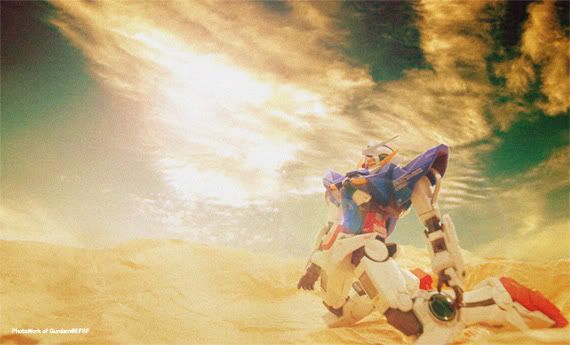
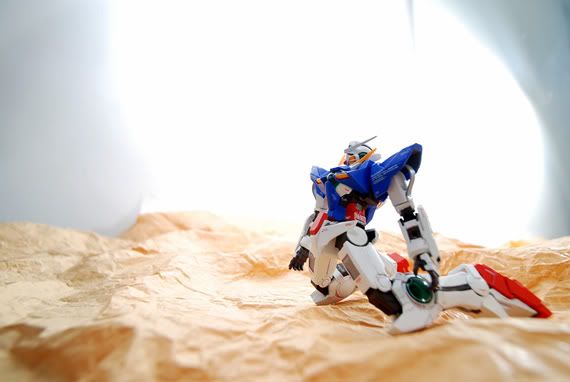
Camera: Sony T-10

settings , 1 big white manila paper, 2 table lamps , and 1 big mirror for deflection

I've set this one for EV +2 so that it can capture most of the light smile.gif

user posted image
Exiled_Gundam
post Aug 23 2008, 05:34 PM

On my way
****
Senior Member
550 posts

Joined: Jan 2007


Hmm I want to ask how to get "all sharp" close-up pics (meaning nothing get blurred regardless of the distance with the camera)?

This post has been edited by Exiled_Gundam: Aug 23 2008, 05:35 PM
TSWolf516
post Aug 23 2008, 05:36 PM

On my way
****
Senior Member
589 posts

Joined: Jul 2007
From: The Reality Known As Hell


QUOTE(Exiled_Gundam @ Aug 23 2008, 05:34 PM)
Hmm  I want to ask how to get "all sharp" close-up pics (meaning nothing get blurred regardless of the distance with the camera)?
*
blink.gif if you wan to get all sharp photo's ur camera will have to focus basically everything in macro mode laugh.gif which is quite hard to do


Added on August 23, 2008, 6:38 pm brows.gif another new picture with the artwork transformation

user posted image

This post has been edited by Wolf516: Aug 23 2008, 06:38 PM
raptor_cZn
post Aug 23 2008, 06:56 PM

Regular
******
Senior Member
1,404 posts

Joined: Feb 2006
From: KL


QUOTE(Exiled_Gundam @ Aug 23 2008, 05:34 PM)
Hmm  I want to ask how to get "all sharp" close-up pics (meaning nothing get blurred regardless of the distance with the camera)?
*
All sharp as in the background and the foreground?
To do that you have to increase the aperture value to reduce the 'bokeh' effect (blurring when the area is not in focus)
Set it to something around f5.6 or higher.

This post has been edited by raptor_cZn: Aug 23 2008, 06:57 PM
iman_210
post Aug 23 2008, 08:52 PM

1.0 bar @ 221WHP
*******
Senior Member
2,684 posts

Joined: Mar 2005
From: Central Region


QUOTE(Wolf516 @ Aug 23 2008, 12:38 PM)
doh.gif I notice that some of you just randomly posting your collection pictures

please refrain yourself from doing that as it will make others think that this is just another show off thread

Please post something informative such as what lighting condition you using, camera settings and etc
Just by posting the picture we wouldn't learn anything from it
*
u can check the pics exif from right clicking on it. lighting are usually non existant for most of my shots.
Helldiver
post Aug 25 2008, 05:21 PM

Casual
***
Junior Member
460 posts

Joined: Aug 2008


How do you get results like this? http://www.geocities.jp/hetare_d_max/galle...IC_39_G3G4.html


He has the infinity sweep look and the light don't reflect off the paper... I tried a bit, the only thing I cant get the is the infinity sweep look lol.
valho
post Aug 25 2008, 05:55 PM

Look at all my stars!!
*******
Senior Member
4,967 posts

Joined: Jan 2003
From: somewhere, far far away


QUOTE(Exiled_Gundam @ Aug 23 2008, 05:34 PM)
Hmm  I want to ask how to get "all sharp" close-up pics (meaning nothing get blurred regardless of the distance with the camera)?
*
use smaller aperture, but it'll depends on the type of camera you are using how small you need to go, DSLR probably need to go as much as f/16, a PnS probably f/8 is enough

QUOTE(Helldiver @ Aug 25 2008, 05:21 PM)
How do you get results like this? http://www.geocities.jp/hetare_d_max/galle...IC_39_G3G4.html
He has the infinity sweep look and the light don't reflect off the paper... I tried a bit, the only thing I cant get the is the infinity sweep look lol.
*
uh dun get what you mean, which pic are you refering to ?

9 Pages « < 4 5 6 7 8 > » Top
 

Change to:
| Lo-Fi Version
0.0225sec    0.76    6 queries    GZIP Disabled
Time is now: 17th December 2025 - 02:47 AM