Welcome Guest ( Log In | Register )

40 Pages « < 36 37 38 39 40 >Bottom

Outline · [ Standard ] · Linear+

 Overclocking E7XXX Series

views
     
deep_hunter
post Apr 6 2010, 05:22 PM

Getting Started
**
Junior Member
282 posts

Joined: Jan 2009
user posted image

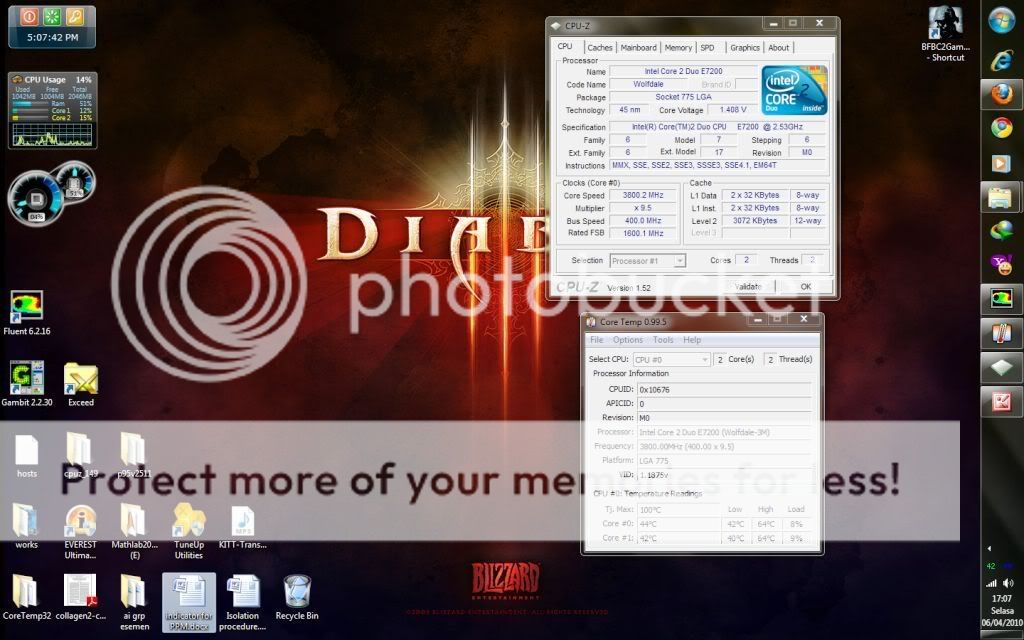
screenshot after OCed. managed to increase multiplier to 9.5..its a pain in da a**. rclxub.gif
really..have to increase voltage up to 1.45v in bios just to make it stable...
temp during idle just 40'c and load almost 70'c. i got stimulator (fluent) running behind so that why the temp a bit higher.
CM N520 quite good in maintaining temp i think laugh.gif
farscope
post Apr 6 2010, 08:43 PM

Look at all my stars!!
*******
Senior Member
3,427 posts

Joined: Apr 2007
From: Gangster Paradise


1.45V to get 400 x 9.5 is kinda high, its quite a big jump from yr 400x9.. sweat.gif but anyway, good try.. wink.gif

load at 70 for prime95 is bit too high, but cz yr vcore is high, so i think its ok..

try run linx with that setting and i can guarantee yr temps will shoot above 90.. brows.gif
deep_hunter
post Apr 7 2010, 12:52 AM

Getting Started
**
Junior Member
282 posts

Joined: Jan 2009
i think not to try that linX..coz from previous post they reach scary temp nod.gif
i think just to stick with 400X9.0 at voltage below 1.36v
JoBigShow
post Apr 7 2010, 01:25 AM

Ω Ξ Ψ Σ Д Ӫ Ж Π ✿
*****
Senior Member
969 posts

Joined: Jul 2009
From: ɹndɯnן ɐןɐnʞ


QUOTE(farscope @ Apr 6 2010, 08:43 PM)
1.45V to get 400 x 9.5 is kinda high, its quite a big jump from yr 400x9.. sweat.gif but anyway, good try.. wink.gif

load at 70 for prime95 is bit too high, but cz yr vcore is high, so i think its ok..

try run linx with that setting and i can guarantee yr temps will shoot above 90.. brows.gif
*
I think with Linx, the guy's temps might reach 100c with kind of Vcore paired with air cooling... sweat.gif
And if so, it will reach TJ Max and auto-shutdown during Linx test-run rounds doh.gif

@deep_hunter
no need to try Linx if you are patient with using prime95, Linx makes the long hours of test in prime95 done in half an hour or more, but will rev-up your E7200 temp very high.
Btw, are you sure 1.45v is the lowest you can get stable on E7200?
Try lowering it by increments until you stumble on errors during prime95...I hope you can get lower bro..1.45v is indeed an unhealthy voltage for the 45nm proc...

farscope
post Apr 7 2010, 10:23 AM

Look at all my stars!!
*******
Senior Member
3,427 posts

Joined: Apr 2007
From: Gangster Paradise


QUOTE(JoBigShow @ Apr 7 2010, 01:25 AM)
I think with Linx, the guy's temps might reach 100c with kind of Vcore paired with air cooling...  sweat.gif 
And if so, it will reach TJ Max and auto-shutdown during Linx test-run rounds  doh.gif

@deep_hunter
no need to try Linx if you are patient with using prime95, Linx makes the long hours of test in prime95 done in half an hour or more, but will rev-up your E7200 temp very high.
Btw, are you sure 1.45v is the lowest you can get stable on E7200?
Try lowering it by increments until you stumble on errors during prime95...I hope you can get lower bro..1.45v is indeed an unhealthy voltage for the 45nm proc...
*
yup.. linx temps r indeed killing..

i run prime95 at 56 max, i run linx reach 71.. sweat.gif

tat's true, 400x9 is way better than yr 400x9.5.. try to do some fine tuning if u wan to for yr 400x9 settings.. wink.gif
JoBigShow
post Apr 7 2010, 11:52 AM

Ω Ξ Ψ Σ Д Ӫ Ж Π ✿
*****
Senior Member
969 posts

Joined: Jul 2009
From: ɹndɯnן ɐןɐnʞ


QUOTE(deep_hunter @ Apr 7 2010, 12:52 AM)
i think not to try that linX..coz from previous post they reach scary temp nod.gif
i think just to stick with 400X9.0 at voltage below 1.36v
*
Bro, now that you are settled with CPU OC'ing, now you should move onto tightening the trd timing, oc the Ram a bit (as HyperX can do moderate OC'ig, but for hardcore Ram oc'ing usually are in Corsair, etc. territory)
Tight tRD have direct performance increase on your system (cpu, ram, NB).

Here is some pics of what happens when you tight the timing: (performance increases as going down descending the list below)

Pay attention to the top right corner of memory latency.

With my 800mhz HyperX oc'ed to 961mhz
Attached Image

With my 800mhz HyperX stock clock; but timing change from 5-5-5-18 to 5-5-5-15
Attached Image

With my 800mhz HyperX oc'ed to 1000mhz; tighten the PL level
Attached Image

With my 800mhz HyperX oc'ed to 1000mhz; but timing change from 5-5-5-18 to 5-5-5-15
Attached Image

deep_hunter
post Apr 7 2010, 07:21 PM

Getting Started
**
Junior Member
282 posts

Joined: Jan 2009
so i have tightening ram timing rite?coz rite now my ram timing 5-5-5-15. if i use 4-4-4-12 is that tight enough?lower the number meaning ur latency is lower rite?
JoBigShow
post Apr 8 2010, 02:03 AM

Ω Ξ Ψ Σ Д Ӫ Ж Π ✿
*****
Senior Member
969 posts

Joined: Jul 2009
From: ɹndɯnן ɐןɐnʞ


QUOTE(deep_hunter @ Apr 7 2010, 07:21 PM)
so i have tightening ram timing rite?coz rite now my ram timing 5-5-5-15. if i use 4-4-4-12 is that tight enough?lower the number meaning ur latency is lower rite?
*
I used to try 4-4-4-12, but it's tricky to get stable on this CL5 HyperX especially with P43 Giga mobo...in Asus mobo, they got this PL thingy that you can adjust the overall performance level... you're better of with a HyperX 800mhz CL4 (4-4-4-12).
I think you should increase the clock speed of the RAM, as you can see, it does wonders with the result I've attached above.
And the HyperX is meant for moderate OC'ing bro. nod.gif
If you select 333 for the latch, you can increase the clocks from 801mhz to 961mhz, and if you select the latch @ 400, you can increase the clocks from 800mhz to 1000mhz/10066mhz (I forgot which one, but you get my point, right?)
And do increase just a bit of vdimm, not too much, you can do 'memtest' to see if the RAM is stable @ that designated OC'ed value, you can use Memtest86, its' some sorta advance diagnostics for ram...

deep_hunter
post Apr 8 2010, 10:44 AM

Getting Started
**
Junior Member
282 posts

Joined: Jan 2009
i try to use memtest but still need to learn it..again...last time i can use it but edi forgot how doh.gif
i edi run with 4-4-4-12 timing and do prime test for 4 hrs.is that right?
ill try to test with memtest after this and if that stable i try to increase the clock. rite now 400mhz at mch latch with 2.00D ram multiplier.
mybe will try with 333X2.6 or 3.00 later laugh.gif

btw intel recommended 1.36V the max rite?do anyone use higher Vcore like 1.5V for 24/7? hmm.gif

This post has been edited by deep_hunter: Apr 8 2010, 10:44 AM
JoBigShow
post Apr 8 2010, 01:21 PM

Ω Ξ Ψ Σ Д Ӫ Ж Π ✿
*****
Senior Member
969 posts

Joined: Jul 2009
From: ɹndɯnן ɐןɐnʞ


Yeah, prime95 does test if your RAM's stability, but not as on an advance level as memtest86. But should do for now.
Other errors you might encounter if the rami s unstable is while gaming..your pc with freeze, or bsod
My point is that, the ram stability can be known when the system properly runs on load on real life applications such as gaming, esp those intense graphic demanding games...
Prime95 can't really test how stable a ram is accordingly to each person's rig because every rig's system are unique to each other, prime only test the ram's stability on a moderate level.

Anyways, I think you should download Everest Free Edition ( http://majorgeeks.com/download4181.html ) and run that memory benchmark test on both with stock ram and OC'ed ram in order to have some sort of sense how much of an improvement there is to your system performance.

One thing I learn that, it's hard to get tight timing and high clocks at the same time on the ram, but this is only if you have high PL Level,
but I think you can OC'ed the ram with both high clocks and tight timing if you oc'ed the ram 'stand alone'.....meaning leave the the PL level on stock and just OC the ram..

btw intel recommended 1.36V the max rite?do anyone use higher Vcore like 1.5V for 24/7?

I literally read that some guy's (on other forum) OC'ed proc up to 1.5v,(even with full custom WC) got his proc to live only months.
Before I read about that, I thought it's the temps that kills a chip, not voltage, but I was wrong..and even more wrong when I google around about it...

If you think of OC'ing that high it's unrecommended, even 1.41v+ you'll get people telling you it's unrecommended..
And what's more, your proc is a 45nm chip, can't take that much abuse bro..


This post has been edited by JoBigShow: Apr 8 2010, 01:29 PM

deep_hunter
post Apr 8 2010, 03:53 PM

Getting Started
**
Junior Member
282 posts

Joined: Jan 2009
so what ur daily voltage?coz don wanna fried my proc..on economy depression rite now..LOL
rite now my Vcore is 1.34~1.32V
temp 40~44

-pWs-
post Apr 8 2010, 04:02 PM

Look at all my stars!!
Group Icon
Elite
8,545 posts

Joined: Aug 2006
From: 224.0.0.6


That is ok bro w that vCore & temp. smile.gif

-pWs-
JoBigShow
post Apr 8 2010, 04:17 PM

Ω Ξ Ψ Σ Д Ӫ Ж Π ✿
*****
Senior Member
969 posts

Joined: Jul 2009
From: ɹndɯnן ɐןɐnʞ


QUOTE(deep_hunter @ Apr 8 2010, 03:53 PM)
so what ur daily voltage?coz don wanna fried my proc..on economy depression rite now..LOL
rite now my Vcore is 1.34~1.32V
temp 40~44
*
In bios, I set the Vcore at 1.32v.

user posted image

These days with the climate is freakin' hot, I can't get idle below 35c, load around 65c.
Plus my thermal paste wasn't properly applied last time I took out my cpu hsf. Using Artic Cooling Freezer Xtreme btw.
Planning to get Tuniq TX3 thermal paste this weekend, with that I'll probably be looking to idle around 30-34c and load below 60c. rclxm9.gif
KIntos
post Apr 26 2010, 02:13 AM

Regular
******
Senior Member
1,132 posts

Joined: Dec 2008
heya..was this proc oced better? i just managed to get it alive with EP43-UD3L. Strange things about this proc is BI P35-T2RSL & Asus P5KL-AM unable to boot this proc. Anythings special about this proc? Was it better than Intel Dual Core E6300 2.8Ghz 1066 FSB in OCed?


» Click to show Spoiler - click again to hide... «
farscope
post Apr 26 2010, 08:40 AM

Look at all my stars!!
*******
Senior Member
3,427 posts

Joined: Apr 2007
From: Gangster Paradise


wat do u mean unable to boot with those 2 mobo? is it new? u can onli boot up with GAEP43-UD3L? yes, a C2D is suppose to be better than a PDC..

This post has been edited by farscope: Apr 26 2010, 08:40 AM
KIntos
post Apr 26 2010, 10:09 AM

Regular
******
Senior Member
1,132 posts

Joined: Dec 2008
QUOTE(farscope @ Apr 26 2010, 08:40 AM)
wat do u mean unable to boot with those 2 mobo? is it new? u can onli boot up with GAEP43-UD3L? yes, a C2D is suppose to be better than a PDC..
*
1. BI P35 was a 2nd mobo. Installed with new bios also cant boot it. When power on, the cpu fan spin for 2~3 sec then powered off itself.

2. Try with new mobo Asus P5KL-AM at my fren pc shop. Same things occur. Spin for 2~3 sec then powered off itself.

Additional verification with ram and psu still same. Therefore i purchased a Intel Dual Core E6300 and make a conclusion C2D faulty that time.

But recently i purchased a 2nd mobo of GA EP43-UD3L to replace BI P35 as current BI P35 having system auto restart during half way play DOTA. Change higher PSU and diff GC as well yet its still same occurance. Since i got a ichty hand to put this C2D proc into EP43-UD3L to boot.

shocking.gif It booted thumbup.gif

Tested with a quick OCed using easy tune 6. At level 3 (410*8) unable to pass prime. Will do manual isolate oc when free.
JoBigShow
post Apr 26 2010, 11:47 AM

Ω Ξ Ψ Σ Д Ӫ Ж Π ✿
*****
Senior Member
969 posts

Joined: Jul 2009
From: ɹndɯnן ɐןɐnʞ


QUOTE(KIntos @ Apr 26 2010, 02:13 AM)
heya..was this proc oced better? i just managed to get it alive with EP43-UD3L. Strange things about this proc is BI P35-T2RSL & Asus P5KL-AM unable to boot this proc. Anythings special about this proc? Was it better than Intel Dual Core E6300 2.8Ghz 1066 FSB in OCed?
*
Actually, in real world application the PDC E6300 is almost the same as the C2D E7300...but you could have bought E6500 which as good as a C2D E7400 and a bit better than your E6300... tongue.gif
My bro bought the E6500 which priced at around RM238 (@Lowyat Plaza) and OC'ed to 4.0ghz easily, and kinda beats my RM370 OC'ed E7400 (@3.8ghz) in synthetic benchmarks... doh.gif

C2D is more expensive because of the marketing; with PDCs, consumers still thinks that PDCs are likes of those E5300/E5200 procs and didn't take much notice that Intel already manufactured a more powerful PDC line of procs, like E6300/E6500...

In another words, you got two procs with almost the same power but one is more expensive because it's a 'Core 2 Duo'...

But in terms of overclockability, I think you should OC both proc and see which one can OC higher... brows.gif
You got 2 procs to OC now, this should be fun... laugh.gif

KIntos
post Apr 26 2010, 01:42 PM

Regular
******
Senior Member
1,132 posts

Joined: Dec 2008
QUOTE(JoBigShow @ Apr 26 2010, 11:47 AM)
Actually, in real world application the PDC E6300 is almost the same as the C2D E7300...but you could have bought E6500 which as good as a C2D E7400 and a bit better than your E6300... tongue.gif
My bro bought the E6500 which priced at around RM238 (@Lowyat Plaza) and OC'ed to 4.0ghz easily, and kinda beats my RM370 OC'ed E7400 (@3.8ghz) in synthetic benchmarks...  doh.gif

C2D is more expensive because of the marketing; with PDCs, consumers still thinks that PDCs are likes of those E5300/E5200 procs and didn't take much notice that Intel already manufactured a more powerful PDC line of procs, like E6300/E6500...

In another words, you got two procs with almost the same power but one is more expensive because it's a 'Core 2 Duo'...

But in terms of overclockability, I think you should OC both proc and see which one can OC higher...  brows.gif 
You got 2 procs to OC now, this should be fun... laugh.gif
*
yup. i read some review about dual core E6xxx versus C2D 7xxx series. Except for the L2 cache. Current latest model of Dual Core is kinda powerful.

I bought this E6300 last years when its pricing around RM260~RM270 before other model avail. in the market. But i think i will sell E6300 with BI P35 mobo bundle sales since my bro cant play DOTA with it.
JoBigShow
post Apr 26 2010, 05:45 PM

Ω Ξ Ψ Σ Д Ӫ Ж Π ✿
*****
Senior Member
969 posts

Joined: Jul 2009
From: ɹndɯnן ɐןɐnʞ


QUOTE(KIntos @ Apr 26 2010, 01:42 PM)
yup. i read some review about dual core E6xxx versus C2D 7xxx series. Except for the L2 cache. Current latest model of Dual Core is kinda powerful.

I bought this E6300 last years when its pricing around RM260~RM270 before other model avail. in the market. But i think i will sell E6300 with BI P35 mobo bundle sales since my bro cant play DOTA with it.
*
I always recommend the PCD E6xxx for people who's looking for an overclockable proc and in the range of the low-mid end Core2Duo (E7xxx) procs because it's cost RM100+ lesser, but performs almost similarly at stock clocks.
Well the Cache.. it could be an advantage, but not a major one that is...

You got aftermarket CPU cooler?
Stock Intel cooler won't do any good...

Be sure to ditch Easy Tune 6 and tweak the overclocking parameters manually in the bios - it's always the best way... thumbup.gif
KIntos
post Apr 26 2010, 06:19 PM

Regular
******
Senior Member
1,132 posts

Joined: Dec 2008
QUOTE(JoBigShow @ Apr 26 2010, 05:45 PM)
I always recommend the PCD E6xxx for people who's looking for an overclockable proc and in the range of the low-mid end Core2Duo (E7xxx) procs because it's cost RM100+ lesser, but performs almost similarly at stock clocks.
Well the Cache.. it could be an advantage, but not a major one that is...

You got aftermarket CPU cooler?
Stock Intel cooler won't do any good...

Be sure to ditch Easy Tune 6 and tweak the overclocking parameters manually in the bios - it's always the best way... thumbup.gif
*
will use hyper 212+ on E7300 and TX3 on E6300. well the lv2 cache is giving advantages when play game or transfering large file


40 Pages « < 36 37 38 39 40 >Top
 

Change to:
| Lo-Fi Version
0.0200sec    1.94    6 queries    GZIP Disabled
Time is now: 20th December 2025 - 07:22 AM