Outline ·
[ Standard ] ·
Linear+
ASUS motherboard overclocking discussion, ASUS mb owners come to discuss here.
|
zubai
|
 Apr 7 2008, 12:41 AM Apr 7 2008, 12:41 AM
|

|
P5N-E SLi user reporting in  . So far, I've manage to oc my E6420 to 3339MHz with 1.45 vcore w/ bios ver 0901. Orthos has been running for 1 hour rite now. A question; izzit true that Asus board is picky with what ram that we use? I've read about this a few times from other forum. So far I've oc my ram to 800MHz from 667MHz. |
|
|
|
|
|
zubai
|
Apr 9 2008, 12:28 AM
|
|
|
QUOTE(kerryking @ Apr 8 2008, 11:56 AM) hey bro, thats lots of vcore u putting in for 3.3ghz wats ur proc batch? Yeah, I thought so too. I just wish I can do this. About the batch, I'm not sure, what software I can use to check? Tonight I'm testing how far can I go with stock vcore, rite now testing @ 3.1GHz. Wish me luck! |
|
|
|
|
|
zubai
|
Apr 20 2008, 03:41 AM
|
|
|
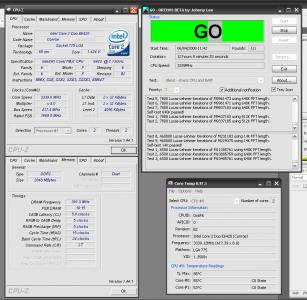
As you can see above, my oc is stable @ 12hours of orthos, but my system will crash when playing a certain video files (not all), sometimes 20 minutes while playing, and sometimes just a few second and then crash. Hell I've played Crysis 3 hours straight and everthing was fine. The prob disappear when i switch to stock setting tho.  I'm seeing stars now.. Is this mean that my oc isn't stable enough? |
|
|
|
|
|
zubai
|
Apr 21 2008, 06:14 PM
|
|
|
QUOTE(Radeon @ Apr 20 2008, 09:06 AM) try it out with small FFT and check if it is stable, ps: if you are on air cooling your voltage is a bit high to run it 24/7 Yup, it takes THAT much vcore just to stabilized it. Maybe i've got a crap batch  . |
|
|
|
|



 Quote
Quote

 0.0156sec
 0.27
0.27
 7 queries
 GZIP Disabled