

Tried 1:1? It puts less stress on your processor and mobo...
Intel Celeron (E1XXX) & Pentium Dual Core E2XXX, Discussion & Compilation [v2]
Intel Celeron (E1XXX) & Pentium Dual Core E2XXX, Discussion & Compilation [v2]
|
|
 May 15 2008, 11:10 PM May 15 2008, 11:10 PM
Return to original view | Post
#141
|
 
Senior Member
4,947 posts Joined: Nov 2007   
|
Tried 1:1? It puts less stress on your processor and mobo...
|
|
|
|
|
|
May 17 2008, 09:13 PM
Return to original view | Post
#142
|
|
Senior Member
4,947 posts Joined: Nov 2007
|
QUOTE(Liuteva @ May 17 2008, 08:53 PM) Mean the news is fake wan? Yeah, the news are fake and maybe dblooi had already tried it. From my understanding, you really can't unlock something internal by doing an external mod. |
|
|
May 23 2008, 06:48 PM
Return to original view | Post
#143
|
|
Senior Member
4,947 posts Joined: Nov 2007
|
QUOTE(kmarc @ May 23 2008, 06:43 PM) You can OC to 3.0Ghz and still have a relatively long CPU life. I think he's asking whether under voltage will damage the processor or not Just run Prime95 "Small FFTs" which will stress your CPU.....  |
|
|
May 23 2008, 06:55 PM
Return to original view | Post
#144
|
|
Senior Member
4,947 posts Joined: Nov 2007
|
QUOTE(davidbilly87 @ May 23 2008, 06:49 PM) then about the ....volt or i put b default...i afrad heat .....so low the volt ....will any effect on 2.4ghz? If your E2160 can do 266*9 without adding voltage, leave it. Lowering the voltage might cause instability. BTW, if you're on stock cooler, its fine to even increasing the voltage to around 1.36. Its fine as long as your stock cooler's heatsink and fan is not stained with dust, it will perform its duty to satisfactory level. If you feel abit laggy, why not increasing the multiplier to 333*9 3Ghz? If yours can't do that at stock voltage, try 1.34~1.38. I'm sure it would be usable for most cases. ? but i still feel my pc abit lagg on 64bit vista .....is is t ram ? i put 1:2.5 divide on bios .....cpu 266:333x2 ram mhz.....how setting will be most best ?1:1 ? 200: 200? ? but i still feel my pc abit lagg on 64bit vista .....is is t ram ? i put 1:2.5 divide on bios .....cpu 266:333x2 ram mhz.....how setting will be most best ?1:1 ? 200: 200?  newbie on oc ....pls help newbie on oc ....pls help  |
|
|
May 23 2008, 07:08 PM
Return to original view | Post
#145
|
|
Senior Member
4,947 posts Joined: Nov 2007
|
QUOTE(davidbilly87 @ May 23 2008, 07:01 PM)  the i change b the orginal volt ?.....because i wan low the heat ....  ..and i use stock fan .....with 62~65c on core temp show on prima test.....or i low the ram mhz to get low latecy? my cpuz show ....200mhz =3 : 3 : 3 : 9 : 12 .......266mhz =4 : 4 : 4 : 12 : 16 .......333 : 5 : 5 :5 : 15 : 20..... ..and i use stock fan .....with 62~65c on core temp show on prima test.....or i low the ram mhz to get low latecy? my cpuz show ....200mhz =3 : 3 : 3 : 9 : 12 .......266mhz =4 : 4 : 4 : 12 : 16 .......333 : 5 : 5 :5 : 15 : 20.....  and my mb auto change the ram volt 1.8 v to 1.89 v? and my mb auto change the ram volt 1.8 v to 1.89 v?  and bro when stop the prima5 test ? i see it keep going .... and bro when stop the prima5 test ? i see it keep going ....  Anyway, 62~65C with what voltages? If your E2160 is a M0 stepping processor its fine as long as it stays under 73'C. BTW, use the CPU-Z's Memory tab to monitor your RAMs' current speeds. Oh... 1.89v? I think you can decrease it through the bios back to 1.8v or so. This post has been edited by Silverfire: May 23 2008, 07:11 PM |
|
|
May 23 2008, 07:13 PM
Return to original view | Post
#146
|
|
Senior Member
4,947 posts Joined: Nov 2007
|
QUOTE(davidbilly87 @ May 23 2008, 07:11 PM) cpu the say 1.8v .....my mb auto change i think ....but my mb software show at 67c? which 1 true ? Well... 333Mhz at 5-5-5-15 is normal for any value rams... Unless you're not using value rams my ram currnt spped is 333mhz setting 5-5-5-15-20   BTW, 67'C or 65'C really doesn't matter, they just caught the timing different, thats why the reading different. Both should be accurate. Your current processor voltage is 1.8v? |
|
|
|
|
|
May 23 2008, 07:28 PM
Return to original view | Post
#147
|
|
Senior Member
4,947 posts Joined: Nov 2007
|
QUOTE(davidbilly87 @ May 23 2008, 07:22 PM) no la bro ....i cahnge b to 1.3125v that is ram volt .....haiz keep restart the pc for bios Try this settings and see what's the effect:Processor: 333*9 1.325v (I believe that's your stock vcore?) If can't boot, increase it by 1 step till its bootable and usable, stress it and monitor its temperature closely RAM: Make it 333:333 which is 1:1 and if possible, decrease the voltage to 1.8v |
|
|
May 23 2008, 07:36 PM
Return to original view | Post
#148
|
|
Senior Member
4,947 posts Joined: Nov 2007
|
QUOTE(davidbilly87 @ May 23 2008, 07:34 PM) just now i change to 333* 7 =2.4 at 1.3125v......ram 667 ......the cpu:ram is 1:2.... 1.3125v should be able to do 333*8, try that. fbs : 1333mhz ram change b to 1.8v .....is this ok ? fbs : 1333mhz ram change b to 1.8v .....is this ok ?  idle : 40c load : 61c on core temp i think my hardisk slow speed using 15gb old hardisk idle : 40c load : 61c on core temp i think my hardisk slow speed using 15gb old hardisk |
|
|
May 23 2008, 07:54 PM
Return to original view | Post
#149
|
|
Senior Member
4,947 posts Joined: Nov 2007
|
QUOTE(davidbilly87 @ May 23 2008, 07:39 PM) i think 333* 7 it ok for daily using alredy ....so i stick with it .....erm...bro what is C1E i see amny ppl wan closed it on mb bios ?i also closed it That will be a waste to not use your processor up to its potential when you're overclocking. C1E & EIST? It automatically lower your processor multiplier when its not in use. |
|
|
May 23 2008, 08:35 PM
Return to original view | Post
#150
|
|
Senior Member
4,947 posts Joined: Nov 2007
|
QUOTE(razr_sped @ May 23 2008, 08:28 PM) boss...u also using mars right? (from ur other thread)...well its default 1.89v for Vdimm on it tats cpuz u mention is de SPD...not wat ur ram is running...1st thing prime5 is same as orthos, it will run non stop unless u stop it or it crash..2nd thing u wan lower heat, get a better cooler lo, btw e2xxx is not tat hot as compare to c2d...so its quite normal i assume for ur temp... for e2200, i touch de heat pipe of my hsf...no feel de...but for my e6600, its freakin hot...haha... so its quite ok for tat temp... furthermore de room temp in MY is kinda hot, so u wont possible go till v low using stock cooler Added on May 23, 2008, 8:28 pm haha...sum can also do 333x9 le wei...haha Added on May 23, 2008, 8:31 pm another thing...when ur ram ratio is 1:2 (for mars)...its onli 667mhz...not 1333 n its hard to stable a 1333mhz ram right at 1.8V?...  yup...disable those to get better OC Mars? Yeah... I know many can do 333*9, I had 3 E2160, only 1 was able to that without increasing vcore. 1333mhz FSB... Not 1333mhz RAM Disable C1E and EIST to achieve a better/stabler overclocking result. This post has been edited by Silverfire: May 23 2008, 09:04 PM |
|
|
May 26 2008, 11:06 AM
Return to original view | Post
#151
|
|
Senior Member
4,947 posts Joined: Nov 2007
|
QUOTE(Without @ May 26 2008, 10:46 AM) stick with your mobo software. I guess with stock cooler and stock thermal paste, 70'C at full load is possible?how come 70c above , did you raise anything other than vcore. |
|
|
May 26 2008, 01:02 PM
Return to original view | Post
#152
|
|
Senior Member
4,947 posts Joined: Nov 2007
|
It should be better as it cost quite alot more...
|
|
|
May 28 2008, 09:55 AM
Return to original view | Post
#153
|
|
Senior Member
4,947 posts Joined: Nov 2007
|
QUOTE(davidbilly87 @ May 28 2008, 12:05 AM) i noob at ram haiz It depends... ...3-3-3-9 fast or 4-4-4-12 or 5-5-5-15 fast ? blur here .....if is MUSHKIN brand i will take HP2-6400 4-4-4-12 (2x1GB) << i saw very nice based on that tread give review http://forum.lowyat.net/topic/697040 1200mhz 5-5-5-12 is faster than 1000mhz 4-4-4-10 1000mhz 4-4-4-10 is faster than 800mhz 3-3-3-8 You should grab a pair of Team Elite 800mhz cl4 2gb kit if you're aiming for something cheap. According to the review here it works at 1140mhz 5-5-5-12 at a mere 1.9vdimm. I've bought a pair for RM160 and tried it out, it works  This post has been edited by Silverfire: May 28 2008, 09:57 AM |
|
|
|
|
|
May 28 2008, 06:17 PM
Return to original view | Post
#154
|
|
Senior Member
4,947 posts Joined: Nov 2007
|
QUOTE(davidbilly87 @ May 28 2008, 05:30 PM) so the mhz more important than timing ? Nope... The timing and speed are both important. Timing must be fast and speed must be high to achieve maximum performance  |
|
|
May 28 2008, 08:58 PM
Return to original view | Post
#155
|
|
Senior Member
4,947 posts Joined: Nov 2007
|
QUOTE(LExus65 @ May 28 2008, 06:53 PM) it more like latency is more important, so far the best is CL4 @ 1000 mhz i suppose....... for DDR2 1200mhz 5-5-5-12 is faster than 1000mhz 4-4-4-10. Latency is important, but the speed but not be low too.but DDR 3 may be different case |
|
|
May 29 2008, 11:12 AM
Return to original view | Post
#156
|
|
Senior Member
4,947 posts Joined: Nov 2007
|
QUOTE(Bigblock @ May 29 2008, 12:20 AM) Bro's well i dunno how but what do you guys say checking the latency with everest mem bench Alright, alright. Here's the result with E8200 set at 400*6 for every bench. it depends in the mem timings also mah800mhz 3-3-3-8 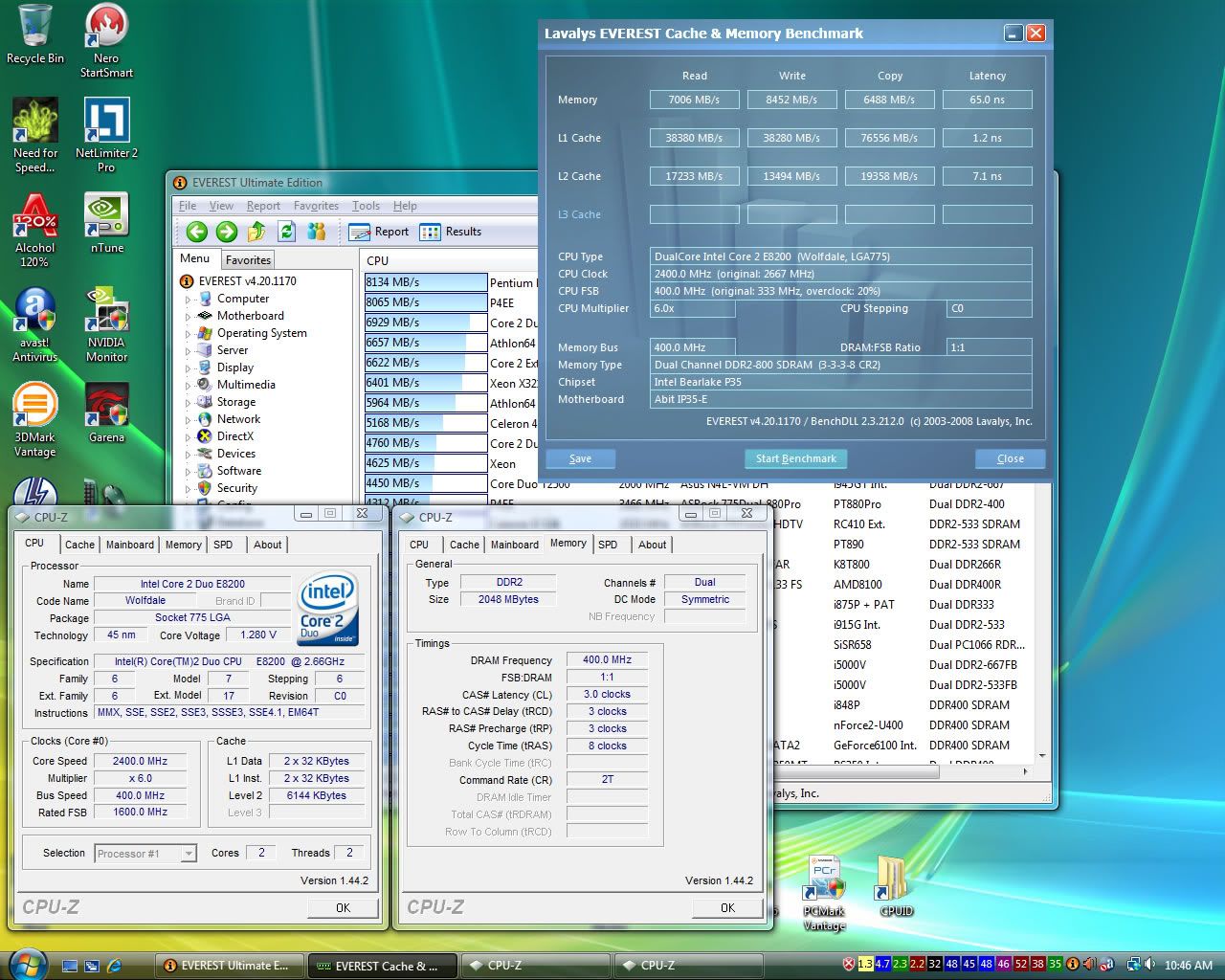 1000mhz 4-4-4-10 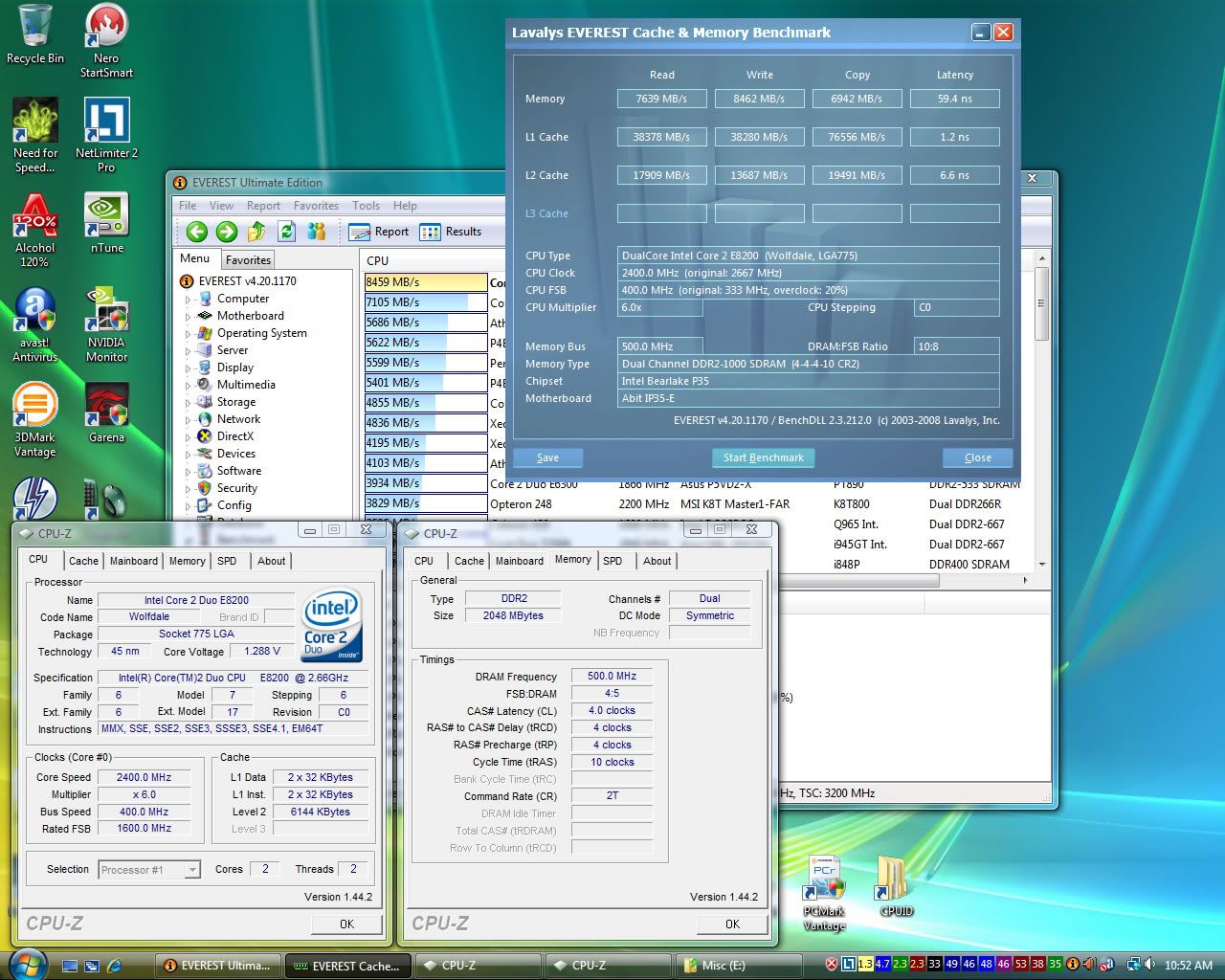 1200mhz 5-5-5-12 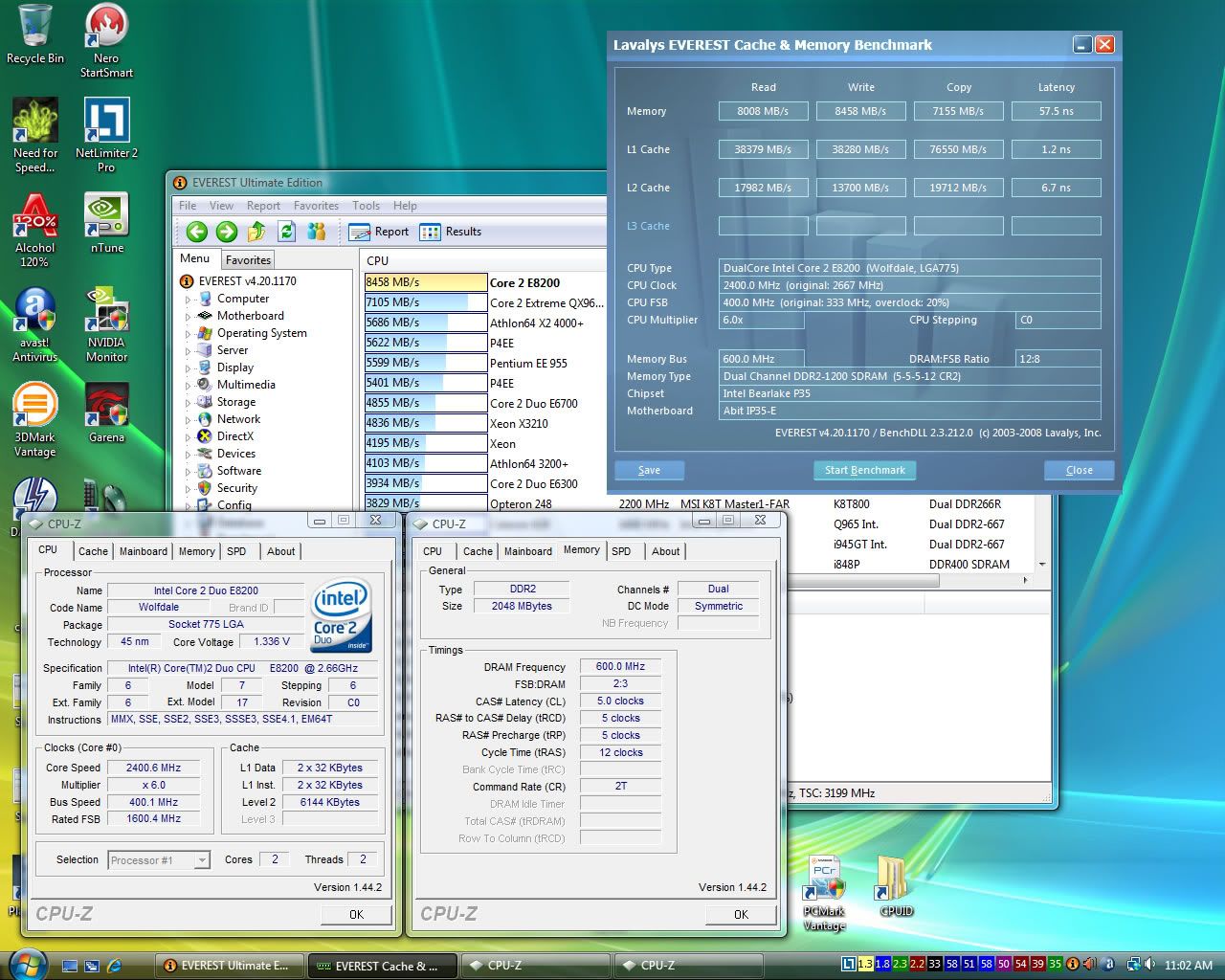 |
|
|
May 29 2008, 11:16 AM
Return to original view | Post
#157
|
|
Senior Member
4,947 posts Joined: Nov 2007
|
QUOTE(sniper69 @ May 29 2008, 11:16 AM) IMO... @DDR1000 with various timing setting would be great for comparison Errr? Suggestion? I go do again |
|
|
Jul 2 2008, 07:10 PM
Return to original view | Post
#158
|
|
Senior Member
4,947 posts Joined: Nov 2007
|
Guys, I've an extra abit IP35P motherboard, fresh from warranty, please view: http://forum.lowyat.net/topic/732916 if interested. |
|
|
Jul 2 2008, 07:19 PM
Return to original view | Post
#159
|
|
Senior Member
4,947 posts Joined: Nov 2007
|
That's quite low... Not high at all
|
|
|
Oct 6 2008, 07:51 AM
Return to original view | Post
#160
|
|
Senior Member
4,947 posts Joined: Nov 2007
|
Yeap... I've used Foxconn Mars and apparently E2k series doesn't clock well with them.
|
| Change to: |  0.0511sec 0.0511sec
 0.46 0.46
 7 queries 7 queries
 GZIP Disabled GZIP Disabled
Time is now: 12th December 2025 - 06:57 PM |
 Quote
Quote