Welcome Guest ( Log In | Register )

32 Pages « < 12 13 14 15 16 > » Bottom

Outline · [ Standard ] · Linear+

 Windows VISTA Service Pack 1 Discussion

views
     
vincentlaw
post Mar 24 2008, 06:25 PM

Regular
******
Senior Member
1,507 posts

Joined: May 2007


QUOTE(Cheesenium @ Mar 24 2008, 06:09 PM)
I still cant get SP1 to be shown on my Windows Update.

Is there anyway to fix this?
*
press the "check for update" on the left side panel of windows Update? wait and make sure ur internet connection is smooth...
Cheesenium
post Mar 24 2008, 06:35 PM

Vigilo Confido
*******
Senior Member
4,852 posts

Joined: Aug 2006
QUOTE(vincentlaw @ Mar 24 2008, 06:25 PM)
press the "check for update" on the left side panel of windows Update? wait and make sure ur internet connection is smooth...
*
Yeah,i did press and my connection is ok.I have remove the problematic drivers in my system and it's still not offered.
myitlab.net
post Mar 24 2008, 06:42 PM

Casual
***
Junior Member
490 posts

Joined: Oct 2005
QUOTE(vailance @ Mar 24 2008, 03:35 PM)
my boot time is faster around 1min+ compare to last and i did a clean install 1st. also changed a new hdd la. so far sp1 giving me no prob. and it faster alot when copying large files
*
Yes, you're right. This is the best way to find out the performance of SP1. Without format and reinstall Windows, you might have some driver or software that might cause problem. It proven to be faster on boot up time.
alwizbthere
post Mar 24 2008, 06:47 PM

10k Club
********
All Stars
10,222 posts

Joined: Jan 2003


QUOTE(vincentlaw @ Mar 24 2008, 12:57 PM)
problem ofcoz not so obvious coz when u play games, most of the data will be transfered to ur memory... which wat memory for.. so u wont feel lack..

if u do compare data transfer, such as copy big files from one hdd to another hdd in a big sum of capacity, then u compare to better hdd, u will notice the difference

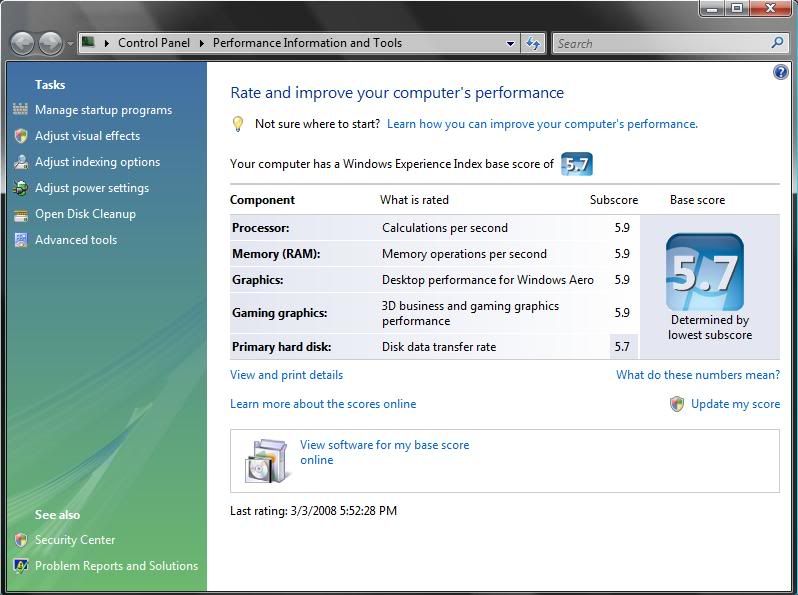
4+ index still perform well in vista since if im not wrong the min requirement is 3+ and recommended is 4+


Added on March 24, 2008, 12:59 pm

remember that if u are using those high end card such as 3870x2 or 9800Gx2...... they have 1gb memory ... so if u want to use 32bit OS(which is commonly used), then dont bother to get 4gb... instead get 3gb ram coz the max u can go is 3gb for full utilize... it will show 4gb if u install it but only 3gb is used......
*
dun worry bout tat, i know pretty well bout tat as i myself has posted few post regarding it in hardware Q & A. using only 8800gts g80 312mb, so probably should see bout 3.5gb+
vincentlaw
post Mar 24 2008, 08:25 PM

Regular
******
Senior Member
1,507 posts

Joined: May 2007


QUOTE(alwizbthere @ Mar 24 2008, 06:47 PM)
dun worry bout tat, i know pretty well bout tat as i myself has posted few post regarding it in hardware Q & A. using only 8800gts g80 312mb, so probably should see bout 3.5gb+
*
lol did i seems like worrying??? im explaning there... doh.gif anbd ur 312mb.. LOL typo... but u shud get 3.7gb instead since 4,096mb - 320mb = 3,776mb..... is u have other hardware that utilises memory then will bcom lesser than 3.7gb...

This post has been edited by vincentlaw: Mar 24 2008, 08:27 PM
1024kbps
post Mar 24 2008, 09:10 PM

李素裳
*******
Senior Member
6,017 posts

Joined: Feb 2007


regardless how many video memory u have, u will still get 3.25GB(3325MB) if u have 4Gb of physical memory installed on 32bit of vista.

and it will reduce further if u are using on-board VGA.
alwizbthere
post Mar 24 2008, 09:38 PM

10k Club
********
All Stars
10,222 posts

Joined: Jan 2003


QUOTE(vincentlaw @ Mar 24 2008, 08:25 PM)
lol did i seems like worrying??? im explaning there...  doh.gif anbd ur 312mb.. LOL typo... but u shud get 3.7gb instead since 4,096mb - 320mb = 3,776mb..... is u have other hardware that utilises memory then will bcom lesser than 3.7gb...
*
LOL really typo, cos i was tulan my car kena bang from behind today...
anyway, wat i mean bout worrying is just to tell ya u don't need to explain this to me, i know bout it pretty well
vincentlaw
post Mar 24 2008, 09:43 PM

Regular
******
Senior Member
1,507 posts

Joined: May 2007


QUOTE(1024kbps @ Mar 24 2008, 09:10 PM)
regardless how many video memory u have, u will still get 3.25GB(3325MB) if u have 4Gb of physical memory installed on 32bit of vista.

and it will reduce further if u are using on-board VGA.
*
obsolutely totally 100% confirm wrong... totally disagree... it varies acording to ur system memory utilization... not fix..... i have 4gb memory and Asus 8800GT TOP edition 512mb graphic card.... i get only 3.5gb utilization from ram only....
1024kbps
post Mar 24 2008, 09:59 PM

李素裳
*******
Senior Member
6,017 posts

Joined: Feb 2007


QUOTE(vincentlaw @ Mar 24 2008, 09:43 PM)
obsolutely totally 100% confirm wrong... totally disagree... it varies acording to ur system memory utilization... not fix..... i have 4gb memory and Asus 8800GT TOP edition 512mb graphic card.... i get only 3.5gb utilization from ram only....
*
post a screenshot of ur dxdiag then brows.gif or task manager also can.
or may be u can explain to me, why im using 2600xt with 256mb of video memory, my total physical memory only left 3.25gb?
vincentlaw
post Mar 24 2008, 10:47 PM

Regular
******
Senior Member
1,507 posts

Joined: May 2007


QUOTE(1024kbps @ Mar 24 2008, 09:59 PM)
post a screenshot of ur dxdiag then brows.gif or task manager also can.
or may be u can explain to me, why im using 2600xt with 256mb of video memory, my total physical memory only left 3.25gb?
*
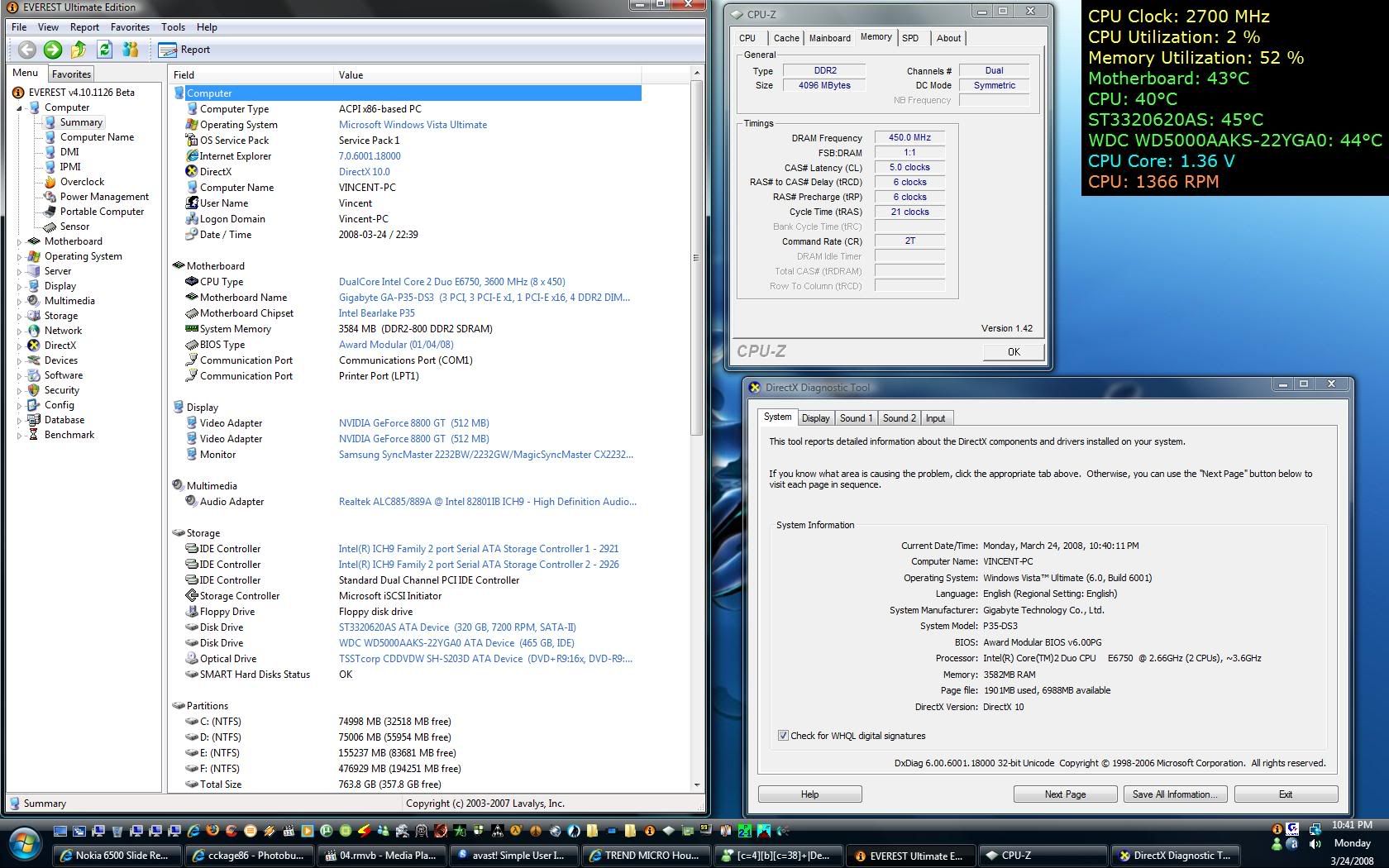
as u wish notworthy.gif .... here is the screenshot rclxms.gif ... sry for those who think too big.. purposely dont want to minimise so it is CLEAR enuf to see nod.gif .... the everest ultimate is to double confirm it... icon_rolleyes.gif

im not sure how can u get 3.25gb but im pretty sure it is cause by the rest of ur hardware..... or maybe settings.. anyway ur statement is a wrong statement...

as for mine... 4 x 1,024mb = 4,096mb...... 4,096mb - 512mb = 3,584mb........ but im still wondering why 2mb missing from dxdiag... the everest is the correct value.... maybe 2mb use for BIOS or sumthg like that
user posted image

This post has been edited by vincentlaw: Mar 24 2008, 11:04 PM

BuLaNaR
post Mar 24 2008, 10:56 PM

penyair sepi
*****
Senior Member
777 posts

Joined: Sep 2007
From: bandar baru bangi


ur sata 2 is wat brand and model.. if seagate then u shud have a white jumper on ur seagate hdd and u shud plug that out to get sata2 performance... by default the white jumper is plugged into the harddisk for compatible sake, activating at sata1 only...

user posted image
*

[/quote]

bro...if i pull the jumpe at the hard disk..need to pull jumper at mobo oso??? icon_question.gif

vincentlaw
post Mar 24 2008, 11:16 PM

Regular
******
Senior Member
1,507 posts

Joined: May 2007


QUOTE(BuLaNaR @ Mar 24 2008, 10:56 PM)
bro...if i pull the jumpe at the hard disk..need to pull jumper at mobo oso???  icon_question.gif
*
i assume u are using biostar ta690g mobo acording to ur signature..... ur mobo support sata2 hdd... so ur u can take off ur seagate hdd jumper for sata2 mode... default plug in = sata1 compatibility mode..... about ur mobo.. there shudnt be anythg to configure for sata..... its automatic.... so just go ahead and take off the white small tiny jumper from ur seagate hdd to get into sata2 mode.. off ur computer only do it ah...... i will faint if u leave ur computer on and do that......

my seagate model???? see above quoted picture... ST3320620AS... u can see it in everest report or everest OSD or in my signature below...
xk2
post Mar 24 2008, 11:32 PM

Temporary OFF
*******
Senior Member
2,910 posts

Joined: Oct 2007
From: Melaka


before update service pack 1


Attached thumbnail(s)
Attached Image
xk2
post Mar 24 2008, 11:35 PM

Temporary OFF
*******
Senior Member
2,910 posts

Joined: Oct 2007
From: Melaka


after update ,my max clear theme become like tis doh.gif doh.gif doh.gif doh.gif


Attached thumbnail(s)
Attached Image
vincentlaw
post Mar 24 2008, 11:39 PM

Regular
******
Senior Member
1,507 posts

Joined: May 2007


ur maxclear thggie is a customization of windows... so perhaps u need to reinstall it to get the compatibility coz in the process of upgrading sp1.. some of the system file code is change or wat... anyway just try to reinstall it
xk2
post Mar 24 2008, 11:50 PM

Temporary OFF
*******
Senior Member
2,910 posts

Joined: Oct 2007
From: Melaka


QUOTE(vincentlaw @ Mar 24 2008, 11:39 PM)
ur maxclear thggie is a customization of windows... so perhaps u need to reinstall it to get the compatibility coz in the process of upgrading sp1.. some of the system file code is change or wat... anyway just try to reinstall it
*
lazy to reinstall window,now only customize theme wont work,but the original aero still can run,so use back original looks lo sweat.gif

and i notice tat my pc become slow during start up,need to wait about 2 minutes before i can start click anythings,only the wireless connection become faster than b4
1024kbps
post Mar 24 2008, 11:54 PM

李素裳
*******
Senior Member
6,017 posts

Joined: Feb 2007


QUOTE(vincentlaw @ Mar 24 2008, 10:47 PM)
as u wish notworthy.gif .... here is the screenshot rclxms.gif ... sry for those who think too big.. purposely dont want to minimise so it is CLEAR enuf to see nod.gif .... the everest ultimate is to double confirm it...  icon_rolleyes.gif

im not sure how can u get 3.25gb but im pretty sure it is cause by the rest of ur hardware..... or maybe settings.. anyway ur statement is a wrong statement...

as for mine... 4 x 1,024mb = 4,096mb...... 4,096mb - 512mb = 3,584mb........ but im still wondering why 2mb missing from dxdiag... the everest is the correct value.... maybe 2mb use for BIOS or sumthg like that
*
ok it seems only nvidia 8 series user can use up to 3.5gb on 32bit OS
while ati user only can see 3.2gb, again please prove im wrong lol doh.gif
xk2
post Mar 24 2008, 11:56 PM

Temporary OFF
*******
Senior Member
2,910 posts

Joined: Oct 2007
From: Melaka


anybody facing the same theme problem same with me after update ?
vincentlaw
post Mar 25 2008, 12:10 AM

Regular
******
Senior Member
1,507 posts

Joined: May 2007


QUOTE(1024kbps @ Mar 24 2008, 11:54 PM)
ok it seems only nvidia 8 series user can use up to 3.5gb on 32bit OS
while ati user only can see 3.2gb, again please prove im wrong lol doh.gif
*
u really want ah.... then i have to do it with my old x800GT... hahaha... u want me do it with X800GT? maybe later u "ohh maybe x800 range users only can get it, mine diff cause x2000 series"... tongue.gif

This post has been edited by vincentlaw: Mar 25 2008, 12:12 AM
1024kbps
post Mar 25 2008, 12:26 AM

李素裳
*******
Senior Member
6,017 posts

Joined: Feb 2007


QUOTE(vincentlaw @ Mar 25 2008, 12:10 AM)
u really want ah.... then i have to do it with my old x800GT... hahaha... u want me do it with X800GT? maybe later u "ohh maybe x800 range users only can get it, mine diff cause x2000 series"...  tongue.gif
*
i did search on google before, as i cant find any ati card user have 3584mb of ram with 32bit of xp or vista, unless they are using x64 of xp or vista. icon_idea.gif
i will stop discuss it further as we are in off-topic already, post ur x800gt and the dxdiag+everest, and full stop lol whistling.gif

32 Pages « < 12 13 14 15 16 > » Top
 

Change to:
| Lo-Fi Version
0.0267sec    1.09    6 queries    GZIP Disabled
Time is now: 24th December 2025 - 11:25 PM