

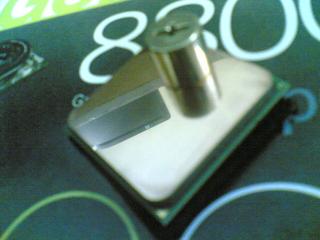

Shiny after autosol

Still thinking tho whether to take out my rig tonight to oc or not, damn mahfan taking out the GeminII

AMDŽ Socket-AM2/AM2+ Overclocking thread (V5), FTW...
|
|
 Feb 15 2008, 04:51 AM Feb 15 2008, 04:51 AM
Return to original view | Post
#61
|
 
Senior Member
1,633 posts Joined: Oct 2007 From: Cheras, Selangor  
|
Huargh ! Just finish lapping my proc. Damn tiring. Polish abit using autosol, still havent decide whether trying the chip out tonight or not, damn tiring and sleepy. Anyway, share share abit my new proc -
Shiny after autosol Still thinking tho whether to take out my rig tonight to oc or not, damn mahfan taking out the GeminII |
|
|
|
|
|
Feb 15 2008, 05:58 AM
Return to original view | Post
#62
|
|
Senior Member
1,633 posts Joined: Oct 2007 From: Cheras, Selangor
|
QUOTE(ongbs @ Feb 15 2008, 05:39 AM) walau eh...that is a mirror not F3 I started at 8pm, minus dinner, surf surf lowyat.net, curi-curi watching movie,finished at 4:59am berapa lama u "gosok" huh?    I dont know why most of the guides say that removing the nickel coating needs around 45 mins - 1 hour but mine took like 3hours only started showing copper. I started with 100 grit somemore. Guess that I was too careful and slowly lap that's why took so long Not gonna continue my project la tonite I guess, after bathe feel like damn syiok sleeping hehe.  p/s: hope to get the same figure like the previous owner  |
|
|
Feb 15 2008, 06:53 AM
Return to original view | Post
#63
|
|
Senior Member
1,633 posts Joined: Oct 2007 From: Cheras, Selangor
|
QUOTE(Oxburg @ Feb 15 2008, 06:37 AM) SIAO !~ btw i wan to do so ! but after 1-2 years first == anyway where to get those lapping tools?how much estimation? Haih wanna sleep but ada phone call pulak then chatting chatting. Anyway bro, haha, it really needs lotsa patience, but after you see the temp drop you will About lapping tool, you dont really need tools. Here's what you need - 1.Different grit of sandpaper 2.masking tape 3.piece of mirror or glass ( to mount the sandpaper on flat surface, thats why we choose glass or mirror ) 4.elbow grease 5.patience 6.time 7.Autosol for superb finishing The sandpaper I bought from 100grit,120grit,300,400,600,800,1000,1200,1500,200. RM1 each. Masking tape at rm2.50. Should be around rm10 only. Autosol you can buy and polish any metal,copper, aluminum to give fine finishing. For certain ppl the temp drop wasnt so important, but im sure we as overclockers very very care about our temp right Added on February 15, 2008, 6:55 am QUOTE(ongbs @ Feb 15 2008, 06:44 AM) If you wanna SIAO as well, just go from grid 200-->800-->1200 will do, just wanna make sure the IHS is flat.... Haha Abang ongbs sudah expert in lapping so take less than hour lorr. Me noobie, this is my second lapped proc only I spent about 30 to 40min with this method. If wanna a mirror-like effect then ask bro mizivincible Yes actually the most important thing in lapping is to make sure the surface is totally flat so that it can fully contact with heatsink thus dissipate heat better. The mirror finish is for stylish la i guess  This post has been edited by mizivincible: Feb 15 2008, 06:56 AM |
|
|
Feb 16 2008, 08:29 PM
Return to original view | Post
#64
|
|
Senior Member
1,633 posts Joined: Oct 2007 From: Cheras, Selangor
|
Hello all ! Just got my modem. I brought back all my rig back home and couldnt online pulak due to burnt modem. Anyway, not regret getting F3 at all (Guess most of F3 owner will say this too).
First few attempts with super PI 1m and 32m - 

Anyway, I can only reached that speed with the timing of 5-5-5-15-21. Tried looser cant reach 3.3ghz, after Biostar green screen my whole screen turn red dont know why. Tried tighter timing 4-4-4-12-16 and can only reach 3.2ghz only. Sifu help, what timing should I use ni, planning after this oc to 24/7 usage. Tonight wanna try beyond 3.5ghz This post has been edited by mizivincible: Feb 16 2008, 08:59 PM |
|
|
Feb 16 2008, 08:58 PM
Return to original view | Post
#65
|
|
Senior Member
1,633 posts Joined: Oct 2007 From: Cheras, Selangor
|
Yerp, I was also thinking the same.
Yesterday with 4-4-4-12, 667 divider, I get 1000mhz ++ freq at 3.2ghz with 2.15vdimm. Note : Im using OCZ SLi Edition 4gb kit. But the poison is strong, thinking to try at more than 3.5 before settle down hehehe. |
|
|
Feb 16 2008, 10:29 PM
Return to original view | Post
#66
|
|
Senior Member
1,633 posts Joined: Oct 2007 From: Cheras, Selangor
|
QUOTE(dblooi @ Feb 16 2008, 09:29 PM) cooling is the key to break through 3.6GHz Hahaha kantoi pulak with you. Indeed that's your sc, paiseh liao For me i manage to do that air cond + air cooling anyway, i think your proc can do 3.6GHz with 1.5Xv eidted: hehe, i saw my ss in your desktop  I take few of the ss to refer, my inspiration  Anyway trying out 3.6 after this, bro dblooi, what timing should I use ? As for the temp I'll monitor it, kinda glad my GeminII still doing the job, after lapping the F3 at 1.5v load at 47' max. Currently r.unning on naked system. Need advise please please  |
|
|
|
|
|
Feb 16 2008, 10:38 PM
Return to original view | Post
#67
|
|
Senior Member
1,633 posts Joined: Oct 2007 From: Cheras, Selangor
|
QUOTE(@meno @ Feb 16 2008, 10:32 PM) @-pws- Biostar TA690G My specs: AMD 3800+ X2 F3 | @meno | Abit AN9 32x | Team Value Ram | 1044 | 5-5-5-15-21 | Thermalright IFX-14 [attachmentid=399190] @mzinvincible, wat mobo you running on? Have your proc hit the wall ? You havent pump vcore right ? Should can get higher speed. And, is stock vcore at 1.16v only ? Usually when I wanna start OC I'll straight pump +0.100v then start pushing. |
|
|
Feb 16 2008, 11:06 PM
Return to original view | Post
#68
|
|
Senior Member
1,633 posts Joined: Oct 2007 From: Cheras, Selangor
|
QUOTE(-pWs- @ Feb 16 2008, 11:05 PM) Where is your SPI 32M or Orthos?? Alamak, I wanna try at 3.6 before submit the result can I abang -pWs- ? Hopefully I can, if not just settle down with 3.5...I gonna compile it later late at night.  -pWs- |
|
|
Feb 16 2008, 11:22 PM
Return to original view | Post
#69
|
|
Senior Member
1,633 posts Joined: Oct 2007 From: Cheras, Selangor
|
QUOTE(dblooi @ Feb 16 2008, 11:07 PM) timing for ram? Thanks. i never touched 1200mhz before. The highest is 1066mhz. I think I'll use 533 divider then. CL4 ? Will try with 4-4-4-5-11 then. 900mhz should be nice paired with 3.6 (if achievable la) haha. which divider you will be using? if u plan to use 667 divider at 10x multiplier at 3.6GHz, your ram will be oced to 1200MHz actually that's quite high , have you try that speed b4 with your ram? you can use 533 divider also. 3600/8 = 450 , ram oc to 900Mhz in that case ram timings, it's really depend on the user himself. i cannot predict much for you as i'm not using that ram.  can try CL 4 if you are going to use 533 divider Anyway, issit the stock speed only uses 1.16v ? mine is like that one. If wanna start oc I straight pump until 1.26v. Added on February 16, 2008, 11:26 pm QUOTE(afosz @ Feb 16 2008, 11:21 PM) But temp above 55C for load kinda too high for me Yours will never touch 55c la got super fast fans hahaha  I prefer to keep HTL below 1000MHz, don't feel like exceeding it. A bit maybe acceptable  This post has been edited by mizivincible: Feb 16 2008, 11:28 PM |
|
|
Feb 16 2008, 11:31 PM
Return to original view | Post
#70
|
|
Senior Member
1,633 posts Joined: Oct 2007 From: Cheras, Selangor
|
QUOTE(dblooi @ Feb 16 2008, 11:29 PM) VID for you proc is 1.2v I see, because I read last time about the voltage drop, and I thought it was abit only, didnt expect that much.your mobo has voltage drop issue Edited : Aside from running naked system, I add up another table fan blowing towards my system. Hope this helps since db said cooling is the key  This post has been edited by mizivincible: Feb 17 2008, 12:09 AM |
|
|
Feb 17 2008, 12:31 AM
Return to original view | Post
#71
|
|
Senior Member
1,633 posts Joined: Oct 2007 From: Cheras, Selangor
|
QUOTE(dblooi @ Feb 17 2008, 12:28 AM) From my experience , air cooling/water cooling itself is not efficient enough for 3.6GHz Ic, got it. And my hall aircond the remote got problem pulak, if not can switch on i always fail to boot into windows due to high temp. min requirement is air cond + air cooling, but that don't work for 3.7GHz above.. 3.7GHz above i need water cooler + ais in order to boot into windows btw are you using TA690G? Yes I am using TA690G. Any good tips to share sifu ?Just now with the tight timing at 2.8ghz dont know why stucked at windows loading there. I reset and now try with 4-4-4-12-16, trfc changed to 195 and mal to 10. Start pushing again. |
|
|
Feb 17 2008, 12:48 AM
Return to original view | Post
#72
|
|
Senior Member
1,633 posts Joined: Oct 2007 From: Cheras, Selangor
|
QUOTE(dblooi @ Feb 17 2008, 12:42 AM) what's the ram chipset of your ram? Bro DB, im not really sure what is the chipset of my ram. How to determine the chipset ? this is my ram - http://guru3d.com/article/memory/476/1 [attachmentid=399233] This is SS from me, hope it helps From SS shown by bro sempronic previously, your proc is on par v mine And thanks for the ss. Sure it helps alot. p/s : proc is on par but not the owner hehehe, I still need to learn alot, I mean alot from you guys. |
|
|
Feb 17 2008, 01:15 AM
Return to original view | Post
#73
|
|
Senior Member
1,633 posts Joined: Oct 2007 From: Cheras, Selangor
|
QUOTE(dblooi @ Feb 17 2008, 01:09 AM) The easiest way is take off the heatspreader and take a look, Yeah that's the only way I know but taking out the heatspreader in condition the ram chipset is not relabeled. If it's relabeled , then you need to look at the side of the ram chipset to find out the orientation of the metal dots ( trust me, this is hard )here's an example, how to find out D9 ram chipset without looking at the label [attachmentid=399245] [attachmentid=399247] But i don't think D9GMH, D9GKX and D9GCT come in 2GB set Also, take off the heatspreader might lead you to warranty void. In that case, the only thing you can do is try to google search for its chipset Just got it few days. After few loop of google also didnt find any. Will try to look harder.Edited : with 4-4-4-12-16 at 2.8 already BSOD. Now trying with other timing as well. Do I need to change the trfc too ? This post has been edited by mizivincible: Feb 17 2008, 01:27 AM |
|
|
|
|
|
Feb 17 2008, 01:25 PM
Return to original view | Post
#74
|
|
Senior Member
1,633 posts Joined: Oct 2007 From: Cheras, Selangor
|
Now my system doesnt boot. I dont know what's the problem.
Reset CMOS - failed. Install only one stick of ram - failed. Dissemble all hardwares and put it back - failed. Install and uninstall processor - failed. Now I dont know what to do. Both of the red LED on TA690G dont show anything. |
|
|
Feb 17 2008, 01:35 PM
Return to original view | Post
#75
|
|
Senior Member
1,633 posts Joined: Oct 2007 From: Cheras, Selangor
|
QUOTE(ah_khoo @ Feb 17 2008, 01:28 PM) any spare chip to boot with? Yeah almost forgot. Will use my 4000+.Mangkok Ayon - Nope. Nothing, after switch on the power - cooler running, graphic card running, but no boot at all. |
|
|
Feb 17 2008, 01:50 PM
Return to original view | Post
#76
|
|
Senior Member
1,633 posts Joined: Oct 2007 From: Cheras, Selangor
|
Update : Tried with other proc, and same thing happens - which is nothing happens. Issit because of mobo ? If it does I'll go LYP and claim for warranty then. But RMA process should be damn long
 This post has been edited by mizivincible: Feb 17 2008, 01:51 PM |
|
|
Feb 17 2008, 02:01 PM
Return to original view | Post
#77
|
|
Senior Member
1,633 posts Joined: Oct 2007 From: Cheras, Selangor
|
QUOTE(dblooi @ Feb 17 2008, 02:00 PM) Really ? Are they replacing new mobo for you ? And would you say its the mobo the culprit bro ?When I switch on - cooler fans running gc running no red LED (both) Tried with other proc, still same Swap ram slot, same Dissemble all parts and install back, fail too. This is symptom of ? EDITED : Went thru Alphamatic website - But, what its related to Biostar product bro DB ? This post has been edited by mizivincible: Feb 17 2008, 02:06 PM |
|
|
Feb 17 2008, 02:32 PM
Return to original view | Post
#78
|
|
Senior Member
1,633 posts Joined: Oct 2007 From: Cheras, Selangor
|
QUOTE(alive88 @ Feb 17 2008, 02:17 PM) ok bro..now u got the same problem with me..no boot at all rite?is the power led keep on flashing? The power LED doesnt lit at all (both red led) and no nothing. The thing is my gc and cooler are running. Tried everything still cant. Now I only suspect mobo problem. No boot at all. Dang the mobo led show u something or not?ive tried reassemble and every thing..but still cant..try with another proc,still cant..change the ram,still cant..seems like my mobo keep restarting..hate it.. Added on February 17, 2008, 2:33 pm QUOTE(-pWs- @ Feb 17 2008, 02:17 PM) Ermm...Alphamatics is the supplier of DFI n Biostar I think. Owh rilly ? If they can RMA in one day like bro db said then should be solution ! Still waiting for db confirmation.-pWs- Added on February 17, 2008, 2:34 pm QUOTE(Amedion @ Feb 17 2008, 02:05 PM) Oh.. My mobo also overvolts by itself.. Sure bro, will try now while having breakfast. Hungry Current voltage is 1.6v .. I guess my motherboard cannot support more than 280HTT.. Fail in Orthos.. Want to find TA690 already lar.. Added on February 17, 2008, 2:07 pmTake out battery and leave it for 3 minutes then try again? This post has been edited by mizivincible: Feb 17 2008, 02:34 PM |
|
Topic ClosedOptions
|
| Change to: |  0.0425sec 0.0425sec
 0.50 0.50
 7 queries 7 queries
 GZIP Disabled GZIP Disabled
Time is now: 3rd December 2025 - 08:10 PM |
 Quote
Quote