

 Aug 2 2008, 04:42 AM


QUOTE(clawhammer @ Aug 2 2008, 05:21 AM)
Thanks  You sure it's working? I mean, I want to restore all the sms back to the phone. It's always pain to upgrade firmware

Well, i personally havent tested it out myself, but according to internet sources, yeah its working You sure it's working? I mean, I want to restore all the sms back to the phone. It's always pain to upgrade firmware QUOTE
Steps:
1) Open PC Suite,
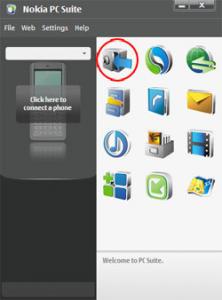
2) Open Nokia Content Copier (highlight in the picture).
3) Choose the stuff you want to backup (choices are Messages, Contacts, Notes, Calendar,etc...)
4) It will ask you where to save the backup file; just save it wherever you want and feel is safe.
5)It will take some time to backup all the data.
6)After you're finished, hard reset your phone.
7) Connect to PC Suite again.
8) Open Nokia Content Copier.
9) Instead of saving a backup file, this time select Restore from backup file. Then select the file you saved earlier.
10) After the restoration is complete, the phone will restart.
Content Copier1) Open PC Suite,
2) Open Nokia Content Copier (highlight in the picture).
3) Choose the stuff you want to backup (choices are Messages, Contacts, Notes, Calendar,etc...)
4) It will ask you where to save the backup file; just save it wherever you want and feel is safe.
5)It will take some time to backup all the data.
6)After you're finished, hard reset your phone.
7) Connect to PC Suite again.
8) Open Nokia Content Copier.
9) Instead of saving a backup file, this time select Restore from backup file. Then select the file you saved earlier.
10) After the restoration is complete, the phone will restart.
 Quote
Quote











 0.0308sec
 0.41
0.41
 6 queries
 GZIP Disabled