Welcome Guest ( Log In | Register )

Outline · [ Standard ] · Linear+

 LYN Nvidia SLI Club, All SLI discussion here

views
     
TSianho
post Jan 10 2008, 04:35 PM, updated 17y ago

Cucimangkoklife
Group Icon
VIP
15,705 posts

Joined: Mar 2005
From: Tg. Rambutan
Wokeh, I've noticed there are a lot of people using SLI in LYN now n quite a few fellas have been asking me to start a thread for the SLI users. So here it is. All SLI users please come in n share ur user experience, tips, performance issues, driver issues, games issues. Just anything n everything about SLI.

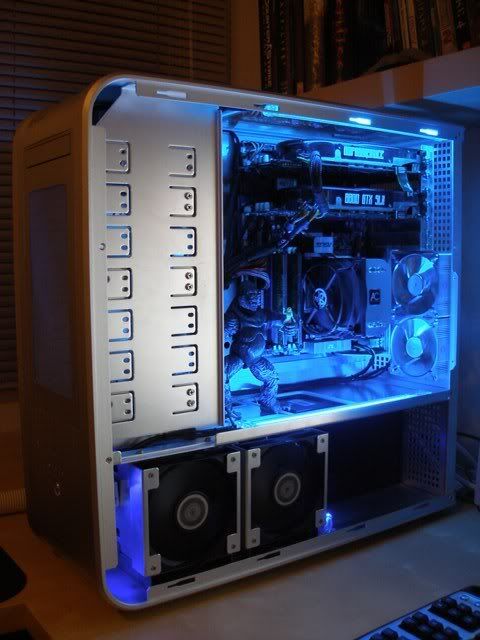
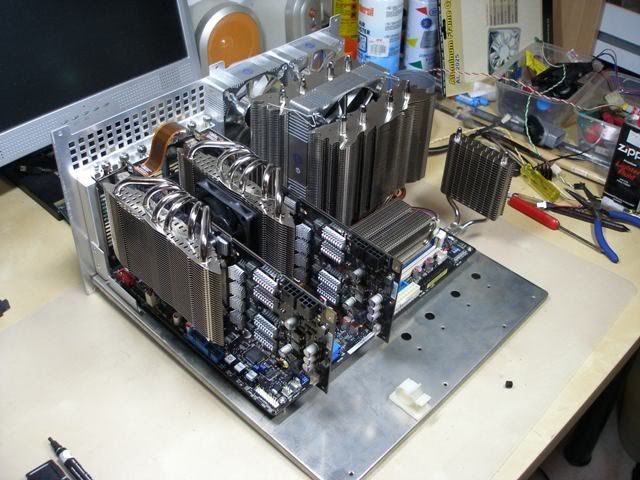
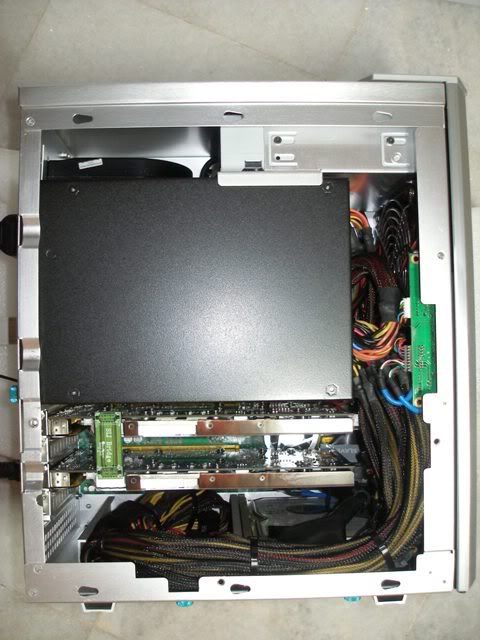
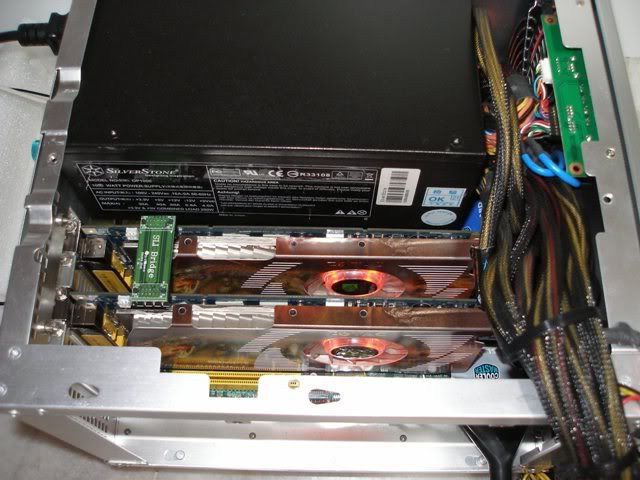
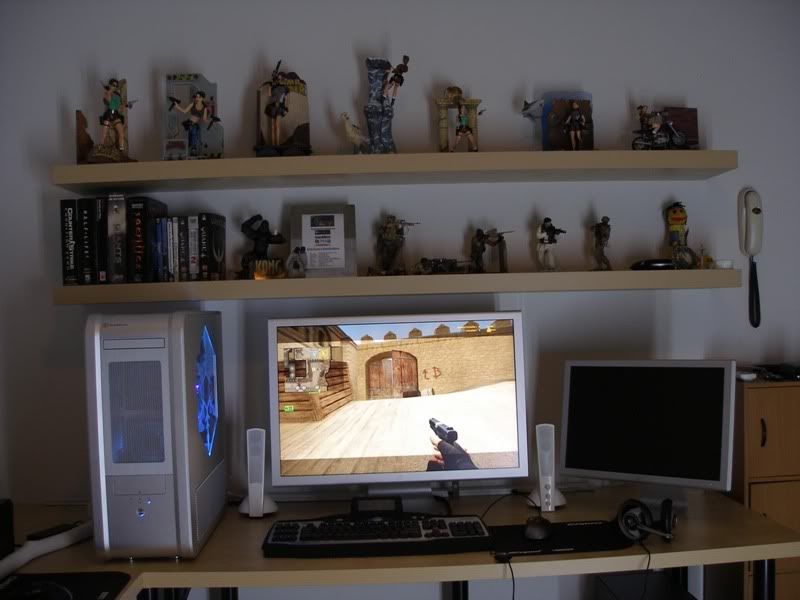
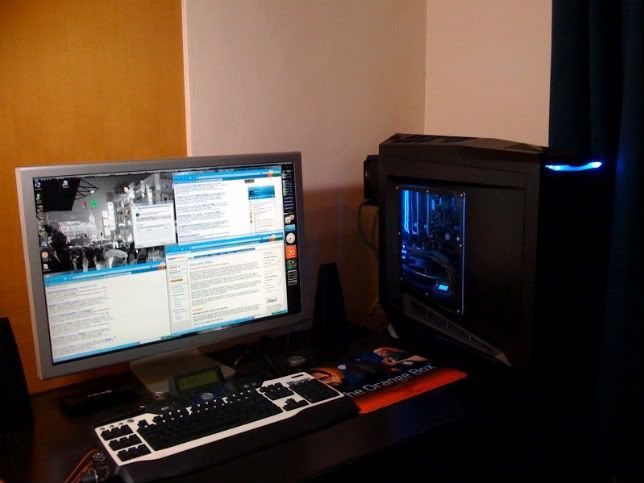
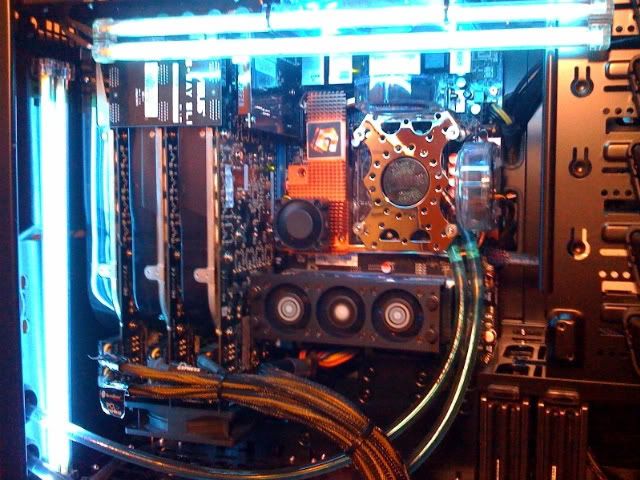
Just to start off the thread. I'll post up pictures of my SLI rigs.


King Kong rig.

user posted image


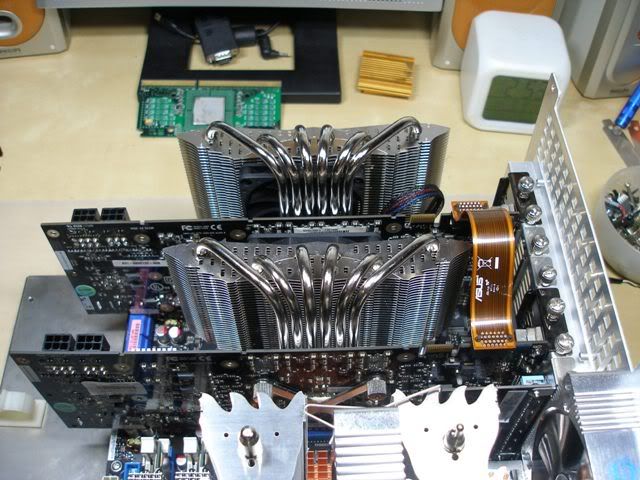
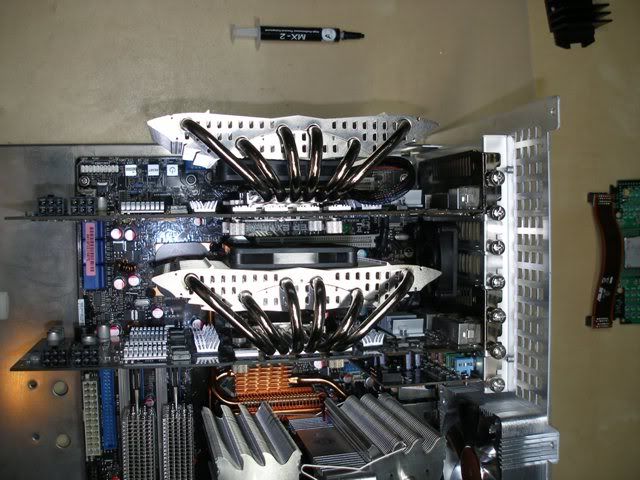
Thermalright benching rig with 8800GTX SLI.

user posted image


GT40 rig.

user posted image

user posted image


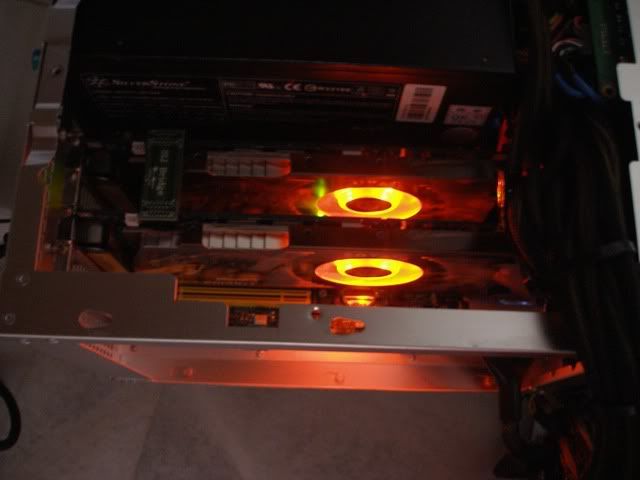
My loooooooovely Zotac AMP 8800GT in the dark. Double Dragons breathing fire at night. laugh.gif

user posted image


Mali mali mali, all SLI users come in n share ur set ups, tips, basically anything n everything to do with SLI.

This post has been edited by ianho: May 17 2009, 04:02 AM
TSianho
post Jan 10 2008, 04:57 PM

Cucimangkoklife
Group Icon
VIP
15,705 posts

Joined: Mar 2005
From: Tg. Rambutan
QUOTE(nles @ Jan 10 2008, 04:45 PM)
o.O awesome thermalright rig. How do you mount the hr03, I thought it was suppose to be larger than that?
And what case fan are those, looks sleek.
*
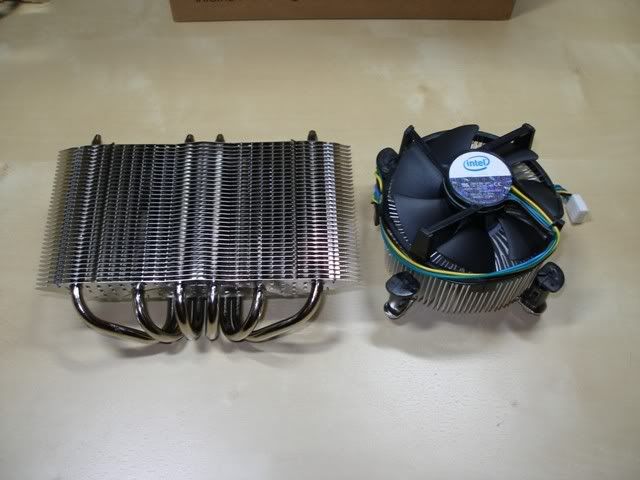
The HR03 is gigantic. Just looks small in that pic coz everything else is very big too, especially the 8800GTX is so big oso. Lemme show u just how big the HR03 is at a different angle.

user posted image

user posted image


HR03 compared to Intel 775 HSF.

user posted image
TSianho
post Jan 10 2008, 05:09 PM

Cucimangkoklife
Group Icon
VIP
15,705 posts

Joined: Mar 2005
From: Tg. Rambutan
QUOTE(nles @ Jan 10 2008, 05:02 PM)
Now that's huge. The 1st pig angle doesn't shows.

What fan is that in the IFX14?
*
Evercool aluminum fan on the IFX14. The fans I used for the HR03 Plus is also Evercool 70x10mm size so I use it in SLI. Normal size fan wont fit on the HR03 for SLI use.


Added on January 10, 2008, 6:40 pmI just tried the Crysis patch 1.1. I did the Crysis built in GPU n CPU bench b4 I patched it. Then I benched again after the patch. Guess what? It made absolutely no difference. It's supposed to improve performance for SLI but there was no diff in the bench. Any1 else tried it?

This post has been edited by ianho: Jan 10 2008, 06:40 PM
TSianho
post Jan 10 2008, 07:29 PM

Cucimangkoklife
Group Icon
VIP
15,705 posts

Joined: Mar 2005
From: Tg. Rambutan
QUOTE(VT-Ten @ Jan 10 2008, 07:26 PM)
XFX 8800GTS XXX SLI user reporting in
err... must show pic one ar?  whistling.gif
*
LOL. Verification process mar. Show us ur latest 3DM06 scores with the Q6600 man.
TSianho
post Jan 12 2008, 11:14 AM

Cucimangkoklife
Group Icon
VIP
15,705 posts

Joined: Mar 2005
From: Tg. Rambutan
QUOTE(RegentCid @ Jan 12 2008, 11:01 AM)
SLi cannot run Dual Display.....got something as 1 to 2 head deviece i dunno what name.....but can make SLI run dual display....LYP got sell deviece?
*
U want to run dual screen with SLI then u need to do a set up like mine. Use a 3rd gfx card to power the 2nd monitor. Then u dont need to turn off SLI to run 2 screens


Added on January 12, 2008, 11:17 am
QUOTE(sniper69 @ Jan 12 2008, 11:13 AM)
doh.gif, pig kaaa? laugh.gif

this is nice... too bad, i'm going to Crossfire instead of SLI, later la, i'll SLI with my old 7300GT if any icon_idea.gif brows.gif, still SLI what...

yes, the HR-03 is montrous VGA cooler and @uncle... damn nice those ThermalRight city brows.gif

psst... i'm going to create Crossfire thread la like this... whistling.gif
*
LOL. I may get 3870 n Crossfire in my Striker Extreme mobo oso. Can join u then. The HP VooDoo Striker Extreme BIOS is available oredi. So now all Striker Extreme users can oso Crossfire. thumbup.gif

This post has been edited by ianho: Jan 12 2008, 11:17 AM
TSianho
post Jan 13 2008, 06:19 PM

Cucimangkoklife
Group Icon
VIP
15,705 posts

Joined: Mar 2005
From: Tg. Rambutan
QUOTE(RegentCid @ Jan 12 2008, 12:01 PM)
Asus EA1050 256mb can be used?


Added on January 12, 2008, 12:40 pmianho:
After i get my ATI Sapphire 2400pro ...what is the step i need to do?
Do i need take out both nvidia GC when installing this ATI 2400?
*
U hafta go to the Nvidia site n search for 3 card dual monitor set up instructions. It's extremely complicated n many many many steps to follow.U need to do it in the exact order n it may not work the 1st time around too.


QUOTE(VT-Ten @ Jan 13 2008, 02:25 PM)
sweeet, p5n32e SLI PLUS supports penryn dual core, where as p5n32e and Striker Extreme owners can sit down there and bang ballz.  mad.gif


*
I cudn care less about the Penryns. As long as it's a Quad, I'm a happy camper. The later native quads come out then it'll get interesting.
TSianho
post Jan 13 2008, 10:28 PM

Cucimangkoklife
Group Icon
VIP
15,705 posts

Joined: Mar 2005
From: Tg. Rambutan
QUOTE(LExus65 @ Jan 13 2008, 09:09 PM)
uncle ian, the voodoo bios available already ?? anyone reporting of using it already ??? this is a good news wor if want to build a benchrig, can alternativing between different graphic cards from different camp....

faster go get 2 pieces of 3870, would love to see ur king kong running it too......
*
Ya HP Blackbird's Striker Extreme BIOS is available.
TSianho
post Oct 12 2008, 06:17 PM

Cucimangkoklife
Group Icon
VIP
15,705 posts

Joined: Mar 2005
From: Tg. Rambutan
Those of u who say SLI is pointless or only helps a lil bit, when u game on this kinda monitor then u will know that SLI is a necessity. brows.gif

user posted image


TSianho
post Oct 14 2008, 04:03 PM

Cucimangkoklife
Group Icon
VIP
15,705 posts

Joined: Mar 2005
From: Tg. Rambutan
QUOTE(nas06 @ Oct 12 2008, 11:52 AM)
Hi there..i'm new to SLI.. Yesterday i tried to put my 8500 GT onto my Fatal1ty FP IN9 SLI. Fired it up, the system detects both GC..
The prob is i can't enable my SLI, coz the option in the control panel is not there...
need help on this.. sad.gif
*
Did u switch on the SLI mode on ur mobo? Ur mobo is using the ol skool method by switching around the switch card circled in yellow in the pic.

user posted image
TSianho
post Oct 14 2008, 09:10 PM

Cucimangkoklife
Group Icon
VIP
15,705 posts

Joined: Mar 2005
From: Tg. Rambutan
QUOTE(nas06 @ Oct 14 2008, 05:10 PM)
I did switch it to SLI mode.
my gpuz detect "SLI available", but in nTune, the option to enable SLI is not there.
both 8500 GT is detected, and i switch between both PCIE slots.
still, its not there...
  sad.gif
*
Then mebe u can try turning the SLI bridge between the gfx cards, the other way. Some of them only work in SLI with the bridge in 1 direction.
TSianho
post May 17 2009, 03:52 AM

Cucimangkoklife
Group Icon
VIP
15,705 posts

Joined: Mar 2005
From: Tg. Rambutan
QUOTE(Najmods @ Mar 16 2009, 11:07 PM)

With or without that, I haven't notice the microstuttering most of the time, its there, but not at the rate it annoys and game become unplayable. The worst game is Crysis, other game is not as obvious. Unreal Tournament 3 is the best for SLi, some say Call of Duty 4 and World At War runs great too but I haven't tried it yet
*
Crysis is such a headache. After 2 years, I thought they'd sorted out the issues oredi. Back when Crysis was launched, I played it with 8800GTX 2 way SLI at 2560x1600 on minimal eye candy settings just to get smooth fps n finish the game. Today with much improved drivers and 3 way SLI, I'm still suffering Crysis Warhead at about 30FPS at 2560x1600 using Gamer settings. sweat.gif sweat.gif sweat.gif


QUOTE(rafeeq @ May 12 2009, 05:08 PM)
how about 3 sli?want PSU should i used?
*
Y do u want or need 3 way SLI? Ask yourself that 1st. If you're not using a 30" LCD then dont waste time and money going 3 way SLI. 3 way SLI is only for those running top of the line specs for everything and run everything at 2560x1600 resolutions.

If u still wanna go 3 way, the requirement is 1200W and that better be a really solid PSU as a quad core, 3 way SLI rig easily draws 800+ watts at full load. If your house wiring is not good, u can even see your lights go dim, I kid u not. Now just think about ur electricity bill at the end of the month. sweat.gif So if you're not using a 30" LCD, dont waste your $.


QUOTE(Mavrix @ May 15 2009, 01:05 AM)
GUys..

Any1 here has install the latest nvidia driver?? whql 185.85???

Ive just install to my pc now and my system got a bit slower.. why is that?? is it normal?
*
I'm on 185.85 WHQL. Darn thing sucks and I'm too lazy to uninstall and revert to previous driver. LOL. Funny thing is games are ok but Windows damn slow sometimes. Especially the Taskbar thingy in Vista. So slooooooow.

This post has been edited by ianho: May 17 2009, 03:56 AM

TSianho
post May 17 2009, 02:43 PM

Cucimangkoklife
Group Icon
VIP
15,705 posts

Joined: Mar 2005
From: Tg. Rambutan
QUOTE(sakurakinomoto @ May 17 2009, 12:58 PM)
Oh lol.

I can always remember when I turn on my computer using the main socket/PSU Back switch, the light flick on time lol.

And the computer is not on yet.

Another thing is, Whenever you are using a highwatt PSU, if you are using extension socket, make sure it is solid built lol. sometimes the extension socket blows.

Happened to me, after changing to solid built extension, then it didn't blow.
*
OMG! I totally forgot about the extension socket. Thank god I'm using the 90000A Belkin Surgemaster . If it was a cap ayam, I think terbakar oredi by now. laugh.gif
TSianho
post May 19 2009, 11:55 AM

Cucimangkoklife
Group Icon
VIP
15,705 posts

Joined: Mar 2005
From: Tg. Rambutan
QUOTE(dlwl @ May 19 2009, 10:31 AM)
wanna ask, i've enabled sli with my 2 8800GT. both are different brands, one msi, another is xfx. the clock speed for msi is 6600mhz, and the xfx one 640mhz.

when i run 3dmark06, there's like red flickers or some distortion in the graphics. when the xfx is master, there's distortion, and when the msi one is master, there's red flickers. even when i run some games also it's the same.

and 3dmark06 shows a result almost similar to a single card only. can  anyone help?
*
Downclock back to standard speeds lor. 3DM06 is lidat 1. SLI doesnt show much improvement in the scores coz it's using a puny 1280x1024 resolution for default test only. U will see a big difference if u set it to test run at higher resos like 1920 or 2560x1600. At high resos u will really see SLI fly.
TSianho
post May 19 2009, 12:16 PM

Cucimangkoklife
Group Icon
VIP
15,705 posts

Joined: Mar 2005
From: Tg. Rambutan
QUOTE(dlwl @ May 19 2009, 12:05 PM)
i see. it wouldn't be advisable to overclock or downclock either cards to match each other right?

eg like i downclock the msi to 640mhz to match the xfx one..
*
SLI is supposed to run all cards at the same speed. But urs are showing signs of artifacts so u better use stock clocks as in reference clocks by Nvidia.
TSianho
post May 20 2009, 04:56 PM

Cucimangkoklife
Group Icon
VIP
15,705 posts

Joined: Mar 2005
From: Tg. Rambutan
LOL. 41" TV and 35" monitor. MUst be prototypes. This fella must own the LCD factory or something. Kakakaka
TSianho
post May 20 2009, 07:03 PM

Cucimangkoklife
Group Icon
VIP
15,705 posts

Joined: Mar 2005
From: Tg. Rambutan
Hehehe. Since some ppl so desperate for Tri SLI until invented new prototype system with prototype TV n Monitors, let me share my antique system with u guys.


It's a pretty old system but still rocking. cool.gif
It does 19000 marks in 3DM06 default test.
13000 marks in 3DM06 at 2560x1600 reso.
17500 marks in 3D Mark Vantage default test.

user posted image

user posted image


Sry for the blur pics. Used my phone cam for some quick shots.

This post has been edited by ianho: May 20 2009, 07:07 PM
TSianho
post May 20 2009, 07:23 PM

Cucimangkoklife
Group Icon
VIP
15,705 posts

Joined: Mar 2005
From: Tg. Rambutan
QUOTE(rosihan @ May 20 2009, 07:13 PM)
waaaaa drool.gif drool.gif
dude y not chg 2 water cooling 4 GC thumbup.gif
*
Coz I was testing many different set ups for my Silverstone Raven RV01 case review. This is 1 of the few set ups I tried. I also tried with Thermalright HR03, Arctic Cooling and will try out a Swiftech water cooling set up soon. All in, about a months worth of trying out everything with the Raven. Will update the Raven review with the various set ups soon.

This post has been edited by ianho: May 20 2009, 07:25 PM
TSianho
post May 20 2009, 09:07 PM

Cucimangkoklife
Group Icon
VIP
15,705 posts

Joined: Mar 2005
From: Tg. Rambutan
QUOTE(sakurakinomoto @ May 20 2009, 08:57 PM)
Ianho, what is the 2 cards there?
*
2 cards???????
TSianho
post May 20 2009, 09:20 PM

Cucimangkoklife
Group Icon
VIP
15,705 posts

Joined: Mar 2005
From: Tg. Rambutan
QUOTE(sakurakinomoto @ May 20 2009, 09:14 PM)
Sorry, I meant the SLI-ed setup in your setup above. the "old" system.
*
It's an old Tri SLI, quad core set up.
TSianho
post May 26 2009, 08:52 AM

Cucimangkoklife
Group Icon
VIP
15,705 posts

Joined: Mar 2005
From: Tg. Rambutan
QUOTE(Odinn @ May 26 2009, 07:54 AM)
Thanks a lot for the answers fellas  thumbup.gif

Now at least I know my budget range and what to look for next. Hopefully next month I get my dual(future tri-SLI) rig running. Cheers again  notworthy.gif
*
U better think n plan properly whether u want to go up to SLI only or Tri SLI. Coz if u only need SLI then better get an Intel X58 mobo since u'll need a cpu upgrade anyway so might as well buy new mobo, new quad core n some DDR3. Or u can just get a cheap SLI mobo and a new PSU for a budget upgrade.

If u intend to go Tri SLi then u will hafta get an Nvidia mobo. From what I see, Tri SLi is gonna cost u a big bomb coz u dont have the CPU, mobo n 1200W PSU to support it. Include the cost of 3x GTX n it's gonna be a nuclear bomb budget

2 Pages  1 2 >Top
 

Change to:
| Lo-Fi Version
0.0305sec    0.55    7 queries    GZIP Disabled
Time is now: 4th December 2025 - 05:24 AM