


 Feb 15 2007, 12:36 PM, updated 17y ago


Background: Windows 7 is the next generation version of the Windows Client.
Versions: Windows 7 x86 32 /64 Bit Client
Current public build: 7000
Q: Is Microsoft working on an operating system after Windows Vista?
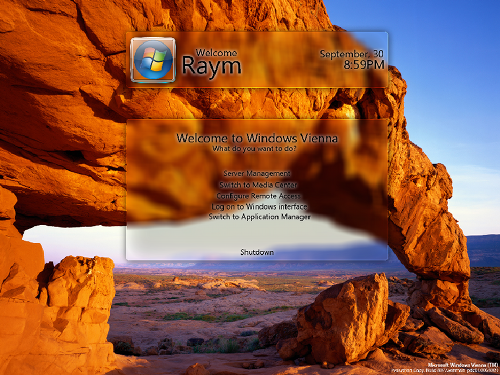
A: Yes. The next client version of Windows was originally codenamed "Blackcomb," though the company renamed it to "Windows Vienna" in early 2006 and to "Windows Seven" or "Windows 7" more recently. I prefer Vienna, so I'll continue to refer to it by that name here.
Q: Why Windows 7?
A: Since Windows Vista is really Windows 6.0, Vienna will presumably be version 7.0.
Q: I heard that Windows Vista will be the last major OS release from Microsoft. Is that true?
A: No. Windows-based PCs will continue to form the center of our digital lifestyles, and as Microsoft executives have noted in recent days, there are still plenty of areas in which Microsoft can improve Windows. Some obvious examples include voice recognition and storage.
Q: So is Vienna going to be a major Windows version?
A: No. Windows Vista was a major release, and Vienna will be a relatively minor, or interim, update. Microsoft is currently on a development path where every other Windows version is a major release.
Q: When will Vienna ship?
A: Microsoft currently plans to ship Vienna in 2009, about two to two and a half years after Vista. The next major release of Windows is expected two years after Vienna, in 2011. (Windows Server updates are on a similar cycle.)
Q: What features will be included in Windows Vienna?
A: Microsoft hasn't publicly committed to any features for Vienna and the company is currently still deciding what this next Windows release will look like. We do know a few things about Vienna, however: It will include a new version of Windows Explorer that is being built by the same team that designed the Ribbon user interface in Office 2007. It will likely include some form of the "Hypervisor" (Windows Virtualization) technologies that will ship shortly after Windows Server "Longhorn". It will also likely include the WinFS (Windows Future Storage) technologies, though they won't be packaged or branded as WinFS.
Q: Will Windows Vienna be available in both 32-bit and 64-bit versions like Vista?
A: No, Vienna will almost certainly ship only in 64-bit versions. This is in keeping with Microsoft's x64 migration schedule.
Q: Will Microsoft release any Windows updates between now and Vienna?
A: Yes. Windows Vista Service Pack 1 (SP1, codenamed "Fiji") will ship simultaneously with Windows Server "Longhorn" and will include a new kernel version that makes that release up to date with the kernel version in Longhorn. As such, we might consider Fiji a major release for a service pack: No previous service pack has ever included a major kernel update.--Paul Thurrott
February 14, 2007
Source: Paul Thurrott's SuperSite for Windows: Windows "Vienna"/"Seven"/"7" FAQ
Added on January 8, 2009, 12:42 pmInformation on Downloading and Installing Windows 7 Beta
On January 9th, the Windows 7 Beta will be available for Windows enthusiasts to download via the Windows 7 page on Windows.com. The Windows 7 Beta is going to be available download-only (we’re not sending out physical media) and available for a limited time to the first 2.5 million people who download the beta.
The Windows 7 Beta will be available in English, German, Japanese, Arabic, and Hindi, and each language will be available in 32-bit and 64-bit versions (except Hindi which will only be available in 32-bit). Because the Windows 7 Beta will be offered download-only, it will be provided to you as an ISO image (an .iso file) that you download. After downloading either the 32-bit or 64-bit ISO image of the Windows 7 Beta, you will be required to burn the ISO image to a DVD to install Windows 7. So you want to be sure you have a DVD burner before spending the time downloading the ISO image.
To burn the ISO image of the Windows 7 Beta to DVD, if your PC comes with Nero or Roxio products – you should be able to burn the ISO image to DVD. If you don’t already have DVD burning software on your PC, you can also check out ImgBurn which is free and can be downloaded here.
The Windows 7 Beta only supports Windows Vista SP1 to Windows 7 upgrades. So if you intend to do an upgrade – be sure it is on a PC running Windows Vista with Service Pack 1. We are not yet announcing anything regarding finalized upgrade paths for Windows 7.
The Windows 7 Beta will be only available in one edition, which is roughly equivalent the Ultimate edition of Windows Vista.
Also, another important thing to keep in mind is that the Windows 7 Beta will expire on August 1st, 2009.
http://windowsteamblog.com/blogs/windows7/...ows-7-beta.aspx
Download: Microsoft Windows 7 Beta 1 Build 7000.0.081212-1400
This post has been edited by fariz: Jan 18 2009, 12:35 PM
 Quote
Quote







 0.0375sec
 0.66
0.66
 6 queries
 GZIP Disabled