

 )
)Guide foobar2000 customization topic, post screenshot here.
Guide foobar2000 customization topic, post screenshot here.
|
|
 Jun 20 2007, 01:56 PM Jun 20 2007, 01:56 PM
Return to original view | Post
#1
|
 
Junior Member
156 posts Joined: Nov 2005 From: Shah Alam  
|
Please excuse my noobness, but can I know how to change the player's Windows title? e.g, like fariz's foobar windows title above is FUBAR. For mine, the title there is PanelsUI, so can I change it? (Do you guys understand my english?
) |
|
|
|
|
|
Jun 20 2007, 05:50 PM
Return to original view | Post
#2
|
|
Junior Member
156 posts Joined: Nov 2005 From: Shah Alam
|
QUOTE(gtoforce @ Jun 20 2007, 03:04 PM) whats foobar? Err... A music player preferred by LYN audiophiles..   Not me.. I'm new in this audiophile thingy although I use foobar for quite a long time. Not me.. I'm new in this audiophile thingy although I use foobar for quite a long time.Err... I'm offtopic.. sorry.. |
|
|
Jan 7 2010, 02:26 PM
Return to original view | Post
#3
|
|
Junior Member
156 posts Joined: Nov 2005 From: Shah Alam
|
Hi guys.
I stumbled upon a problem when I use Sp@wnie's monolitemod-slim theme. 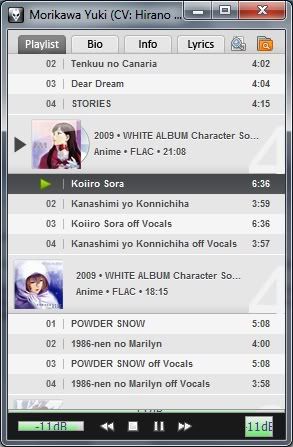 As you can see in the above picture, my progress is not showing anything in there even though I'm actually playing a song there. The same goes for my volume bar and the one on the rightside of the stop/play buttons . The problem doesn't exist when I use monolitemod theme before. What can I do to rectify these problems? EDIT: My bad, I forgot to update my wsh panel component to the latest version. It's working great now. Thanks for the great theme Sp@wnie  This post has been edited by Ffenixz: Jan 7 2010, 02:46 PM |
|
|
Jan 8 2010, 08:23 AM
Return to original view | Post
#4
|
|
Junior Member
156 posts Joined: Nov 2005 From: Shah Alam
|
QUOTE(Sp@wnie @ Jan 8 2010, 12:06 AM) ;p Nice.. Done that already. just in case you want to change playlist font, just go to definition field tab under playlist settings and amend _font1_ and _font2_ fonts.  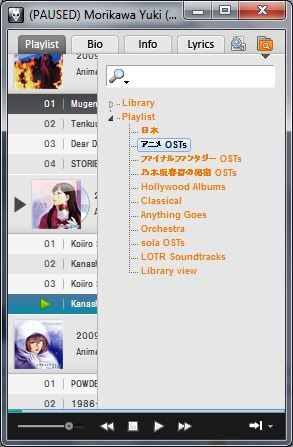 Might sound silly but how can I change the font in the playlist switcher? The orange coloured font there. I can't seem to find the setting that do that. |
|
|
Feb 11 2010, 03:24 PM
Return to original view | Post
#5
|
|
Junior Member
156 posts Joined: Nov 2005 From: Shah Alam
|
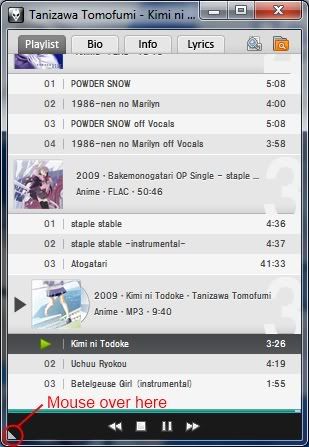 Mouse over the bottom left edge until u can see a white triangle showing up like in the picture above and click that. For your info, all the 4 edges are clickable. |
| Change to: |  0.0371sec 0.0371sec
 0.61 0.61
 7 queries 7 queries
 GZIP Disabled GZIP Disabled
Time is now: 5th December 2025 - 12:06 PM |
 Quote
Quote