Welcome Guest ( Log In | Register )

Outline · [ Standard ] · Linear+

 need help with skyworth gn630v, unable to connect with xiaomi router

views
     
TSaccordvtec
post Sep 12 2025, 04:35 PM, updated 4 months ago

Getting Started
**
Junior Member
107 posts

Joined: Jul 2021


Hi all,
all these while im having a reliable LAN but after the unifi change my plan and "upgrade" my router to this skyworth GN630V, everything went haywired.

xiaomi router doesnt have VLAN setting, thus in my previous setup, i use TM router for pppoe then connect LAN2 to WAN of xiaomi and set to obtain internet via DHCP IP. it has been working well but not with this skyworth box.

i connect the skyworth's LAN1/WAN to WAN of xiaomi but it just wont get any IP from the skyworth. i tried connecting LAN1/WAN to laptop and it can get DHCP IP.
i also tried connecting LAN2/3/4 to WAN of xiaomi but none work.

Any idea what went wrong? hopefully any sifu can give me some guidance.
QuantumEdge
post Sep 12 2025, 08:28 PM

Regular
******
Senior Member
1,602 posts

Joined: Jan 2016


QUOTE(accordvtec @ Sep 12 2025, 04:35 PM)
Hi all,
all these while im having a reliable LAN but after the unifi change my plan and "upgrade" my router to this skyworth GN630V, everything went haywired.

xiaomi router doesnt have VLAN setting, thus in my previous setup, i use TM router for pppoe then connect LAN2 to WAN of xiaomi and set to obtain internet via DHCP IP. it has been working well but not with this skyworth box.

i connect the skyworth's LAN1/WAN to WAN of xiaomi but it just wont get any IP from the skyworth. i tried connecting LAN1/WAN to laptop and it can get DHCP IP.
i also tried connecting LAN2/3/4 to WAN of xiaomi but none work.

Any idea what went wrong? hopefully any sifu can give me some guidance.
*
user posted image
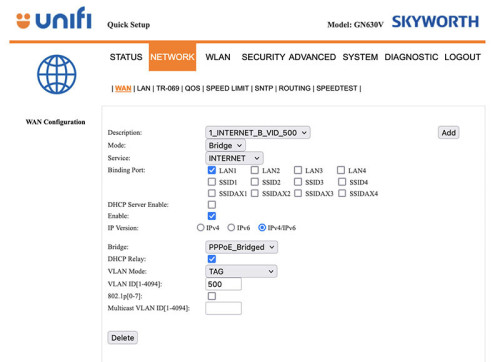
Give this a try, then do the PPPOE dialup in the Xiaomi router because Skyworth supports VLAN tagging under bridge mode
Make sure you are plugged into LAN1 of the Skyworth
You can turn off the wifi of the combo box after setting it as bridge
*Remember to backup the config of your Skywoth box before applying the settings

This post has been edited by QuantumEdge: Sep 12 2025, 08:30 PM
TSaccordvtec
post Sep 13 2025, 12:03 AM

Getting Started
**
Junior Member
107 posts

Joined: Jul 2021


QUOTE(QuantumEdge @ Sep 12 2025, 08:28 PM)
user posted image
Give this a try, then do the PPPOE dialup in the Xiaomi router because Skyworth supports VLAN tagging under bridge mode
Make sure you are plugged into LAN1 of the Skyworth
You can turn off the wifi of the combo box after setting it as bridge
*Remember to backup the config of your Skywoth box before applying the settings
*
thank you sir. will try to next week when back into office
TSaccordvtec
post Sep 19 2025, 01:12 PM

Getting Started
**
Junior Member
107 posts

Joined: Jul 2021


QUOTE(QuantumEdge @ Sep 12 2025, 08:28 PM)
user posted image
Give this a try, then do the PPPOE dialup in the Xiaomi router because Skyworth supports VLAN tagging under bridge mode
Make sure you are plugged into LAN1 of the Skyworth
You can turn off the wifi of the combo box after setting it as bridge
*Remember to backup the config of your Skywoth box before applying the settings
*
hi, just for update, yes i manage to setup using this setting. actually the problem lies on the xiaomi router because after i reset then can already
JJzaii96
post Oct 11 2025, 09:39 PM

New Member
*
Newbie
4 posts

Joined: Jun 2016


QUOTE(QuantumEdge @ Sep 12 2025, 08:28 PM)
user posted image
Give this a try, then do the PPPOE dialup in the Xiaomi router because Skyworth supports VLAN tagging under bridge mode
Make sure you are plugged into LAN1 of the Skyworth
You can turn off the wifi of the combo box after setting it as bridge
*Remember to backup the config of your Skywoth box before applying the settings
*
Hi, I planned to get a new router as Im currently also using the combobox GN630V. Is it I just need to switch the mode from router to bridge in the setting and then connect my new router to LAN1, and setup PPPOE on my new router? Is there any extra configuration needed? Thank you

This post has been edited by JJzaii96: Oct 11 2025, 09:41 PM
QuantumEdge
post Oct 11 2025, 09:43 PM

Regular
******
Senior Member
1,602 posts

Joined: Jan 2016


QUOTE(JJzaii96 @ Oct 11 2025, 09:39 PM)
Hi, I planned to get a new router as Im currently also using the combobox GN630V. Is it I just need to switch the mode from router to bridge in the setting and then connect my new router to LAN1, and setup PPPOE on my new router? Is there any extra configuration needed? Thank you
*
Remember to turn off CN630V's wifi, that is the extra step
JJzaii96
post Oct 11 2025, 09:50 PM

New Member
*
Newbie
4 posts

Joined: Jun 2016


QUOTE(QuantumEdge @ Oct 11 2025, 09:43 PM)
Remember to turn off CN630V's wifi, that is the extra step
*
Thanks for the info. Actually I did reach out to TM via live chat -> technical assistance. But they replied that they do not provide any assistance on the configuration/settings. Btw, is it I just leave the Bridge setting (7th) as PPPoE_Bridged or it will automatically changed to PPPoE_Bridged once I changed the mode to Bridge
QuantumEdge
post Oct 11 2025, 09:59 PM

Regular
******
Senior Member
1,602 posts

Joined: Jan 2016


QUOTE(JJzaii96 @ Oct 11 2025, 09:50 PM)
Thanks for the info. Actually I did reach out to TM via live chat -> technical assistance. But they replied that they do not provide any assistance on the configuration/settings. Btw, is it I just leave the Bridge setting (7th) as PPPoE_Bridged or it will automatically changed to PPPoE_Bridged once I changed the mode to Bridge
*
Not sure, been a while since I touch that router
But should be automatic
JJzaii96
post Oct 15 2025, 08:29 PM

New Member
*
Newbie
4 posts

Joined: Jun 2016


I have the issue where the Internet light is not lighted up after I changed to bridge mode and restart the router
JJzaii96
post Oct 15 2025, 08:37 PM

New Member
*
Newbie
4 posts

Joined: Jun 2016


OK, no need to switch the mode, click on quick setup on top left corner, then choose bridge mode will do


Change to:
| Lo-Fi Version
0.0168sec    0.55    5 queries    GZIP Disabled
Time is now: 21st December 2025 - 05:57 AM