

 Sep 12 2025, 08:28 PM


QUOTE(accordvtec @ Sep 12 2025, 04:35 PM)
Hi all,
all these while im having a reliable LAN but after the unifi change my plan and "upgrade" my router to this skyworth GN630V, everything went haywired.
xiaomi router doesnt have VLAN setting, thus in my previous setup, i use TM router for pppoe then connect LAN2 to WAN of xiaomi and set to obtain internet via DHCP IP. it has been working well but not with this skyworth box.
i connect the skyworth's LAN1/WAN to WAN of xiaomi but it just wont get any IP from the skyworth. i tried connecting LAN1/WAN to laptop and it can get DHCP IP.
i also tried connecting LAN2/3/4 to WAN of xiaomi but none work.
Any idea what went wrong? hopefully any sifu can give me some guidance.

all these while im having a reliable LAN but after the unifi change my plan and "upgrade" my router to this skyworth GN630V, everything went haywired.
xiaomi router doesnt have VLAN setting, thus in my previous setup, i use TM router for pppoe then connect LAN2 to WAN of xiaomi and set to obtain internet via DHCP IP. it has been working well but not with this skyworth box.
i connect the skyworth's LAN1/WAN to WAN of xiaomi but it just wont get any IP from the skyworth. i tried connecting LAN1/WAN to laptop and it can get DHCP IP.
i also tried connecting LAN2/3/4 to WAN of xiaomi but none work.
Any idea what went wrong? hopefully any sifu can give me some guidance.
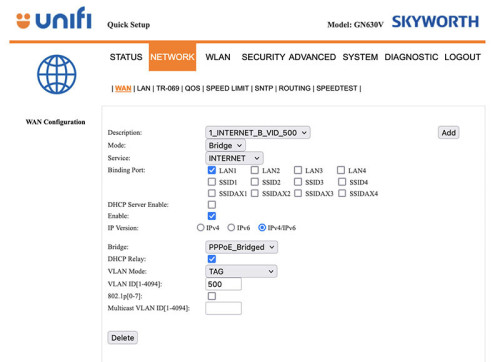
Give this a try, then do the PPPOE dialup in the Xiaomi router because Skyworth supports VLAN tagging under bridge mode
Make sure you are plugged into LAN1 of the Skyworth
You can turn off the wifi of the combo box after setting it as bridge
*Remember to backup the config of your Skywoth box before applying the settings
This post has been edited by QuantumEdge: Sep 12 2025, 08:30 PM
 Quote
Quote
 0.0155sec
 0.50
0.50
 6 queries
 GZIP Disabled