Welcome Guest ( Log In | Register )

Outline · [ Standard ] · Linear+

 Ceiling Fan Alpha 828/3B no longer working

views
     
TScontestchris
post Jun 23 2025, 07:51 PM, updated 6 months ago

Look at all my stars!!
*******
Senior Member
5,531 posts

Joined: Aug 2011

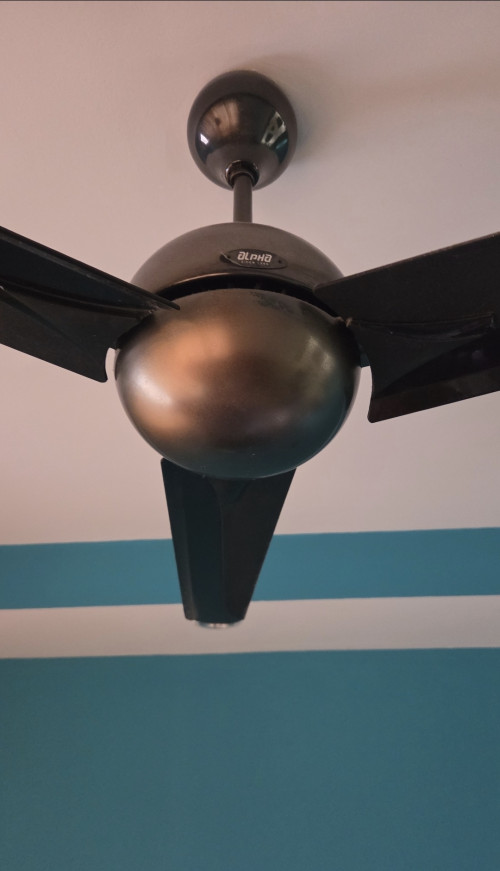
user posted image

The fan suddenly stopped working earlier. If I manual push the blade, it spins, but very very slowly. The remote works fine, I can hear the "tiiit tiiit" noise when clicking the buttons on the remote.

How do I fix it? I have two of the same in my living room, the other unit is just fine.

PS: I've attached the manual.

This post has been edited by contestchris: Jun 23 2025, 07:53 PM


Attached File(s)
Attached File  Alpha_Fan_Manual___E_light_28_828_5B_828_3B_838_5B_.pdf ( 2.1mb ) Number of downloads: 20
acbc
post Jun 23 2025, 07:55 PM

Look at all my stars!!
*******
Senior Member
9,041 posts

Joined: Jan 2003
Capacitor kaput.

Dismantle and check the type number and order from Shopee.

This post has been edited by acbc: Jun 23 2025, 07:55 PM
lj0000
post Jun 23 2025, 08:33 PM

Look at all my stars!!
*******
Senior Member
2,199 posts

Joined: Jan 2003
The coil opened.
Inside got thermal fuse burnt

Check continuity and you will find the small coil ok but big coil open
TScontestchris
post Jun 23 2025, 09:09 PM

Look at all my stars!!
*******
Senior Member
5,531 posts

Joined: Aug 2011

QUOTE(lj0000 @ Jun 23 2025, 08:33 PM)
The coil opened.
Inside got thermal fuse burnt

Check continuity and you will find the small coil ok but big coil open
*
What does this mean in layman term?

Can be fixed or not?

If yes, how much roughly? What spare part needs to be bought?
TScontestchris
post Jun 23 2025, 09:10 PM

Look at all my stars!!
*******
Senior Member
5,531 posts

Joined: Aug 2011

QUOTE(acbc @ Jun 23 2025, 07:55 PM)
Capacitor kaput.

Dismantle and check the type number and order from Shopee.
*
Is capacitor and coil the same thing? The other commentor said something about coil.
andrekua2
post Jun 23 2025, 09:35 PM

10k Club
********
All Stars
13,469 posts

Joined: Jan 2012


QUOTE(contestchris @ Jun 23 2025, 09:10 PM)
Is capacitor and coil the same thing? The other commentor said something about coil.
*
Usually it's capacitor. The fan refused to spin (until you push it) and spinning very slowly are usually signs of malfunctioning capacitor.
lj0000
post Jun 23 2025, 09:52 PM

Look at all my stars!!
*******
Senior Member
2,199 posts

Joined: Jan 2003
QUOTE(contestchris @ Jun 23 2025, 09:09 PM)
What does this mean in layman term?

Can be fixed or not?

If yes, how much roughly? What spare part needs to be bought?
*
Measure to confirm
If putus consider change new

https://pin.it/7snQAXvSL

Measure small and big coil reaistance

I have gone through the capacitor and MOSFET change
Only to realise the coil is broken.

Bought a new alpha DC fan at rm1xx

This post has been edited by lj0000: Jun 24 2025, 06:15 AM
knwong
post Jun 23 2025, 10:04 PM

Look at all my stars!!
*******
Senior Member
3,559 posts

Joined: Sep 2005
From: Shenzhen Bahru


You need to have soldering skill. Capacitor is cheap. I’ve replaced before with my fan and aircond. If you get technician to come they’ll charge cut throat price


This post has been edited by knwong: Jun 23 2025, 10:04 PM
TScontestchris
post Jun 23 2025, 11:19 PM

Look at all my stars!!
*******
Senior Member
5,531 posts

Joined: Aug 2011

Just wondering, this fan is 10+ years old, is it worth repairing or just get a new one?

I am considering KDK K14XZ-PBR or Panasonic F-M14SHVBKH. Anything I should know about these models?

https://www.kdk.com.my/product/k14xz-pbr/

https://www.panasonic.com/my/air-solutions/...-m14shvbkh.html

My only "problem" with getting a new fan is that I will have two different fans in my living room. The other fan is still running well, don't see the need to change that as well. Perhaps if I buy dark brown/black colour, the difference will be less pronounced.

This post has been edited by contestchris: Jun 23 2025, 11:20 PM
TScontestchris
post Jun 24 2025, 12:53 AM

Look at all my stars!!
*******
Senior Member
5,531 posts

Joined: Aug 2011

QUOTE(contestchris @ Jun 23 2025, 11:19 PM)
Just wondering, this fan is 10+ years old, is it worth repairing or just get a new one?

I am considering KDK K14XZ-PBR or Panasonic F-M14SHVBKH. Anything I should know about these models?

https://www.kdk.com.my/product/k14xz-pbr/

https://www.panasonic.com/my/air-solutions/...-m14shvbkh.html

My only "problem" with getting a new fan is that I will have two different fans in my living room. The other fan is still running well, don't see the need to change that as well. Perhaps if I buy dark brown/black colour, the difference will be less pronounced.
*
The Panasonic above is a DC motor while the KDK has an AC motor. Does it matter? Will either work in place of my current Alpha fan, without the need to do any additional wiring or hacking?
KitZhai
post Jun 24 2025, 05:25 AM

Casual
***
Junior Member
376 posts

Joined: Dec 2008
From: /k/


QUOTE(contestchris @ Jun 24 2025, 12:19 AM)
Just wondering, this fan is 10+ years old, is it worth repairing or just get a new one?

I am considering KDK K14XZ-PBR or Panasonic F-M14SHVBKH. Anything I should know about these models?

https://www.kdk.com.my/product/k14xz-pbr/

https://www.panasonic.com/my/air-solutions/...-m14shvbkh.html

My only "problem" with getting a new fan is that I will have two different fans in my living room. The other fan is still running well, don't see the need to change that as well. Perhaps if I buy dark brown/black colour, the difference will be less pronounced.
*
If 10 years I suggest buy new and change it...
lj0000
post Jun 24 2025, 06:17 AM

Look at all my stars!!
*******
Senior Member
2,199 posts

Joined: Jan 2003
QUOTE(contestchris @ Jun 24 2025, 12:53 AM)
The Panasonic above is a DC motor while the KDK has an AC motor. Does it matter? Will either work in place of my current Alpha fan, without the need to do any additional wiring or hacking?
*
No need new wiring. Plug and play. Regardless of ac or DC fan
dudester
post Jun 24 2025, 07:25 AM

Regular
******
Senior Member
1,223 posts

Joined: Nov 2017
If change capacitor to difficult, look for the circuit board and just replace. shopee plenty.
LA773
post Jun 24 2025, 07:34 AM

Regular
******
Senior Member
1,063 posts

Joined: Apr 2020
QUOTE(contestchris @ Jun 23 2025, 11:19 PM)
Just wondering, this fan is 10+ years old, is it worth repairing or just get a new one?

I am considering KDK K14XZ-PBR or Panasonic F-M14SHVBKH. Anything I should know about these models?

https://www.kdk.com.my/product/k14xz-pbr/

https://www.panasonic.com/my/air-solutions/...-m14shvbkh.html

My only "problem" with getting a new fan is that I will have two different fans in my living room. The other fan is still running well, don't see the need to change that as well. Perhaps if I buy dark brown/black colour, the difference will be less pronounced.
*
QUOTE(KitZhai @ Jun 24 2025, 05:25 AM)
If 10 years I suggest buy new and change it...
*
10 yrs actually not old for a ceiling fan.. My house kdk been running for 30yrs+,
Not sure kdk still makes with the quality like last time..
TScontestchris
post Jun 24 2025, 08:25 AM

Look at all my stars!!
*******
Senior Member
5,531 posts

Joined: Aug 2011

QUOTE(lj0000 @ Jun 24 2025, 06:17 AM)
No need new wiring. Plug and play. Regardless of ac or DC fan
*
Can this be done ownself? I can do simple things - install new PSU in computer, change 3-pin wall socket, change lightbulb. Have assembled furniture according to the manual. Never done something as "big" as this before but can follow instructions.

I asked a electrician, he say just pasang is RM150.
lj0000
post Jun 24 2025, 08:29 AM

Look at all my stars!!
*******
Senior Member
2,199 posts

Joined: Jan 2003
QUOTE(contestchris @ Jun 24 2025, 08:25 AM)
Can this be done ownself? I can do simple things - install new PSU in computer, change 3-pin wall socket, change lightbulb. Have assembled furniture according to the manual. Never done something as "big" as this before but can follow instructions.

I asked a electrician, he say just pasang is RM150.
*
easy peasey.
follow safety rules ya
off MCB breaker while u work
use sturdy tangga

prep tools
electrical test pen
screw drivers philips and cross
wire connector just in case need
TScontestchris
post Jun 24 2025, 11:55 AM

Look at all my stars!!
*******
Senior Member
5,531 posts

Joined: Aug 2011

QUOTE(lj0000 @ Jun 24 2025, 08:29 AM)
easy peasey.
follow safety rules ya
off MCB breaker while u work
use sturdy tangga

prep tools
electrical test pen
screw drivers philips and cross
wire connector just in case need
*
I'm leaning to the Bayu 4-blade fan. The new variant with DC motor can be purchased under RM300 from Lazada (including shipping). Is this a good choice? I see many people complain about Bayu model, but this is the first time it comes with DC motor, previously is all AC motor. Anything to be worried about?

Also, any safety precautions for first timer changing fan?
andyng38
post Jun 24 2025, 12:37 PM

Look at all my stars!!
*******
Senior Member
2,399 posts

Joined: Jun 2007
QUOTE(contestchris @ Jun 24 2025, 11:55 AM)
I'm leaning to the Bayu 4-blade fan. The new variant with DC motor can be purchased under RM300 from Lazada (including shipping). Is this a good choice? I see many people complain about Bayu model, but this is the first time it comes with DC motor, previously is all AC motor. Anything to be worried about?

Also, any safety precautions for first timer changing fan?
*
I have no experience with DC motor fans, but have DIY installed house fans.

It's not hard. Shut off the main circuit breaker, use a good ladder and uninstall the old fan. Leave the safety cable on until u r ready to take down the fan.

After the old fan is down, inspect the rubber bushing on the ceiling hook; replace if it's worn out. After 10 years I believe it's better to replace it. The bushing is cheap.

Bring up the new fan, lay it on the bushing of the ceiling hook and secure the safety cable. Plug in the fan, go down from the ladder and away from under the fan and then test it. If it wobbles, you may have to balance the blades. Some fans come with stick-on weights. Google for instructions on balancing the blades. Again this is not hard.

Optional: a thin light coating of silicon car tyre polish on the blades will slow down the collection of dust thus extending time between cleanings. Buff down the polish...the blades should feel much smoother to your fingers.

mhhee
post Jun 24 2025, 12:46 PM

Regular
******
Senior Member
1,310 posts

Joined: Feb 2005


QUOTE(contestchris @ Jun 23 2025, 07:51 PM)
user posted image

The fan suddenly stopped working earlier. If I manual push the blade, it spins, but very very slowly. The remote works fine, I can hear the "tiiit tiiit" noise when clicking the buttons on the remote.

How do I fix it? I have two of the same in my living room, the other unit is just fine.

PS: I've attached the manual.
*
Open the switch cover & change the capacitor, there are 3 screws holding the cover.

My house is using this model & I have changed capacitor on few of them, owning them for around 13 years & still working after capacitor changed.
lj0000
post Jun 24 2025, 03:56 PM

Look at all my stars!!
*******
Senior Member
2,199 posts

Joined: Jan 2003
QUOTE(contestchris @ Jun 24 2025, 11:55 AM)
I'm leaning to the Bayu 4-blade fan. The new variant with DC motor can be purchased under RM300 from Lazada (including shipping). Is this a good choice? I see many people complain about Bayu model, but this is the first time it comes with DC motor, previously is all AC motor. Anything to be worried about?

Also, any safety precautions for first timer changing fan?
*
I got alpha DC fan rm1xx
Got led light

If got another person help you carry thing is easier.
Solo also no problem

I am departing away from pana kdk.
Mine all have noisy bearing

This post has been edited by lj0000: Jun 24 2025, 03:58 PM
TOMEI-R
post Jun 24 2025, 04:03 PM

Extraordinaire
*********
All Stars
24,219 posts

Joined: Mar 2007
From: Kuala Lumpur


Pinned.
TScontestchris
post Jun 24 2025, 04:30 PM

Look at all my stars!!
*******
Senior Member
5,531 posts

Joined: Aug 2011

QUOTE(lj0000 @ Jun 24 2025, 03:56 PM)
I got alpha DC fan rm1xx
Got led light

If got another person help you carry thing is easier.
Solo also no problem

I am departing away from pana kdk.
Mine all have noisy bearing
*
What Alpha model did you get? Why people all saying get Panasonic/KDK?
lj0000
post Jun 24 2025, 05:37 PM

Look at all my stars!!
*******
Senior Member
2,199 posts

Joined: Jan 2003
QUOTE(contestchris @ Jun 24 2025, 04:30 PM)
What Alpha model did you get? Why people all saying get Panasonic/KDK?
*
Alpha Iriz 56 led
Rm155 shopee

Pana is ok but I realise after few years become noisy
Alpha more than 10 year still noise free. But kaput

Just avoid the d brand
junglebird P
post Jun 25 2025, 09:18 AM

New Member
*
Probation
1 posts

Joined: Nov 2021
Same case with me before... do trial and error first by switching the board from similar fans in your living room... it might be a clip kinda thing then it will be easy... else you need to snip2 and attach... take a few picture of the board for your ref...

If that's the case then buy a new board online... else just replace with a manual regulator fan by kdk for 150...
TScontestchris
post Jun 25 2025, 09:27 AM

Look at all my stars!!
*******
Senior Member
5,531 posts

Joined: Aug 2011

I just bought the new Panasonic Boyu 4 blade fan (DC motor) for RM300. Will try to fix it on Friday. Not sure if I can manage or call somebody to do it
Zot
post Jun 25 2025, 09:33 AM

Look at all my stars!!
*******
Senior Member
7,936 posts

Joined: Mar 2014
It is up to you:

1) Buy new one any model you like. Own install free. Get others to install = $$
2) Buy capacitor <RM10 and replace yourself free
3) Get the PCBA repaired outside probably RM60~100.
4) BUt PCBA online probably around RM60 and replace yourself fee.

TScontestchris
post Jun 25 2025, 09:51 AM

Look at all my stars!!
*******
Senior Member
5,531 posts

Joined: Aug 2011

QUOTE(Zot @ Jun 25 2025, 09:33 AM)
It is up to you:

1) Buy new one any model you like. Own install free. Get others to install = $$
2) Buy capacitor <RM10 and replace yourself free
3) Get the PCBA repaired outside probably RM60~100.
4) BUt PCBA online probably around RM60 and replace yourself fee.
*
My concern is, what guarantee replacing the PCB can get it running? And how long before it fails again? Also, I contacted Alpha CS, they said they no longer have the spare parts for this model. I checked Shopee and Lazada as well, didn't have. It is a year 2009 model.
Zot
post Jun 25 2025, 10:22 AM

Look at all my stars!!
*******
Senior Member
7,936 posts

Joined: Mar 2014
QUOTE(contestchris @ Jun 25 2025, 09:51 AM)
My concern is, what guarantee replacing the PCB can get it running? And how long before it fails again? Also, I contacted Alpha CS, they said they no longer have the spare parts for this model. I checked Shopee and Lazada as well, didn't have. It is a year 2009 model.
*
The capacitor on the board is the faulty part probably more than 90% of fan spin slowly or need to be assisted to start spinning. This is for motor that runs on AC. For the DC fan, it is different mechanism. Capacitor quality may play part on how long it will last but personally I think it does not really matter. Any capacitor will be just the same regardless brand based on my experience.

For me, I'm 100% sure replacing the PCB will make the fan works. The PCB you are looking for is RF56L/5S-FT. I check this and in Shopee it is said to be the PCB for the 838/3B. I found this in Shoppe and also Lazada and price varies from RM50~60 roughly as I glanced through. Surprisingly the capacitor sold for RM30 laugh.gif . I think if you know soldering and want to replace the part yourself I think the capacitor is no more than RM10 in electronics shop
TScontestchris
post Jun 25 2025, 11:29 AM

Look at all my stars!!
*******
Senior Member
5,531 posts

Joined: Aug 2011

QUOTE(Zot @ Jun 25 2025, 10:22 AM)
The capacitor on the board is the faulty part probably more than 90% of fan spin slowly or need to be assisted to start spinning. This is for motor that runs on AC. For the DC fan, it is different mechanism. Capacitor quality may play part on how long it will last but personally I think it does not really matter. Any capacitor will be just the same regardless brand based on my experience.

For me, I'm 100% sure replacing the PCB will make the fan works. The PCB you are looking for is RF56L/5S-FT. I check this and in Shopee it is said to be the PCB for the 838/3B. I found this in Shoppe and also Lazada and price varies from RM50~60 roughly as I glanced through. Surprisingly the capacitor sold for RM30  laugh.gif . I think if you know soldering and want to replace the part yourself I think the capacitor is no more than RM10 in electronics shop
*
Does it need a separate remote? Or can use an existing remote? Do I need to buy the capacitor separately, or is there a capacitor in the PCB?

Also, how do you know its the PCB faulty and not the capacitor or something else?

This post has been edited by contestchris: Jun 25 2025, 11:45 AM
Zot
post Jun 25 2025, 12:28 PM

Look at all my stars!!
*******
Senior Member
7,936 posts

Joined: Mar 2014
QUOTE(contestchris @ Jun 25 2025, 11:29 AM)
Does it need a separate remote? Or can use an existing remote? Do I need to buy the capacitor separately, or is there a capacitor in the PCB?

Also, how do you know its the PCB faulty and not the capacitor or something else?
*
The capacitor is on the board already. Buying just capacitor is just an option not to buy the whole board, but you need to have de-soldering and soldering skill. Errr.. provided that the capacitor is the faulty part. I've had a burnt component before that I bought a replacement PCB because the component was not in stock and need to wait very long for order.

Remote you can use the same remote.
TScontestchris
post Jun 25 2025, 12:43 PM

Look at all my stars!!
*******
Senior Member
5,531 posts

Joined: Aug 2011

QUOTE(Zot @ Jun 25 2025, 12:28 PM)
The capacitor is on the board already. Buying just capacitor is just an option not to buy the whole board, but you need to have de-soldering and soldering skill. Errr.. provided that the capacitor is the faulty part. I've had a burnt component before that I bought a replacement PCB because the component was not in stock and need to wait very long for order.

Remote you can use the same remote.
*
I dont understand, doesn't the remote need to be new?

Also, it seems the board and capacitor is separate, based on this video.

https://youtu.be/9QPhLQaTmqQ?si=b1dDh7XLOCVXhZ9l

So I need to buy all 3?

Appreciate your input man.

Please note the Alpha 828/3B uses an older PCB, model RC55, which is obsolete.

This post has been edited by contestchris: Jun 25 2025, 12:44 PM
Zot
post Jun 25 2025, 04:05 PM

Look at all my stars!!
*******
Senior Member
7,936 posts

Joined: Mar 2014
QUOTE(contestchris @ Jun 25 2025, 12:43 PM)
I dont understand, doesn't the remote need to be new?

Also, it seems the board and capacitor is separate, based on this video.

https://youtu.be/9QPhLQaTmqQ?si=b1dDh7XLOCVXhZ9l

So I need to buy all 3?

Appreciate your input man.

Please note the Alpha 828/3B uses an older PCB, model RC55, which is obsolete.
*
Thank for the video. My Alpha fans are not using remote but my Panasonic does.

In the video it was stated that when he went to get spare part from Alpha, the board is no longer produced. However, Alpha gave an alternative board. The board is of new design and that was the reason you need new remote control. Unlike the old board which has capacitor mounted on board, the new one has capacitor off the board.

So, if you can find the same old PCB model online, then you do not need to replace the remote.

TScontestchris
post Jun 25 2025, 04:09 PM

Look at all my stars!!
*******
Senior Member
5,531 posts

Joined: Aug 2011

QUOTE(Zot @ Jun 25 2025, 04:05 PM)
Thank for the video. My Alpha fans are not using remote but my Panasonic does.

In the video it was stated that when he went to get spare part from Alpha, the board is no longer produced. However, Alpha gave an alternative board. The board is of new design and that was the reason you need new remote control. Unlike the old board which has capacitor mounted on board, the new one has capacitor off the board.

So, if you can find the same old PCB model online, then you do not need to replace the remote.
*
Yes, but the alternative board that Alpha gave him, is the same board you recommended me above. So just to confirm, I will need the PCB + Remote + Capacitor, and still run the risk of the fan not working due to other reasons, e.g. broken coil in the motor. Correct me if I am wrong.
Zot
post Jun 25 2025, 04:17 PM

Look at all my stars!!
*******
Senior Member
7,936 posts

Joined: Mar 2014
QUOTE(contestchris @ Jun 25 2025, 04:09 PM)
Yes, but the alternative board that Alpha gave him, is the same board you recommended me above. So just to confirm, I will need the PCB + Remote + Capacitor, and still run the risk of the fan not working due to other reasons, e.g. broken coil in the motor. Correct me if I am wrong.
*
Did I recommend any board?

Coil in fan is hardly broken. Furthermore, you mentioned that with little push, the fan spin but slow. Normally slowly spin fan is just bad capacitor. Even if you cannot find exact capacitor value but slightly different, the fan will spin but the speed might change slightly too.
TScontestchris
post Jun 25 2025, 04:19 PM

Look at all my stars!!
*******
Senior Member
5,531 posts

Joined: Aug 2011

QUOTE(Zot @ Jun 25 2025, 04:17 PM)
Did I recommend any board?

Coil in fan is hardly broken. Furthermore, you mentioned that with little push, the fan spin but slow. Normally slowly spin fan is just bad capacitor. Even if you cannot find exact capacitor value but slightly different, the fan will spin but the speed might change slightly too.
*
Yes, you did.


----------

For me, I'm 100% sure replacing the PCB will make the fan works. The PCB you are looking for is RF56L/5S-FT. I check this and in Shopee it is said to be the PCB for the 838/3B. I found this in Shoppe and also Lazada and price varies from RM50~60 roughly as I glanced through. Surprisingly the capacitor sold for RM30 laugh.gif . I think if you know soldering and want to replace the part yourself I think the capacitor is no more than RM10 in electronics shop
Zot
post Jun 25 2025, 04:19 PM

Look at all my stars!!
*******
Senior Member
7,936 posts

Joined: Mar 2014
Oh I see what I suggest. It was because it stated as replacement for that model. I have no idea that is the new board though because never owned one
Zot
post Jun 25 2025, 04:35 PM

Look at all my stars!!
*******
Senior Member
7,936 posts

Joined: Mar 2014
I found this. It is said for old board for RC55

https://shopee.com.my/ALPHA-CEILING-FAN-ORI...78-138e61bf63af

Check if this is correct
TScontestchris
post Jun 26 2025, 09:11 AM

Look at all my stars!!
*******
Senior Member
5,531 posts

Joined: Aug 2011

QUOTE(lj0000 @ Jun 24 2025, 08:29 AM)
easy peasey.
follow safety rules ya
off MCB breaker while u work
use sturdy tangga

prep tools
electrical test pen
screw drivers philips and cross
wire connector just in case need
*
How about spanner? Is it needed (to tighten the nuts)?

Plier for the cotter pins?

Any other tool?

This is the installation manual: https://www.panasonic.com/content/dam/pim/m...01ZM_250310.pdf

This post has been edited by contestchris: Jun 26 2025, 09:18 AM
lj0000
post Jun 26 2025, 09:23 AM

Look at all my stars!!
*******
Senior Member
2,199 posts

Joined: Jan 2003
QUOTE(contestchris @ Jun 26 2025, 09:11 AM)
How about spanner? Is it needed (to tighten the nuts)?

Plier for the cotter pins?

Any other tool?

This is the installation manual: https://www.panasonic.com/content/dam/pim/m...01ZM_250310.pdf
*
Ya that too.
TScontestchris
post Jun 26 2025, 06:42 PM

Look at all my stars!!
*******
Senior Member
5,531 posts

Joined: Aug 2011

user posted image

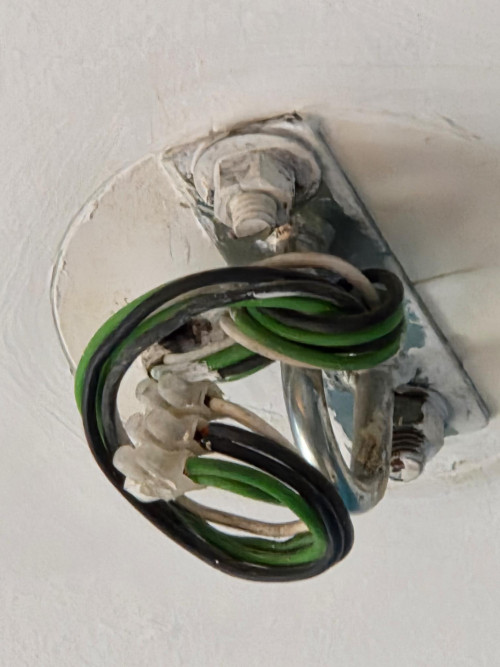
Guys I need help please. My old fan is removed completely from the ceiling. Took me well over an hour, the head is super heavy and I needed someone else to assist with holding the motor unit. Opening the housing also took quite an effort. Anyways I am glad to have done it.

Now I have an issue, the wires on my ceiling not match the colour of the Panasonic Bayu.

The Bayu wires are blue, green and brown. The ceiling wires are green, black and white.
eddievh
post Jun 26 2025, 10:04 PM

Look at all my stars!!
*******
Senior Member
3,218 posts

Joined: Apr 2005


Use test pen to check which one is live lor. Green definitely is earth.
TScontestchris
post Jun 27 2025, 10:10 AM

Look at all my stars!!
*******
Senior Member
5,531 posts

Joined: Aug 2011

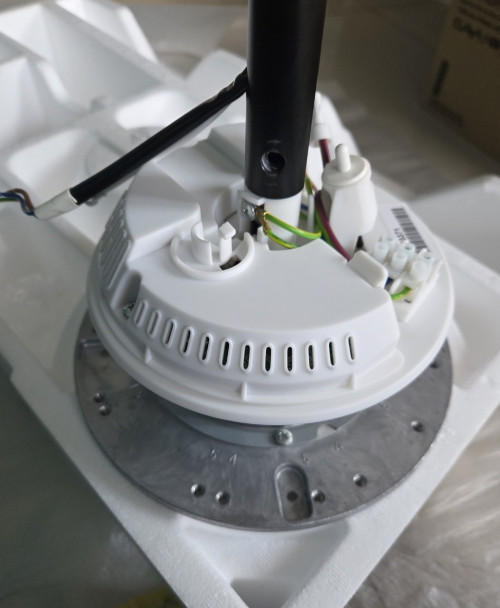
user posted image

Guys, do I need to remove the white cover? The manual doesn't say anything.
andrekua2
post Jun 27 2025, 12:38 PM

10k Club
********
All Stars
13,469 posts

Joined: Jan 2012


QUOTE(contestchris @ Jun 27 2025, 10:10 AM)
user posted image

Guys, do I need to remove the white cover? The manual doesn't say anything.
*
Dont mention then why you bother? doh.gif

Only do what was asked in the manual. Stainless steel hook? Wow...
TScontestchris
post Jun 27 2025, 02:18 PM

Look at all my stars!!
*******
Senior Member
5,531 posts

Joined: Aug 2011

Okay finally completed installation of the Bayu fan.

Sadly, the fan might be defective.

1. It briefly spins backwards, before spinning forwards when turned on
2. When switching speeds, it takes around 10 seconds before applying the new speed. It's not instant, there is some delay there

Can someone confirm if this is indicative of a defective unit?
shyan90's
post Jul 2 2025, 10:19 AM

To Be Old and Wise You Must First be Young and Stupid
******
Senior Member
1,198 posts

Joined: Jun 2015
From: Malaysia


old fan are worth to fix. new 1 very nipis and quality so so only unless pay premium.


Change to:
| Lo-Fi Version
0.0240sec    0.28    6 queries    GZIP Disabled
Time is now: 2nd December 2025 - 05:26 AM