Welcome Guest ( Log In | Register )

Outline · [ Standard ] · Linear+

 Official TM UniFi High Speed Broadband Thread V43, READ 1ST PAGE FOR RELEVANT WIFI INFO!

views
     
adz83
post Sep 22 2025, 12:07 AM

Casual
***
Junior Member
424 posts

Joined: May 2009
From: Petaling Jaya


Hi. need some advise on my situation.
I'm using Unifi 300mb with combo box Skyworth GN630V.

I'm using a company laptop (the only pc at home) and i face a weird issue.
it will connect for a while, and everything is good. but suddenly my PCU will hangs, my wireless tab in windows will disappear and after a while my connection will be lost.
subsequently, my restart will be long and usually fails to fix the issue.

Issue was not noticed on other devices like phones, android tv.

Please note that tthis issue only happens when i'm connected to the home Wifi. When i'm connected to my office wifi, i didn't have this issue at all.

I'm workng a 12 hours shift helpdesk job and i will need to be constantly connected to phone app and a remote desktop. i usually works in the office but sometime i will have to work from home to look after my kids if my wife work time clashes with my schedule.

any advise on the source of the issue?

This post has been edited by adz83: Sep 22 2025, 12:09 AM
adz83
post Sep 22 2025, 06:45 AM

Casual
***
Junior Member
424 posts

Joined: May 2009
From: Petaling Jaya


QUOTE(tng55 @ Sep 22 2025, 01:15 AM)
because not issue unifi its crappy combo box Skyworth GN630V. crappy router problem and unstable
not you PC problem and not you laptop problem

ok i may ask you office what router they are using
i think you office using own router not use FREE TM ROUTER

get you own buy new Router like tp link or ASUS
if you office router what brand and model you can buy same model like office using router settle
*
Thanks for the advice.
I have a previous time/huawei hg8145x6 (moved to unifi as new house is not covered by time). Is it possible to use it instead? If anyone has done it, as u haven't found the guide to do so.
adz83
post Sep 22 2025, 09:35 AM

Casual
***
Junior Member
424 posts

Joined: May 2009
From: Petaling Jaya


QUOTE(kwss @ Sep 22 2025, 08:09 AM)
It sounds more like a WiFi driver issue than router.
Reason:
You mention laptop will hang.
Restart will be slower than usual.

None of the above can be due to the router. Maybe try updating the WiFi driver.
Can try the one from Windows update first. Just update the WiFi driver, don't update any other hardware.

What WiFi module are you using?
*
Hello,
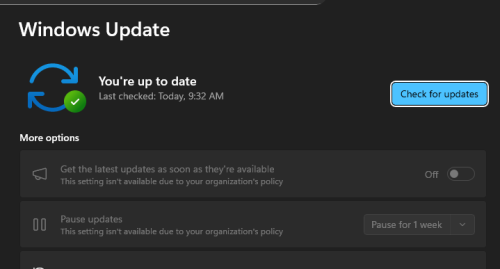
tried checking update but none showing.
user posted image
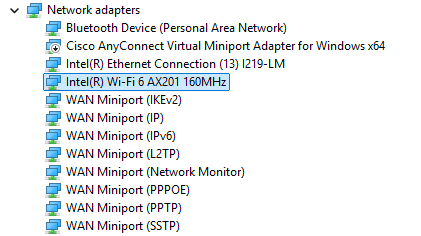
my office provided me with Dell latitude 5520, so not sure the module unsure.gif
i guess, this..

user posted image
adz83
post Sep 22 2025, 09:56 AM

Casual
***
Junior Member
424 posts

Joined: May 2009
From: Petaling Jaya


QUOTE(blacktubi @ Sep 22 2025, 09:47 AM)
I suspect it's due to buggy endpoint security software from your corporate security, it's quite common actually laugh.gif

Try to check if it's still happening if you use other WiFi network like your phone hotspot or etc
*
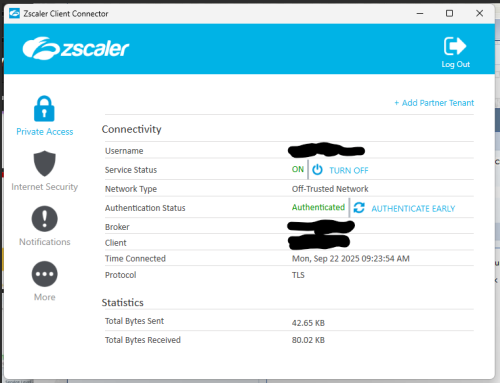
u meant the Zscaler?

user posted image
adz83
post Sep 22 2025, 10:15 AM

Casual
***
Junior Member
424 posts

Joined: May 2009
From: Petaling Jaya


QUOTE(kwss @ Sep 22 2025, 10:04 AM)
Does your user account has permission to install driver manually?

Can try the Dell official version:
https://www.dell.com/support/home/en-my/dri...-15-5520-laptop

Or Intel official version:
https://www.intel.com/content/www/us/en/dow...windows-11.html

Do you use ZScaler while you are in office? Or only when at home? Since you said works fine in office.
You are using WiFi in office right?
*
Unfortunately my account doesn't allow me to install driver manually. /
and yes, using Zscaler in both office and at home.
adz83
post Sep 22 2025, 10:18 AM

Casual
***
Junior Member
424 posts

Joined: May 2009
From: Petaling Jaya


QUOTE(SilentVampire @ Sep 22 2025, 10:07 AM)
Yes, it is possible. From your screenshot, you’re using Zscaler ZPA and ZIA. It could be caused by the WiFi driver + Zscaler conflict, more specifically the Zscaler filter driver, which inspect and redirect all traffic through Zscaler. You can try asking your IT to troubleshoot.
*
I see, i've already notified my IT and still waiting for their responds.
adz83
post Sep 22 2025, 10:22 AM

Casual
***
Junior Member
424 posts

Joined: May 2009
From: Petaling Jaya


QUOTE(fruitie @ Sep 22 2025, 10:18 AM)
I’m using ZScaler too and compared to the Cisco we have, I think it’s using a lot of memory and my PC sometimes hangs too. laugh.gif

Luckily my work doesn’t require me to connect to VPN most of the time, so I usually disable it on my PC. Everything works better for me.
*
lucky for u man. in my case, it's locked and unable to disable. oh well..
adz83
post Sep 22 2025, 10:25 AM

Casual
***
Junior Member
424 posts

Joined: May 2009
From: Petaling Jaya


QUOTE(kwss @ Sep 22 2025, 10:21 AM)
Then the only course of action is to find your IT Helpdesk.

I don't know how your ZScaler is being setup. They might use split horizon with different internal / external DNS record, meaning the VPN isn't actually active when you are in office, but will be active when you are at home.

Or try what blacktubi suggest and see if the problem still exist when you hotspot with your phone.
*
alright, will try this and see if there's any difference. thanks.
once connected, like right now, it's ok. problems starts sometimes as soon at 45 mins. and sometimes after 2 hours.
that's when the long restarting sequence.
and the panic + anxiety kicking in, hoping no call or email coming in at that time that will butcher my SLA. sad.gif

This post has been edited by adz83: Sep 22 2025, 10:35 AM
adz83
post Sep 22 2025, 10:31 AM

Casual
***
Junior Member
424 posts

Joined: May 2009
From: Petaling Jaya


QUOTE(fruitie @ Sep 22 2025, 10:25 AM)
Right click on system tray> exit? That’s how I do it but every time the PC is switched off then it will be auto connected again when turned on. So redo it all the time.

I don’t have issue with it in terms of speed, not too bad as it always chooses the closest server to us and my case is Singapore. Only once a while crazy and can feel the slowness, happens but not always.
*
they sets it that i need to connect to it else nothing is accessible.
and this too

user posted image
adz83
post Sep 22 2025, 11:23 AM

Casual
***
Junior Member
424 posts

Joined: May 2009
From: Petaling Jaya


QUOTE(adz83 @ Sep 22 2025, 10:25 AM)
alright, will try this and see if there's any difference. thanks.
once connected, like right now, it's ok. problems starts sometimes as soon at 45 mins. and sometimes after 2 hours.
that's when the long restarting sequence.
and the panic + anxiety kicking in, hoping no call or email coming in at that time that will butcher my SLA.  sad.gif
*
and this usually the early signs that it's about to happens. notice the wireless tab is gone.
user posted image

QUOTE(kwss @ Sep 22 2025, 10:45 AM)
Looks like your laptop have a LAN port. Maybe can plug in directly into your router while you are at home.

Your admin set the policy to prevent zscaler from being turned off
*
the main combo box is in the the living room, while i work from a separate room to avoid kids noise.
gonna need a long LAN cable if i am forced to go to that route.

QUOTE(fruitie @ Sep 22 2025, 10:49 AM)
Looks like your company is stricter than mine. Ours don’t force us to use.
*
yea, company laptop, company's rule. sweat.gif

This post has been edited by adz83: Sep 22 2025, 11:29 AM


Change to:
| Lo-Fi Version
0.0225sec    0.68    7 queries    GZIP Disabled
Time is now: 11th December 2025 - 03:21 PM