


PLEASE HELP!!!
Thanks

Mac with maxis broadband, Setting on maxis broadband
|
|
 Nov 11 2007, 09:14 AM, updated 19y ago Nov 11 2007, 09:14 AM, updated 19y ago
Show posts by this member only | Post
#1
|
 
Junior Member
72 posts Joined: Dec 2006  
|
anyone using Maxis broadband Hua wei Rm138 package???i can't connect to it now...before i use tiger i can use it..but when i change to leopard cannot...anyone try on this??at window side didn't got any problem.....
PLEASE HELP!!! Thanks |
|
|
|
|
|
Nov 12 2007, 11:41 PM
Show posts by this member only | Post
#2
|

Junior Member
23 posts Joined: Apr 2006
|
Yeah, same here. Called Maxis and they said Leopard is not supported yet. They are working on it at the moment.
|
|
|
Nov 13 2007, 09:56 AM
Show posts by this member only | Post
#3
|
|
All Stars
11,811 posts Joined: Jun 2006
|
hmmmm, is it possible to make it wireless for the maxis broadband?
|
|
|
Nov 13 2007, 10:03 AM
Show posts by this member only | Post
#4
|

Senior Member
654 posts Joined: Dec 2004
|
QUOTE(rx330 @ Nov 13 2007, 09:56 AM) hmmmm, is it possible to make it wireless for the maxis broadband? I just use my 3G phone as modem (via bluetooth) works perfectly fine with Leopard (using right now). Just an alternatively you may want to consider while they sort it out |
|
|
Nov 13 2007, 10:05 AM
Show posts by this member only | Post
#5
|
|
All Stars
11,811 posts Joined: Jun 2006
|
the problem is its a landline for maxis broadband, contract aredi sign liao
|
|
|
Nov 13 2007, 11:01 PM
Show posts by this member only | Post
#6
|

Senior Member
1,255 posts Joined: Aug 2006 From: Langkawi
|
Don't know about Maxis broadband and how it works, but I suppose you could get a router to initiate the connection before plugging in your Leopard enabled Mac.
|
|
|
|
|
|
Nov 13 2007, 11:24 PM
Show posts by this member only | Post
#7
|

Junior Member
407 posts Joined: Dec 2005
|
QUOTE(zaakath @ Nov 13 2007, 10:03 AM) I just use my 3G phone as modem (via bluetooth) works perfectly fine with Leopard (using right now). Just an alternatively you may want to consider while they sort it out doesnt the bluetooth bottleneck the 3G connection, i know the 3G connection is much faster than the bluetooth connection |
|
|
Nov 14 2007, 09:08 AM
Show posts by this member only | Post
#8
|
|
Senior Member
1,029 posts Joined: Jan 2003 From: Petaling Jaya
|
QUOTE(|Keantan| @ Nov 13 2007, 11:24 PM) doesnt the bluetooth bottleneck the 3G connection, i know the 3G connection is much faster than the bluetooth connection How can a bluetooth be a bottleneck of a 3G connection ? The slowest bluetooth 1.2 is already running on 1Mbit/s, version 2.0 is 3Mbit/s. How fast is our 3G connection in real world ? HSDPA 8Mbit/s ??? |
|
|
Nov 14 2007, 11:22 AM
Show posts by this member only | Post
#9
|
|
All Stars
11,811 posts Joined: Jun 2006
|
the router doesnt works with maxis modem
|
|
|
Nov 14 2007, 02:02 PM
|
|
Junior Member
407 posts Joined: Dec 2005
|
QUOTE(ZhaoYun @ Nov 14 2007, 09:08 AM) How can a bluetooth be a bottleneck of a 3G connection ? The slowest bluetooth 1.2 is already running on 1Mbit/s, version 2.0 is 3Mbit/s. How fast is our 3G connection in real world ? HSDPA 8Mbit/s ??? I was just curious because from previous experience using my dad's 3G connection is a gazillion times faster than the BT i use for file transfer  |
|
|
Nov 14 2007, 03:53 PM
|
|
Senior Member
654 posts Joined: Dec 2004
|
QUOTE(|Keantan| @ Nov 14 2007, 02:02 PM) I was just curious because from previous experience using my dad's 3G connection is a gazillion times faster than the BT i use for file transfer Nope haven't experince any difference between using a cable and BT if that is what you are referring to but oddly enough disconnection occured more often with BT |
|
|
Nov 17 2007, 11:02 PM
|

Senior Member
593 posts Joined: Feb 2005 From: Highland, Texas
|
QUOTE(|Keantan| @ Nov 14 2007, 02:02 PM) I was just curious because from previous experience using my dad's 3G connection is a gazillion times faster than the BT i use for file transfer i thought maxis said that there was no guarantee on p2p speed... and there is a fair usage policy governing this right? |
|
|
Nov 23 2007, 02:14 PM
|

Junior Member
360 posts Joined: Mar 2006 From: PJ
|
I'm using it now to type this... it's easy...
System Preferences > Network > Choose "HUAWEI MOBILE" >click "Advance" > Modem Tab 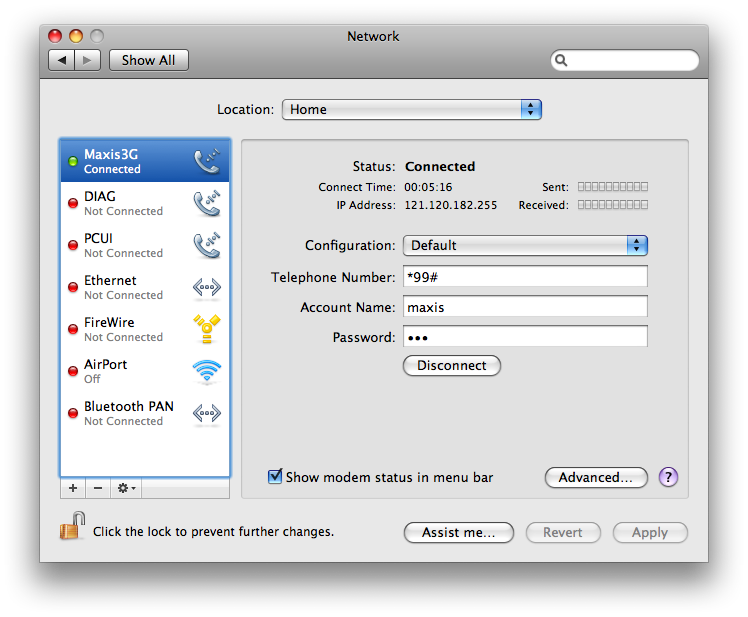 I changed the name from HUAWEI MOBILE to Maxis3G since it sounds nicer  Change Vendor to "Other" then select model "HUAWEI Mobile Connect (u will see 2 HUAWEI, choose the 1st one) Press "OK" 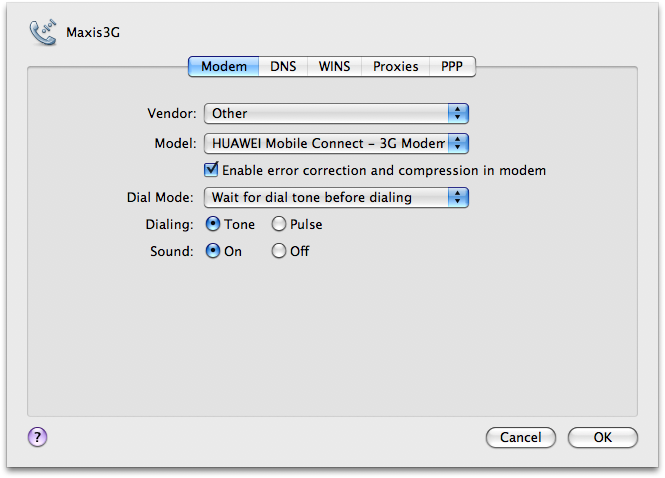 Configuration: Default Tel Number: *99# A/c Name: maxis Password: wap Press "Apply" Click "Connect" **notice tat sometimes u cannot click 'connect' to power up the modem, if this happens, Application > MobileConnect > "connect" Tats all... enjoy maxis3G guys... This post has been edited by jensen_tidus: Nov 23 2007, 05:31 PM |
|
|
|
|
|
Nov 24 2007, 01:38 AM
|
|
Junior Member
72 posts Joined: Dec 2006
|
QUOTE(jensen_tidus @ Nov 23 2007, 03:14 PM) I'm using it now to type this... it's easy... thanks..finally can use it in LEOPARD!!!!!but something wrong with ADIUM...can't sign in with msn acc....is it maxis problem or msn??when in window side,my msn keep on sign in sign out...haiz.....System Preferences > Network > Choose "HUAWEI MOBILE" >click "Advance" > Modem Tab I changed the name from HUAWEI MOBILE to Maxis3G since it sounds nicer Change Vendor to "Other" then select model "HUAWEI Mobile Connect (u will see 2 HUAWEI, choose the 1st one) Press "OK" Configuration: Default Tel Number: *99# A/c Name: maxis Password: wap Press "Apply" Click "Connect" **notice tat sometimes u cannot click 'connect' to power up the modem, if this happens, Application > MobileConnect > "connect" Tats all... enjoy maxis3G guys... thanks HELPING!!!      |
|
|
Nov 24 2007, 08:39 AM
|
|
Junior Member
360 posts Joined: Mar 2006 From: PJ
|
my guess is msn's port number is blocked by maxis... i tried to call the customer service, the only thing they ask me do is use the web-based www.meebo.com or emessenger...
they block peer to peer ports, so i guess msn is within the range tat maxis blocked... correct me if i'm wrong bout this la... my fren using in vista do some crack on his live messenger tat automatic change the connection settings, as for mac... i'm still waiting for maxis's feedback... for current, only skype and iChat av i used can connection without any problem. This post has been edited by jensen_tidus: Nov 24 2007, 08:44 AM |
|
|
Nov 24 2007, 02:29 PM
|
|
Junior Member
72 posts Joined: Dec 2006
|
QUOTE(jensen_tidus @ Nov 24 2007, 09:39 AM) my guess is msn's port number is blocked by maxis... i tried to call the customer service, the only thing they ask me do is use the web-based www.meebo.com or emessenger... thanks for replying!!!!but my msn acc is keep on sign in and out...like pop in out in out...is it acc problem or msn????my fren acc didn't face this problem....mean all MAC user's can't use adium msn acc??? they block peer to peer ports, so i guess msn is within the range tat maxis blocked... correct me if i'm wrong bout this la... my fren using in vista do some crack on his live messenger tat automatic change the connection settings, as for mac... i'm still waiting for maxis's feedback... for current, only skype and iChat av i used can connection without any problem. |
|
|
Nov 24 2007, 09:50 PM
|
|
Junior Member
360 posts Joined: Mar 2006 From: PJ
|
msn client is not usable...
use web-based msn eg: emessenger / www.meebo.com i still dun have the solution for tat yet.... |
| Change to: |  0.0240sec 0.0240sec
 0.76 0.76
 5 queries 5 queries
 GZIP Disabled GZIP Disabled
Time is now: 17th December 2025 - 01:47 AM |
 Quote
Quote