Outline ·
[ Standard ] ·
Linear+
Mac with maxis broadband, Setting on maxis broadband
|
jensen_tidus
|
 Nov 23 2007, 02:14 PM Nov 23 2007, 02:14 PM
|

|
I'm using it now to type this... it's easy... System Preferences > Network > Choose "HUAWEI MOBILE" >click "Advance" > Modem Tab 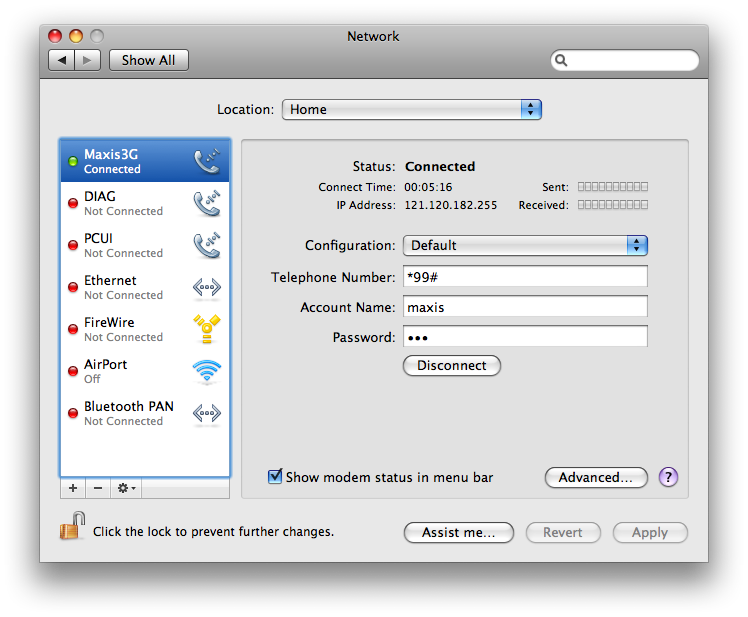 I changed the name from HUAWEI MOBILE to Maxis3G since it sounds nicer  Change Vendor to "Other" then select model "HUAWEI Mobile Connect (u will see 2 HUAWEI, choose the 1st one) Press "OK" 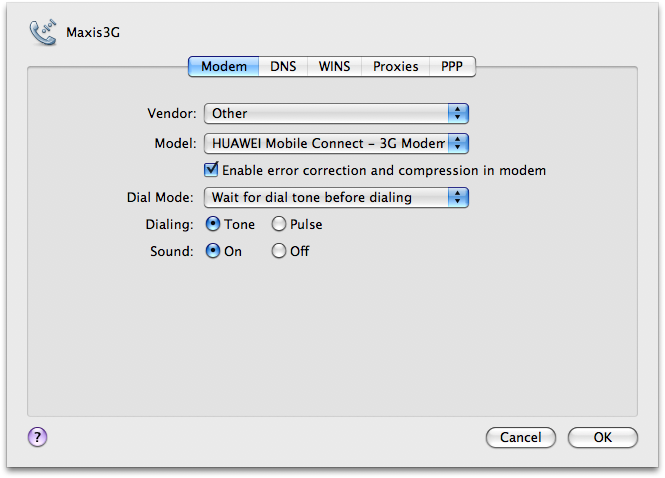 Configuration: Default Tel Number: *99# A/c Name: maxis Password: wap Press "Apply" Click "Connect" **notice tat sometimes u cannot click 'connect' to power up the modem, if this happens, Application > MobileConnect > "connect" Tats all... enjoy maxis3G guys... This post has been edited by jensen_tidus: Nov 23 2007, 05:31 PM |
|
|
|
|
|
jensen_tidus
|
Nov 24 2007, 08:39 AM
|
|
|
my guess is msn's port number is blocked by maxis... i tried to call the customer service, the only thing they ask me do is use the web-based www.meebo.com or emessenger...
they block peer to peer ports, so i guess msn is within the range tat maxis blocked... correct me if i'm wrong bout this la...
my fren using in vista do some crack on his live messenger tat automatic change the connection settings, as for mac... i'm still waiting for maxis's feedback...
for current, only skype and iChat av i used can connection without any problem.
This post has been edited by jensen_tidus: Nov 24 2007, 08:44 AM
|
|
|
|
|
|
jensen_tidus
|
Nov 24 2007, 09:50 PM
|
|
|
msn client is not usable...
use web-based msn eg: emessenger / www.meebo.com
i still dun have the solution for tat yet....
|
|
|
|
|



 Quote
Quote
 0.0157sec
 0.39
0.39
 6 queries
 GZIP Disabled