

 Mar 18 2025, 07:22 PM, updated 9 months ago


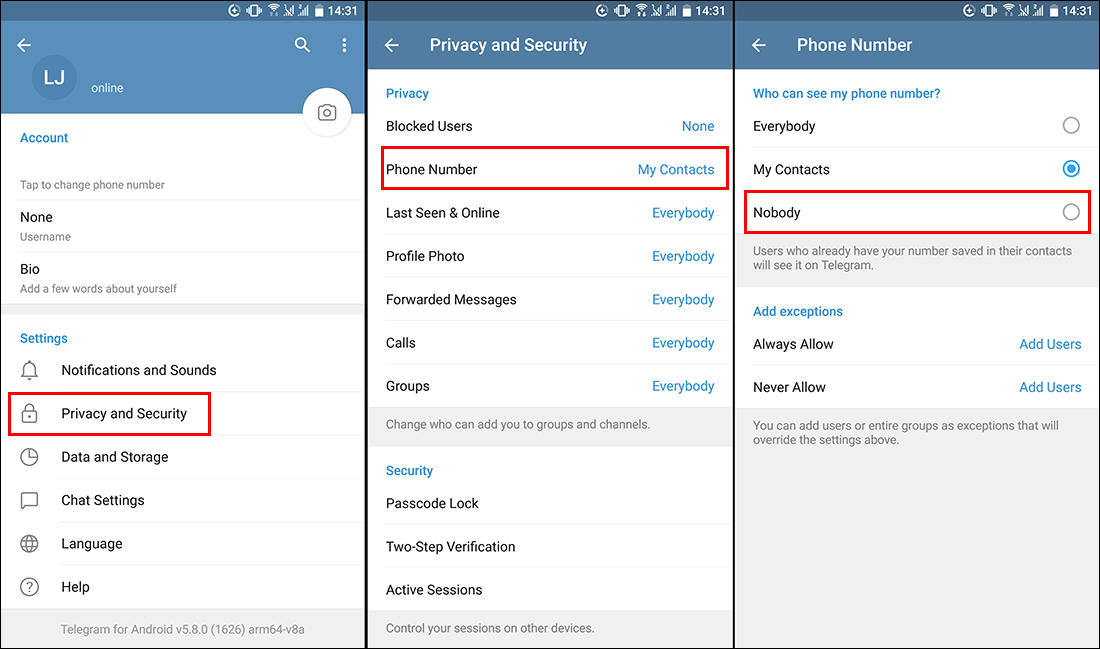
1️⃣ Open Telegram and go to ☰ (Menu) > Settings
2️⃣ Select Privacy & Security
3️⃣ Tap Phone Number
4️⃣ Under Who can see my phone number?, choose:
Nobody (Completely hide your number)
My Contacts (Only people in your contacts can see it)
5️⃣ If you choose "Nobody," you can add exceptions to allow specific people to see your number.
After adjusting these settings, your phone number will be hidden from strangers, keeping your privacy safe. 🚀
---------------------------------------------------------------------------------------------------------------------------------------------------
Telegram X is no longer actively developed and does not support video calls, but it can hide your phone number if you add your friends using their Telegram ID .
If you need video calling, it's best to switch to the official Telegram app (the blue icon version), which supports both voice and video calls.
If you prefer to keep using Telegram X but need video calls, you can try:
🔹 Using the official Telegram app just for video calls while continuing to chat in Telegram X.
🔹 Using another app like WhatsApp, Google Meet, or Zoom for video calls.
2️⃣ Telegram (Android) Cannot Hide Phone Number
Telegram does allow you to hide your phone number, but you may need to manually adjust the privacy settings.


This post has been edited by plouffle0789: Mar 20 2025, 03:32 AM
 Quote
Quote






 0.0145sec
 0.58
0.58
 5 queries
 GZIP Disabled