Outline ·
[ Standard ] ·
Linear+
[wta]How to setup unifi fixed il, On tm modem
|
TScloudclone
|
 Dec 27 2024, 12:13 AM, updated 12 months ago Dec 27 2024, 12:13 AM, updated 12 months ago
|

|
Hi. Recently upgrading biz fixed ip, got 5 fixed ip.
Old tm modem dlink can directly set wan ip as router IP, sp when I plug in lan cable, I can direct assign fixed ip and use.
Now the new tm modem can't, have to set lan ip and wan ip separate. Any way can do?
The tm technician didn't seem know how to do so.
This post has been edited by cloudclone: Dec 30 2024, 10:10 PM
|
|
|
|
|
|
TScloudclone
|
Dec 30 2024, 10:09 PM
|
|
|
QUOTE(eds2 @ Dec 28 2024, 10:29 PM) port forward your desired private IP and port to the fixed IP? Any detailed guide? It works by port forwarding like normal? |
|
|
|
|
|
TScloudclone
|
Dec 31 2024, 11:55 PM
|
|
|
QUOTE(eds2 @ Dec 31 2024, 01:09 AM) if the tm dlink is same with home router, it only have basic port forwarding feature (cannot add wan IP) so, connect the device to router lan port and set tm wan fixed IP on the device. iinm need to disable NAT at pppoe profile first. but by doing this, wifi will not work and only device connected to the router only can get internet. need to add secondary router for NAT and dhcp. get another router like fortinet or mikrotik. i'm using pfsense btw and this is my settings: 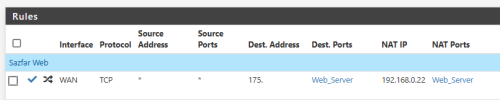 Pfsense add port forward like the one u set right? |
|
|
|
|
|
TScloudclone
|
Jan 2 2025, 03:11 PM
|
|
|
QUOTE(eds2 @ Jan 2 2025, 12:09 AM) yeah. you're hosting anything at office? Yes housing everything |
|
|
|
|



 Quote
Quote

 0.0174sec
 0.73
0.73
 6 queries
 GZIP Disabled