


 Oct 21 2024, 07:27 PM, updated 2y ago


To book a Grab ride for someone else, you can follow these steps:
QUOTE
1. Open the Grab app:
Ensure you have the latest version of the Grab app installed on your phone.
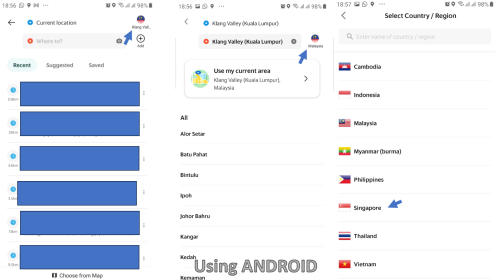
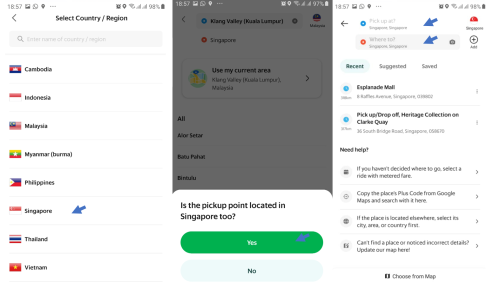
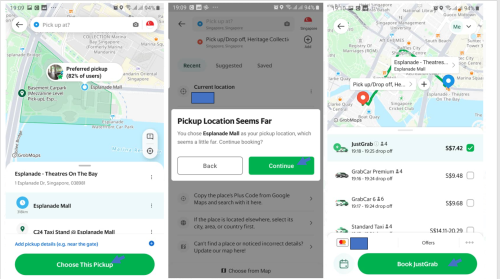
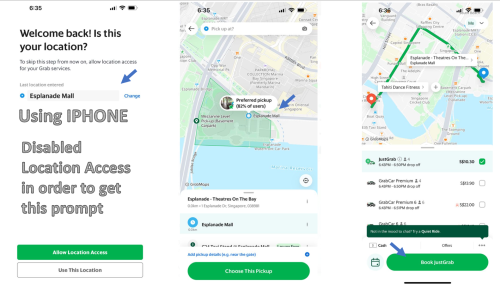
2. Enter the pickup location:
On the main screen, tap on the location bar at the top.
Set the pickup location to where the other person is currently located, not where you are.
3. Set the destination:
Enter the destination that the other person needs to go to.
4. Choose the ride type:
Select the type of Grab service (e.g., GrabCar, GrabBike) you want to book.
5. Enter the passenger’s details:
When booking for someone else, look for the option to input the passenger’s contact information. This is usually done at the confirmation screen. There, you can add their name and phone number, ensuring the driver can contact them directly.
6. Confirm the booking:
Double-check the details and confirm the booking.
7. Inform the other person:
Let the other person know that the Grab ride is booked, and give them any relevant ride details like the driver's name, license plate, and estimated arrival time.
QUOTE
QUOTE
 Quote
Quote





 0.0122sec
 0.79
0.79
 5 queries
 GZIP Disabled