Welcome Guest ( Log In | Register )

Outline · [ Standard ] · Linear+

 Unifi's FiberHome router LAN port speed is capped?

views
     
TSLozy
post Aug 26 2024, 06:12 PM, updated 2y ago

Getting Started
**
Junior Member
83 posts

Joined: Apr 2016


user posted image
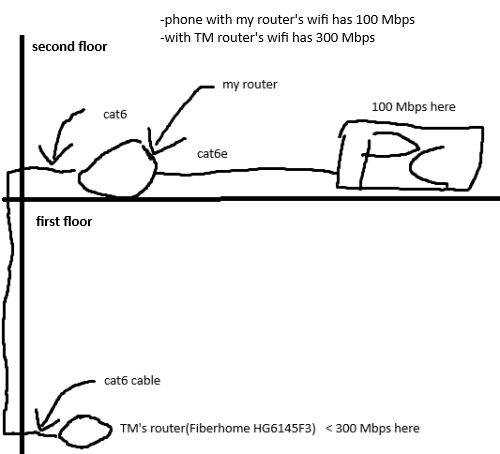
Wifi/Wired connections to TM's router is getting 300Mbps, but my second router is only receiving 100Mbps
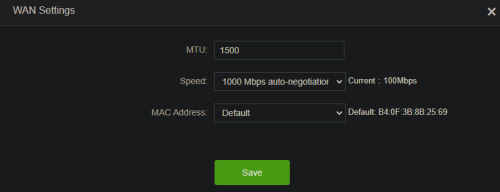

user posted image
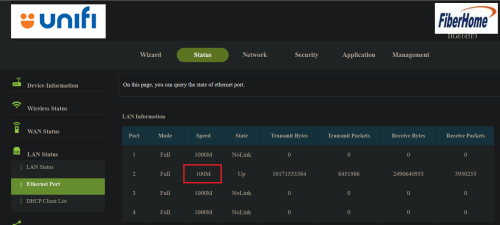
My router's firmware is showing its receiving only 100 Mbps, tested on speedtest also same result
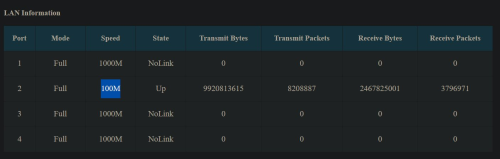


user posted image
TM's router's firmware showing its sending 100 Mbps via LAN port

What do these findings indicate?

If I'm getting 300 Mbps directly to TM's router, it should also serves 300 Mbps to downstream routers connected via LAN port? It should work like this isnt it?
All cables are cat6 up, except I dont know whats inside my cat wall jack behind the walls
Went to TM's routers firmware and I couldnt find anything related to "speed"

If TM's router is indicating its sending 100 Mbps via LAN port, its safe to assume theres no faulty cable inside my walls right? rclxub.gif rclxub.gif rclxub.gif


budi1413
post Aug 26 2024, 06:20 PM

Regular
******
Senior Member
1,607 posts

Joined: Aug 2013


QUOTE(Lozy @ Aug 26 2024, 06:12 PM)
user posted image
Wifi/Wired connections to TM's router is getting 300Mbps, but my second router is only receiving 100Mbps
user posted image
My router's firmware is showing its receiving only 100 Mbps, tested on speedtest also same result
user posted image
TM's router's firmware showing its sending 100 Mbps via LAN port

What do these findings indicate?

If I'm getting 300 Mbps directly to TM's router, it should also serves 300 Mbps to downstream routers connected via LAN port? It should work like this isnt it?
All cables are cat6 up, except I dont know whats inside my cat wall jack behind the walls
Went to TM's routers firmware and I couldnt find anything related to "speed"

If TM's router is indicating its sending 100 Mbps via LAN port, its safe to assume theres no faulty cable inside my walls right?  rclxub.gif  rclxub.gif  rclxub.gif
*
most probably the cable behind the wall is cat5
TSLozy
post Aug 26 2024, 06:24 PM

Getting Started
**
Junior Member
83 posts

Joined: Apr 2016


QUOTE(budi1413 @ Aug 26 2024, 06:20 PM)
most probably the cable behind the wall is cat5
*
But TM's router is already indicating its sending just 100 Mbps, isnt it suffice to eliminate the possiblity of faulty cable inside the walls?
user posted image
IccyAsd
post Aug 26 2024, 06:27 PM

Enthusiast
Group Icon
Staff
846 posts

Joined: Apr 2005
QUOTE(Lozy @ Aug 26 2024, 06:12 PM)
user posted image
Wifi/Wired connections to TM's router is getting 300Mbps, but my second router is only receiving 100Mbps
user posted image
My router's firmware is showing its receiving only 100 Mbps, tested on speedtest also same result
user posted image
TM's router's firmware showing its sending 100 Mbps via LAN port

What do these findings indicate?

If I'm getting 300 Mbps directly to TM's router, it should also serves 300 Mbps to downstream routers connected via LAN port? It should work like this isnt it?
All cables are cat6 up, except I dont know whats inside my cat wall jack behind the walls
Went to TM's routers firmware and I couldnt find anything related to "speed"

If TM's router is indicating its sending 100 Mbps via LAN port, its safe to assume theres no faulty cable inside my walls right?  rclxub.gif  rclxub.gif  rclxub.gif
*
to test it out, bring your router to first floor connect with a short Cat6 cable.
budi1413
post Aug 26 2024, 06:33 PM

Regular
******
Senior Member
1,607 posts

Joined: Aug 2013


QUOTE(Lozy @ Aug 26 2024, 06:24 PM)
But TM's router is already indicating its sending just 100 Mbps, isnt it suffice to eliminate the possiblity of faulty cable inside the walls?
user posted image
*
both router network port auto negotiate the best speed to use sweat.gif
TSLozy
post Aug 26 2024, 06:34 PM

Getting Started
**
Junior Member
83 posts

Joined: Apr 2016


QUOTE(IccyAsd @ Aug 26 2024, 06:27 PM)
to test it out, bring your router to first floor connect with a short Cat6 cable.
*
Hmm so if i can get 300 Mbps then it must be the cables somewhere
If I get 100 Mbps then my Tenda AC2100 is a faulty router

Will give it another try tomorrow when I come back home, thanks for the pointer
TSLozy
post Aug 26 2024, 06:36 PM

Getting Started
**
Junior Member
83 posts

Joined: Apr 2016


QUOTE(budi1413 @ Aug 26 2024, 06:33 PM)
both router network port auto negotiate the best speed to use sweat.gif
*
Ahh, i thought its one way, makes sense then something is wrong in between the 2 routers
TSLozy
post Aug 27 2024, 10:59 AM

Getting Started
**
Junior Member
83 posts

Joined: Apr 2016


QUOTE(budi1413 @ Aug 26 2024, 06:33 PM)
both router network port auto negotiate the best speed to use sweat.gif
*
QUOTE(IccyAsd @ Aug 26 2024, 06:27 PM)
to test it out, bring your router to first floor connect with a short Cat6 cable.
*
So I took my router and the cat6 cable its using to connect to the walljack on second floor, and had a direct connect to TM's router
And I have 300 Mbps on wifi with both my TM router and my personal router...

This 100% means something is wrong with my walljack right? But how do I find the root cause?
Whether if its the port on first floor, second floor, or the entire cable inside the wall?

I looked up on the internet, seems like I have to dismount my walljack to check what cable its using inside, is there any other way to check without dismantling the entire thing? cry.gif cry.gif cry.gif


karenzayn
post Aug 27 2024, 12:53 PM

Getting Started
**
Junior Member
98 posts

Joined: Sep 2019
From: Kuching
QUOTE(Lozy @ Aug 27 2024, 10:59 AM)
So I took my router and the cat6 cable its using to connect to the walljack on second floor, and had a direct connect to TM's router
And I have 300 Mbps on wifi with both my TM router and my personal router...

This 100% means something is wrong with my walljack right? But how do I find the root cause?
Whether if its the port on first floor, second floor, or the entire cable inside the wall?

I looked up on the internet, seems like I have to dismount my walljack to check what cable its using inside, is there any other way to check without dismantling the entire thing?  cry.gif  cry.gif  cry.gif
*
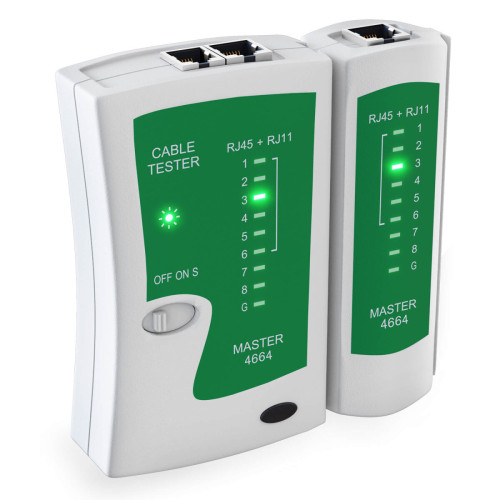
Get one of those cheap cable tester and test it end to end, see if the walljack missed some of the pairs, if all 8 light running in the right sequence, no problem, but if any of the pairs went blank or hop to a different row of light, redo the walljack.

user posted image
TSLozy
post Aug 27 2024, 03:34 PM

Getting Started
**
Junior Member
83 posts

Joined: Apr 2016


QUOTE(karenzayn @ Aug 27 2024, 12:53 PM)
Get one of those cheap cable tester and test it end to end, see if the walljack missed some of the pairs, if all 8 light running in the right sequence, no problem, but if any of the pairs went blank or hop to a different row of light, redo the walljack.

user posted image
*
Hmm what cables do i need to test with?
Because the problem has narrowed down to either the walljack on first or second floor, or the cable inside the wall that connect both walljack

So its not really about cables at this point isnt it?


Zot
post Aug 27 2024, 05:00 PM

Look at all my stars!!
*******
Senior Member
7,938 posts

Joined: Mar 2014
A badly terminated cable can cause the drop in speed also. Using cable tester help to determine how good the cables are. If the cable tested good, then your router port can be faulty.. Corroded pin can be the cause too. Good RJ-45 socket and plug are gold plated.

How is the cable laid to top floor? If cable is not shielded type, maybe it is prone to interference if close to electrical wiring. If need to run along the electrical cable, maybe it is good to use fiber optic. It is cheaper than the LAN cable but the converter optic to LAN maybe expensive a bit. laugh.gif
budi1413
post Aug 27 2024, 07:02 PM

Regular
******
Senior Member
1,607 posts

Joined: Aug 2013


QUOTE(Lozy @ Aug 27 2024, 03:34 PM)
Hmm what cables do i need to test with?
Because the problem has narrowed down to either the walljack on first or second floor, or the cable inside the wall that connect both walljack

So its not really about cables at this point isnt it?
*
how long the cable already there? since already got trunking inside easier to just lay new cable replacing the current cabling.
IccyAsd
post Aug 27 2024, 07:33 PM

Enthusiast
Group Icon
Staff
846 posts

Joined: Apr 2005
QUOTE(Lozy @ Aug 27 2024, 10:59 AM)
So I took my router and the cat6 cable its using to connect to the walljack on second floor, and had a direct connect to TM's router
And I have 300 Mbps on wifi with both my TM router and my personal router...

This 100% means something is wrong with my walljack right? But how do I find the root cause?
Whether if its the port on first floor, second floor, or the entire cable inside the wall?

I looked up on the internet, seems like I have to dismount my walljack to check what cable its using inside, is there any other way to check without dismantling the entire thing?  cry.gif  cry.gif  cry.gif
*
this means your router has no issue, most likely the cables in the wall. either bad cable, connection or its using CAT 5 cable, if its CAT 5E you could have reach 1gb.

This post has been edited by IccyAsd: Aug 27 2024, 07:41 PM
TSLozy
post Aug 27 2024, 11:39 PM

Getting Started
**
Junior Member
83 posts

Joined: Apr 2016


QUOTE(Zot @ Aug 27 2024, 05:00 PM)
Using cable tester help to determine how good the cables are. If the cable tested good, then your router port can be faulty.. Corroded pin can be the cause too. Good RJ-45 socket and plug are gold plated.
*
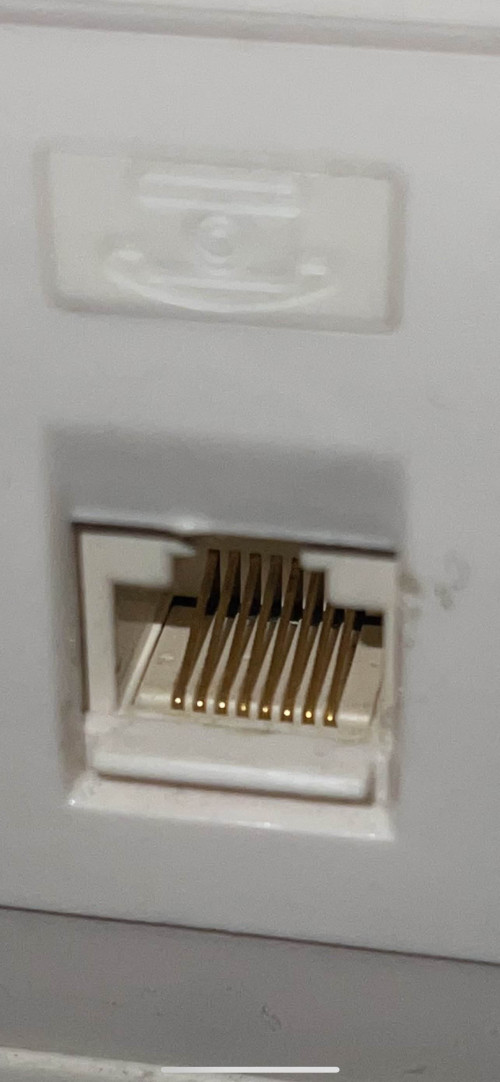
Just figured out how to use cable tester, yeah it makes sense now to me
At first i thought its to test my cable and not the port, but actually i need just a cable to connect the cable tester and my walljack port

user posted image
This is what I see from the outside, but all I see are gold plated "pins"


QUOTE(Zot @ Aug 27 2024, 05:00 PM)
How is the cable laid to top floor? If cable is not shielded type, maybe it is prone to interference if close to electrical wiring. If need to run along the electrical cable, maybe it is good to use fiber optic. It is cheaper than the LAN cable but the converter optic to LAN maybe expensive a bit.  laugh.gif
*
No idea unfortunately...and I'm having second thought whether if I even need cable tester at this point or just call someone up to fix the entire thing for me rclxub.gif
TSLozy
post Aug 27 2024, 11:41 PM

Getting Started
**
Junior Member
83 posts

Joined: Apr 2016


QUOTE(budi1413 @ Aug 27 2024, 07:02 PM)
how long the cable already there? since already got trunking inside easier to just lay new cable replacing the current cabling.
*
Ever since we moved in, it sounds like I need professional help on this right?
Because I need to take out the old cable, insert new cable, cable termination, keystone jack, walljack mounting
Zot
post Aug 28 2024, 08:44 AM

Look at all my stars!!
*******
Senior Member
7,938 posts

Joined: Mar 2014
QUOTE(Lozy @ Aug 27 2024, 11:39 PM)
Just figured out how to use cable tester, yeah it makes sense now to me
At first i thought its to test my cable and not the port, but actually i need just a cable to connect the cable tester and my walljack port

user posted image
This is what I see from the outside, but all I see are gold plated "pins"
No idea unfortunately...and I'm having second thought whether if I even need cable tester at this point or just call someone up to fix the entire thing for me  rclxub.gif
*
In your case it is not difficult I think. Take your router from upstairs down to connect direct using your known good cable to the TM port. Try another cable for confirmation if it is still 100Mbps. If it still is, then probably the router. If you get more than 100Mbps, then the cable in the wall. I did not know that the cable to upstairs were already there when you moved in. Probably that cable cannot handle the speed due to spec + length.
TSLozy
post Aug 28 2024, 09:39 AM

Getting Started
**
Junior Member
83 posts

Joined: Apr 2016


QUOTE(Zot @ Aug 28 2024, 08:44 AM)
In your case it is not difficult I think. Take your router from upstairs down to connect direct using your known good cable to the TM port. Try another cable for confirmation if it is still 100Mbps. If it still is, then probably the router. If you get more than 100Mbps, then the cable in the wall. I did not know that the cable to upstairs were already there when you moved in. Probably that cable cannot handle the speed due to spec + length.
*
Yep tested before already, was able to get full speed if i connect my router to tm’s router directly without using walljack, tried swapping the cables before also for both the routers-walljack path, no luck, speed still being throttled by something… 🥲
trix
post Aug 28 2024, 09:56 AM

Enthusiast
*****
Senior Member
848 posts

Joined: Feb 2005
From: everywhere, yet nowhere.


QUOTE(Lozy @ Aug 27 2024, 11:41 PM)
Ever since we moved in, it sounds like I need professional help on this right?
Because I need to take out the old cable, insert new cable, cable termination, keystone jack, walljack mounting
*
cable tester = ~RM12
few minutes of your time to test

then,
punch down tool = ~RM6
keystone+wall plate = ~RM6x2
a few minutes to a few hours to watch youtube how to do it and to do it

only if its still not working properly you get a professional to replace the in wall cable


Zot
post Aug 28 2024, 09:56 AM

Look at all my stars!!
*******
Senior Member
7,938 posts

Joined: Mar 2014
QUOTE(Lozy @ Aug 28 2024, 09:39 AM)
Yep tested before already, was able to get full speed if i connect my router to tm’s router directly without using walljack, tried swapping the cables before also for both the routers-walljack path, no luck, speed still being throttled by something… 🥲
*
The cable going upstairs is inside the wall? This is not installed by you, right? I bet the cable is either the CAT5. The speed is 100Mbps max.

This post has been edited by Zot: Aug 28 2024, 09:58 AM
TSLozy
post Aug 28 2024, 10:50 AM

Getting Started
**
Junior Member
83 posts

Joined: Apr 2016


QUOTE(Zot @ Aug 28 2024, 09:56 AM)
The cable going upstairs is inside the wall? This is not installed by you, right? I bet the cable is either the CAT5. The speed is 100Mbps max.
*
Yes inside the wall, and yes not installed by me

QUOTE(trix @ Aug 28 2024, 09:56 AM)
cable tester = ~RM12
few minutes of your time to test

then,
punch down tool = ~RM6
keystone+wall plate = ~RM6x2
a few minutes to a few hours to watch youtube how to do it and to do it

only if its still not working properly you get a professional to replace the in wall cable
*
Will consider about it once I feel confident to fix it
Because the process of opening the walljack and to do all these thing, can definitely make me think "wish i never started all this"

This post has been edited by Lozy: Aug 28 2024, 10:50 AM

2 Pages  1 2 >Top
 

Change to:
| Lo-Fi Version
0.0214sec    0.66    5 queries    GZIP Disabled
Time is now: 19th December 2025 - 03:57 PM