

Any recommended router modem for TIME ?
budget around 200. Max can go is RM 300
TIME suitable modem
TIME suitable modem
|
|
 Aug 17 2024, 09:00 AM, updated 2y ago Aug 17 2024, 09:00 AM, updated 2y ago
Show posts by this member only | Post
#1
|
 
Senior Member
1,431 posts Joined: Mar 2009  
|
Any recommended router modem for TIME ?
budget around 200. Max can go is RM 300 |
|
|
|
|
|
Aug 17 2024, 11:28 AM
Show posts by this member only | IPv6 | Post
#2
|

Senior Member
2,614 posts Joined: Nov 2020 
|
Firstly
Do not confuse modem and router Modem, also known as BTU or ONT, is the one that takes the fiber and converts it into an Ethernet Port for you to connect your router to The router is the one who handles all the network connections and also gives you your WiFi On newer setups, they give you a 2 in 1 device, that combines both into one If your modem is faulty, call TIME and get them to replace it, free, lifetime warranty If you want a new better router, firstly, what's your current router to compare with But for like 200 to 300, maybe consider a TP-Link AX53? |
|
|
Aug 17 2024, 01:14 PM
Show posts by this member only | Post
#3
|
|
Senior Member
1,431 posts Joined: Mar 2009
|
QUOTE(PRSXFENG @ Aug 17 2024, 11:28 AM) Firstly My TIME modem is fine, i just want a new one to have 2 in 1 function so i can discard the TIME default modem.Do not confuse modem and router Modem, also known as BTU or ONT, is the one that takes the fiber and converts it into an Ethernet Port for you to connect your router to The router is the one who handles all the network connections and also gives you your WiFi On newer setups, they give you a 2 in 1 device, that combines both into one If your modem is faulty, call TIME and get them to replace it, free, lifetime warranty If you want a new better router, firstly, what's your current router to compare with But for like 200 to 300, maybe consider a TP-Link AX53?  So for you , which you recommend ? to have 2 in 1 or buy a router and bridge them ? |
|
|
Aug 17 2024, 01:37 PM
Show posts by this member only | IPv6 | Post
#4
|
|
Senior Member
2,614 posts Joined: Nov 2020
|
QUOTE(genjo @ Aug 17 2024, 01:14 PM) My TIME modem is fine, i just want a new one to have 2 in 1 function so i can discard the TIME default modem. 2in1 ones are not generally available for general publicSo for you , which you recommend ? to have 2 in 1 or buy a router and bridge them ? you could buy a 2nd hand time provided one or recontract to get one but it's not worth it to recontract and 2nd hand ones require advanced configuring and even then, most prefer modem + router seperate as it gives you more freedom to choose your own router keep the time provided modem and use a router that you like eyerule liked this post
|
|
|
Aug 17 2024, 02:05 PM
Show posts by this member only | Post
#5
|
|
Senior Member
1,431 posts Joined: Mar 2009
|
if i get TP-Link AX53,
how to get it done and use ? |
|
|
Aug 17 2024, 03:48 PM
Show posts by this member only | IPv6 | Post
#6
|

Senior Member
1,602 posts Joined: Jan 2016
|
QUOTE(genjo @ Aug 17 2024, 02:05 PM) if i get TP-Link AX53, Contact CS to change the mode of 2 in 1 into bridge mode, plug in your new routerhow to get it done and use ? Key in PPPOE credentials, done Or you can try my method if you are comfortable digging a bit more Export the backup file from 2 in 1,buy a huawei ONU (single mode, no wifi version), restore using the backup file Remove PPPOE credentials from the settings, plug in your new router, done |
|
|
|
|
|
Aug 17 2024, 04:54 PM
Show posts by this member only | IPv6 | Post
#7
|
|
Senior Member
2,614 posts Joined: Nov 2020
|
QUOTE(genjo @ Aug 17 2024, 02:05 PM) if i get TP-Link AX53, Assuming you are on oldhow to get it done and use ? modem + router 2 device setup remove old router plug new router, connecting from LAN 1 of modem to WAN of router login to time self care portal and get PPPoE username and password enter those into new router setup done |
|
|
Aug 17 2024, 06:03 PM
Show posts by this member only | IPv6 | Post
#8
|
|
Senior Member
1,431 posts Joined: Mar 2009
|
QUOTE(QuantumEdge @ Aug 17 2024, 03:48 PM) Contact CS to change the mode of 2 in 1 into bridge mode, plug in your new router Key in PPPOE credentials, done Or you can try my method if you are comfortable digging a bit more Export the backup file from 2 in 1,buy a huawei ONU (single mode, no wifi version), restore using the backup file Remove PPPOE credentials from the settings, plug in your new router, done QUOTE(PRSXFENG @ Aug 17 2024, 04:54 PM) Assuming you are on old TQ so much guy , im gonna try once i get it from the sales. What is the price should i be looking for TP-Link AX53?modem + router 2 device setup remove old router plug new router, connecting from LAN 1 of modem to WAN of router login to time self care portal and get PPPoE username and password enter those into new router setup done |
|
|
Aug 17 2024, 08:07 PM
Show posts by this member only | IPv6 | Post
#9
|

Senior Member
1,368 posts Joined: Aug 2010
|
QUOTE(genjo @ Aug 17 2024, 09:00 AM) Any recommended router modem for TIME ? If you're still looking for time 2in1 let me know.budget around 200. Max can go is RM 300 I've terminate my time internet by using less then a year due to moved location and no coverage. 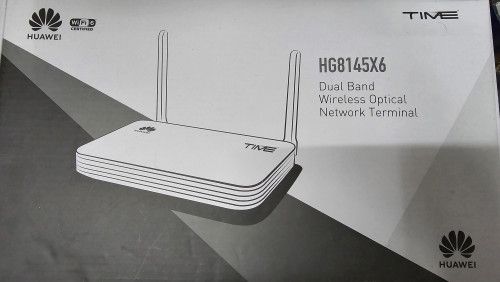 |
| Change to: |  0.0169sec 0.0169sec
 0.52 0.52
 5 queries 5 queries
 GZIP Disabled GZIP Disabled
Time is now: 20th December 2025 - 09:21 AM |
 Quote
Quote