Welcome Guest ( Log In | Register )

Outline · [ Standard ] · Linear+

 Do TM's individual users have to pay for IPV6

views
     
TSsixguyz_jayhan
post Aug 25 2024, 10:45 AM

Getting Started
**
Junior Member
215 posts

Joined: Sep 2019
QUOTE(kwss @ Aug 24 2024, 03:35 PM)
Your screenshot is the IPv6 tab right?
There's another tab called Internet Setting, you put your PPPoE there.
*
Yup. In internet setting, all fine, using pppoe. This tab, IPv6, I tried using DHCP mode but not working, so I changed to PPPoE mode ya.
TSsixguyz_jayhan
post Aug 25 2024, 10:49 AM

Getting Started
**
Junior Member
215 posts

Joined: Sep 2019
Yestd I asked TM's staff, they encourage us to use SLAAC+Stateless mode. However, my router (AC23) doesn't provide the option for SLAAC but DHCPv6, they got no way to help. They recommended me to use their new router (RG6) as they only have certain manual instruction on hand.
I think the SLAAC make the diff, which cause the IPv6 won't work on my network access.
PJng
post Aug 25 2024, 10:55 AM

10k Club
********
All Stars
12,063 posts

Joined: Oct 2017


QUOTE(sixguyz_jayhan @ Aug 25 2024, 10:44 AM)
Tenda, AC23. Thanks dude.
*
Just checked emulator, no such setting, as compare to my TP Link
kwss
post Aug 25 2024, 03:49 PM

Regular
******
Senior Member
1,209 posts

Joined: Aug 2018
QUOTE(sixguyz_jayhan @ Aug 25 2024, 10:45 AM)
Yup. In internet setting, all fine, using pppoe. This tab, IPv6, I tried using DHCP mode but not working, so I changed to PPPoE mode ya.
*
DHCPv6 with prefix delegation is the correct setting.
Just wondering if you tried updating the firmware of your Tenda?

What device you use to test the IPv6? Only Android needs SLAAC. Windows and other OS can work with DHCP.
Did you check if you enable IPv6 in your network adapter?
TSsixguyz_jayhan
post Aug 27 2024, 09:39 AM

Getting Started
**
Junior Member
215 posts

Joined: Sep 2019
QUOTE(kwss @ Aug 25 2024, 03:49 PM)
DHCPv6 with prefix delegation is the correct setting.
Just wondering if you tried updating the firmware of your Tenda?

What device you use to test the IPv6? Only Android needs SLAAC. Windows and other OS can work with DHCP.
QUOTE
Did you check if you enable IPv6 in your network adapter?

*
QUOTE
Just wondering if you tried updating the firmware of your Tenda?

Yes.

QUOTE
What device you use to test the IPv6?

PC.

QUOTE
Did you check if you enable IPv6 in your network adapter?

Yes. Refer to prev attachment, I enabled it. Don't work.
kwss
post Aug 30 2024, 03:02 AM

Regular
******
Senior Member
1,209 posts

Joined: Aug 2018
QUOTE(sixguyz_jayhan @ Aug 27 2024, 09:39 AM)
*

Yes. Refer to prev attachment, I enabled it. Don't work.
*
I read back all your posts but it isn't obvious to me that you confirm to have enabled IPv6 in your PC network adapter. Could you double check on that?

Other than that I suspect the way Tenda requests IPv6 is not compatible with TM.
eg: Tenda sends DHCPv6-IA_NA + PD. This will get you IPv6 on Time and Maxis, but not TM.
With TM, the router must only request PD and nothing else.

This post has been edited by kwss: Aug 30 2024, 03:02 AM
TSsixguyz_jayhan
post Aug 31 2024, 11:51 AM

Getting Started
**
Junior Member
215 posts

Joined: Sep 2019
QUOTE(kwss @ Aug 30 2024, 03:02 AM)
I read back all your posts but it isn't obvious to me that you confirm to have enabled IPv6 in your PC network adapter. Could you double check on that?

Other than that I suspect the way Tenda requests IPv6 is not compatible with TM.
eg: Tenda sends DHCPv6-IA_NA + PD. This will get you IPv6 on Time and Maxis, but not TM.
With TM, the router must only request PD and nothing else.
*
QUOTE
Could you double check on that?

Let me update with you once Im on that network. Just to clarify ya, you want me to show the Properties of Network Connection in Network Adapter? Sorry if I can't get your doubt sweat.gif

QUOTE
Other than that I suspect the way Tenda requests IPv6 is not compatible with TM.

Yep. I guess it is...maybe certain model of router would do

kwss
post Aug 31 2024, 10:51 PM

Regular
******
Senior Member
1,209 posts

Joined: Aug 2018
QUOTE(sixguyz_jayhan @ Aug 31 2024, 11:51 AM)
Let me update with you once Im on that network. Just to clarify ya, you want me to show the Properties of Network Connection in Network Adapter? Sorry if I can't get your doubt  sweat.gif
Yep. I guess it is...maybe certain model of router would do
*
Yes I meant that. I suspect it might be disabled in Windows.
TSsixguyz_jayhan
post Sep 5 2024, 07:32 PM

Getting Started
**
Junior Member
215 posts

Joined: Sep 2019
QUOTE(kwss @ Aug 31 2024, 10:51 PM)
Yes I meant that. I suspect it might be disabled in Windows.
*
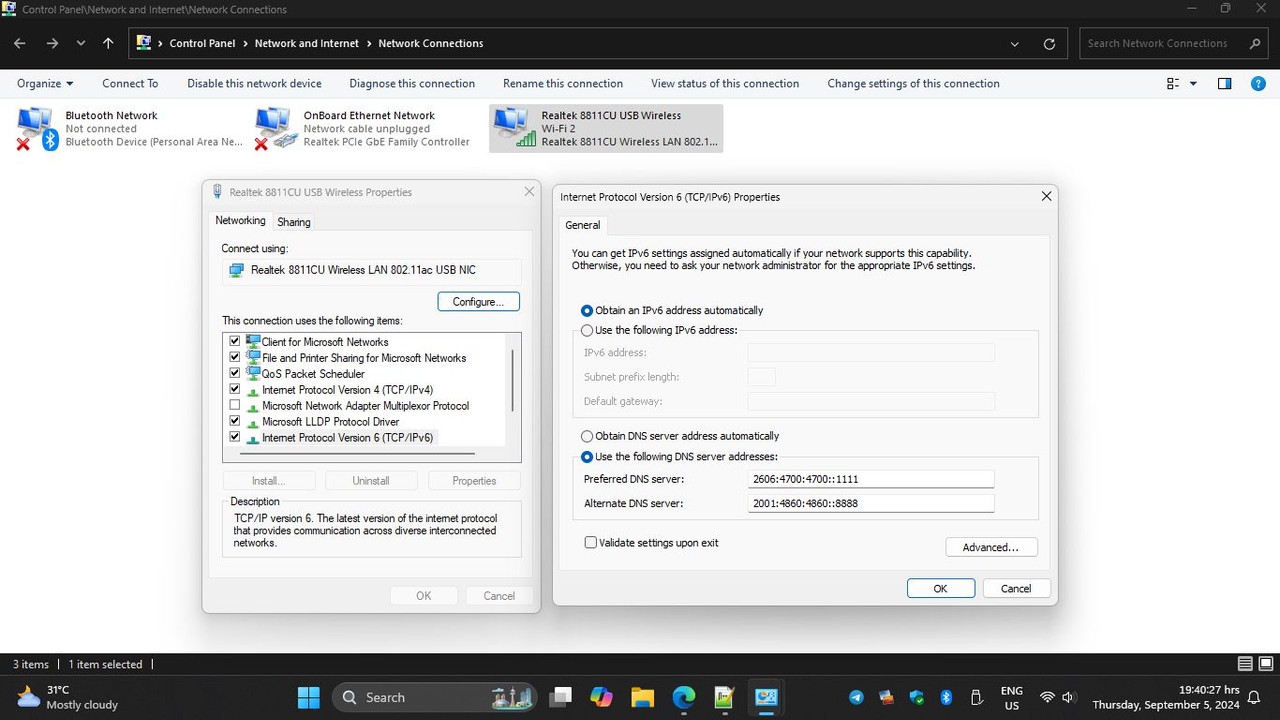
Sorry for the late reply

By default, the option was on. But I didn't use any manual input DNS.


Attached thumbnail(s)
Attached Image
Xploit Machine
post Sep 5 2024, 07:42 PM

❤️ 孤独な旅行者 ❤️​
*******
Senior Member
7,272 posts

Joined: Nov 2008
From: SINGAPORE💃

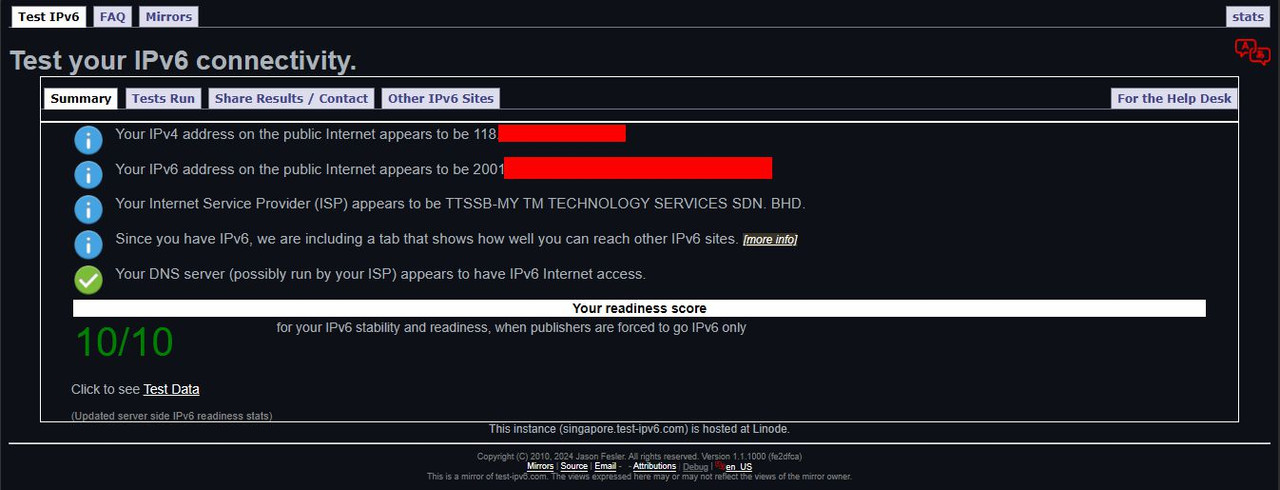
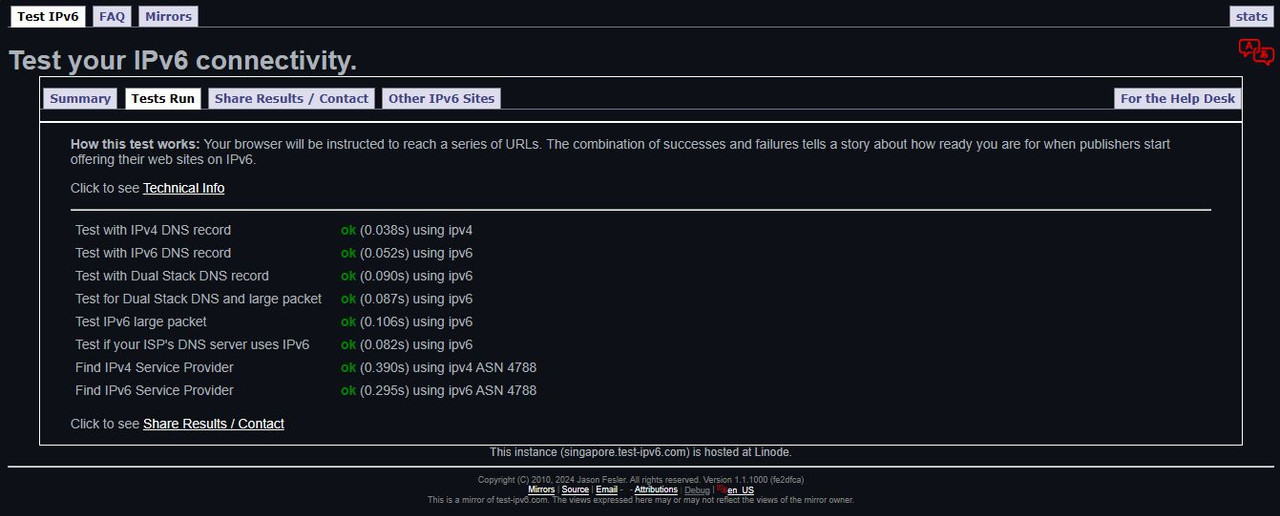
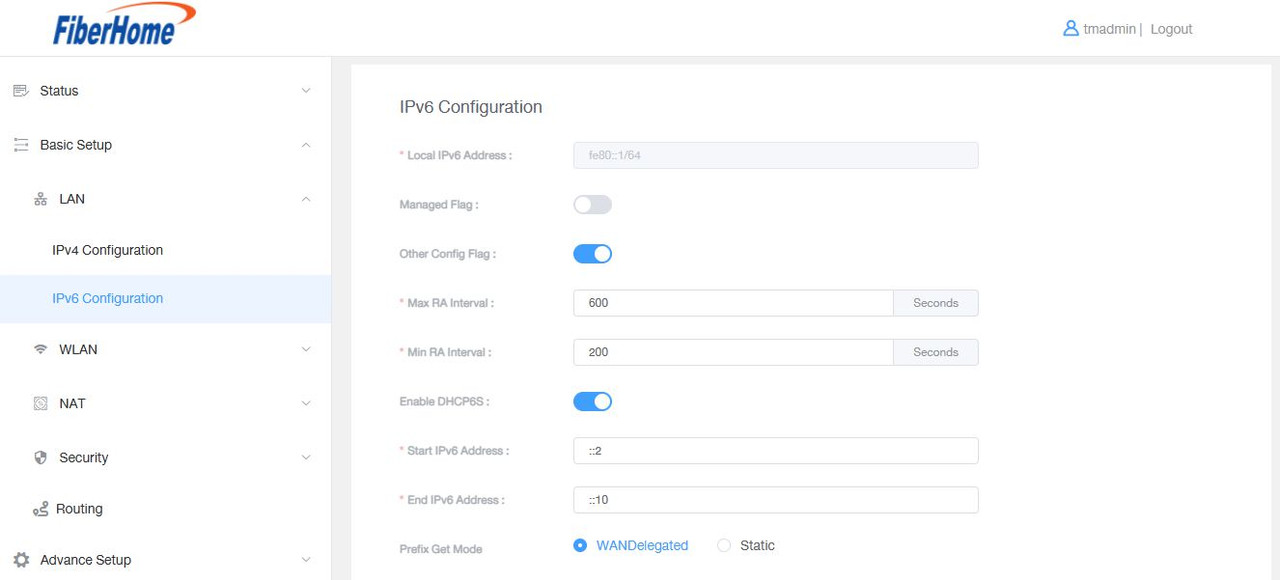
all new routers have IPv4 and IPv6, mine all ok .. i keep all the same settings since the day 1 installed TM UnFi fibre ..

user posted image
user posted image
user posted image
user posted image

PRSXFENG
post Sep 5 2024, 08:06 PM

Look at all my stars!!
*******
Senior Member
2,616 posts

Joined: Nov 2020


I feel like the solution is just... replace the Tenda router.

kwss
post Sep 5 2024, 11:02 PM

Regular
******
Senior Member
1,209 posts

Joined: Aug 2018
QUOTE(sixguyz_jayhan @ Sep 5 2024, 07:32 PM)
Sorry for the late reply

By default, the option was on. But I didn't use any manual input DNS.
*
I suspect the way the Tenda does DHCPv6 is not compatible with TM then.
TM DHCPv6 server is very picky on the options. It will not hand out IPv6 if you request anything more than PD.

3 Pages < 1 2 3Top
 

Change to:
| Lo-Fi Version
0.0184sec    0.73    6 queries    GZIP Disabled
Time is now: 24th December 2025 - 12:06 PM