

https://inonius.net/speedtest/
dual stack IPv4 and IPv6 speed test
Do TM's individual users have to pay for IPV6
Do TM's individual users have to pay for IPV6
|
|
 Aug 16 2024, 11:14 AM Aug 16 2024, 11:14 AM
|
 
Senior Member
2,795 posts Joined: May 2008 
|
|
|
|
|
|
|
Aug 16 2024, 11:32 AM
Show posts by this member only | IPv6 | Post
#22
|

Junior Member
932 posts Joined: Dec 2019
|
QUOTE(Zot @ Aug 16 2024, 08:24 AM) How you know? If the network is congested, IPv4 or IPv6 makes no difference. It is just benefit the service and content providers more the way I see it. Yes, your request get resolved faster but the network bandwidth will limit the data speed. TM v4 and v6 actually has different peering path afaik, depending on what you’re trying to connect to, it might offer a tangible improvement to the loading times  sixguyz_jayhan liked this post
|
|
|
Aug 16 2024, 11:57 AM
|

Senior Member
7,938 posts Joined: Mar 2014
|
QUOTE(yenchenje @ Aug 16 2024, 11:32 AM) TM v4 and v6 actually has different peering path afaik, depending on what you’re trying to connect to, it might offer a tangible improvement to the loading times The IPv^ is faster in such a way that it has faster routing due to lack of NAT and faster packet processing. So, you will have lower latency. That's about it. So, if you are doing FTP/IP with handshaking on packets, then you will likely see improvement on speed. However if you are streaming data on UDP/IP, then probably nothing much significant in speed. This is because speed difference between IPv4 and IPv6 can vary depending on network configurations, hardware, and other factors which can be negligible. sixguyz_jayhan liked this post
|
|
|
Aug 17 2024, 09:59 AM
|
|
Senior Member
5,296 posts Joined: Nov 2006
|
QUOTE(Zot @ Aug 16 2024, 11:57 AM) The IPv^ is faster in such a way that it has faster routing due to lack of NAT and faster packet processing. So, you will have lower latency. That's about it. So, if you are doing FTP/IP with handshaking on packets, then you will likely see improvement on speed. However if you are streaming data on UDP/IP, then probably nothing much significant in speed. This is because speed difference between IPv4 and IPv6 can vary depending on network configurations, hardware, and other factors which can be negligible. I concur but malaysia IPV6 got sucky routing. IPV4 still the best in term of latency |
|
|
Aug 19 2024, 10:48 AM
|

Junior Member
215 posts Joined: Sep 2019
|
QUOTE(The.Lucas.DaY @ Aug 15 2024, 10:39 PM) This is my setting in Unifi stock router, that's default setting Thanks for your help, but can't view your attachment....» Click to show Spoiler - click again to hide... « |
|
|
Aug 19 2024, 10:51 AM
|
|
Junior Member
215 posts Joined: Sep 2019
|
QUOTE(Zot @ Aug 16 2024, 08:24 AM) How you know? If the network is congested, IPv4 or IPv6 makes no difference. It is just benefit the service and content providers more the way I see it. Yes, your request get resolved faster but the network bandwidth will limit the data speed. I use this https://test-ipv6.com/ for checking. I don't know is it formal... |
|
|
|
|
|
Aug 20 2024, 03:05 PM
|

Junior Member
340 posts Joined: Mar 2010 From: Shah Alam 
|
Also, if you're on a plan below 500 Mbps (or is it 800 Mbps now?), IPv6 means you're not behind a CGNAT.
|
|
|
Aug 20 2024, 04:36 PM
Show posts by this member only | IPv6 | Post
#28
|

All Stars
12,059 posts Joined: Oct 2017 
|
i just show my tp link setting, and the page result 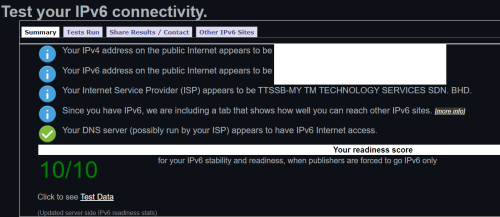 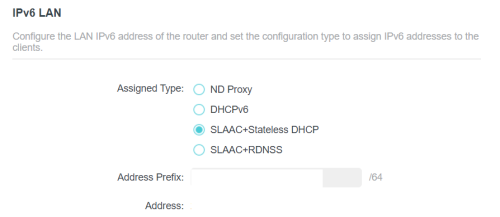 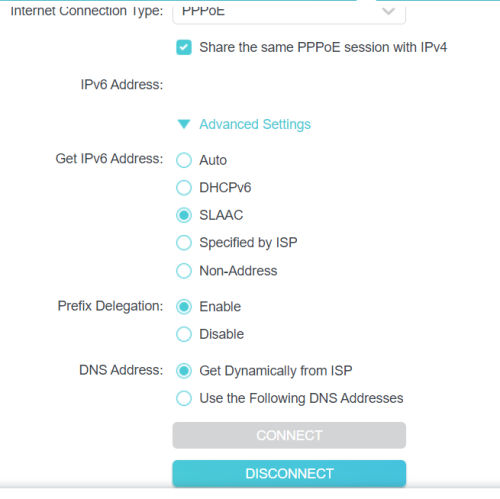 sixguyz_jayhan liked this post
|
|
|
Aug 20 2024, 05:24 PM
Show posts by this member only | IPv6 | Post
#29
|
|
Junior Member
932 posts Joined: Dec 2019
|
QUOTE(Epic_winner091 @ Aug 20 2024, 03:05 PM) Also, if you're on a plan below 500 Mbps (or is it 800 Mbps now?), IPv6 means you're not behind a CGNAT. CGNAT doesn’t apply to TM IPv6, I was using IPv6 to host stuff back then to bypass CGNAT when I was still on 30Mbps sixguyz_jayhan liked this post
|
|
|
Aug 23 2024, 04:28 PM
|
|
Junior Member
215 posts Joined: Sep 2019
|
QUOTE(Epic_winner091 @ Aug 20 2024, 03:05 PM) Also, if you're on a plan below 500 Mbps (or is it 800 Mbps now?), IPv6 means you're not behind a CGNAT. Do you mind to elaborate more? |
|
|
Aug 23 2024, 04:29 PM
|
|
Junior Member
215 posts Joined: Sep 2019
|
QUOTE(PJng @ Aug 20 2024, 04:36 PM) i just show my tp link setting, and the page result Thanks! I'll try it later and update with you. |
|
|
Aug 23 2024, 04:46 PM
|
|
Junior Member
387 posts Joined: May 2019
|
QUOTE(sixguyz_jayhan @ Aug 23 2024, 04:28 PM) Do you mind to elaborate more? That’s purely false information. CGNAT(usually on lower plan) is a way for ISPs to use a single IPv4 address for multiple customers as we are running out of IPv4. Being on CGNAT or not, doesn’t affect IPv6. sixguyz_jayhan liked this post
|
|
|
Aug 23 2024, 10:47 PM
Show posts by this member only | IPv6 | Post
#33
|
|
Junior Member
215 posts Joined: Sep 2019
|
QUOTE(PJng @ Aug 20 2024, 04:36 PM) i just show my tp link setting, and the page result QUOTE(sixguyz_jayhan @ Aug 23 2024, 04:29 PM) Thanks! I'll try it later and update with you. My case might not same as urs, lots of functions not available.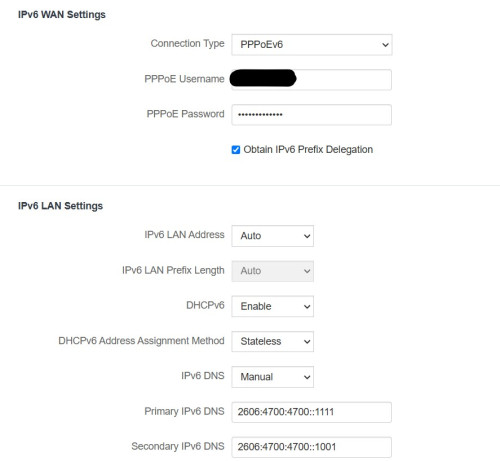 |
|
|
|
|
|
Aug 24 2024, 12:48 AM
Show posts by this member only | IPv6 | Post
#34
|
|
All Stars
12,059 posts Joined: Oct 2017
|
QUOTE(sixguyz_jayhan @ Aug 23 2024, 10:47 PM) My case might not same as urs, lots of functions not available. what is those drop down menu? or someone can help?the first auto got SLAAC? prefix length /64? mine look like is box that hardcoded /64 |
|
|
Aug 24 2024, 05:43 AM
|
|
Senior Member
1,208 posts Joined: Aug 2018
|
QUOTE(sixguyz_jayhan @ Aug 23 2024, 10:47 PM) My case might not same as urs, lots of functions not available. Change connection type from PPPoEv6 to DHCPv6.The rest of the setting looks correct. |
|
|
Aug 24 2024, 02:59 PM
|
|
Junior Member
215 posts Joined: Sep 2019
|
QUOTE(PJng @ Aug 24 2024, 12:48 AM) what is those drop down menu? or someone can help? Nothing much inside, most options got tried.the first auto got SLAAC? prefix length /64? mine look like is box that hardcoded /64 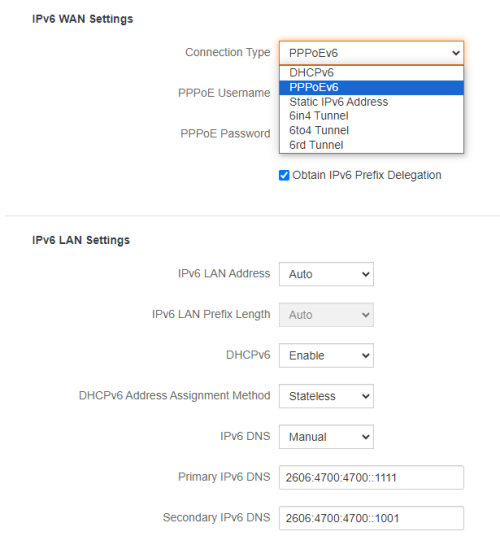 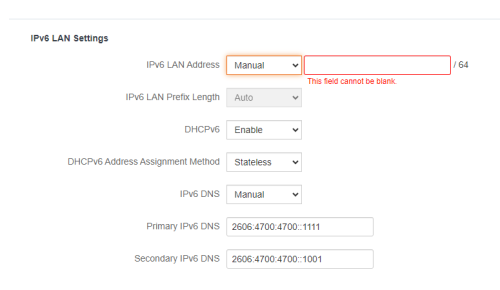 QUOTE(kwss @ Aug 24 2024, 05:43 AM) Change connection type from PPPoEv6 to DHCPv6. Nope. not working. It will cause network down.The rest of the setting looks correct. |
|
|
Aug 24 2024, 03:03 PM
Show posts by this member only | IPv6 | Post
#37
|
|
All Stars
12,059 posts Joined: Oct 2017
|
Sorry, is posted, edit later
This post has been edited by PJng: Aug 24 2024, 03:04 PM |
|
|
Aug 24 2024, 03:35 PM
Show posts by this member only | IPv6 | Post
#38
|
|
Senior Member
1,208 posts Joined: Aug 2018
|
QUOTE(sixguyz_jayhan @ Aug 24 2024, 02:59 PM) Nothing much inside, most options got tried. Your screenshot is the IPv6 tab right? Nope. not working. It will cause network down. There's another tab called Internet Setting, you put your PPPoE there. |
|
|
Aug 24 2024, 09:01 PM
Show posts by this member only | IPv6 | Post
#39
|
|
All Stars
12,059 posts Joined: Oct 2017
|
what your router model? i try on emulator to check setting
|
|
|
Aug 25 2024, 10:44 AM
|
|
Junior Member
215 posts Joined: Sep 2019
|
QUOTE(PJng @ Aug 24 2024, 09:01 PM) what your router model? i try on emulator to check setting Tenda, AC23. Thanks dude. |
| Change to: |  0.0270sec 0.0270sec
 1.15 1.15
 6 queries 6 queries
 GZIP Disabled GZIP Disabled
Time is now: 20th December 2025 - 11:22 PM |
 Quote
Quote
