

 Sep 27 2024, 12:12 PM


You can do it this way if you have additional lines.
I did try to ask nicely from customer service, but they refused to give and keep say "please use Time Voice app. Thank You". Now I am going to teach them the hard way for their arrogance.
1. Install HTTP Toolkit in your computer
2. Launch Android AVD with root access. (Go google and find out how). Install Time Voice App by using ADB
3. Connect HTTP Toolkit to that AVD as shown below
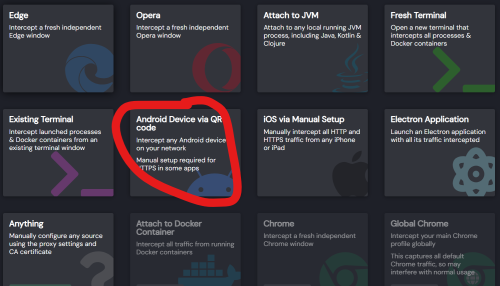
4. Now use that AVD and import the QR code generated in self-service page
5. Follow the guided instructions to setup those permissions.
6. Go to left hand corner. press and hold. You will see a page where you can change your password.
7. Do not click anything, then click save
8. The APP will do the SIP registration again.
9. Go back to HTTP toolkit and look for the request sip/register.
10. The username and password are in the payload.
However, OLT is the easiest way. You will need the above method if you have two lines, since ONT only has one POTS port. They refused to add the additional voice line even though is technically possible to do so. So, I am going to do it the hard way.
Here's the catch. Please read properly.
1. Please ensure you get successful SIP registration in the first 2 attempts, otherwise the username and password will get reset where you will lose access to both your phone lines connected to ONT and Time Voice App.
2. Only one call at one time when registering using the details (including SIP server) from the above method.
After that you will need to reset and generate a new QR code again. You only have 6 tries.
3. Only one call at a time using the sip server obtain from the above-mentioned steps.
This post has been edited by leezhijiang: Sep 27 2024, 12:15 PM
 Quote
Quote

 0.0161sec
 0.78
0.78
 7 queries
 GZIP Disabled