

Maxis Fibre 1Gbps Unable to Deliver
|
|
 Jun 24 2025, 10:17 AM Jun 24 2025, 10:17 AM
Return to original view | Post
#1
|
 
Senior Member
1,602 posts Joined: Jun 2007 
|
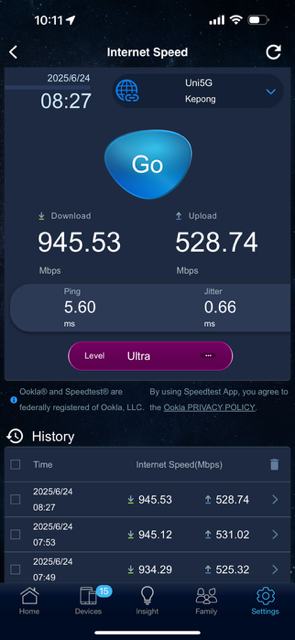
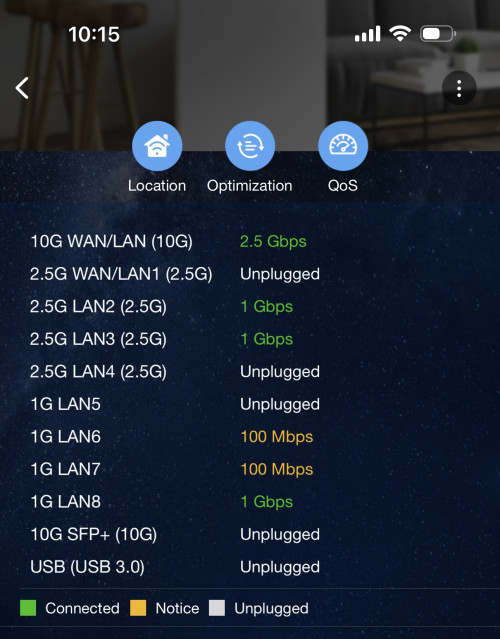
Just recently upgraded to 1Gbps. Using Skyworth 2.5G modem and Asus be88u router. Not able to get past 1Gbps, it seem to stuck at max 950Mbps.. like there is a limit to it… can anyone help me figure out what else I’ve missed? Thanks.
|
|
|
|
|
|
Jun 24 2025, 12:45 PM
Return to original view | Post
#2
|
|
Senior Member
1,602 posts Joined: Jun 2007
|
QUOTE(blacktubi @ Jun 24 2025, 10:25 AM) Nothing can be done, just bad luck that some Maxis users are capped lower at certain locations I actually made a call to them yesterday and they said my speed is capped at 1.1Gbps. They even help me reset the line to refresh the connection. So I suspect one of the equipment is the bottleneck but unsure because the speed is consistently stay right below 950Mbps. I just bought a usb-c 2.5g Ethernet for testing later to see if that fixes it…I tried to fight and even get MCMC involved but they stand firm that once 90% speed provided, it's all good I will terminate this Telco with false advertising once my contract ends  Blacktubi, what router did you use for your testing? |
|
|
Jun 25 2025, 07:42 PM
Return to original view | Post
#3
|
|
Senior Member
1,602 posts Joined: Jun 2007
|
QUOTE(blacktubi @ Jun 24 2025, 02:52 PM) Issue is at the TM Infra, nothing to do with Maxis Well for my router I found a solution to it. It seems that Asus router speed negotiation is flawed with certain ONT cause it to lock up to the default 1Gbps port speed. To force it to negotiate higher speed, stick a switch with desired speed, eg 2.5Gbps switch to both router and ont then reboot.I use XT12 and it can do over 1Gbps on TIME This most last post worked for me: https://www.reddit.com/r/ASUS/s/7JigPGN9pG I bought a tplink 5 port 2.5 Gbps switch to force the speed negotiation to higher than 1Gbps. Able to get beyond 950Mbps consistently now, consistent with what maxis said, speed capped to 1.1Gbps (including buffer speed) hovering at around 1070Mbps. |
|
|
Jun 28 2025, 02:54 PM
Return to original view | Post
#4
|
|
Senior Member
1,602 posts Joined: Jun 2007
|
QUOTE(blacktubi @ Jun 24 2025, 02:52 PM) Issue is at the TM Infra, nothing to do with Maxis fixed I use XT12 and it can do over 1Gbps on TIME  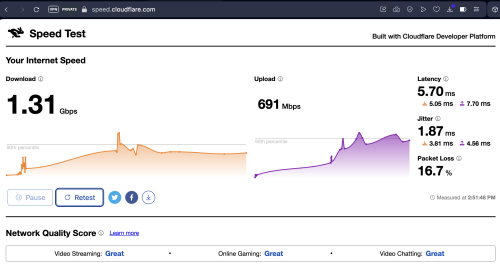 |
|
|
Jun 28 2025, 11:12 PM
Return to original view | Post
#5
|
|
Senior Member
1,602 posts Joined: Jun 2007
|
QUOTE(blacktubi @ Jun 28 2025, 04:30 PM) You're lucky I guess Don’t give up bro, keep blasting and request for it. I actually lodged a complaint to them after I solve the initial issue because at night the speed dips below 800 and day time it seem to be fine. The maxis guy came and noticed that the Skyworth modem is excessively warm. He pulled the report of modem behavior from tm side and said the modem kept spiking (not too sure what this means) but he said eligible for change to a new unit, which was what he did on last visit. He also said this is a common issue with the white Skyworth modem.Some of us are unfortunate |
| Change to: |  0.0253sec 0.0253sec
 0.27 0.27
 6 queries 6 queries
 GZIP Disabled GZIP Disabled
Time is now: 6th December 2025 - 05:57 AM |
 Quote
Quote