Outline ·
[ Standard ] ·
Linear+
NVIDIAŽ GeForceŽ 8800 GT, Official Overclocking Discussions...
|
vincentlaw
|
 Mar 14 2008, 01:16 PM Mar 14 2008, 01:16 PM
|

|
QUOTE(Punish @ Mar 14 2008, 10:25 AM) just wanto ask u guyz noob question... iam using the rivatuner auto fan control launcher so my GC can raise the speed of the fan according to the core temp by itself.... the problem is....when i start to play games....my GC fan keep changing speed frequently from low to hi, low to hi, 30% to 70%....what iam trying to say is, the changes is to often... my question is....is tat scenario ok....will it spoil my card cuzz the changes of the fan speed is to often... GTG shouldnt be a problem there.. but why it change often?? when u playing game.. ur card shud be hot and ur fanspeed too shud be high all the while to maintain the temperature.... unless u alt+tab often then it cools down..... make sure u do the profile correctly... here is 2 links for the guide http://www.guru3d.com/article/article/449/ and http://www.vaguesoft.com/users/dwood/blog/...ials/rivatuner/This post has been edited by vincentlaw: Mar 14 2008, 01:16 PM |
|
|
|
|
|
vincentlaw
|
Mar 14 2008, 05:57 PM
|
|
|
QUOTE(likito @ Mar 14 2008, 04:29 PM) how about just fix the fan speed at 70% , adjust fan speed by ur self , after playing game just turn back 30% .. IMO this way is abit tedious in long run..  |
|
|
|
|
|
vincentlaw
|
Mar 21 2008, 12:02 PM
|
|
|
QUOTE(QiW @ Mar 21 2008, 11:34 AM) the 88gt i am using is asus 88gt top with glaciator fan .. the temp readings for this card cannot be detected by both everest or gpuz(latest version) .. the software provided by asus only lets me control (up or down clock) the core/shader/memory .. previously i was using asus 88gt top oso but the reference cooler version .. that one has temp reading for both core and memory .. i tried stressing gpu using atitool artifact thing .. temp hit 80+ for core and close to 60 for memory anyways ... since u guys says its heat related then cannot do anything coz this one doesnt even allow me to change fan speed .. hahahaa comparing by TOUCH ... previous 88gt top was much hotter than this glaciator version .. the previous one didnt have heat issues oso .. so i EXPECT heat should not be an issue laa .... i downclocked it abit ... hang much much much much less liau now ... after mine OCed to the clock stated in my signature... idle at 49'c and full load with ATItools 30mins at 64-67'c depend on day/nite.... why downclock??? so far i've no problem with hangs EXCEPT crysis.... the rest about 11+ games no problem.. include COD4, GoW, HL2, WIC, CoH:OP, LPEC and more... |
|
|
|
|
|
vincentlaw
|
Mar 21 2008, 03:46 PM
|
|
|
QUOTE(QiW @ Mar 21 2008, 12:43 PM) but the thing is ,, CRYSIS is the game i am playin now ma .. hahahahaaa so have to down clock abit lor ... not very much la .. maybe to 670 or so only .. i dunno why that dam crysis hang also... and the IQ is not as nice as expected for high settings...... awww   super resources hogger + dont have the feelings of the game... while COD4:MW is damn damn damn damn good... eventhou the IQ is good enuf and u really can feel as if u are inside the scene... wow ... hail COD4 hail |
|
|
|
|
|
vincentlaw
|
Apr 3 2008, 11:47 PM
|
|
|
hmm that is a maybe for not clean old driver.... anyway try to use driver cleaner pro to remove it.... uninstall nvidia driver... driver cleaner pro to clean nvidia thggie, install the latest WHQL driver and bench again... remember to off ur background application too...
Added on April 3, 2008, 11:56 pmQUOTE(clawhammer @ Mar 18 2008, 10:34 PM) Is your system stable at that speed? Sometimes if it's not stable, you get a lower score. My E8200 @ 4.01Ghz gives +/- 14920 3dmarks. Zzzzz so high... mine just 13.8k... lose out interms of CPU to u?? » Click to show Spoiler - click again to hide... « This post has been edited by vincentlaw: Apr 3 2008, 11:56 PM |
|
|
|
|
|
vincentlaw
|
Apr 8 2008, 08:15 PM
|
|
|
QUOTE(OC4/3 @ Apr 8 2008, 08:10 PM) Make sure core to shader ratio is not more than 2.6(shader/core). huh if over??? mind to explain more indetails or give us any link that explains it? |
|
|
|
|
|
vincentlaw
|
Apr 9 2008, 06:31 PM
|
|
|
so the 2.6x multiplier of coreclock:shader clock is true or not?
|
|
|
|
|
|
vincentlaw
|
Apr 13 2008, 12:21 PM
|
|
|
hey guys..... wanna ask wats the latest BEST driver for Asus 8800GT 512mb TOP edition??? for dx10 play in vista.....
|
|
|
|
|
|
vincentlaw
|
Apr 14 2008, 12:56 PM
|
|
|
QUOTE(vincentlaw @ Apr 13 2008, 12:21 PM) hey guys..... wanna ask wats the latest BEST driver for Asus 8800GT 512mb TOP edition??? for dx10 play in vista..... any1 can help? |
|
|
|
|
|
vincentlaw
|
Apr 18 2008, 01:24 PM
|
|
|
QUOTE(alive88 @ Apr 18 2008, 12:03 PM) how much ar that vizo propeller? i was thinking of buying an extra 120mm delta fan and put it direct under the gc..how is it?can or not? rm50-60 |
|
|
|
|
|
vincentlaw
|
Apr 20 2008, 06:33 PM
|
|
|
QUOTE(mizivincible @ Apr 20 2008, 04:43 PM) Anyway, got my GT yesterday after letting go my 320mb GTS. To be exact its Galaxy dual slot 8800GT with twin pci-e power connector. So anyone has the same card ? Mine letting me know the max (stable in gaming too) u can go for the card ? I mean in term of core,memory and shader. And been wondering does the twin pci-e power help in term of oc-ing the card..... ooo twin 6pin connector??? need so much power ??? standard 1 is 1x6pin only... |
|
|
|
|
|
vincentlaw
|
Apr 21 2008, 01:32 PM
|
|
|
QUOTE(mizivincible @ Apr 21 2008, 10:48 AM) Alamak no one reply my question pulak. Guess everyone has moved on to 9 series u shud try on ur own... even same brand + model wont exact give u the same Max OC result. OC urself will be a better way. But ofcoz u can get those same brand+model+rev+etc and use it as a mini guide.. |
|
|
|
|
|
vincentlaw
|
Apr 25 2008, 01:04 PM
|
|
|
QUOTE(glock88 @ Apr 25 2008, 11:56 AM) er i have a question. hope all could help me. i am using rivatuner to tune my stock 8800gt to around 708/1770/2000 but my core temp still shows the temp before the OC. around 42-43 only. is this correct? cause last time i downtune the card and the temp still remains the same but with error. but now no error yet. can some1 help me with this. i really dunno what to do. everest also didnt show my cards core temp. only asus smartdoctor shows the temp but as i say, it didnt change at all... FYI Asus glaciator fan card only can be overclocked by smartdoctor and view temp with smart doctor.... im not sure izzit for all glaciator fan product but im sure for Asus 8800GT 512mb TOP edition coz thats my previous card |
|
|
|
|
|
vincentlaw
|
Apr 27 2008, 04:58 PM
|
|
|
QUOTE(marky @ Apr 27 2008, 03:43 PM) nope..it moves together with core it is possible to desync the coreclock and shader.... everycard have own coreclock:shader ratio... 88GT/96GT shud be 2.5x in sync... ofcoz can desync it when u feel the sync OC reach max... This post has been edited by vincentlaw: Apr 27 2008, 06:23 PM |
|
|
|
|



 Quote
Quote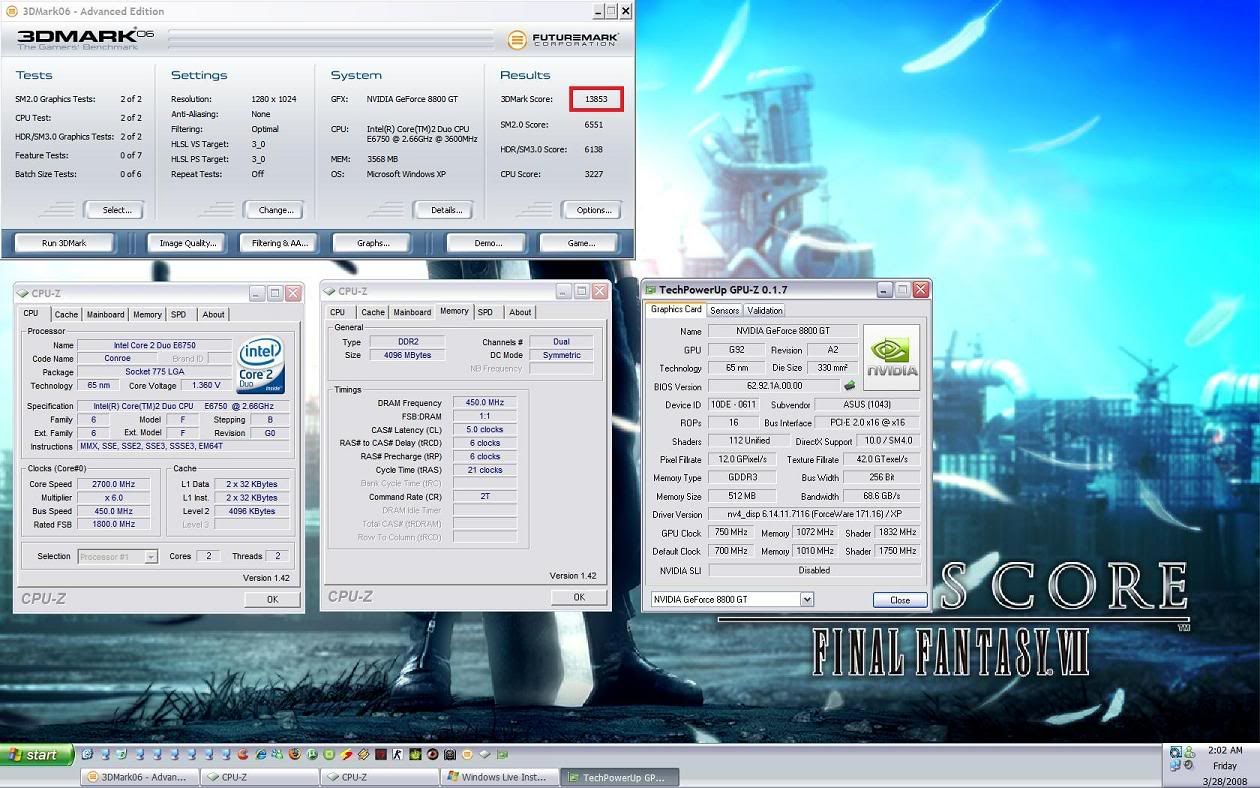

 0.4094sec
 0.33
0.33
 7 queries
 GZIP Disabled