Welcome Guest ( Log In | Register )

Outline · [ Standard ] · Linear+

 aimesh vs deco, undecided

views
     
TSBlinklime
post Mar 28 2024, 01:00 PM, updated 2y ago

Getting Started
**
Junior Member
140 posts

Joined: Aug 2013
From: Langkawi

hi sorry open new thread, not sure to post in asus tred or tplink
been using my home network about 2 years now.
i got no issue. but pipu in my home complain.
about why i suka wifimain, wifiroom, wifikitchen, wifiofis, IOt, guest etc ...
multiple ssid around the property. all got wire backhaul. but all different brand router/model, i bought over the years.

so decided to spent about 1.2k to upgrade to wifi6 minimum with 2 more ap/mesh.
one ring to rule them all. one ssid and one/two guest maybe.

currently i have these two brands/model or router. unsure with mesh/network ecosystem is better.

asus rt-ac5300
deco m9 plus (2unit)

asus more features
no lock paid features (no subscription crap)
more ports
maybe bulky depending on model

deco basic features
newer models have paid features
less ports
app easy to setup and use

aimesh superior or deco?
aimesh works with their router and mesh units.
deco works with deco, no onemesh or omada ap.
aimesh may bug on firmware updates, especially on discontinued models.
read somewhere their guest settings are not really isolated.
what is your experience with aimesh?

tplink maybe lock more features or discontinue their whole deco line or something else.
just like kasa to tapo. no more kasa updates. ranting.gif
otherwise no hassle to setup or use. i think 3 buttons to completely configure.
but less ports, have to get switch. messy.
app really basic.

house spec
about 6000sqft 2 floors
g floor basically living and kitchen area, 2 rooms
1st floor about 7 rooms alot of walls
outside quite big but not priority atm.
about 5 lan outlet around the property. important areas. but i really need 3 or 4 nodes only.
maybe about 30 clients maybe, iot maybe another 15

i have a jellyfin server that anyone i allow can use remotely or local.
very simple nas thing. for personal use locally.

i shortlisted these 2

RT-AX59U
deco xe-75


unsure which hone has the better mesh system
unsure which has better coverage and wall penetration


if i go with one, i probably abandoned the other. or repurpose it.

the only wifi 6e device i have is a mac and iphone pro max
that also i dun really need. cuz im only on a 500mbs package. tm unifi.
more then enough for me. rather up to wifi 7 when its more affordable.


kk131
post Mar 28 2024, 01:14 PM

On my way
****
Junior Member
566 posts

Joined: Jun 2005
From: Somewhere over the rainbow


Asus have better support and longer support, especially for the popular routers, I would look at the AX86U Pro or the AX88U which should get LTS. There is also Merlin third party firmware for some Asus routers which expands on the features of the stock Asus firmware.
mystvearn
post Mar 28 2024, 01:23 PM

...
*******
Senior Member
6,639 posts

Joined: Jan 2003
From: "New Castle"


I went from the default ISP router to a ax10 tp link router to mesh deco and to tp link ax75 router. One thing I noticed is that even though decorative solved the range, it does not solve the ping. Cannot use steam link since lag. If you find a good wifi 6e high range. Would settle deco and no need plugs for excess deco
acbc
post Mar 28 2024, 01:29 PM

Look at all my stars!!
*******
Senior Member
9,050 posts

Joined: Jan 2003
My set-up is much simpler.

Primary router is OPNsense running on an old office PC with RAID1 using ZFS built into OPNsense installation. Added 8GB RAM too.

The rest of the AP are Deco M4 for each room. Total used 6 units. And all connected via LAN cable as wireless is shit.

On DiGi Fibre 500, the connection is stable and smooth. Uptime much better than the stock Zyxel router given by DiGi. So far, I've clocked 9 months uptime without a single disconnection.

failed.hashcheck
post Mar 28 2024, 02:17 PM

Neighborhood plant pathologist
*******
Senior Member
2,096 posts

Joined: Aug 2009
From: Shithole Klang
When people say Asus routers are good, they mean of those Broadcom-based models like -68U, -86U, -88U and few others as well its variants.

Other than those models, you are overpaying for very old but proven, or just nothing spectacular MediaTek chipsets just to have 'Asus' name slapped on it. You can get the exact same or even better chipset for less with tplink.

This post has been edited by failed.hashcheck: Mar 28 2024, 02:23 PM
Omochao
post Mar 28 2024, 02:52 PM

Enthusiast
*****
Junior Member
835 posts

Joined: Nov 2007
From: Land of Forgotten
If you want long term support and more customizations options to play around with, I would say ASUS offers more robust option and settings.

TP-Link is easier and straight forward hence the lack of settings.

From what I research and done on my own study for differences between this 2 makers of mesh system

ASUS
- can use web management/app to adjust settings for the main node and mesh nodes
- can individually adjust settings like connection preference, signal source for their nodes
- can adjust even the LED settings on specific nodes, where else Tp-Link can only adjust on whole network.
- can flash to Asus-wrt or custom fw Merlin/GNUton firmwares for the meshes.
- can adjust more in depth settings like RSSI roaming treshold for nodes or main.
- can setup different SSID for specific functions, gaming or IoT devices.

Tp-Link
- only DECO app to adjust settings for the Deco nodes, the web ui cannot be remotely access from outside the network, not even port forwarding.
- Web UI is locked to only show ram and cpu usage and very minimal settings for the mesh as compared to ASUS which offers more!
- Deco firmware can be buggy.
- easy to setup but lack of indepth customising as compared to ASUS.
- Different decos, different firmware versions , if you want certain functions like signal source selection and connection preference, you need to make sure all the nodes firmware are already supporting.
- Yes, even though all decos work with each other, but if the decos firmware are different version, you may lose out on the functions.
- Different hardware versions comes with different firmware versions, you really need to be aware and careful on this as Tp-Link is not same like ASUS, release firmware features fast for all across the board.

For example, Deco X50 support ECO mode, but Deco X10 doesn't, so if you have mixture of X50 + X10, you won't see the ECO mode showing up.

Even basic function like speed test, beamforming , OFDMA toggle might be hidden due to different decos in the network topology.

As of now, the latest beta testing is for DECO X50.


So for Tp-Link, is better to find out what kind of features you want first, then narrow it down to one specific deco and firmware support then get all nodes with the same deco and firmware hardware version.

This post has been edited by Omochao: Mar 28 2024, 02:54 PM
TSBlinklime
post Mar 28 2024, 05:56 PM

Getting Started
**
Junior Member
140 posts

Joined: Aug 2013
From: Langkawi

tq everyone bruce.gif

i have to give it some thought
probably buy this evening when i get back
hopefully in time before sale end.
if cannot decide, ill just do a coin toss and let the heavens decide.

i do intend to setup a n100 and setup a dedicated homelab to run 24/7 down the road
but its something i gonna do when im really free. provided i have all the parts ready to go.
the mesh/ap should work the same, only no longer acting as primary router.
hence my need for more converge, seemless handoff, can penetrate walls more effectively.

as for features, i think i think im becoming like those uncle. drive big v8 car, but drive under speed limit.
i wanna have more feature, but my priority is to please everyone with one ssid, no more multi ssid.
later on for more features i just get a better firewall/router and configure from there.
as for iot security ill just trust the guest network to do its job. i have to.

getthing 2 pack xe75 means i would have 4 deco nodes.
asus 2 pack means i would get 3 nodes in aimesh.
merlin only works with certain supported models, not all.
i have to either increase my budget to get 2 supported merlin routers or
buy 2 less capable model to use unlock merlin features. (from what ive seen so far)
thats if i really wan those features.
each time i upgrade, have to follow supported models.
gonna be whole new shitshow if something breaks.

i like asus as a company. love their routers.
but im inexperience with aimesh. including merlin etc.
but alot of community support like snbforums and github

i dunlike tplink as a company. bad business practices.
but admittingly their deco ecosystem works.
and i have experienced them. just very bare bones settings.

then again when wifi 7 becomes more affordable, and if i upgrade my speed package.
i probably replace my deco m9.
less likely to replace the asus.


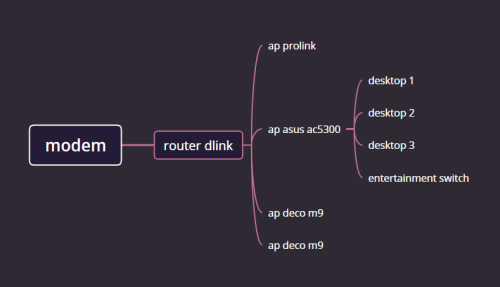
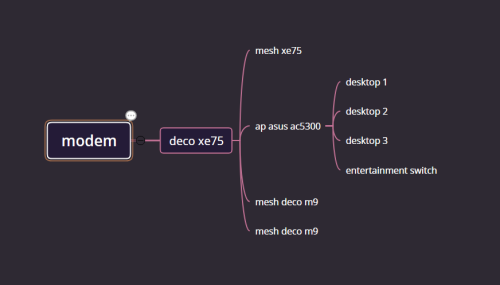
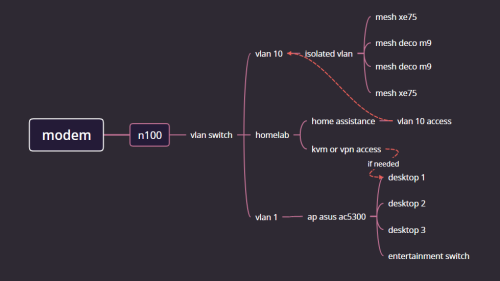
see some diagrams, current, soon, future goal
what u think. all wired


» Click to show Spoiler - click again to hide... «

jacktiew
post Mar 28 2024, 07:27 PM

Getting Started
**
Junior Member
289 posts

Joined: Sep 2012
QUOTE(Blinklime @ Mar 28 2024, 05:56 PM)
tq everyone  bruce.gif

i have to give it some thought
probably buy this evening when i get back
hopefully in time before sale end.
if cannot decide, ill just do a coin toss and let the heavens decide.

i do intend to setup a n100 and setup a dedicated homelab to run 24/7 down the road
but its something i gonna do when im really free. provided i have all the parts ready to go.
the mesh/ap should work the same, only no longer acting as primary router.
hence my need for more converge, seemless handoff, can penetrate walls more effectively.

as for features, i think i think im becoming like those uncle. drive big v8 car, but drive under speed limit.
i wanna have more feature, but my priority is to please everyone with one ssid, no more multi ssid.
later on for more features i just get a better firewall/router and configure from there.
as for iot security ill just trust the guest network to do its job. i have to.

getthing 2 pack xe75 means i would have 4 deco nodes.
asus 2 pack means i would get 3 nodes in aimesh.
merlin only works with certain supported models, not all.
i have to either increase my budget to get 2 supported merlin routers or
buy 2 less capable model to use unlock merlin features. (from what ive seen so far)
thats if i really wan those features.
each time i upgrade, have to follow supported models.
gonna be whole new shitshow if something breaks.

i like asus as a company. love their routers.
but im inexperience with aimesh. including merlin etc.
but alot of community support like snbforums and github

i dunlike tplink as a company. bad business practices.
but admittingly their deco ecosystem works.
and i have experienced them. just very bare bones settings.

then again when wifi 7 becomes more affordable, and if i upgrade my speed package.
i probably replace my deco m9.
less likely to replace the asus.
see some diagrams, current, soon, future goal
what u think. all wired
» Click to show Spoiler - click again to hide... «

*
Asus as main router, deco as AP
Omochao
post Mar 28 2024, 09:43 PM

Enthusiast
*****
Junior Member
835 posts

Joined: Nov 2007
From: Land of Forgotten
QUOTE(Blinklime @ Mar 28 2024, 05:56 PM)
tq everyone  bruce.gif

i have to give it some thought
probably buy this evening when i get back
hopefully in time before sale end.
if cannot decide, ill just do a coin toss and let the heavens decide.

i do intend to setup a n100 and setup a dedicated homelab to run 24/7 down the road
but its something i gonna do when im really free. provided i have all the parts ready to go.
the mesh/ap should work the same, only no longer acting as primary router.
hence my need for more converge, seemless handoff, can penetrate walls more effectively.

as for features, i think i think im becoming like those uncle. drive big v8 car, but drive under speed limit.
i wanna have more feature, but my priority is to please everyone with one ssid, no more multi ssid.
later on for more features i just get a better firewall/router and configure from there.
as for iot security ill just trust the guest network to do its job. i have to.

getthing 2 pack xe75 means i would have 4 deco nodes.
asus 2 pack means i would get 3 nodes in aimesh.
merlin only works with certain supported models, not all.
i have to either increase my budget to get 2 supported merlin routers or
buy 2 less capable model to use unlock merlin features. (from what ive seen so far)
thats if i really wan those features.
each time i upgrade, have to follow supported models.
gonna be whole new shitshow if something breaks.

i like asus as a company. love their routers.
but im inexperience with aimesh. including merlin etc.
but alot of community support like snbforums and github

i dunlike tplink as a company. bad business practices.
but admittingly their deco ecosystem works.
and i have experienced them. just very bare bones settings.

then again when wifi 7 becomes more affordable, and if i upgrade my speed package.
i probably replace my deco m9.
less likely to replace the asus.
see some diagrams, current, soon, future goal
what u think. all wired

future
still unclear with my planning, have to take time 2 plan out
homelab integration. vm/docker
hopefully better iot isolation
all wireless devices can vpn into jellyfin
increase my raid storage pool.
memang all my desktop wired.
wifi only for streaming, surfing, mobile gaming, iot smart home stuff. nothing serious or work related.
the mesh will be tagged into that vlan port.

[/spoiler]
*
If you want vlan tagging, is better you go for Omada series, get a controller and the omada APs, you can customise a lot of things including captive portal and network bandwidth monitoring.

Asus home usage series offers bandwidth monitoring and also QOS monitoring based on usage behaviour .

There's a reason why ASUS is expensive , the antivirus and in depth basic settings that a router or mesh SHOULD HAVE,is all baked and hardcoded into its firmware/software .

And with so much users and devices at home, you can diagnose network issues from away with Asus...

TP link you could only do so much with the Deco App and if the cloud server crashes ,you need to physically restart the deco .

You can even manually adjust the asus nodes to broadcast which kind of SSID , 2.4ghz or 5ghz at specific nodes. Tp link cannot do that..once you set 2.4ghz...all the nodes only broadcast 2.4ghz or 5ghz..

I still suggest you look into asus or go search for a used one in carousell.
firdausbhari
post Mar 28 2024, 09:47 PM

Look at all my stars!!
*******
Senior Member
2,281 posts

Joined: Feb 2012


this might be my personal opinion but im more comfortable with ASUSwrt vs others. great UI & UX. ASUSwrt gives u all the options u need. also great support for long run. as for performance, it best to say they are quite similar if not, slightly less or better vs other brand.

anyhow, TP-Link will always be my 2nd choice afer ASUS.

This post has been edited by firdausbhari: Mar 28 2024, 09:51 PM
blacktubi
post Apr 1 2024, 07:40 PM

-
Group Icon
Elite
8,421 posts

Joined: Jul 2008

If you are someone that loves tinkering and customizing the network to your liking, get ASUS

If you want something that's a little more advanced to learn about networking, get Mikrotik

If you want something simple that just work, get Deco

Simple

This post has been edited by blacktubi: Apr 1 2024, 07:40 PM


Change to:
| Lo-Fi Version
0.0177sec    0.48    5 queries    GZIP Disabled
Time is now: 21st December 2025 - 09:15 AM