Outline ·
[ Standard ] ·
Linear+
Files Sync App for Mac (not iCloud)
|
TScorad
|
 Feb 20 2024, 11:24 AM, updated 2y ago Feb 20 2024, 11:24 AM, updated 2y ago
|

|
I want to use OneDrive (since I have a Microsoft subscription) to sync files. Problem is OneDrive can only sync files which are in the parent folder /OneDrive ... however most of the default save file location is "My Documents".
I'm thinking of using another app to sync My Documents with OneDrive folder (both on the same machine) so I can continue to use OneDrive. I know it'll duplicate the files but since most of them are just documents it wouldn't be more than 1GB in total, so not a deal breaker.
Any recommended app to do so ? Or a better suggestion to get OneDrive to sync the My Documents folder directly?
This post has been edited by corad: Feb 20 2024, 11:25 AM
|
|
|
|
|
|
RavenSpell
|
Feb 20 2024, 10:31 PM
|
New Member

|
If you're just looking to sync your Documents folder to OneDrive, you can enable it here. 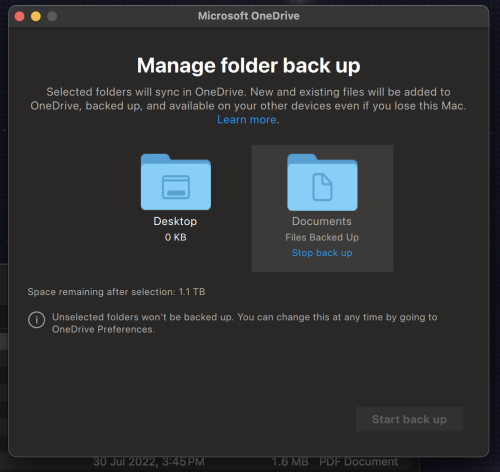 Files in your OneDrive will appear in the Documents folder, and your local files will be synced to OneDrive's Document folder. Will this work for you? |
|
|
|
|
|
TScorad
|
Feb 21 2024, 06:50 PM
|
|
|
QUOTE(RavenSpell @ Feb 20 2024, 10:31 PM) Files in your OneDrive will appear in the Documents folder, and your local files will be synced to OneDrive's Document folder. Will this work for you? Yes that's exactly what I'm looking for. Clicked through every option in OneDrive and couldn't / didn't find the option in your screenshot ? |
|
|
|
|
|
RavenSpell
|
Feb 21 2024, 10:17 PM
|
New Member
|
On the OneDrive App, click on "Backup", then click on the "Manage Backup" button, it will lead you that screen. 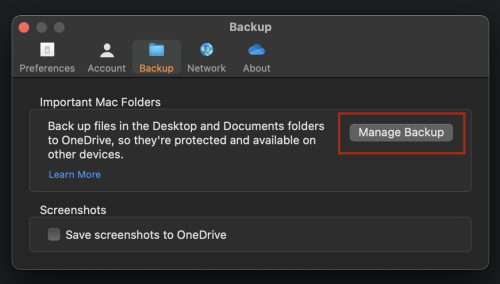 |
|
|
|
|
|
TScorad
|
Feb 22 2024, 11:00 AM
|
|
|
Mine dosen't have that option ? 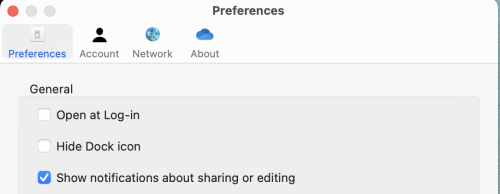 This post has been edited by corad: Feb 22 2024, 01:17 PM This post has been edited by corad: Feb 22 2024, 01:17 PM |
|
|
|
|
|
RavenSpell
|
Feb 22 2024, 09:13 PM
|
New Member
|
QUOTE(corad @ Feb 22 2024, 11:00 AM) Mine dosen't have that option ? Could you check whether are you on the latest version of OneDrive App? Mine is 24.020.0128.003 (Standalone) (Apple Silicon) There are a few possibilities here, Possibility #1 and solution (Most likely)You probably have the App Store version of the OneDrive App installed, or you have an relatively old version of OneDrive App installed. If that is the case, you may need to remove the installed OneDrive App, and install the non-App Store version. You can download the installer here: https://www.microsoft.com/en-my/microsoft-3...edrive/downloadsource: https://learn.microsoft.com/en-us/answers/q...issing-for-onedPossibility #2 (Less likely)There might be an issue when you logged into OneDrive on the OneDrive App, try logging out and logging in and see whether does that resolve your issue. source: https://www.minitool.com/news/onedrive-back...ab-missing.html |
|
|
|
|
|
TScorad
|
Feb 23 2024, 07:55 PM
|
|
|
same version as you. and yes downloaded from app store. 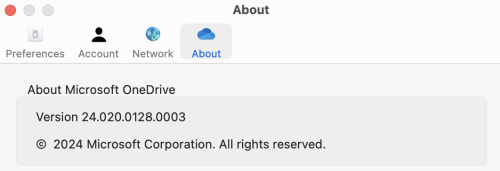 will try to download from microsoft. also just to check, this Backup is a 2 way sync ? This post has been edited by corad: Feb 23 2024, 08:14 PM |
|
|
|
|
|
RavenSpell
|
Feb 23 2024, 10:21 PM
|
New Member
|
QUOTE(corad @ Feb 23 2024, 07:55 PM) same version as you. and yes downloaded from app store. will try to download from microsoft. also just to check, this Backup is a 2 way sync ? Yup, two way sync. |
|
|
|
|
|
TScorad
|
Feb 26 2024, 05:50 PM
|
|
|
tried with OneDrive direct download from MS site but still the same. Any chance yours is a Edu or Business plan ?
|
|
|
|
|
|
RavenSpell
|
Feb 26 2024, 09:50 PM
|
New Member
|
QUOTE(corad @ Feb 26 2024, 05:50 PM) tried with OneDrive direct download from MS site but still the same. Any chance yours is a Edu or Business plan ? Can you double check and confirm the version has "(Standalone)"? I am on Microsoft 365 Family Plan. Which plan are you on? As far as I am aware, backup functionality should available since it is supposedly available for free. QUOTE You can back up a maximum of 5 GB of files in OneDrive for free, up to 1 TB as standard with a Microsoft 365 subscription, or extend that up to 2 TB with add-ons. source: https://support.microsoft.com/en-au/office/...adb#ID0EBBF=Mac |
|
|
|
|
|
TScorad
|
Mar 4 2024, 10:19 AM
|
|
|
QUOTE(RavenSpell @ Feb 26 2024, 09:50 PM) Can you double check and confirm the version has "(Standalone)"?
I am on Microsoft 365 Family Plan. Which plan are you on?
As far as I am aware, backup functionality should available since it is supposedly available for free. 365 Family as well. No Standalone. I've tried on M2 MBA and M1 iMac |
|
|
|
|
|
RavenSpell
|
Mar 4 2024, 04:03 PM
|
New Member
|
QUOTE(corad @ Mar 4 2024, 10:19 AM) 365 Family as well. No Standalone. I've tried on M2 MBA and M1 iMac Did you uninstall/remove the OneDrive App, then restart your mac before installing the one's you downloaded? Once you've restarted the machine, make sure OneDrive is no longer running. Once you've confirmed that, execute the installer for OneDrive. If the correct version of OneDrive is running, you should see a version similar to this. 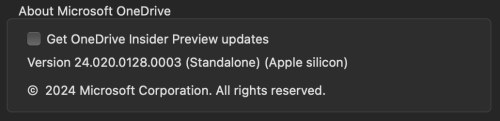 |
|
|
|
|
|
firdausbhari
|
Mar 19 2024, 12:41 AM
|
|
|
Google drive backup & sync?
|
|
|
|
|



 Quote
Quote


 0.0184sec
 0.87
0.87
 5 queries
 GZIP Disabled