

 Feb 18 2024, 10:43 AM


QUOTE(ShinHaruhi @ Feb 16 2024, 03:32 PM)
hi master
want to ask
fiber home AX1800 and AX3000 can connect as mesh ?
or only for same model?

Hard reset the mesh with the reset pin hole that you wish to pair it with your main node.want to ask
fiber home AX1800 and AX3000 can connect as mesh ?
or only for same model?
Once done, turn it on and make sure on your main node multi-ap settings is on and set to "controller & agent".
Then turn back the hard reset mesh on, press the wps button at the back of your main node until it starts blinking.
On your hard reset mesh, hold down the wps button until the LED starts flashing red rapidly, the moment it flashes, quickly release the button and it will pair itself.
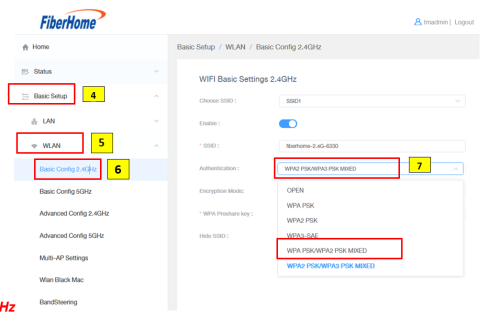
If pairing fails, login into both router and make sure both authentication method is set the same, for example if Main node is WPA/WPA2, then the mesh must also be at WPA/WPA2.
Do it both for 2.4Ghz and 5Ghz, repeat the same step with WPS button.
 Quote
Quote
 0.0129sec
 0.39
0.39
 6 queries
 GZIP Disabled