

hi master
want to ask
fiber home AX1800 and AX3000 can connect as mesh ?
or only for same model?
Unifi HELP... Unifi Router, FiberHome mesh connection
Unifi HELP... Unifi Router, FiberHome mesh connection
|
|
 Feb 16 2024, 03:32 PM, updated 2y ago Feb 16 2024, 03:32 PM, updated 2y ago
Show posts by this member only | Post
#1
|
 
Newbie
36 posts Joined: Aug 2017 From: Axis Federation  
|
hi master
want to ask fiber home AX1800 and AX3000 can connect as mesh ? or only for same model? |
|
|
|
|
|
Feb 16 2024, 11:04 PM
Show posts by this member only | IPv6 | Post
#2
|

Senior Member
1,495 posts Joined: Dec 2012
|
QUOTE(ShinHaruhi @ Feb 16 2024, 03:32 PM) hi master No cannot, you will need to get the same models. For example Fibre Home AX1800 can mesh with other AX1800want to ask fiber home AX1800 and AX3000 can connect as mesh ? or only for same model?  |
|
|
Feb 16 2024, 11:16 PM
Show posts by this member only | Post
#3
|

Senior Member
1,026 posts Joined: Jan 2003 From: Kuala Lumpur, Malaysia
|
QUOTE(ShinHaruhi @ Feb 16 2024, 03:32 PM) hi master It works if you use the WPA2.want to ask fiber home AX1800 and AX3000 can connect as mesh ? or only for same model? ShinHaruhi liked this post
|
|
|
Feb 18 2024, 10:43 AM
Show posts by this member only | IPv6 | Post
#4
|

Junior Member
835 posts Joined: Nov 2007 From: Land of Forgotten
|
QUOTE(ShinHaruhi @ Feb 16 2024, 03:32 PM) hi master Hard reset the mesh with the reset pin hole that you wish to pair it with your main node.want to ask fiber home AX1800 and AX3000 can connect as mesh ? or only for same model? Once done, turn it on and make sure on your main node multi-ap settings is on and set to "controller & agent". Then turn back the hard reset mesh on, press the wps button at the back of your main node until it starts blinking. On your hard reset mesh, hold down the wps button until the LED starts flashing red rapidly, the moment it flashes, quickly release the button and it will pair itself. If pairing fails, login into both router and make sure both authentication method is set the same, for example if Main node is WPA/WPA2, then the mesh must also be at WPA/WPA2. Do it both for 2.4Ghz and 5Ghz, repeat the same step with WPS button. 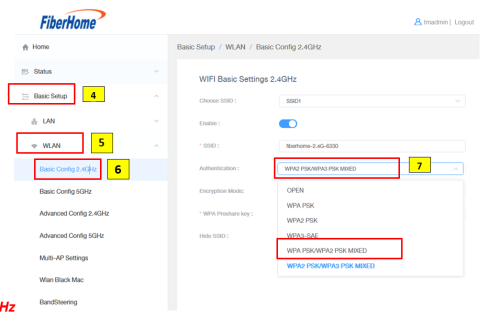 ShinHaruhi liked this post
|
| Change to: |  0.0179sec 0.0179sec
 0.93 0.93
 5 queries 5 queries
 GZIP Disabled GZIP Disabled
Time is now: 14th December 2025 - 04:25 PM |
 Quote
Quote