Welcome Guest ( Log In | Register )

Outline · [ Standard ] · Linear+

 Which 5G Modem is better?

views
     
SUSpetpenyubobo
post Mar 3 2024, 01:47 PM

Regular
******
Senior Member
1,030 posts

Joined: Jan 2022

QUOTE(jack2 @ Feb 17 2024, 05:56 PM)
wonder if this is good to go?

Arcadyan AW1000 Telstra 5G Home Modem X55 WiFi 6 AX3600 Gigabit Ethernet Port 5G CPE Easy Mesh WiFi Router OpenWrt Sim | https://s.lazada.com.my/s.iKbpr
*
This modem already phased out by Telstra in Australia.

Now their latest one is the Telstra 5G Home Broadband Gen 2 aka Arcadyan Meteor

user posted image

It is Mediatek T750 based same as the one used in the Yeacomm NR330 and Zyxel NR5103E modems.

Mediatek T750 is newer chipset with better CA performance.


SUSpetpenyubobo
post Apr 22 2024, 09:52 PM

Regular
******
Senior Member
1,030 posts

Joined: Jan 2022

ZLT28 selling under RM600 among the cheapest in the market.

Mediatek T750 chipset with many useful unlocking features and band locking.


SUSpetpenyubobo
post Apr 29 2024, 01:32 AM

Regular
******
Senior Member
1,030 posts

Joined: Jan 2022

QUOTE(Batusai @ Apr 28 2024, 10:06 PM)
Just wondering if the Zyxel nr5103e 3 brand is still worthwhile to purchase? A friend is selling for 500 for a used one.
*
All Mediatek T750 based 5G modems performs best with DNB's NSA 5G network.

Only drawback is this modem is non modded to work with mobile plans except for Home Broadband 5G data only plans and was mistakenly sold undervalued. You can't buy it anymore because it was quickly taken down once the sellers knew its true value.

Those Brits are putting it up on sale for £229.99 on Amazon UK. Refurbished unit summore.


The ZLT28 doesn't have external antenna ports and the Yeacomm costs almost RM1k.

There's also the new Tenda 5G03 which should be cheaper.
SUSpetpenyubobo
post Jul 18 2024, 08:56 PM

Regular
******
Senior Member
1,030 posts

Joined: Jan 2022

QUOTE(templar1996 @ Jul 14 2024, 03:44 PM)
Im really considering between X50 5G or Nokia Fastmile 3. Price difference is not that much but can't seem to find any comparison between these two. Any input from u guys?
*
Telstra Arcadyan AWS1000 going for only RM528 on Lapsapda with free choice of QWRT or Sopek firmware offered by seller with invite link to a private group.

This customized OpenWRT firmware is very useful if you know what you're doing.
SUSpetpenyubobo
post Aug 6 2024, 12:03 AM

Regular
******
Senior Member
1,030 posts

Joined: Jan 2022

QUOTE(xswatch @ Aug 5 2024, 08:52 PM)
remote monitoring only possible if you have the correct information on hand. You will need the public IP address, as well as the port number, to be able to log into your router network from a distance.
long story short for 5g router I think can't be access remotely.

another alternative I can think of is u can connect ur one pc to the router at office. small pc with low power consumption like Intel nuc is better bec even if u swith on 24/7 also the electricity usage very minimal,no need to attach monitor screen. install a remote software like logmein (may incur additional subscription cost). then using ur phone while you're away, remote to ur pc office (use logmein apps for phone), so from there u can access to the 5g router info/usage.
*
No longer the case with modern cloud based IP-cams.

I'm running CGNAT 5G at home myself, with 4 remote cams connected to the same mobile app in my phone.

You don't even need a centralized DVR just a small microSD card in each individual cam which could store recordings of more than a week each.


SUSpetpenyubobo
post Aug 6 2024, 08:03 PM

Regular
******
Senior Member
1,030 posts

Joined: Jan 2022

QUOTE(xswatch @ Aug 6 2024, 05:47 PM)
yes for cloud based IP cams no need anymore for fixed IP address. I'm referring to the PC connected to the router. since TS main concern is about to remote to the router for checking the usage.
*
Cloud IP-cams are also clients connected to the 5G router. It's just that they have build int firmware which connects back to the product's server via your router as gateway so that remotely your phone can also access your cameras outside.

In a DVR setup it's just one device connected to your router as gateway.

For a cloud based IP-Cam, each device connects via DHCP to your router which also works as a gateway.

You don't need public IP or fixed IP anymore because the IP-Cam cloud software (for each camera connected to your router) pings back to the products server to allow your phone which has the surveillance app installed to access your cams from outside.

Here's an example set-up guide video to give you a rough idea:


You can actually DIY your own camera setup with very little knowledge with wiring and
SUSpetpenyubobo
post Nov 25 2024, 11:47 PM

Regular
******
Senior Member
1,030 posts

Joined: Jan 2022

QUOTE(Billy.Who @ Nov 25 2024, 02:29 PM)
Tested it in PJ/Kelana and Bandar Sri Damansara, both of which should have solid or at the very least decent DNB 5G coverage. Yet the modem could never establish a 5G connection.. very likely a faulty batch as per the link. Have also seen similar comments on platforms like Shopee, Lazada, forums etc.

Got it off Carousell and I'm fortunate that the seller is willing to provide a refund
*
Mine already over a month not rebooted.

The modem can force lock 5G-NSA band without rescan unlike the TP-Link which you can only choose with the drop down menu to select it.

Did you specifically select 5G-NSA instead of auto 4G/5G-NSA fallback?

Which firmware version are you on for the 3 UK NR5103E?
SUSpetpenyubobo
post Nov 26 2024, 12:05 AM

Regular
******
Senior Member
1,030 posts

Joined: Jan 2022

QUOTE(Billy.Who @ Nov 25 2024, 02:29 PM)
Tested it in PJ/Kelana and Bandar Sri Damansara, both of which should have solid or at the very least decent DNB 5G coverage. Yet the modem could never establish a 5G connection.. very likely a faulty batch as per the link. Have also seen similar comments on platforms like Shopee, Lazada, forums etc.

Got it off Carousell and I'm fortunate that the seller is willing to provide a refund
*
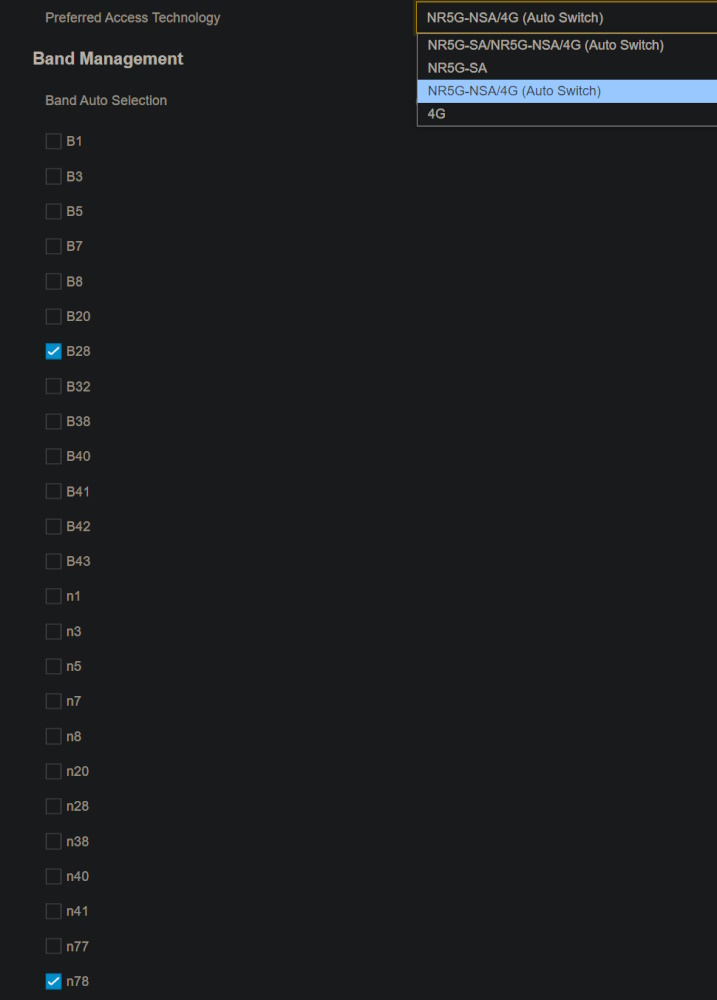
You must select 5G-NSA only and not 4G/5G-NSA/5G-SA Auto fallback.

Then select B28 (many selected N28 wrongly) + N78 ONLY.

Which firmware version u using? Do not upgrade it OTA because it meant for 3 UK market. Stick with version B.

Mine uptime already >1 month 24/7.
SUSpetpenyubobo
post Nov 26 2024, 03:07 PM

Regular
******
Senior Member
1,030 posts

Joined: Jan 2022

QUOTE(Billy.Who @ Nov 26 2024, 02:33 PM)
Can't seem to get the OTA so stuck with B12 anyway. Believe the UK users are at B14 or higher.

Bands already set and configured to Auto Switch @ 5G-NSA/4G. No option for NSA only (other 3 options are SA/NSA/4G Auto; 5G-SA & 4G).
user posted image

Appreciate the very helpful comments from the community so far but the fact is that there are 5103E lemon units around that are practically fully functional save for the ability to connect to 5G at all:

https://www.facebook.com/pendakwahteknologi...750048315/?_rdr

Screenshot of a LYN post from above FB link

https://ispreview.co.uk/talk/threads/zyxel-...3e-no-5g.40149/

https://www.ispreview.co.uk/talk/threads/th...y-b12-fw.39058/
*
That is correct. Did you also check the tiny switch behind the modem whether it's set to external antenna or internal antenna? Make sure it's internal antenna many overlooked that as well.
SUSpetpenyubobo
post Nov 28 2024, 06:19 PM

Regular
******
Senior Member
1,030 posts

Joined: Jan 2022

QUOTE(my44 @ Nov 28 2024, 04:15 PM)
Oh ok. So 5G in Malaysia is using B28? Instead of N-something?
*
B28 is supposed to to be the LTE anchoring band to combine with N78.

Malaysian 5G infrastructure is Non Stand-Alone(NSA) which means you need B28 as a base connection to connect then bond with N78 in order to achieve full 5G connection.

I guess N78 will only be available once we have dedicated full Stand-alone 5G network in future.

It is expensive to maintain because everyone by then must have 5G-only phones and everything else phased out.

This becomes a dedicated 5G network.


Change to:
| Lo-Fi Version
0.0179sec    0.35    7 queries    GZIP Disabled
Time is now: 6th December 2025 - 10:20 AM