Welcome Guest ( Log In | Register )

5 Pages < 1 2 3 4 5 >Bottom

Outline · [ Standard ] · Linear+

 Anybody here use PiHole/Adguard, etc?, hmm

views
     
SUSeds2
post Feb 2 2024, 04:23 PM

Getting Started
**
Junior Member
101 posts

Joined: Jul 2022
From: Kelantan

QUOTE(INGfusion @ Feb 2 2024, 12:42 PM)
yes, did show up in client list got dns queries , just that blocked by filters showing 0, i can see ads in lyn forum after switch to adguard home
*
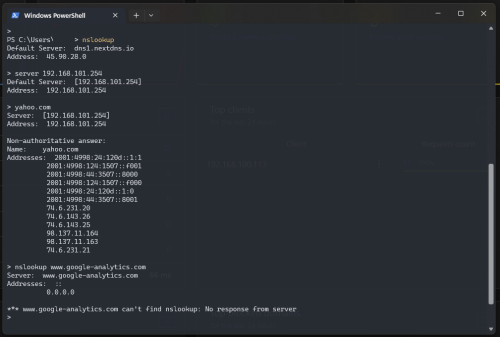
before you abandon your adguard home set up, see if this have any results on your adguard home dashboard

1. at your PC, open cmd or terminal

2. type:
nslookup
server 192.168.0.2 <-- change the IP address to your adguard home IP
google.com
www.google-analytics.com

3. 'google.com' should return something and google-analytics.com will show 0.0.0.0

results might look like this:
user posted image

user posted image

This post has been edited by eds2: Feb 2 2024, 04:25 PM
INGfusion
post Feb 2 2024, 04:58 PM

iPong Oren Leh
*******
Senior Member
7,541 posts

Joined: Jun 2007
From: Kuala Lumpur


QUOTE(PRSXFENG @ Feb 2 2024, 02:29 PM)
check browser private dns settings
android private dns settings
icloud private relay

etc
*
have to turn off icloud private relay ya?
Kadaj
post Feb 2 2024, 09:52 PM

On my way
****
Junior Member
586 posts

Joined: Mar 2006
QUOTE(papyrous @ Jan 31 2024, 11:27 PM)
127.0.0.1 = localhost.
so if you’re running unbound on a VPS and you’re running the command on your pc, it won’t work because the command is querying your pc.
*
Not vps, I run the server locally.

I reckon the new router Dlink DIR-X3060Z is the problem coz previously I used another router which is fine.
INGfusion
post Feb 3 2024, 01:23 AM

iPong Oren Leh
*******
Senior Member
7,541 posts

Joined: Jun 2007
From: Kuala Lumpur


QUOTE(PRSXFENG @ Feb 2 2024, 02:29 PM)
check browser private dns settings
android private dns settings
icloud private relay

etc
*
thx, after i turn of private relay, set dns and ipv6 dns, now all working fine forum look clean clean now
hasmidzul_jojo
post Feb 5 2024, 05:21 PM

Getting Started
**
Junior Member
203 posts

Joined: Feb 2008
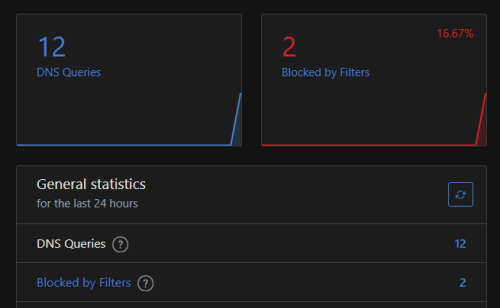
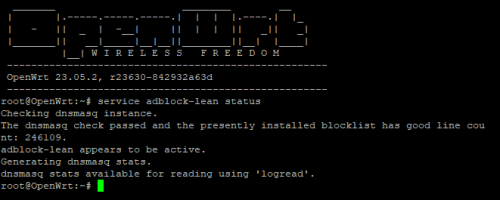
Trying out adblock lean.So far so good.

user posted image
INGfusion
post Aug 20 2024, 08:44 PM

iPong Oren Leh
*******
Senior Member
7,541 posts

Joined: Jun 2007
From: Kuala Lumpur


Hi guys, adguard home support ipv6 ?
SUSeds2
post Aug 20 2024, 09:11 PM

Getting Started
**
Junior Member
101 posts

Joined: Jul 2022
From: Kelantan

QUOTE(INGfusion @ Aug 20 2024, 08:44 PM)
Hi guys, adguard home support ipv6 ?
*
support. you want to use the adguard built in dhcp server?
INGfusion
post Aug 20 2024, 09:13 PM

iPong Oren Leh
*******
Senior Member
7,541 posts

Joined: Jun 2007
From: Kuala Lumpur


QUOTE(eds2 @ Aug 20 2024, 09:11 PM)
support. you want to use the adguard built in dhcp server?
*
because after change ipv6 dns server to adguard ip i no longer have ipv6 service
ChenKaiWen
post Aug 20 2024, 09:55 PM

Casual
***
Junior Member
387 posts

Joined: May 2019


QUOTE(INGfusion @ Aug 20 2024, 09:13 PM)
because after change ipv6 dns server to adguard ip i no longer have ipv6 service
*
For me, I leave IPv6 dns blank and just use ipv4.
INGfusion
post Aug 20 2024, 10:01 PM

iPong Oren Leh
*******
Senior Member
7,541 posts

Joined: Jun 2007
From: Kuala Lumpur


QUOTE(ChenKaiWen @ Aug 20 2024, 09:55 PM)
For me, I leave IPv6 dns blank and just use ipv4.
*
you mean ipv6 dns on your router ?
ChenKaiWen
post Aug 20 2024, 10:37 PM

Casual
***
Junior Member
387 posts

Joined: May 2019


QUOTE(INGfusion @ Aug 20 2024, 10:01 PM)
you mean ipv6 dns on your router ?
*
Yes. I only have ipv4 dns enabled. All queries are done thru ipv4.
PRSXFENG
post Aug 20 2024, 10:38 PM

Look at all my stars!!
*******
Senior Member
2,616 posts

Joined: Nov 2020


QUOTE(INGfusion @ Aug 20 2024, 09:13 PM)
because after change ipv6 dns server to adguard ip i no longer have ipv6 service
*
it really does depend on your router

some routers advertise the router itself
some will put isp dns if you leave blank
some will not advertise anything if you leave blank

i use a router flashed with openwrt and it's behaviour is the last one after i uncheck advertise router as dns server

but whenever needed, i always use the link local (fe80) addresses
ChenKaiWen
post Aug 20 2024, 10:40 PM

Casual
***
Junior Member
387 posts

Joined: May 2019


QUOTE(worldbeater @ Aug 20 2024, 10:10 PM)
since youtube ads can no longer be blocked by adguard since like 5 years ago think its meaningless and dumb to be using it
*
Not really. It can be used still block many in app ads, telemetry etc. And even as a way to use DoH/DoT as ISPs are sometimes hijacking google, cloud flare dns to MCMC dns server now.
PRSXFENG
post Aug 20 2024, 10:41 PM

Look at all my stars!!
*******
Senior Member
2,616 posts

Joined: Nov 2020


QUOTE(worldbeater @ Aug 20 2024, 10:10 PM)
since youtube ads can no longer be blocked by adguard since like 5 years ago think its meaningless and dumb to be using it
*
these dns based adblockers can NEVER block facebook/ig/youtube ads because the content comes from the same domain as the ads
it is not "dumb and meaningless" as it can still help block on

devices that you cant install adblockers: eg, smart tvs
devices that are a bit more painful to install adblockers onto: eg, android phone

and even then, running your own server has benefits like having exact control over what to block and unblock, logging for monitoring purpose, and also now with recent isp hijacks, sending your upstream requests encrypted so isp cant snoop on it

for blocking youtube ads, use firefox and ublock origin, that's all you need.
kwss
post Aug 20 2024, 11:44 PM

Regular
******
Senior Member
1,209 posts

Joined: Aug 2018
QUOTE(eds2 @ Jan 29 2024, 12:30 PM)
i just experimenting with adguard with open port & cloudflared tunnel.

1. adguard DoT, port forward 853 and using letsencrypt cert
work but sometimes a bit wonky (cannot resolve)

2. adguard DoH, port forward 443 and using letsencrypt cert
worked ok

3. adguard DoH with cloudflared tunnel & port forward 443 with cloudflare proxy
worked ok but sometimes high response time

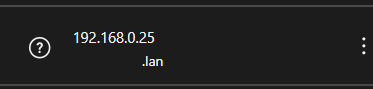
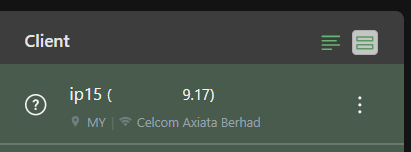
one thing i still stuck is, when using cloudflared tunnel/proxy, client section is like this:

user posted image

but on port forward, its like this:

user posted image
*
To get the actual IP address, you must read and parse the X-Forwarded-For HTTP header.
If the client didn't pass through any proxy, it should be only one IP address. If the client pass through multiple proxy, the field will contain a comma-separated list of IP address.

QUOTE(Kadaj @ Jan 30 2024, 12:03 AM)
I tried Pihole + unbound but the unbound part doesn't work.
$ dig pi-hole.net @127.0.0.1 -p 5335
It return nothing.

Unbound only works if I turn on VPN.
$ dig pi-hole.net @127.0.0.1 -p 5335
Same command but this time it works.

I doubt TM unifi blocked unbound.
Can someone else verify this?
*
D-Link chew UDP 53 packet. You need to configure:
CODE

tcp-upstream: yes

BladeRider88
post Aug 21 2024, 08:57 AM

On my way
****
Junior Member
554 posts

Joined: Nov 2006


QUOTE(INGfusion @ Aug 20 2024, 09:13 PM)
because after change ipv6 dns server to adguard ip i no longer have ipv6 service
*
I did this to get ipv6 internet
first you need to obtain the ipv6 address of your adguard home device, then set it as ipv6 dns in your router settings.
BladeRider88
post Aug 21 2024, 08:59 AM

On my way
****
Junior Member
554 posts

Joined: Nov 2006


QUOTE(worldbeater @ Aug 20 2024, 10:10 PM)
since youtube ads can no longer be blocked by adguard since like 5 years ago think its meaningless and dumb to be using it
*
we use adguard for DoH and block ads in the Internet, so it is still useful cool2.gif
hasmidzul_jojo
post Aug 21 2024, 10:59 AM

Getting Started
**
Junior Member
203 posts

Joined: Feb 2008
QUOTE(BladeRider88 @ Aug 21 2024, 08:59 AM)
we use adguard for DoH and block ads in the Internet, so it is still useful  cool2.gif
*
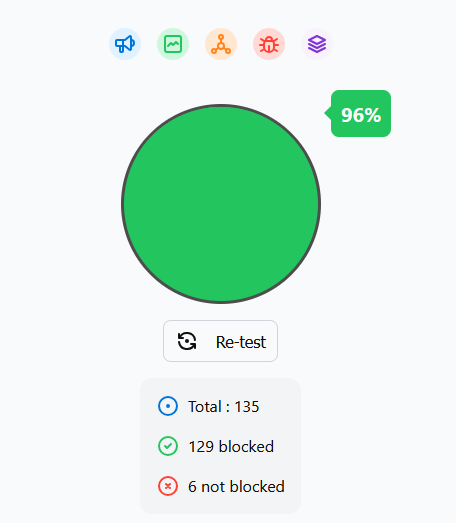
Indeed, i found it very useful.Not only blocking popups ads, i configure with blocking malware, cryptojacking, scam, spam and phishing.

This is my test result with my chosen blocklist.


user posted image
INGfusion
post Aug 21 2024, 11:09 AM

iPong Oren Leh
*******
Senior Member
7,541 posts

Joined: Jun 2007
From: Kuala Lumpur


QUOTE(BladeRider88 @ Aug 21 2024, 08:57 AM)
I did this to get ipv6 internet
first you need to obtain the ipv6 address of your adguard home device, then set it as ipv6 dns in your router settings.
*
Done, ipv6 primary need to key in ip address from adguard and secondary leave it blank
BladeRider88
post Aug 21 2024, 11:22 AM

On my way
****
Junior Member
554 posts

Joined: Nov 2006


QUOTE(worldbeater @ Aug 21 2024, 10:52 AM)
if people are advanced level then just implement on router by urself without needing to use another device and software

its all mainly dnsmasq configuration

got network obsession but still flicking gui settings in pihole and mikrotik?
(probation mode post limit delayed reply)
*
If you wanna argue for the sake of argue, then lets argue cool2.gif

First of all, why i use another device and software? Because i can use different DNS upstream simultaneously, of course you would not understand that. The flexibility offered by AdGuard Home that you will never understand.

2nd, I am using Adguard to block Ads & offer a layer of protection to my elderly or not so IT savvy family members. And AdGuard Home offers a more granular settings compare to browsers extension that got Cripple By Google itself if you are using Google Chrome.

Yes it is all about DNSMASQ config, since there is GUI settings why not leverage it? It is like you prefer manual transmission car and I love auto transmission car and you don't have to laugh at me for being an auto transmission guy. icon_rolleyes.gif


5 Pages < 1 2 3 4 5 >Top
 

Change to:
| Lo-Fi Version
0.0241sec    1.05    6 queries    GZIP Disabled
Time is now: 24th December 2025 - 03:59 PM