

I started using Adguard Home last year. Runs on a Mikrotik hAP ax3.
Anybody here use PiHole/Adguard, etc?, hmm
Anybody here use PiHole/Adguard, etc?, hmm
|
|
 Jan 20 2024, 05:58 PM Jan 20 2024, 05:58 PM
Show posts by this member only | IPv6 | Post
#21
|
 
All Stars
11,458 posts Joined: Oct 2007 From: KL  
|
I started using Adguard Home last year. Runs on a Mikrotik hAP ax3.
|
|
|
|
|
|
Jan 24 2024, 04:15 PM
Show posts by this member only | IPv6 | Post
#22
|

Junior Member
101 posts Joined: Jul 2022 From: Kelantan
|
QUOTE(soonwai @ Jan 20 2024, 05:58 PM) I started using Adguard Home last year. Runs on a Mikrotik hAP ax3. oh, that device support docker? |
|
|
Jan 24 2024, 04:51 PM
Show posts by this member only | IPv6 | Post
#23
|
|
All Stars
11,458 posts Joined: Oct 2007 From: KL
|
QUOTE(eds2 @ Jan 24 2024, 04:15 PM) oh, that device support docker? The arm and arm64 models support but not everything works. So far only using Adguard Home, uptime-kuma and Lego. |
|
|
Jan 25 2024, 04:09 PM
Show posts by this member only | IPv6 | Post
#24
|

Senior Member
1,598 posts Joined: Jan 2016
|
QUOTE(eds2 @ Jan 20 2024, 12:08 PM) if you're into customizing what to block (assuming you didnt do this yet) How do you put the DDNS into adguard tho? Been looking for the settings for days1. set DDNS on your asus router (fqdn will be like somethingyouchoose.asuscomm.com) 2. register free adguard dns account 3. put your ddns fqdn at your account so that adguard knows your profile 4. set the given dns IP on your adguard account to your router |
|
|
Jan 25 2024, 05:27 PM
Show posts by this member only | IPv6 | Post
#25
|

Senior Member
2,611 posts Joined: Nov 2020
|
QUOTE(QuantumEdge @ Jan 25 2024, 04:09 PM) How do you put the DDNS into adguard tho? Been looking for the settings for days Adguard DNS Dashboard -> Home -> Scroll down to your devicesAssuming you added only 1 device, which is your router and have setup adguard on your router Click on settings of that device Scroll down Plain DNS server addresses -> Linked IPv4 address -> Advanced settings -> Configure DDNS If you have never linked before, click on Link IP address first |
|
|
Jan 25 2024, 05:47 PM
Show posts by this member only | IPv6 | Post
#26
|
|
Senior Member
1,598 posts Joined: Jan 2016
|
QUOTE(PRSXFENG @ Jan 25 2024, 05:27 PM) Adguard DNS Dashboard -> Home -> Scroll down to your devices Thanks, got it working nowAssuming you added only 1 device, which is your router and have setup adguard on your router Click on settings of that device Scroll down Plain DNS server addresses -> Linked IPv4 address -> Advanced settings -> Configure DDNS If you have never linked before, click on Link IP address first Tried DNS over TLS, but I dont think merlin and adguard are able to play along Especially I dont see the option to turn off DNS server Followed the steps in the website, couldnt get a connection lol |
|
|
|
|
|
Jan 26 2024, 07:34 PM
|
|
Junior Member
214 posts Joined: May 2017
|
QUOTE(QuantumEdge @ Jan 25 2024, 05:47 PM) Thanks, got it working now Merlin has DoT support directly if you’re using Adguard DNS. Tried DNS over TLS, but I dont think merlin and adguard are able to play along Especially I dont see the option to turn off DNS server Followed the steps in the website, couldnt get a connection lol otherwise if you’re running AdguardHome locally, you just forward everything to AdguardHome and do DoT/DoH/DoQ from Adguardhome |
|
|
Jan 29 2024, 12:30 PM
|
|
Junior Member
101 posts Joined: Jul 2022 From: Kelantan
|
QUOTE(MixBlood @ Jan 18 2024, 09:00 PM) I've compared normal 1.1.1.1 with DoH 1.1.1.1 and the responses I would say, almost the same. Feel like no different to me. i just experimenting with adguard with open port & cloudflared tunnel.1. adguard DoT, port forward 853 and using letsencrypt cert work but sometimes a bit wonky (cannot resolve) 2. adguard DoH, port forward 443 and using letsencrypt cert worked ok 3. adguard DoH with cloudflared tunnel & port forward 443 with cloudflare proxy worked ok but sometimes high response time one thing i still stuck is, when using cloudflared tunnel/proxy, client section is like this:  but on port forward, its like this: 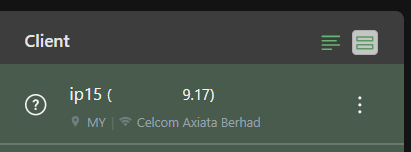 This post has been edited by eds2: Jan 29 2024, 12:40 PM |
|
|
Jan 30 2024, 12:03 AM
|

Junior Member
586 posts Joined: Mar 2006
|
I tried Pihole + unbound but the unbound part doesn't work.
$ dig pi-hole.net @127.0.0.1 -p 5335 It return nothing. Unbound only works if I turn on VPN. $ dig pi-hole.net @127.0.0.1 -p 5335 Same command but this time it works. I doubt TM unifi blocked unbound. Can someone else verify this? |
|
|
Jan 31 2024, 11:27 PM
|
|
Junior Member
214 posts Joined: May 2017
|
QUOTE(Kadaj @ Jan 30 2024, 12:03 AM) I tried Pihole + unbound but the unbound part doesn't work. 127.0.0.1 = localhost. $ dig pi-hole.net @127.0.0.1 -p 5335 It return nothing. Unbound only works if I turn on VPN. $ dig pi-hole.net @127.0.0.1 -p 5335 Same command but this time it works. I doubt TM unifi blocked unbound. Can someone else verify this? so if you’re running unbound on a VPS and you’re running the command on your pc, it won’t work because the command is querying your pc. |
|
|
Feb 1 2024, 12:57 PM
Show posts by this member only | IPv6 | Post
#31
|

Senior Member
7,528 posts Joined: Jun 2007 From: Kuala Lumpur 
|
QUOTE(soonwai @ Jan 20 2024, 05:58 PM) I started using Adguard Home last year. Runs on a Mikrotik hAP ax3. tried to run adguard home, but totally unable to block ads  |
|
|
Feb 1 2024, 01:23 PM
Show posts by this member only | IPv6 | Post
#32
|
|
All Stars
11,458 posts Joined: Oct 2007 From: KL
|
QUOTE(INGfusion @ Feb 1 2024, 12:57 PM) tried to run adguard home, but totally unable to block ads Not even one? Mine, I think most are blocked. I didn't really look in detail but the ads in LYN blocked.It's a DNS block so you may need to clear your DNS cache. Or just use another device to test. This post has been edited by soonwai: Feb 1 2024, 01:25 PM |
|
|
Feb 1 2024, 01:55 PM
Show posts by this member only | IPv6 | Post
#33
|
|
Senior Member
7,528 posts Joined: Jun 2007 From: Kuala Lumpur
|
QUOTE(soonwai @ Feb 1 2024, 01:23 PM) Not even one? Mine, I think most are blocked. I didn't really look in detail but the ads in LYN blocked. tried manual with default filter, set router to adguard home dns, manual set device to adguard home dns none of them block ads It's a DNS block so you may need to clear your DNS cache. Or just use another device to test.  |
|
|
|
|
|
Feb 1 2024, 02:04 PM
|
|
Junior Member
101 posts Joined: Jul 2022 From: Kelantan
|
QUOTE(INGfusion @ Feb 1 2024, 01:55 PM) tried manual with default filter, set router to adguard home dns, manual set device to adguard home dns none of them block ads What blocklist you use? I’m using these btw. Most of the ad is blocked 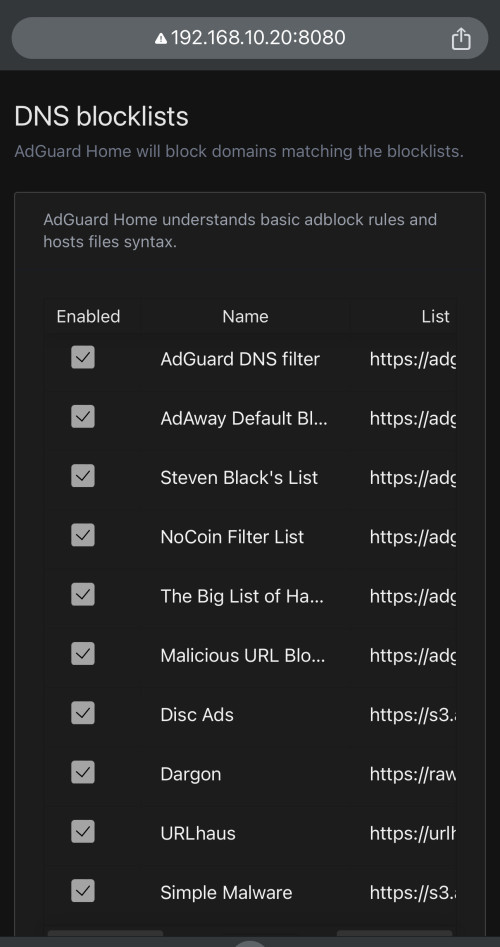 |
|
|
Feb 1 2024, 02:10 PM
Show posts by this member only | IPv6 | Post
#35
|
|
Senior Member
7,528 posts Joined: Jun 2007 From: Kuala Lumpur
|
QUOTE(eds2 @ Feb 1 2024, 02:04 PM) What blocklist you use? i just use the 1 default filter, let me have a try with yoursI’m using these btw. Most of the ad is blocked |
|
|
Feb 1 2024, 03:52 PM
Show posts by this member only | IPv6 | Post
#36
|
|
Senior Member
7,528 posts Joined: Jun 2007 From: Kuala Lumpur
|
haiz, still the same, i think i will just stick with my adguard app
|
|
|
Feb 2 2024, 10:27 AM
|
|
Junior Member
214 posts Joined: May 2017
|
QUOTE(INGfusion @ Feb 1 2024, 03:52 PM) haiz, still the same, i think i will just stick with my adguard app did your clients show up on the client list in adguardhome's dashboard? |
|
|
Feb 2 2024, 11:59 AM
Show posts by this member only | IPv6 | Post
#38
|
|
Senior Member
1,882 posts Joined: Sep 2017
|
Better restart your phone after changing dns. Sometimes the device cache didn't expired so it will still getting the previous record.
And it does not prevent youtube ads and facebook ads. (mobile) |
|
|
Feb 2 2024, 12:42 PM
Show posts by this member only | IPv6 | Post
#39
|
|
Senior Member
7,528 posts Joined: Jun 2007 From: Kuala Lumpur
|
QUOTE(papyrous @ Feb 2 2024, 10:27 AM) did your clients show up on the client list in adguardhome's dashboard? yes, did show up in client list got dns queries , just that blocked by filters showing 0, i can see ads in lyn forum after switch to adguard home |
|
|
Feb 2 2024, 02:29 PM
|
|
Senior Member
2,611 posts Joined: Nov 2020
|
QUOTE(INGfusion @ Feb 2 2024, 12:42 PM) yes, did show up in client list got dns queries , just that blocked by filters showing 0, i can see ads in lyn forum after switch to adguard home check browser private dns settingsandroid private dns settings icloud private relay etc |
| Change to: |  0.0244sec 0.0244sec
 1.32 1.32
 6 queries 6 queries
 GZIP Disabled GZIP Disabled
Time is now: 15th December 2025 - 02:38 PM |
 Quote
Quote