Welcome Guest ( Log In | Register )

Outline · [ Standard ] · Linear+

 Got problem in google play store

views
     
TSdiehard1979
post Dec 30 2023, 04:46 PM, updated 2y ago

Regular
******
Senior Member
1,194 posts

Joined: Jun 2005


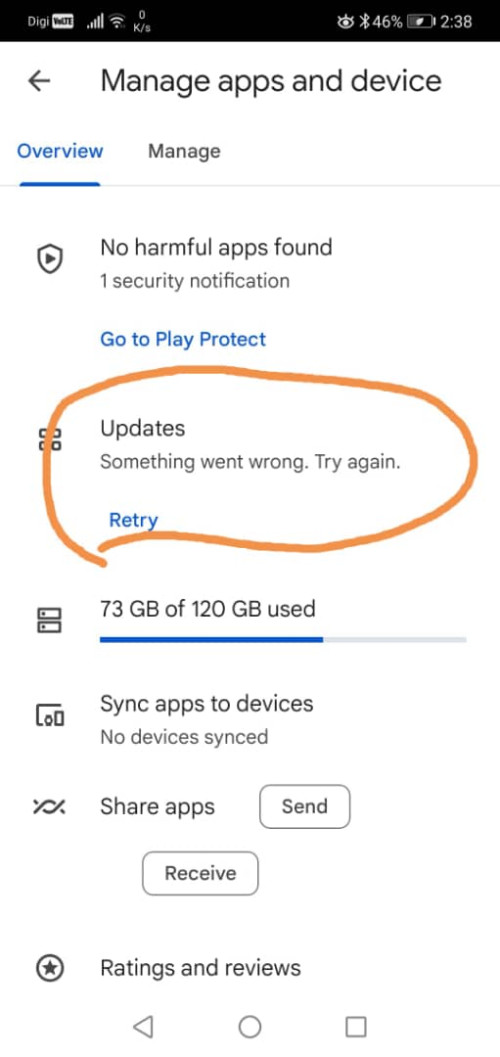
I using this phone for 3 years already, so far so good. No problem in updating apps in google play store for these 3 years but recently in this Dec, I start facing problem when I go in "manage apps and device" Then "Updates" getting error (as show in attachment).

I had tried those solution in internet, such as set date & time to auto, restart phone, remove google account then re-add and relogin back, all these cannot help in solving it.
The only way can solve is force stop google play store then clear cache clear data. Then launch back the google play store it can work for that time. If I close the play store then later launch again, same problem happen. Then every time clear cache and data not always work. Sometime I know I got 10 apps haven't update but it show only 2 apps ready for update, sometime it show all 10 apps.

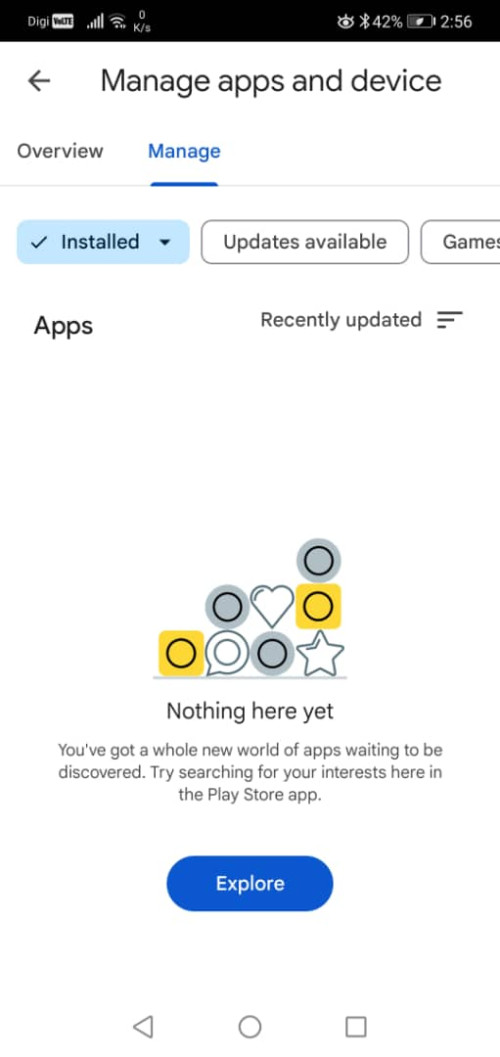
At "installed app part"(as show in attachment), it not show any apps at all.

Anyone can help me on this? what solution?

user posted image

user posted image
tvcat
post Dec 30 2023, 05:12 PM

Mr. Dumb Dumb
*******
Senior Member
2,937 posts

Joined: Nov 2004


Does this happen on both home and mobile network? Are you using VPN? Custom DNS?
TSdiehard1979
post Dec 30 2023, 07:10 PM

Regular
******
Senior Member
1,194 posts

Joined: Jun 2005


QUOTE(tvcat @ Dec 30 2023, 05:12 PM)
Does this happen on both home and mobile network? Are you using VPN? Custom DNS?
*
happen both home time and mobile digi
no vpn on both no custom dns
tvcat
post Dec 30 2023, 08:13 PM

Mr. Dumb Dumb
*******
Senior Member
2,937 posts

Joined: Nov 2004


QUOTE(diehard1979 @ Dec 30 2023, 07:10 PM)
happen both home time and mobile digi
no vpn on both no custom dns
*
Your OS or storage may have some problem, I think reset to factory default is the only way to try.

I read your other post, your Play store version should be the latest as it is the same on my other Android 13 phone.
JLA
post Dec 30 2023, 09:45 PM

Look at all my stars!!
*******
Senior Member
2,799 posts

Joined: May 2008
what phone ?
happen to me one day play store no longer working
factory reset
or use aurora store unofficial google play store without google login
TSdiehard1979
post Dec 30 2023, 10:18 PM

Regular
******
Senior Member
1,194 posts

Joined: Jun 2005


QUOTE(JLA @ Dec 30 2023, 09:45 PM)
what phone ?
happen to me one day play store no longer working
factory reset
or use aurora store unofficial google play store without google login
*
Honor 10. Max update to android 10 only cannot go up.
I clear cache and clear data it work but later go back play store will not work again.

There are suggestion such as clear cache and data for "google play service"
this one got any problem? will it hang or stuck forever until I can't use other things?

Another is "disable" play store then later enable it back but I think this one rarely work.

Another is uninstall all play store update, make it earlier version of play store. Then it will update back to latest version.
I don't know this one will cause any problem or not.
Got bad history that my sister got old tablet which seldom update, one day when she go in play store, suddenly need to relogin when she key in correct login and password, it still fail to login play store account.
That one due to too old version so that tablet cannot get a proper internet browser and cannot update play store so forever stuck at there, no way login. Even create new account and confirm correct login and password but in that tablet, it cannot login with old browser and play store.
So now I scare on uninstall play store to old version.

QUOTE(tvcat @ Dec 30 2023, 08:13 PM)
Your OS or storage may have some problem, I think reset to factory default is the only way to try.

I read your other post, your Play store version should be the latest as it is the same on my other Android 13 phone.
*
factory reset a lot will gone.
I check those latest is 38.8 but that for android 10++ so I think 38.7 is the final version for android 10

tvcat
post Dec 31 2023, 04:36 AM

Mr. Dumb Dumb
*******
Senior Member
2,937 posts

Joined: Nov 2004


QUOTE(diehard1979 @ Dec 30 2023, 10:18 PM)
Honor 10. Max update to android 10 only cannot go up.
I clear cache and clear data it work but later go back play store will not work again.

There are suggestion such as clear cache and data for "google play service"
this one got any problem? will it hang or stuck forever until I can't use other things?

Another is "disable" play store then later enable it back but I think this one rarely work.

Another is uninstall all play store update, make it earlier version of play store. Then it will update back to latest version.
I don't know this one will cause any problem or not.
Got bad history that my sister got old tablet which seldom update, one day when she go in play store, suddenly need to relogin when she key in correct login and password, it still fail to login play store account.
That one due to too old version so that tablet cannot get a proper internet browser and cannot update play store so forever stuck at there, no way login. Even create new account and confirm correct login and password but in that tablet, it cannot login with old browser and play store.
So now I scare on uninstall play store to old version.
factory reset a lot will gone.
I check those latest is 38.8 but that for android 10++ so I think 38.7 is the final version for android 10
*
My other phone is Android 13 and the version is same as yours and that is the latest update. rclxub.gif

I don't think Play store can rollback to older version. Just backup data and reset.
TSdiehard1979
post Dec 31 2023, 11:14 AM

Regular
******
Senior Member
1,194 posts

Joined: Jun 2005


QUOTE(tvcat @ Dec 31 2023, 04:36 AM)
My other phone is Android 13 and the version is same as yours and that is the latest update.  rclxub.gif

I don't think Play store can rollback to older version. Just backup data and reset.
*
but latest version is 38.8
I check already.

I also check website, to roll back older version, just disable play store restart phone then enable it back.
My version become 18.8.16 then later will update back to 38.7.32-29 again.

tvcat
post Dec 31 2023, 11:47 AM

Mr. Dumb Dumb
*******
Senior Member
2,937 posts

Joined: Nov 2004


QUOTE(diehard1979 @ Dec 31 2023, 11:14 AM)
but latest version is 38.8
I check already.

I also check website, to roll back older version, just disable play store restart phone then enable it back.
My version become 18.8.16 then later will update back to 38.7.32-29 again.
*
Latest does't mean it is ready to release to device.
TSdiehard1979
post Dec 31 2023, 12:00 PM

Regular
******
Senior Member
1,194 posts

Joined: Jun 2005


QUOTE(tvcat @ Dec 31 2023, 11:47 AM)
Latest does't mean it is ready to release to device.
*
https://www.reddit.com/r/AndroidQuestions/c...m_update_stuck/

https://support.google.com/android/thread/247164520

https://support.google.com/pixelphone/threa...te-failed?hl=en

these are some of the thread talking about this problem.
It happen to different brand different model from time to time.
This December also got a lot of people facing this problem.
So I think is google part rather than my phone part.
I already disable play store,restart phone , enable it back. (It work like reset for play store already)

Do you know what side effect if I clear cache and data for Google Play "Service"?

tvcat
post Dec 31 2023, 12:11 PM

Mr. Dumb Dumb
*******
Senior Member
2,937 posts

Joined: Nov 2004


QUOTE(diehard1979 @ Dec 31 2023, 12:00 PM)
https://www.reddit.com/r/AndroidQuestions/c...m_update_stuck/

https://support.google.com/android/thread/247164520

https://support.google.com/pixelphone/threa...te-failed?hl=en

these are some of the thread talking about this problem.
It happen to different brand different model from time to time.
This December also got a lot of people facing this problem.
So I think is google part rather than my phone part.
I already disable play store,restart phone , enable it back. (It work like reset for play store already)

Do you know what side effect if I clear cache and data for Google Play "Service"?
*
Those links are of different problem than yours....
I don;t know what it do when your clear the data and cache of googlr play service. At most you just have to re-login I guess

Try go to Settings > About phone > Software information > Google Play system update.
It will tell you if there is an update of GMS or your device need to restart.
SUSdreign
post Dec 31 2023, 01:06 PM

Casual
***
Junior Member
382 posts

Joined: Jan 2003


QUOTE(diehard1979 @ Dec 30 2023, 10:18 PM)

I check those latest is 38.8 but that for android 10++ so I think 38.7 is the final version for android 10
*
Just to share my LG V40 ThinQ
Android 10
Android security patch 1 Jan 2021
Google Play Store 38.8.xx-xx
cimb click 4.1.xxx
Mae 0.9.xx
Both are install via play store.
TSdiehard1979
post Dec 31 2023, 03:00 PM

Regular
******
Senior Member
1,194 posts

Joined: Jun 2005


QUOTE(tvcat @ Dec 31 2023, 12:11 PM)
Those links are of different problem than yours....
I don;t know what it do when your clear the data and cache of googlr play service. At most you just have to re-login I guess

Try go to Settings > About phone > Software information > Google Play system update.
It will tell you if there is an update of GMS or your device need to restart.
*
About phone-> I don't have software information so I cannot go google play system update.
Google play store inside got setting which allow me update to 38.7... only
Phone is Honor 10 (COL-L29 model), EMUI 10, no more update (It show up to date)

QUOTE(dreign @ Dec 31 2023, 01:06 PM)
Just to share my LG V40 ThinQ
Android 10
Android security patch 1 Jan 2021
Google Play Store 38.8.xx-xx
cimb click 4.1.xxx
Mae 0.9.xx
Both are install via play store.
*
About phone->Security patch level 1 August 2020
alex82
post Dec 31 2023, 03:09 PM

^_^
***
Junior Member
371 posts

Joined: Sep 2006
try clearing google play store cache

To do that, open the app info page of Google Play Store from Settings -> Apps -> See all apps -> Google Play Store, and tap “Storage & cache”. Under Storage settings, tap “Clear cache” to delete the cache of the Google Play Store

then restart your phone
TSdiehard1979
post Dec 31 2023, 03:49 PM

Regular
******
Senior Member
1,194 posts

Joined: Jun 2005


QUOTE(alex82 @ Dec 31 2023, 03:09 PM)
try clearing google play store cache

To do that, open the app info page of Google Play Store from Settings -> Apps -> See all apps -> Google Play Store, and tap “Storage & cache”. Under Storage settings, tap “Clear cache” to delete the cache of the Google Play Store

then restart your phone
*
This try many times already.
Earlier Dec it still work for a while, which all things show back, but now cannot anymore.
It show all updated but I know there are some that I always don't want to update.
Then I cannot see what apps had "installed" at manage apps and device.

Just now I try a new google account to sign in, at start still fail but later ok for a while but those installed apps only show the apps related to google only(eg, gmail, map, calender....) other apps such as wechat whatsapp, facebook all missing at there at all.

https://www.stechies.com/google-playstore-e...ecking-updates/

I had tried all steps at there.

This post has been edited by diehard1979: Dec 31 2023, 03:50 PM
tvcat
post Dec 31 2023, 04:44 PM

Mr. Dumb Dumb
*******
Senior Member
2,937 posts

Joined: Nov 2004


QUOTE(diehard1979 @ Dec 31 2023, 03:00 PM)
About phone-> I don't have software information so I cannot go google play system update.
Google play store inside got setting which allow me update to 38.7... only
Phone is Honor 10 (COL-L29 model), EMUI 10, no more update (It show up to date)
About phone->Security patch level 1 August 2020
*
Try to look under Security & Privacy or System.

If all else fail just backup and reset to factory default.
TSdiehard1979
post Dec 31 2023, 05:11 PM

Regular
******
Senior Member
1,194 posts

Joined: Jun 2005


QUOTE(tvcat @ Dec 31 2023, 04:44 PM)
Try to look under Security & Privacy or System.

If all else fail just backup and reset to factory default.
*
what version is your wechat?
I see google only last update on august which is 8.0.37 but my wechat can go to 8.0.44

why reset to factory default can work?
reset play store not enough?


This post has been edited by diehard1979: Dec 31 2023, 05:15 PM
tvcat
post Dec 31 2023, 06:24 PM

Mr. Dumb Dumb
*******
Senior Member
2,937 posts

Joined: Nov 2004


QUOTE(diehard1979 @ Dec 31 2023, 05:11 PM)
what version is your wechat?
I see google only last update on august which is 8.0.37 but my wechat can go to 8.0.44

why reset to factory default can work?
reset play store not enough?
*
I'm not saying it will work but to try. There could be problem on the storage/file system. It is all up to you.

I'm not using WeChat but the Play store version is correct. Huawei AppGallery version is 8.0.44.

My Android 9.1 is an Honor too and I disabled AppGallery. Maybe you can try this. Restart after disabled.
JLA
post Jan 1 2024, 03:44 PM

Look at all my stars!!
*******
Senior Member
2,799 posts

Joined: May 2008
QUOTE(diehard1979 @ Dec 30 2023, 10:18 PM)
Honor 10. Max update to android 10 only cannot go up.

*
The Honor 10 is a smartphone made by Huawei under their Honor sub-brand. The phone was released in April 2018

Google or huawei asking u getting a new phone


alternative of play store is https://auroraoss.com

install and update app
TSdiehard1979
post Jan 1 2024, 04:36 PM

Regular
******
Senior Member
1,194 posts

Joined: Jun 2005


QUOTE(JLA @ Jan 1 2024, 03:44 PM)
The Honor 10 is a smartphone made by Huawei under their Honor sub-brand. The phone was released in April 2018

Google or huawei asking u getting a new phone
alternative of play store is https://auroraoss.com

install and update app
*
getting new phone money is one things. (This kind of software problem, sometime get new phone also will get)
As show from some link, some of their phone got update problem, need to wait almost half year to get it fixed.

Now our phone link to too many things. The most important is bank and TnG. (It make us very hard to let phone shop people repair without us at there.)
A lot of website sign in thing all need authorization code from its apps.
Once you lost phone/missing or replace, those things have to re-setup verify. Some will have 1 week cool period make you cannot do their things for that time.
That why I always hate to use apps. I prefer website but now business company all like to use apps.

2 Pages  1 2 >Top
 

Change to:
| Lo-Fi Version
0.0234sec    1.46    5 queries    GZIP Disabled
Time is now: 23rd December 2025 - 03:04 AM