get any cheap and good after market cooler can improve it, only cost rm100 or less
CPU temp, Is it normal ?
CPU temp, Is it normal ?
|
|
 Jan 12 2024, 04:04 PM Jan 12 2024, 04:04 PM
Show posts by this member only | IPv6 | Post
#21
|
 
Junior Member
504 posts Joined: Feb 2016 
|
get any cheap and good after market cooler can improve it, only cost rm100 or less
|
|
|
|
|
|
Jan 12 2024, 07:55 PM
|
|
Senior Member
2,681 posts Joined: Apr 2017
|
QUOTE(hashtag2016 @ Jan 12 2024, 04:04 PM) get any cheap and good after market cooler can improve it, only cost rm100 or less TS PC is inside a fish tank case with bad airflow, a cheap air cooler likely will still throttle in such a case. Best is to have an AIO vent the heat out directly from PC. |
|
|
Feb 2 2024, 04:59 PM
Show posts by this member only | IPv6 | Post
#23
|

Junior Member
451 posts Joined: Jul 2009 From: JB <> SG  
|
Hi all. Finally, I managed to get these installed after 1 month+
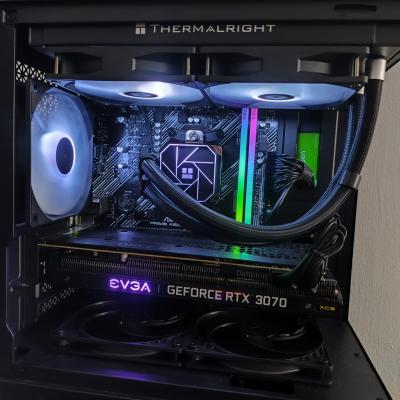
+ Thermalright Aqua Elite 240 AIO + ARCTIC P12 SlimPWM PST x 2 unit + ARCTIC MX-6T hermalpaste Below is the comparison during playing Crysis3. Temperature Before: » Click to show Spoiler - click again to hide... « Temperature After: » Click to show Spoiler - click again to hide... « For the current setup, is that temperature range normal ? And if anyone wonder, this is my current pc look like: » Click to show Spoiler - click again to hide... «  By the way, I would to thank all sifu/seniors for all the recommendations and suggestions provided.  I really appreciate it. TQVM & you guys are awesome. |
|
|
Feb 2 2024, 05:02 PM
Show posts by this member only | IPv6 | Post
#24
|
|
Senior Member
2,992 posts Joined: Feb 2015
|
QUOTE(elmo666 @ Feb 2 2024, 04:59 PM) Hi all. Finally, I managed to get these installed after 1 month+ Well, the min max doesn't tell the whole story.+ Thermalright Aqua Elite 240 AIO + ARCTIC P12 SlimPWM PST x 2 unit + ARCTIC MX-6T hermalpaste Below is the comparison during playing Crysis3. Temperature Before: » Click to show Spoiler - click again to hide... « Temperature After: » Click to show Spoiler - click again to hide... « For the current setup, is that temperature range normal ? And if anyone wonder, this is my current pc look like: » Click to show Spoiler - click again to hide... « By the way, I would to thank all sifu/seniors for all the recommendations and suggestions provided. I really appreciate it. TQVM & you guys are awesome. If possible need to check the temp during gameplay. You can log it using the temp tool. Then open to check the temp in graph format. Or just turn on the in display temperature using MSI afterburner. However, it seems to be better now. This post has been edited by AthrunIJ: Feb 2 2024, 05:03 PM |
|
|
Feb 2 2024, 05:37 PM
|
|
Senior Member
2,681 posts Joined: Apr 2017
|
QUOTE(elmo666 @ Feb 2 2024, 04:59 PM) Hi all. Finally, I managed to get these installed after 1 month+ Temps looks ok. I see for the same max CPU load at ~7xW, now your doing 20oC below what you before so it looks like your not thermal throttling at the same settings anymore. Thats good.+ Thermalright Aqua Elite 240 AIO + ARCTIC P12 SlimPWM PST x 2 unit + ARCTIC MX-6T hermalpaste Below is the comparison during playing Crysis3. For the current setup, is that temperature range normal ? And if anyone wonder, this is my current pc look like: » Click to show Spoiler - click again to hide... « By the way, I would to thank all sifu/seniors for all the recommendations and suggestions provided. I really appreciate it. TQVM & you guys are awesome. If normal for your case, just run your most demanding apps (typically games) and monitor the max load wattage vs max temps. If really want to be sure, run Cinebench/Prime95 for 10-20 min run and see how far you can go (CPU watt) b4 thermal limit (or if it even hit it). But really if your happy now its all that matters. |
|
|
Feb 3 2024, 10:38 AM
Show posts by this member only | IPv6 | Post
#26
|
|
Junior Member
451 posts Joined: Jul 2009 From: JB <> SG
|
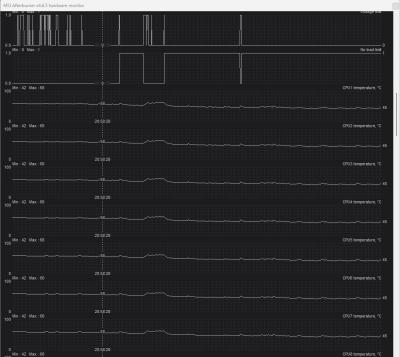
QUOTE(AthrunIJ @ Feb 2 2024, 05:02 PM) Well, the min max doesn't tell the whole story. I did run MSI Afterburner when playing game. Here is the result: If possible need to check the temp during gameplay. You can log it using the temp tool. Then open to check the temp in graph format. Or just turn on the in display temperature using MSI afterburner. However, it seems to be better now. CPU: » Click to show Spoiler - click again to hide... « GPU: » Click to show Spoiler - click again to hide... « Should be okay within that temperature range? QUOTE(babylon52281 @ Feb 2 2024, 05:37 PM) Temps looks ok. I see for the same max CPU load at ~7xW, now your doing 20oC below what you before so it looks like your not thermal throttling at the same settings anymore. Thats good. I did run MSI Afterburner when playing game. Here is the result: If normal for your case, just run your most demanding apps (typically games) and monitor the max load wattage vs max temps. If really want to be sure, run Cinebench/Prime95 for 10-20 min run and see how far you can go (CPU watt) b4 thermal limit (or if it even hit it). But really if your happy now its all that matters. CPU: » Click to show Spoiler - click again to hide... « GPU: » Click to show Spoiler - click again to hide... « I can notice a significant drop in comparison to the previous setup.  I guess I should not worry about the temperature now.  This post has been edited by elmo666: Feb 3 2024, 10:39 AM |
|
|
|
|
|
Feb 3 2024, 10:52 AM
Show posts by this member only | IPv6 | Post
#27
|
|
Senior Member
2,992 posts Joined: Feb 2015
|
QUOTE(elmo666 @ Feb 3 2024, 10:38 AM) I did run MSI Afterburner when playing game. Here is the result: Cpu better.CPU: » Click to show Spoiler - click again to hide... « GPU: » Click to show Spoiler - click again to hide... « Should be okay within that temperature range? I did run MSI Afterburner when playing game. Here is the result: CPU: » Click to show Spoiler - click again to hide... « GPU: » Click to show Spoiler - click again to hide... « I can notice a significant drop in comparison to the previous setup. I guess I should not worry about the temperature now. Gpu however. Abit toasty but all good if can control it between 70 and 80 Enjoy your rig breh |
|
|
Feb 3 2024, 10:57 AM
|
|
Senior Member
1,263 posts Joined: Oct 2009
|
If you believe uncle a cooler master hyper 212 single fan variant is more than enough for your Ryzen 5 5600 if your casing have good airflow like Corsair 4000D airflow variant for example
Uncle use Ryzen 7 5700x the most lousy CPU variant hyper 212 can handle like a champ without problem at all This post has been edited by zuozi: Feb 3 2024, 10:58 AM |
|
|
Feb 3 2024, 09:42 PM
|
|
Senior Member
2,681 posts Joined: Apr 2017
|
QUOTE(elmo666 @ Feb 3 2024, 10:38 AM) I can notice a significant drop in comparison to the previous setup. CPU issue is settled just that GPU still remain bcuz your case bad airflow but at 80oC maxed I wouldnt be too worried about it unless your running it constantly for AI or mining or work. I guess I should not worry about the temperature now. The added benefit is now you got more ARGB bling in your case to show off too. |
| Change to: |  0.0240sec 0.0240sec
 0.34 0.34
 6 queries 6 queries
 GZIP Disabled GZIP Disabled
Time is now: 7th December 2025 - 01:11 AM |
 Quote
Quote