Welcome Guest ( Log In | Register )

Bump Topic Topic Closed RSS Feed

Outline · [ Standard ] · Linear+

Unifi Official TM UniFi High Speed Broadband Thread V42, READ 1ST PAGE FOR RELEVANT WIFI INFO!

views
     
ypkhoo
post Aug 28 2024, 05:06 PM

New Member
*
Junior Member
32 posts

Joined: Sep 2008


QUOTE(Cavino @ Aug 28 2024, 08:16 AM)
Keep it. Don't let them take it away (my installer mentioned they don't take it anyway).

Yesterday tested the new black DLink ONR bridging, dropped again to 200-300Mbps permanently.
I hooked back the old Huawei modem to get back consistent 800-930Mbps speed. Will check again tonite see if it drop to 300Mbps even when using old Huawei modem.
If it drop, then its the ISP problem, if stable 800-900++, then have to abandon DLink ONR and hope for the best.

If my old Huawei ONU fail, will try to request for Huawei modem replacement. If they still insist on using the black ONR without correcting the situation for bridging, I may as well downgrade my package to 500Mbps, have even better speed than 1GB with 300Mbps bridging.
*
Same here, my blink black ONR on bridge, run smooth and ok for near 4-5 days, for constant 1000mbps. however since yesterday, the speed keep drop to 200-300.
Yet to plug the old ONU. still monitoring how long can last after power reset.
ypkhoo
post Aug 29 2024, 12:52 PM

New Member
*
Junior Member
32 posts

Joined: Sep 2008


1gbps plan with Dlink Black ONR.
Last few day i notice, speed drop to 300/100 after 10am, and perform restart ONR wont restore the speed.
Only can restore when restart ONR at night.
Install smart plug today, when detect speed drop set a power off / on schedule and perform 2 restart at 10am & 11am, speed remain cap at 300/100. Will perform another restart at 2pm and try.
wonder anyone faced this issue. if continue i rather change back to old ONU, which can stable at 940 at least.
ypkhoo
post Aug 29 2024, 01:56 PM

New Member
*
Junior Member
32 posts

Joined: Sep 2008


QUOTE(Cavino @ Aug 29 2024, 12:59 PM)
Is the black DLink ONR in router mode or bridge mode?
*
yes, bridge to AX86U Pro
ypkhoo
post Aug 29 2024, 03:38 PM

New Member
*
Junior Member
32 posts

Joined: Sep 2008


QUOTE(Cavino @ Aug 29 2024, 03:29 PM)
I'm bridging to Asus AX-11000, gave up on DLink Black ONR cause constantly drop to 200-300 Mbps. Used back the old reliable Huawei ONU. Many ppl with DLink ONR has the same problem. No solution on the ONR yet for this bridging drop issue.
*
Ya, i tired on this too, add on smart plug for schedule rebooting also cant help.
Tonight change back to Old ONU. at least can get stable speed.
ypkhoo
post Aug 29 2024, 06:34 PM

New Member
*
Junior Member
32 posts

Joined: Sep 2008


QUOTE(neekun @ Aug 29 2024, 04:36 PM)
I am using the black onr, so far so good no speed drop issue. My router is ax-11000 too.
Speed drop usually happens day or night or just randomly?
*
mine at day, after 9/10am capped at 300, despite reboot ONR wont back to full speed.
but at night, after 9pm, reboot ONR, full speed until next morning

previously is ok full speed all while during day & night using ONR.
I think logged a report to TM on this and see next.


This post has been edited by ypkhoo: Aug 29 2024, 07:10 PM
ypkhoo
post Aug 29 2024, 07:08 PM

New Member
*
Junior Member
32 posts

Joined: Sep 2008


QUOTE(Epic_winner091 @ Aug 29 2024, 05:34 PM)
If we bridge the ONR, does VoIP still work and do we need to set up the VLANs on the router?
*
can, no problem
ypkhoo
post Aug 30 2024, 12:25 PM

New Member
*
Junior Member
32 posts

Joined: Sep 2008


QUOTE(neekun @ Aug 30 2024, 07:36 AM)
Any other former 800 mbps user getting free upgrade to 2gbps as well mind to share here please. Thanks.
*
mine just 800 to 1gbps only.
so lucky to have free to 2gbps
ypkhoo
post Aug 30 2024, 12:27 PM

New Member
*
Junior Member
32 posts

Joined: Sep 2008


QUOTE(Cavino @ Aug 30 2024, 09:44 AM)
So lucky.

No idea on when drop, after reboot at evening, it worked for the night at least for next few hours, then tomorrow morning back to 200-300Mbps. Happened for 3 days in a row and switched out the ONR.
*
same as me. but today very good.
still maintain full speed as now. restart in 2am and running still.
i remote run speed test at router within 1-2 hours try to determine time it drop.
ypkhoo
post Aug 30 2024, 12:41 PM

New Member
*
Junior Member
32 posts

Joined: Sep 2008


QUOTE(BladeRider88 @ Aug 30 2024, 12:30 PM)
you will never get full speed 2Gbps with this router as it has only 1 2.5G WAN and the rest is 1G LAN
*
if test at router, suppose can, as the connection on WAN can see as 2.5G, mean the ONR also have 2.5G port, and connect to router on same protocol.
if test on LAN via gigaport also wont get this speed, as 1G capped at 940-950max
ypkhoo
post Aug 30 2024, 05:36 PM

New Member
*
Junior Member
32 posts

Joined: Sep 2008


QUOTE(mdzaboy @ Aug 30 2024, 02:59 PM)
This is coming from D-link 3060 right? My client's using this model and i lodged a report to TM and request to change to stand alone modem aka BTU.

So far after changed it no issue with the dropping speed.

Btw using 1gb package right now
*
1gbps plan can request change modem? not all issue with Dlink ONR Black?
Mentioned modem with 2.5G port?
ypkhoo
post Aug 30 2024, 05:37 PM

New Member
*
Junior Member
32 posts

Joined: Sep 2008


QUOTE(kwss @ Aug 30 2024, 03:07 PM)
Hi everyone with the D-Link speed drop issue.

Did you put your device in a confined area?
Do you host any server, torrent or transfer huge amount of data?
*
no, i have 2 casing fan 24x7 blow on it too. no host server, just purely work as bridge
ypkhoo
post Aug 30 2024, 05:41 PM

New Member
*
Junior Member
32 posts

Joined: Sep 2008


QUOTE(BladeRider88 @ Aug 30 2024, 12:45 PM)
I been told that running speedtest in router might not able to achieve full speed due to the limitation on the speed test app.
*
not sure on TPLINK, but asus router speed test can hit, even for 2gbps
ypkhoo
post Aug 30 2024, 05:46 PM

New Member
*
Junior Member
32 posts

Joined: Sep 2008


QUOTE(OKLY @ Aug 30 2024, 01:39 PM)
Guys, usually which speedtest.net server you guys use to test a 1-2gbps connection?

My 1gbps usually hitting around 870-880mbps on most servers. Only off peak and certain hours I will see it above 900mbps closer to my 1GBe limitation.
*
prior to this, if your using pure ONR, you can test inside the router, should hit over 1gbps based on your plan. if you on LAN, due to port limitation, max also 920-940
Other wise, if you on bridge, much depend on your ONR/ONU have 2.5G port, as well your router have 2.5H WAN, if so, if test on router, you can hit over 1gbps based on your plan. If you test on wifi, depend which version of your devise, and Wifi 5G setting, If test on LAN, same, if your LAN port of router is G/2.5G, if just gigaport, still max 920-940
server sometime does contribute, but use cyberjaya / KL one most stable.
ypkhoo
post Sep 6 2024, 01:04 PM

New Member
*
Junior Member
32 posts

Joined: Sep 2008


For asus router, shall i change dns to cleanbrowing, and on DoT, set both IPV4 and 6 to cleanbrowing?
cleanbrowing dns still ok?
ypkhoo
post Sep 6 2024, 01:35 PM

New Member
*
Junior Member
32 posts

Joined: Sep 2008


QUOTE(soonwai @ Sep 6 2024, 01:32 PM)
Cleanbrowsing Family not working. Adult & Security still ok last I checked.
*
plan to use security only
ok, i try set it later when back home. not try on remote. later cant get access internet.
ypkhoo
post Sep 6 2024, 01:54 PM

New Member
*
Junior Member
32 posts

Joined: Sep 2008


QUOTE(Anime4000 @ Sep 6 2024, 01:43 PM)
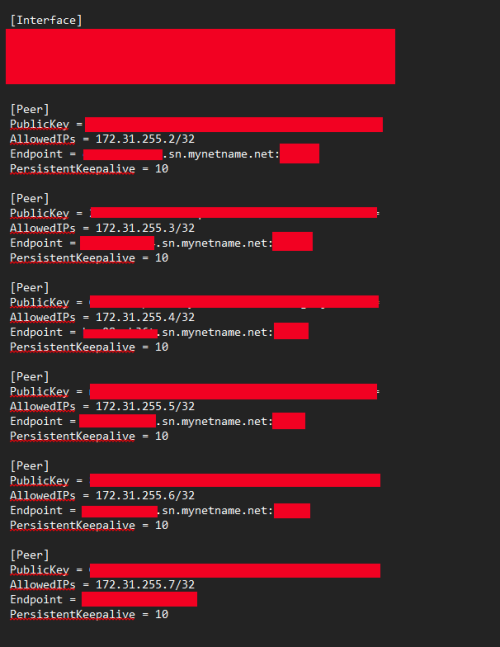
have few client joined my Free DNS over WG

user posted image

mostly run on Primary DNS, no secondary... need volunteer for 2nd server, haha

also DNS over DNS Tunnel and DNS over ICMP Tunnel also working
*
how to join and try?
ypkhoo
post Sep 6 2024, 01:58 PM

New Member
*
Junior Member
32 posts

Joined: Sep 2008


QUOTE(Anime4000 @ Sep 6 2024, 01:55 PM)
If your router has Wireguard support, just WG join

because DNS only can be access via Wireguard
*
Have, saw that in VPN setting
ypkhoo
post Nov 18 2024, 12:58 PM

New Member
*
Junior Member
32 posts

Joined: Sep 2008


Dlink ONR (Black, 2.02), after flash firmware to 2.03, login GUI ok. but cant find GPON Bridge.
Only Gpon Mode and RG mode.
Anything other process to set?
Please advice. thx much
ypkhoo
post Nov 27 2024, 11:55 AM

New Member
*
Junior Member
32 posts

Joined: Sep 2008


QUOTE(Cavino @ Nov 27 2024, 08:38 AM)
I don't get why cannot if he is tm tech unless the modem corrupt liao.

Mine with guidance from posters here just remind me to plug the cable from laptop TO port 4.

I have tried accessing the modem using the correct ip address and can't even connect to modem for a few days without avail.....only to be reminded from posters here that we NEED to connect directly to PORT 4 ONLY to access the modem while in bridge mode. Other port just does not work and can't access the web interface.

Then I uploaded the firmware that I got here to the modem. Worked so far.
*
Yes, when ONR on bridge mode setting, only Port 4 can access the GUI
Once go in, load the 2.03 firmware and all done.
i loaded 2.03 but yet tried it. So far heard wont speed drop but in monitoring.
ypkhoo
post Dec 14 2024, 09:25 PM

New Member
*
Junior Member
32 posts

Joined: Sep 2008


QUOTE(emy_xvidia @ Dec 14 2024, 06:27 PM)
RM200 and above just for the package excluding the 8% tax. You can try and go nego but I dont think they would entertain those paying below RM200 but wanting the 2Gbps free upgrade. They'd offer the standard 500Mbps (1Gbps free speed upgrade at RM150+ instead for bills below RM200.) I know some guys who got 800Mbps Turbo package last time were lucky that they managed to get the 800 Turbo upgrade while paying less than RM180 but these guys wont get the 2Gbps one as per the current SWU4.0.
*
package only mine is 189, with ruby pack come to 229
from 800mbps free upgrade (no contract) to 1gbps
hmmmm.. any chance shall i nego for 2gbps?

2 Pages  1 2 >Top
Topic ClosedOptions
 

Change to:
| Lo-Fi Version
0.0330sec    0.62    7 queries    GZIP Disabled
Time is now: 18th December 2025 - 02:39 PM