Welcome Guest ( Log In | Register )

Bump Topic Topic Closed RSS Feed
4 Pages  1 2 3 > » Bottom

Outline · [ Standard ] · Linear+

Unifi Official TM UniFi High Speed Broadband Thread V42, READ 1ST PAGE FOR RELEVANT WIFI INFO!

views
     
dev/numb
post Dec 11 2023, 09:19 PM

On my way
****
Junior Member
691 posts

Joined: Nov 2021
QUOTE(go626201 @ Dec 11 2023, 08:33 PM)
Anyone having issue with unifi?
I think TM network having something wrong now.
1/3 network connection is high latency and packet lost.
Even to google dns also having similar issue.

Or only my area or region(Johor) have this issue?
*
Same. JB area. Switching IP pool also same. Tried 1.9.xx.xxx and 60.5x.xxx.xx both koyak. At first I thought it’s their usual international peering issue, but it seems more serious that that. Even connecting to local MY datacenter also getting packet loss. Don’t know if it’s just us in Johor or nationwide. Posting this via hotspot (Celcom) from my phone.
dev/numb
post Apr 25 2024, 06:28 AM

On my way
****
Junior Member
691 posts

Joined: Nov 2021
QUOTE(ikengkai @ Apr 25 2024, 12:24 AM)
Hi Sifu-sifu,

Want to ask what the fastest free DNS to use?
I been with Google dns all the time, and CloudFlare seem attractive as it's block malicious sites. Anyway, did test with ping and benchname Google, both seem point to Google DNS 10 - 20% faster. Even though Google DNS some query hit the 3.5s timeout, it still faster. The CloudFlare may slower for the fastest time, but it's seem consistent and no query that hit timeout. Would like hear from sifu and learn more on this topic. Thanks.
*
In our region, if you’re looking for speed over all else, big two candidates are likely Cloudflare or Google. It also depends on your ISP/Telco peering, and I’m sure you know how badly Unifi sucks at night.

If you want some form of ad/tracker/malware filtering or a non-logging DNS, then you can look at providers like NextDNS, Quad9, ControlD, dnsWarden, AhaDNS-Blitz. Most of these providers have globally distributed servers so you can try and see if you get one with good performance.

This post has been edited by dev/numb: Apr 25 2024, 06:30 AM
dev/numb
post Apr 25 2024, 10:45 PM

On my way
****
Junior Member
691 posts

Joined: Nov 2021
QUOTE(The.Lucas.DaY @ Apr 25 2024, 09:02 PM)
Wanna ask about dns setup, do i need to setup dns, e.g. Quad9, in every devices, even i have set up dns in wifi router?

I noticed my connection is not using Quad9 even i setup dns in router.
*
Depends. How are you checking the connection? Some web browsers or operating systems will override your router DNS if they have their own encrypted DNS – usually DNS-over-HTTPS (DoH) or DNS-over-TLS (DoT) – settings. For example, I think Chrome and Android will always default to using Google DNS unless you manually change the connection settings.

Edit:
If your router DNS settings doesn’t support encrypted DoH/DoT, then it is always a good idea to set an encrypted DNS on device. Especially useful for mobile devices, since you will continue using the custom DNS you’ve configured even when you’re on cellular data or joined another wifi network.

This post has been edited by dev/numb: Apr 25 2024, 10:48 PM
dev/numb
post Apr 26 2024, 04:21 PM

On my way
****
Junior Member
691 posts

Joined: Nov 2021
QUOTE(The.Lucas.DaY @ Apr 26 2024, 09:13 AM)
I'm using NextDNS to check which dns is using.

I'm using TPLink Archer C1200 which i don't think it support encrypted DoH/DoT, i'll have to manually setup dns on each device

Edit: Want to ask if NextDNS/Quad9 is completely free? While i see Nextdns has pricing plans
*
Use https://dnscheck.tools or https://browserleaks.com/ip to check your DNS resolvers.

Quad9 is free afaik. NextDNS has both free and paid plans. Their free plan offers all the same features as the pro plan but is limited to 300,000 queries a month. If you exceed that limit, your queries will still be routed through NextDNS servers but without any filtering. If you intend to stick to the free plan, make sure to tick the “cache boost, option in the settings tab. Also, wrt NextDNS or Quad9, always set them up manually in your OS settings (using DoT or DoH). Instead of downloading their apps. Here’s a good beginners guide for NextDNS setup; https://github.com/yokoffing/NextDNS-Config

This post has been edited by dev/numb: Apr 26 2024, 04:23 PM
dev/numb
post May 2 2024, 11:55 PM

On my way
****
Junior Member
691 posts

Joined: Nov 2021
QUOTE(MrWax @ May 2 2024, 10:36 PM)
What should I do? Image is speed test connecting to server at Norway, tried another at Germany also less than 5mbps
*
Nothing much you can do. Even VPNs are also hit-and-miss, depending on the locations you want to access. It’s mainly European mirrors that are heavily affected due to the current undersea cable fault in the Indian Ocean, plus you have to combine that with TM’s usual shit peering. With my VPN provider, peering to their Singapore servers totally koyak right now (100ms+ ping and >5% packet loss). Malaysia server no issue connecting, but the ISP for the hosting provider also seems to be depending on that Indian Ocean route so it doesn’t help much (way better than withoit VPN but still not exactly stable packet flow). I have to connect to a Japan server to get decent speeds, at the expense of higher latency. Seems my VPN’s Japan server hosting company routes through China for Europe access.

This post has been edited by dev/numb: May 2 2024, 11:56 PM
dev/numb
post May 3 2024, 11:21 PM

On my way
****
Junior Member
691 posts

Joined: Nov 2021
QUOTE(MrWax @ May 3 2024, 08:31 PM)
Which VPN are you on? Interestingly I tried ExpressVPN and the issue became more tolerable with 80 mbps dl speed, though still abnormal high ping
*
I’m on IVPN currently. Right now (time is on top of attached image), SG is useable, but this wasn’t the case last night, and even tonight it might koyak anytime with ping doubling/tripling and 10-20% packet loss occurring. MY server connection and speedtests are good for most of the day, but certain domains (mainly EU based) resolve very slowly and video streaming (pirate sites or video conferencing to UK) buffers a lot, meaning that the MY hosting provider’s ISP is also affected. JP server exhibits higher latency, but no issues when surfing and streaming. I don’t do gaming so cannot advise you on that. Screenshot from IVPN app included below. HK and TW totally koyak for the past months.

Mullvad currently (~11pm) some SG servers are responding well. HK servers also having relatively low (around 50-60ms) ping with zero packet loss. But I’m currently not subscribed to Mullvad so this is just based on traceroutes and ping tests. From previous experience I know that some of Mullvad’s HK and JP servers route through China for EU queries, so likely unaffected by the Indian Ocean cable fault.

I avoid the other commercial VPNs (personal trust issues) so cannot comment.

user posted image

This post has been edited by dev/numb: May 3 2024, 11:28 PM
dev/numb
post May 4 2024, 10:36 PM

On my way
****
Junior Member
691 posts

Joined: Nov 2021
QUOTE(go626201 @ May 4 2024, 05:07 PM)
If you're concerned about privacy, I'd recommend building your own VPN with SG Server/VPS. (I prefer OVH SG ,since it is private peering with TM)
But it you just need normal vpn and alot of worldwide country vpn server to use,i would recommend NordVPN (thousands of server on worldwide)
*
A rented VPS advantages are performance (if you’re willing to pay) and security (if you harden the base Linux install properly). In terms of privacy*, not really since;
a. They will log everything at hypervisor level.
b. They have all your payment/cc info.
c. It’s still a single hop VPN, so correlation is relatively easy based on timestamps and bandwidth usage.
*exceptions would be truly anonymous hosting providers like 1984 Hosting or Njalla, but you will lose any performance advantage because the servers are located so far away.
dev/numb
post May 9 2024, 11:06 PM

On my way
****
Junior Member
691 posts

Joined: Nov 2021
Had to prove I was a human to Cloudflare DDoS protection before logging in to post this. Why? Because I’m currently connected to a JP VPN server. sweat.gif

UniFi peering to my usual MY and SG VPN servers totally koyak tonight. Usually at least one can use. Tonight both also kaput. 120+ms ping to a server in KL? You no shame ha, TM?!! bangwall.gif

This post has been edited by dev/numb: May 9 2024, 11:08 PM
dev/numb
post May 9 2024, 11:19 PM

On my way
****
Junior Member
691 posts

Joined: Nov 2021
QUOTE(soonwai @ May 9 2024, 11:14 PM)
Looks like many Unifi subscribers in Malaysia. Everyone please let them know. Report to MCMC too.
*
Honestly I think all of you on this thread with social media account better just try to group viral and then send link to SoyaCincau and MalaysiaKini. Malaysia pattern; if kena viral baru baiki.

This post has been edited by dev/numb: May 10 2024, 12:50 AM
dev/numb
post May 22 2024, 11:41 AM

On my way
****
Junior Member
691 posts

Joined: Nov 2021
QUOTE(yenchenje @ May 22 2024, 10:47 AM)
If someone here is on the 115.135.x range for IP, can help verify if speedtest to singapore servers are fucked?

GBe plan but only getting max 200mbps, need to know if it's a router issue or peering issue
*
It’s variable, and changes almost daily. One day your peering to a certain Singapore server is fine and the next day you will get triple the latency and >10% packet loss. For example, last night between 9pm-1am, out of the 5 servers my VPN provider offers in SG, only 1 was useable. It’s not just SG either. Even HK, Thai and Indo servers can be affected. It’s a TM problem and has been going on since just before MCO, not related to the submarine cable faults currently affecting our EU connectivity for the past month. So basically, we Unifi users are battling a combination of 2 issues nowadays – TM peering issues plus EU connectivity issues. Every night for the past month I try find one nearby SG server and use that as the first hop to negate TM’s usual peering issues, and then connect to Japan for the second hop to avoid the slow connectivity to EU domains caused by the undersea cable breakage.
dev/numb
post May 24 2024, 11:17 PM

On my way
****
Junior Member
691 posts

Joined: Nov 2021
QUOTE(NagaK @ May 24 2024, 06:59 PM)
Who is the that the app developer for the unifi app…
*
Gaji Buta Software Sdn Bhd
dev/numb
post May 27 2024, 05:34 PM

On my way
****
Junior Member
691 posts

Joined: Nov 2021
QUOTE(Oltromen Ripot @ May 27 2024, 01:08 PM)
what is the opinion over the following VPN set up.
local KVM Linux VPS in KL area, with unmetered 1Gbps bandwidth

the idea is to have local VPN endpoint rather than overseas, since
target usage is heavily towards accessing local conferencing server, which currently is very slow even with 2Gbps link. Or 1Gbps link, if you consider it's the bloody white ONR.

i was thinking it would be better to set up VPN in local datacentre endpoint and then leave the international or local routing to the datacentre's own route management.
is there gotchas or flaws to this thinking?
*
As others have said, no guarantee.

Up until middle of this month I was using a commercial VPN provider that had a MY node in KL/Cyberjaya provided by Gigabit Hosting Sdn Bhd. My IP to the VPN server zero issues throughout the day, even maintaining <10ms ping during typical Unifi peak/koyak hours, but hosting server’s peering to EU is also badly affected right now.

Most datacenters won’t bend over for a single rented VPS rental customer, so it’s best you contact whatever local provider and ask beforehand if they have provisions to manage routing/peering upon customer request.

If your primary use case is local conferencing, maybe less of an issue if you find a decent local VPS. You only need to worry about your connection to the server. At worst, you might need to rotate your own IP range every few days (because TM), but should be minimal.

This post has been edited by dev/numb: May 27 2024, 09:14 PM
dev/numb
post Jul 1 2024, 08:32 PM

On my way
****
Junior Member
691 posts

Joined: Nov 2021
Past few hours most of the IP pools koyak and experiencing packet loss to VPN servers. Even my “safe haven” JP server also koyak. Wtf happened today?

This post has been edited by dev/numb: Jul 1 2024, 09:01 PM
dev/numb
post Jul 3 2024, 11:04 PM

On my way
****
Junior Member
691 posts

Joined: Nov 2021
QUOTE(aniq8676 @ Jul 3 2024, 08:52 PM)
Maybe some users are affected,
because I didn't experience any service interruptions last night
*
It was very weird. I was streaming football on my iPad using a VPN connected to a SG server and everything seemed normal, but my phone (not connected to VPN) suddenly gave a notification saying it couldn’t connect to my DNS provider (NextDNS). After doing some tests, I found that I couldn’t connect to NextDNS (the service wasn’t down because it worked fine on 5G data) but Cloudflare DNS was working. Pinging some VPN servers in SG showed that connections to DataPacket servers were fine while M247 servers all couldn’t connect.
dev/numb
post Jul 6 2024, 10:04 PM

On my way
****
Junior Member
691 posts

Joined: Nov 2021
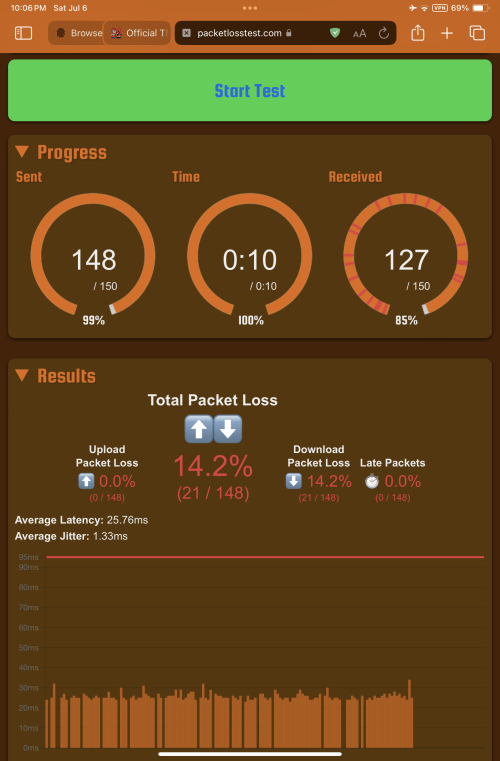
Did UniFi just shit itself again?
IP pool: 124.13.xx.xxx

SG server
user posted image

This post has been edited by dev/numb: Jul 6 2024, 10:19 PM
dev/numb
post Jul 7 2024, 12:06 PM

On my way
****
Junior Member
691 posts

Joined: Nov 2021
QUOTE(westlife @ Jul 7 2024, 03:14 AM)
which model of wifi 6 and 7 model will be sufficient to cover a 882 sq ft two bedrooms and 2 bathrooms apartment unit?

just want to go for a minimum model that can do the job.
Apartment AX-57 probably enough already. You can even buy 2 and use the Ai-Mesh feature, but not needed in most cases for apartments. Fyi, I think the AX-57 has been superseded by a newer model, 1800HP or something like that. Do take note that the lower priced Asus routers don’t support Merlin firmware. Lastly, the prices in your pic seem higher than what I’ve previously seen, but maybe diesel naik router also naik, so I’m not sure.

This post has been edited by dev/numb: Jul 7 2024, 12:07 PM
dev/numb
post Jul 7 2024, 04:10 PM

On my way
****
Junior Member
691 posts

Joined: Nov 2021
QUOTE(westlife @ Jul 7 2024, 12:40 PM)
these are local promo by pcimage etc.. their price is normally higher than shopee etc... not surprise that even after this promo now it is still higher than elsewhere...  tongue.gif

u mean this one?
https://shopee.com.my/ASUS-AX1800-High-Powe...d4-a0044bfe03ff

sold by asus offical pc store on shopee.. 2.1k unit sold...

but dual-band will it cause performance degrade comparing to tri-band?
what is the difference if it supports merlin firmware or not?

i check out all the models in the promo list that are below rm1k.. all dual-band only...
*
Sorry sorry. I got my model numbers mixed up. The AX1800HP replaced the old AX55. The AX57 in your pic should be newer and (a bit) more powerful, so likely to be priced higher.

Comparison: https://www.asus.com/my/product-compare?Pro...-servers-wifi-6

Merlin firmware allows some advanced features, but if you don’t know about it then you probably don’t need it. Nowadays the gap between AsusWRT and Merlin is not so big anyway. Stock AsusWRT firmware is more newbie friendly since it contains presets for our TM, Maxis, etc settings and all that.

Better to ask in the dedicated wifi router thread. More experts there.
dev/numb
post Jul 7 2024, 09:32 PM

On my way
****
Junior Member
691 posts

Joined: Nov 2021
QUOTE(westlife @ Jul 7 2024, 09:10 PM)
hi. yes. looks like the spec for AX57 is much more better, but again it is dual-band only. not sure if it will really has good performance.
*
Do you have many people in your apartment with many devices? If your environment involves many devices doing bandwidth heavy stuff (streaming, gaming, local network file transfers) at the same time, tri-band can help. If it’s just you and your partner streaming different shows every night, then no issue with dual-band. In most cases,you will likely hit Unifi’s limit long before you hit the router’s limit.

This post has been edited by dev/numb: Jul 7 2024, 09:32 PM
dev/numb
post Aug 17 2024, 02:47 PM

On my way
****
Junior Member
691 posts

Joined: Nov 2021
QUOTE(Anime4000 @ Aug 17 2024, 02:00 PM)
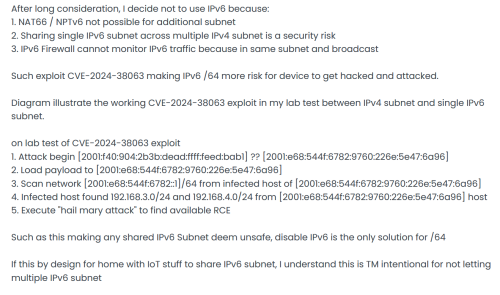
None, MCMC not enforce RFC 6177, thus I give up, just don't use IPv6

user posted image
*
So TM wants to install malware to steal our data or mine crypto. laugh.gif
I wouldn’t be surprised if MCMC actually wants this vulnerability active in order to remotely install future spyware.

This post has been edited by dev/numb: Aug 17 2024, 02:48 PM
dev/numb
post Aug 26 2024, 01:18 AM

On my way
****
Junior Member
691 posts

Joined: Nov 2021
QUOTE(simmarjit @ Aug 25 2024, 10:24 PM)
I am sure its fine for windows but if you're using Linux based OSes i would prefer Intel ones.
*
https://www.realtek.com/Download/List?cate_id=584
https://github.com/awesometic/realtek-r8125-dkms

Probably also available in AUR or Slackbuilds somewhere.

4 Pages  1 2 3 > » Top
Topic ClosedOptions
 

Change to:
| Lo-Fi Version
0.2200sec    0.50    7 queries    GZIP Disabled
Time is now: 4th December 2025 - 03:53 PM