Welcome Guest ( Log In | Register )

Bump Topic Topic Closed RSS Feed

Outline · [ Standard ] · Linear+

Unifi Official TM UniFi High Speed Broadband Thread V42, READ 1ST PAGE FOR RELEVANT WIFI INFO!

views
     
StuartLee2015
post Oct 18 2024, 10:43 PM

Regular
******
Senior Member
1,221 posts

Joined: Sep 2014
From: Malaysia


Hi guys, I was using this SR1041F Router from Unifi. Apparently it's AX3000 and my previous router is TP-Link AX20... it's AX1800.

I got around 300 Mbps on Speedtest. I then changed to this SR1041F FIBER Home Router, and TP-Link AXE5400 TXE75E Wifi adapter, I got some increases in Wifi 5Ghz speed to 620+ Mbps!

I wanna ask is this SR1041F Router any good or the D-Link AX3000 is better, or what router should i go for? Single Storey Terrace house with a square feet of 1600.
StuartLee2015
post Oct 19 2024, 07:47 PM

Regular
******
Senior Member
1,221 posts

Joined: Sep 2014
From: Malaysia


is TP-link AX55 good for unifi 500mbps?
StuartLee2015
post Oct 19 2024, 09:32 PM

Regular
******
Senior Member
1,221 posts

Joined: Sep 2014
From: Malaysia


QUOTE(Khan92 @ Oct 19 2024, 08:02 PM)
I've been using since January, so far pretty good.

Can get solid 500Mbps with no problem, for mesh it's expected if you far a bit from main unit the speed drop
*
Thanks for the reply, I using the SR1041F Fiber Home AX3000 router, is it any good for now or better get this AX55?

I got about 620+/- MBps on wifi 5GHz. and it's pretty stable since i tested it 3 days ago after I got an TP-Link TXE75E PCIE WIFI adapter. I got about 86% Signal Strength with 620 +/- Mbps wifi 5Ghz. Router is outside my room, located on a desk/tv cabinet on dining hall.

Thoughts?
StuartLee2015
post Oct 19 2024, 10:12 PM

Regular
******
Senior Member
1,221 posts

Joined: Sep 2014
From: Malaysia


QUOTE(Khan92 @ Oct 19 2024, 10:07 PM)
I assumed the fiberhome is standard issued router by TM? Most of the time it's standard as it is, for 500mbps but you get 600++ I think your package got speed upgrade to 800 mbps?
*
I also not quite sure... my account still says unifi 500Mbps - Super Value YEP 2019. I did get an SMS notification that i am gonna get upgraded to 800mbps. Don't remember when already. I got the Fiberhome router after renewing contract with them. is the upgrade permanent or temporary?
StuartLee2015
post Oct 19 2024, 11:20 PM

Regular
******
Senior Member
1,221 posts

Joined: Sep 2014
From: Malaysia


QUOTE(Khan92 @ Oct 19 2024, 10:49 PM)
Free upgrade usually is permanent, given with your current speedtest safe to say your current router only capable up to 600 mbps with 5ghz channel
*
I read a few pages ago, that some is 6months with something called SWU , there's many versions , 1, 2 and 3.
StuartLee2015
post Oct 20 2024, 07:49 PM

Regular
******
Senior Member
1,221 posts

Joined: Sep 2014
From: Malaysia


QUOTE(Khan92 @ Oct 20 2024, 07:35 AM)
Also correct.

There are 2 types of speed upgrade

1. Genuine speed upgrade, where you no need to do anything TM will do it for you by batches.

2. Stay With Unifi is a retention plan to make customer stay with TM, earlier SWU 1 and 2 the speed usually last for 6-12 months after that revert to original speed, SWU main point is to reducing monthly commitment.

Last year I checked with tm point cs was swu 3.0 (not sure now what) the speed upgrade is permanent as I remember.
*
Just checked my Unifi Account today, after receiving an SMS that it's upgraded/updated in profile. It's now 800Mbps Pro Upgrade.

Will the SR1041F Fiber Home Router sufficient for the time being, or should i go look for more suitable router?

List of Device
- 2x TV , one is Smart, one is Android
- 2x TP-Link TAPO CCTV, one Tablet, 3 Phones, 1 laptop, and 1 desktop.

When relatives' visits, they will be like additional 12 Phones.


StuartLee2015
post Oct 20 2024, 08:43 PM

Regular
******
Senior Member
1,221 posts

Joined: Sep 2014
From: Malaysia


QUOTE(Khan92 @ Oct 20 2024, 08:31 PM)
If with current situation you're not experiencing any lag or speed drop its sufficient for time being.

With upgrade at least it's future proof for 2gbps
*
I see... Go for AX3000 and above? Is the Unifi's D-Link AX3000 that's selling everywhere any good ?

What about TP-link?
StuartLee2015
post Oct 20 2024, 09:00 PM

Regular
******
Senior Member
1,221 posts

Joined: Sep 2014
From: Malaysia


QUOTE(kazekage_09 @ Oct 20 2024, 08:54 PM)
Good to know if it doesn't renew my contract. Funny coz few pages back I'm asking if my old package ok or not and today I'm getting free speed upgrade.

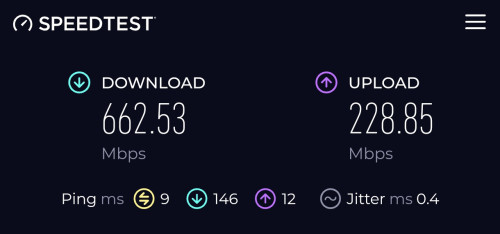
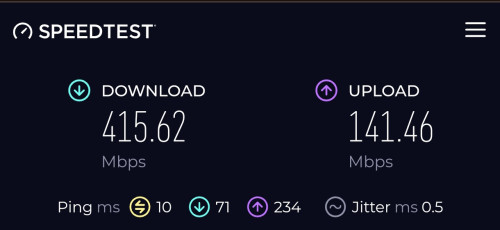
But now I wonder if my current router is enough or not. I don't have a laptop to try cable speedtest but below is the speed I get from my phone near the router.

user posted image

And this what I'm getting from my phone but from my PC room

user posted image

Any ideas how to improve the speed from my PC room? Do I need to get better wifi adapter/receiver?
*
Yeah, what adapter you are currently using on your desktop pc?

I have ASUS AX3000 PCIE WIFI adapter for sale. RM80 if you want.
StuartLee2015
post Oct 20 2024, 10:19 PM

Regular
******
Senior Member
1,221 posts

Joined: Sep 2014
From: Malaysia


QUOTE(Khan92 @ Oct 20 2024, 10:03 PM)
Before using tplink im using D-Link Ax3000, it was okay but not really app friendly. Been using tplink ax55 pro more than 6 months, solid connection so far
*
I see, the AX55 have one that's not PRO, which i think is one less LAN port if am not wrong... for now, i think use the SR1041F router for the time being.

I used TP-link AX20 before this, the Tether app have a very user friendly interface. The SR1041F, not so much.
StuartLee2015
post Oct 20 2024, 11:25 PM

Regular
******
Senior Member
1,221 posts

Joined: Sep 2014
From: Malaysia


QUOTE(Khan92 @ Oct 20 2024, 10:48 PM)
And usb port if I'm not mistaken the normal ax55 doesn't have usb port
*
Is the USB port to connect the WD NAS storage , put beside the router, like that, then from my pc, i can access the files on the NAS?
StuartLee2015
post Oct 21 2024, 02:42 PM

Regular
******
Senior Member
1,221 posts

Joined: Sep 2014
From: Malaysia


QUOTE(soonwai @ Oct 21 2024, 02:38 PM)
I got mine on 31/7. On the same day, plan name changed from "unifi 800Mbps - Super Value YEP 2019" to "Unifi Home 1Gbps - Pro Upgrade".
https://forum.lowyat.net/index.php?showtopi...#entry110165751
*
Mine's Unifi Home 800Mbps - Pro Upgrade now, from 500 Mbps - Super Value YEP 2019.

while speed increases is nice to have. How can i utilize all those speed?
StuartLee2015
post Nov 9 2024, 10:50 PM

Regular
******
Senior Member
1,221 posts

Joined: Sep 2014
From: Malaysia


Currently using Fiberhome SR1041F AX3000 router. Plan was 800Mbps. Desktop using AXE5400 Tp-link PCIE Wifi card ( Wifi 6e )

Single storey house. Router roughly at the center of the house. My pc is in my room and the router is at dining hall TV table. My room and dining hall is just side by side. Signal strength around 77% .


Is the D-link DIR-X3000Z ( non unifi ) better and more stable wifi signal strength or just the same?
StuartLee2015
post Nov 10 2024, 10:48 PM

Regular
******
Senior Member
1,221 posts

Joined: Sep 2014
From: Malaysia


QUOTE(westlife @ Nov 9 2024, 11:58 PM)
serious?! need a site visit only they considered whether to give the public ip?  tongue.gif
for landed given the length of the house, unlikely u can really very good even with the high end, if you can wire ur different parts of your house with wired connection and do with wireless mesh (even cheap one) u can get good experience...
*
My house is 20x80. My wifi adapter is one with extendable antenna and i place it pretty high up and away from anything metallic or solid object. Sometimes, it can get to 80% but then drops to around 75 to 70% (estimates) but never below 65%.
StuartLee2015
post Nov 10 2024, 10:55 PM

Regular
******
Senior Member
1,221 posts

Joined: Sep 2014
From: Malaysia


QUOTE(blacktubi @ Nov 9 2024, 11:47 PM)
With a good router you can get around 600-700Mbps for that kind of distance.

The DIR-X3000Z is just a cheap basic router. Don't expect a huge improvement.

I would suggest get something a little higher end like TP-Link Archer AX73 or ASUS TUF-AX4200 then you will see a huge jump in performance.

Of course, if you have even higher budget, getting the full 1Gbps is possible with WiFi 7 routers.
*
With the SR1041F, I could get great speeds. Below is screenshot of the most recent test. Should be good for now i guess...
The TP-link AX73 seems cool, with more antennas. Will be getting that someday.


Attached thumbnail(s)
Attached Image
StuartLee2015
post Nov 11 2024, 11:18 AM

Regular
******
Senior Member
1,221 posts

Joined: Sep 2014
From: Malaysia


QUOTE(cyberic @ Nov 11 2024, 10:11 AM)
Do avoid usb based wifi adapter, the performance is crap.
*
mine is pcie wifi card. Archer TXE75E
StuartLee2015
post Nov 11 2024, 11:19 AM

Regular
******
Senior Member
1,221 posts

Joined: Sep 2014
From: Malaysia


QUOTE(westlife @ Nov 10 2024, 11:36 PM)
but sometimes it is not just the strength that decides the quality of the wifi, you may be getting 65 to 80% of the signal strength, but if it flustrates, the stability and the actual experience (including latency) may not be that good..
*
Stability as in disconnections, and bufferings?

Topic ClosedOptions
 

Change to:
| Lo-Fi Version
0.0646sec    1.53    7 queries    GZIP Disabled
Time is now: 23rd December 2025 - 12:37 PM