Outline ·
[ Standard ] ·
Linear+
Unifi Official TM UniFi High Speed Broadband Thread V42, READ 1ST PAGE FOR RELEVANT WIFI INFO!
|
SUSLonelyHart16
|
 Apr 27 2024, 08:54 PM Apr 27 2024, 08:54 PM
|
Getting Started


|
Is Unifi really slow lately?
Especially for video and photo sites?
Youtube and Twitter is ok, but many video and photo sites like streaming services and high resolution galleries are really slow to load.
ANything to do with recent cable cut issue in middle east?
|
|
|
|
|
|
SUSLonelyHart16
|
Apr 27 2024, 10:34 PM
|
Getting Started
|
QUOTE(PowerSlide @ Apr 27 2024, 09:51 PM) i play warthunder ping until 400 connect to eu server until now still not fixed? How was your speed before? |
|
|
|
|
|
SUSLonelyHart16
|
Apr 28 2024, 09:35 PM
|
Getting Started
|
QUOTE(PowerSlide @ Apr 28 2024, 09:06 PM) ping was like 200 to 250-ish to eu server..game still playable but now 400 and packet lost cant even connect to server cant get into game mode now cant do anything but just wait for fix I noticed that at around 4AM, the speed goes back to normal. Then around 9AM, its back to slowness. TM doing something funny at night? Maintenance? |
|
|
|
|
|
SUSLonelyHart16
|
May 3 2024, 09:43 PM
|
Getting Started
|
Wow, apparently we all experiencing weird slow down at night.
Speed only return around 4am to 9pm, then go back to slow again entire day.
What is wrong with Unifi? They doing some major upgrade or throttling?
No announcement pun, so unfair.
|
|
|
|
|
|
SUSLonelyHart16
|
Sep 10 2024, 06:23 AM
|
Getting Started
|
Tmnet banned manual DNS setting ka?
I got the GN630V Skyworth router from Unifi.
But I cannot find the DNS settings? How to change?
|
|
|
|
|
|
SUSLonelyHart16
|
Sep 10 2024, 06:59 AM
|
Getting Started
|
QUOTE(Jeffreynsx @ Sep 10 2024, 06:40 AM) Can you take a screenshot of the Network tab and under the section of LAN for the Skyworth web console? The IPv4 manual DNS section is there and under IPv6, you can change it to STATIC and input your own preferred IPv6 DNS Server as well. If still cannot find this option, change the Network Type to Bridge and use your own router. It is more stable and able to customize more features and feel peace of mind. I found this.  But it's under LAN? Is this correct? I connect to wifi with my laptop. |
|
|
|
|
|
SUSLonelyHart16
|
Sep 10 2024, 07:18 AM
|
Getting Started
|
QUOTE(Jeffreynsx @ Sep 10 2024, 07:14 AM) Yes, correct. Regardless of Wifi or LAN, it will redirect you to Google DNS. But make sure your PC got enabled Secured DNS in the browser in order to redirect your network to Google DNS. Or else if you check from browser leak, the Skyworth router will redirect you to their TM DNS. I see, so I have to open Chrome and find the secure DNS setting, enable it? |
|
|
|
|
|
SUSLonelyHart16
|
Sep 10 2024, 07:37 AM
|
Getting Started
|
QUOTE(Jeffreynsx @ Sep 10 2024, 07:21 AM) Please refer to the below link and look for Manage Advanced security settings > Use a secure connection to look up a site’s IP address. https://support.google.com/chrome/answer/10...ites-ip-addressThank you, found it.  Now I have to do it for the other browsers, haha. I didn't know browsers will not auto use the new DNS, so weird, all the guides no mention. Btw, what about IPV6, no need change the DNS in router?  |
|
|
|
|
|
SUSLonelyHart16
|
Sep 10 2024, 09:11 AM
|
Getting Started
|
QUOTE(Jeffreynsx @ Sep 10 2024, 08:21 AM) You can scroll down the page and you may saw IPv6 configuration. Try to change the Prefix to Static and input your desire IPv6 IP Address and click the Apply to make the changes. Try to do the browser leak test to ensure no TM DNS is shown from the result page. But I don't know what to enter for Prefix and prefix length. Also, how to do leak test?  Update: I found this website? Correct ka?  This post has been edited by LonelyHart16: Sep 10 2024, 09:18 AM This post has been edited by LonelyHart16: Sep 10 2024, 09:18 AM |
|
|
|
|
|
SUSLonelyHart16
|
Sep 10 2024, 01:25 PM
|
Getting Started
|
QUOTE(The.Lucas.DaY @ Sep 10 2024, 11:57 AM) I presumed have to set dns in DHCP server setting as well? I set all in ipv4,ipv6 & DHCP server What do you put for the DNS prefix and prefix length value? IPV6 got these weird values, don't know how? |
|
|
|
|
|
SUSLonelyHart16
|
Sep 10 2024, 01:55 PM
|
Getting Started
|
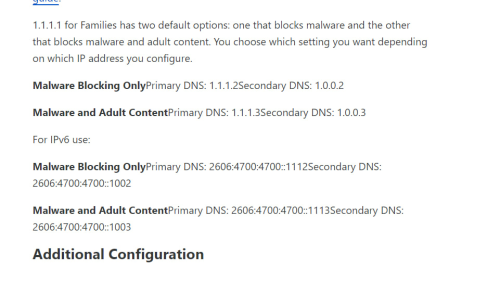
QUOTE(The.Lucas.DaY @ Sep 10 2024, 01:52 PM) I'm using cloudflare. just copy paste into the setting | IPv4 | IPv6 | | 1.1.1.2 | 2606:4700:4700::1112 | | 1.0.0.2 | 2606:4700:4700::1002 |
I thought cloudfare is 1.1.1.1? how come .2 pulak?  |
|
|
|
|
|
SUSLonelyHart16
|
Sep 10 2024, 02:12 PM
|
Getting Started
|
QUOTE(syahpian @ Sep 10 2024, 01:57 PM) wow, so .2 is better ka? Block malware. |
|
|
|
|




 Quote
Quote

 0.0273sec
 0.58
0.58
 7 queries
 GZIP Disabled