Welcome Guest ( Log In | Register )

Bump Topic Topic Closed RSS Feed

Outline · [ Standard ] · Linear+

Unifi Official TM UniFi High Speed Broadband Thread V42, READ 1ST PAGE FOR RELEVANT WIFI INFO!

views
     
BenYeeHua
post Sep 17 2024, 12:36 PM

Regular
******
Senior Member
1,873 posts

Joined: Nov 2010


And for others don't care about privacy issues, get yourself a WARP+ or ZeroTrust for free.
(unsure how to setup ZeroTrust, as I saw reddit mention about ZeroTrust "MIGHT" get high priority as WARP+, so just sharing it out for others to test about it la, me lazy person. ;P
Should give better privacy, because it target business customer, still, if you have time to set it up.)

So far TM do nothing to the certain IP range that based on WARP, it is still routing to KUL, so you can going via the routing of CloudFlare and enjoy full speed for free.
(And nope, tested, it is dedicated for WARP only, not allowed to use as :80 or :443)

This might shared your phone number out by telegram, so be aware if you gonna generating key for yourself, so far I generated once, no stranger sharing the same key/account with me, and yes, faster than regular WARP, full speed for oversea slow long comic site. wink.gif
https://t.me/s/warpplus
https://t.me/generatewarpplusbot
---EDIT
Yes, no privacy.

» Click to show Spoiler - click again to hide... «

https://www.reddit.com/r/selfhosted/comment...omment/kuz1la6/

This post has been edited by BenYeeHua: Sep 17 2024, 12:44 PM
BenYeeHua
post Sep 17 2024, 12:49 PM

Regular
******
Senior Member
1,873 posts

Joined: Nov 2010


QUOTE(tng55 @ Sep 17 2024, 12:40 PM)
yah see 175.xxx always batter
that mine ip 175.xxx i happy i wont turn off btu or router due will change other ip i get lost 175.xxx because very hard lol
*
I lost it before, because of stupid transparent DNS(you know la, that orange router need reboot to reapply DNS config), lucky midnight is such a good time to reboot router and get those interesting IP lol.

Sadly, the lowest best IP is gone since 17 years ago, in past during Streamyx era, with 60.48.x.x, I get 50ms from MY to China mainland, 50ms to HK, and 60ms to TW.

Now?
Everything high latency to reach China website, blah... doh.gif

QUOTE(mycrystal88 @ Sep 17 2024, 12:45 PM)
Big Thank you ,
Now I am working, I shall come back to you later .
And following this thread , posting

Just tried , problem same ……
*
Well, as this is about money, better get a good VPN that don't mark as bot, and safer.
You should have spare money for it? laugh.gif
BenYeeHua
post Sep 17 2024, 12:56 PM

Regular
******
Senior Member
1,873 posts

Joined: Nov 2010


Hmm, found interesting stuff.
If you generated that free WARP+, you can also using it via Wireguard, which supported only by Android TV box.

So yes, good for streaming those special video oversea but can't use WARP, lol.

https://www.reddit.com/r/CloudFlare/comment...with_wireguard/
BenYeeHua
post Sep 17 2024, 01:48 PM

Regular
******
Senior Member
1,873 posts

Joined: Nov 2010


QUOTE(akhito @ Sep 17 2024, 01:34 PM)
Tbh the concern is actually more than that if you are using key from those telegram group
https://broadband.forum/threads/getting-unl...ee-tier.215678/
Indian people ald found loophole to generate warp+ key using zero trust key
and the main point of zerotrust is for organization to tunnel back to certain server within the internal network.
Piece this together. the telegram owner might be creating 50 free zero trust user id using one credit card credential then
then use them to generate their so called warp+ child key.via
https://github.com/rany2/warp.sh
There is possibility that if they want they can legally monitor and decrypt trafficof those using the keys using cloudflare zero trust dashboard.
Well they might not be so free or desperate yet but I think the possibility of backdoor is there
So far that's what I piece through when research about warp+ free key and zero trust yesterday  as TM annoy the hell out of me too.
Do correct me if there is anything wrong

TLDR; if u want better free vpn than free warp maybe go get ur own zero trust or just use proton. I would warn again using the free WARP+ key from telegram. Dunwan to be mitm by people abusing cloudflare zero trust
*
Just read the forum you provide to me, it is about ZeroTrust, not WARP+.
For WARP+ still unknown, I think they made it by inviting bot, or TRIAL bug as posted in that topic.

And yes, apply those WARP+ key only give you WARP+, the app still asking you to login ZeroTrust, so it is kind of different la.

---
Well, for safety, I just use it for guest website, else, routing to another CDN via simple hosts file, lol.
Just let them see where I read my comic website via Mihon app, lol. laugh.gif

And yet this is why I hate anycast IP, it is ISP choose to rerouting you where you should go, while with regular CDN IP address, you can set it up at hosts file or DNS, then I can choose to going HK, SG, MY, anywhere I want, as long as it is not congested. tongue.gif
BenYeeHua
post Sep 17 2024, 11:32 PM

Regular
******
Senior Member
1,873 posts

Joined: Nov 2010


QUOTE(vapanel @ Sep 17 2024, 10:55 PM)
Actually I don't understand this

If vpn can be fast, why without vpn slow?

Does Unifi throttle us? I can't even access www.x.com

I even need vpn to access forum.lowyat.net
*
Yes, throttling 99% of customer to get those high paid customer better QoS.
For example, you connect to CloudFlare, CloudFlare itself need to reach the server back which host at SG, so they need high QoS than yours.

Normally this works well, because you connect to local CF server instead of SG, so you don't feel it.
But now, the problem is everyone getting kick to SG CF, local KUL CF is for VIP local website only...

Paying VPN is like paying a shared business/provider line with them la, so just pay it and done.
Else, go with WARP+ which is cheapest, but unstable as TM still can kick you out from KUL to HK or SG.
BenYeeHua
post Sep 17 2024, 11:34 PM

Regular
******
Senior Member
1,873 posts

Joined: Nov 2010


QUOTE(MyProLife @ Sep 17 2024, 11:30 PM)
Unifi messing up DNS again? Some devices only able to watch YouTube only. Others cannot surf, not even discord
*
Those is under CloudFlare, it is normal, even the Imgur is getting throttling as it is at US only.

QUOTE(PJng @ Sep 17 2024, 11:32 PM)
yes asked before, i not expert on this ping, trace command
and any IP i need filter out before post?
*
Nothing, only tracert need to filter the second IP which is the gateway, but if you are CGNATed, then no need lol.
BenYeeHua
post Sep 17 2024, 11:51 PM

Regular
******
Senior Member
1,873 posts

Joined: Nov 2010


QUOTE(kwss @ Sep 17 2024, 11:50 PM)
Yes it looks bad. My trace to the same IP
» Click to show Spoiler - click again to hide... «

*
Same as yours, guess the power of 175.141.x.x, lol. laugh.gif
BenYeeHua
post Sep 17 2024, 11:57 PM

Regular
******
Senior Member
1,873 posts

Joined: Nov 2010


QUOTE(solarmystic @ Sep 17 2024, 11:56 PM)
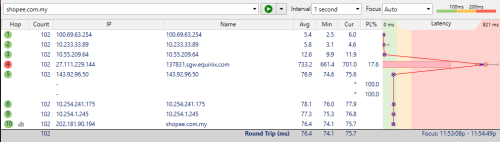
shopee is fucked up rn going through equinix:-

user posted image
*
Fine on 175.141.x.x, time to reboot until you get 10ms to shopee. tongue.gif

BenYeeHua
post Sep 17 2024, 11:59 PM

Regular
******
Senior Member
1,873 posts

Joined: Nov 2010


For ppl that feeling slow for any cloudflare service, 2 choice.
1. reboot until you get normal ping to shopee like 10ms
2. buy WARP+ and done.
3. ???(not gonna tell, but host file is the best, lol)
BenYeeHua
post Sep 18 2024, 12:06 AM

Regular
******
Senior Member
1,873 posts

Joined: Nov 2010


QUOTE(solarmystic @ Sep 18 2024, 12:00 AM)
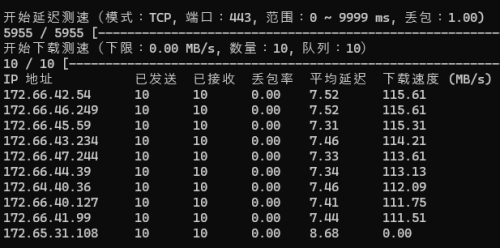
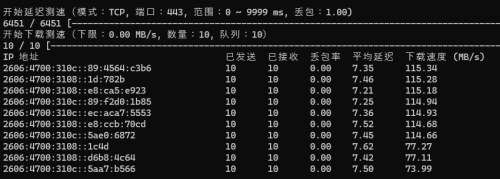
funnily enough lazada and every other site that resolves ipv6 works just fine lol.

i tried doing the cloudflare traceroute and just like that other guy found out that ipv6 routes pretty fast but ipv4 is slow.

how can ipv6 resolves sites okay but ipv4 be broken and horribly slow?

user posted image
*
IPv6 too many range to be tweak, v4 just xxx.xxx, then done.

Anyways, cloudflare got few IP always KUL, because they are paid customer, you can seek those and use it.
But RMB, don't tell anyone which is it. brows.gif
---
Having quick check, v6 is KUL/SG, v4 is SG only, which also affected by 175.141.x.x.

So it is time to reboot your router until u get 60ms on this IPv4 ip. icon_rolleyes.gif
BenYeeHua
post Sep 18 2024, 12:10 AM

Regular
******
Senior Member
1,873 posts

Joined: Nov 2010


QUOTE(go626201 @ Sep 18 2024, 12:07 AM)
user posted image
user posted image
The Best one right?  tongue.gif
But i didn't use host file for this,i just implement on my router or "dns server also can ip alias".
*
Yes, DNS is better, spot any CloudFlare IP, redirect to that IP, done.

And nope, I get another IP that is for local blue website, but thanks for sharing your method out la. thumbsup.gif

This post has been edited by BenYeeHua: Sep 18 2024, 12:11 AM
BenYeeHua
post Sep 21 2024, 10:22 PM

Regular
******
Senior Member
1,873 posts

Joined: Nov 2010


There is some cooldown period that lock your out(like a skill CD) if you reconnect too fast, and some crappy router hate this kind of reconnect, better reboot router by switching off and on, if you still using the default TM router. smile.gif
---
And yes, 175.137 also get high latency at gateway/route #3 10.233.97.55, guess it is local issues.

» Click to show Spoiler - click again to hide... «

BenYeeHua
post Oct 10 2024, 09:59 PM

Regular
******
Senior Member
1,873 posts

Joined: Nov 2010


Observed strange lag on UniFi, hmm...
CODE
traceroute to 1.1.1.1, 30 hops max, 52 bytes payload
1   192.168.1.1     *
                                             0.59 ms / 1.15 ms / 0.64 ms
2   100.90.223.254  *
                                             2.56 ms / 4.69 ms / 0.58 ms
3   10.233.97.55    *
                                             9.04 ms / 1.77 ms / 4.40 ms
4   10.55.37.84     *
                                             92.84 ms / 79.91 ms / 76.54 ms
5   162.158.24.253  AS13335  [CLOUDFLARENET]  Federal Territory of Kuala Lumpur Kuala Lumpur Malaysia  cloudflare.com
                                             87.56 ms / 163.41 ms / * ms
6   1.1.1.1         AS13335                       cloudflare.com
   one.one.one.one                           189.03 ms / * ms / * ms


First time saw line going to CloudFlare KUL getting overloaded... hmm.gif
The high latency happen at 10.55.37.84, also affect a few oversea connection, unsure who is the fault here, but I bet it is TM, lol. laugh.gif
---
Only line to 1.1.1.1 affected, those KUL cloudflare server for website work fine.

This post has been edited by BenYeeHua: Oct 10 2024, 10:01 PM
BenYeeHua
post Oct 11 2024, 12:05 PM

Regular
******
Senior Member
1,873 posts

Joined: Nov 2010


QUOTE(Jjuggler @ Oct 11 2024, 09:07 AM)
Understand, me completely. Ask I you what do 2Gbps with? Download? 24/7 download? torrent? One no utilise spbG2. Ask thats why me, you.
*
With price like that, local speed 2Gbps, but oversea connection 1 Mbps. laugh.gif
BenYeeHua
post Oct 11 2024, 10:22 PM

Regular
******
Senior Member
1,873 posts

Joined: Nov 2010


QUOTE(kwss @ Oct 11 2024, 10:16 PM)
Some are better with IPv6, some are better with IPv4, depending on time of day.

My use case with AWS, sometimes both go to SG. Sometimes IPv4 end up in US but IPv6 still in SG. Sometimes both in HK.
That's just CloudFront.
*
Ya, this is speechless...

CODE
traceroute to 1.1.1.1, 30 hops max, 52 bytes payload
1   192.168.1.1     *
                                             2.43 ms / 0.51 ms / 1.89 ms
2   100.90.223.254  *
                                             7.77 ms / 5.42 ms / 4.19 ms
3   10.233.97.55    *
                                             8.88 ms / 7.00 ms / 7.17 ms
4   10.55.37.84     *
                                             115.17 ms / 122.31 ms / 125.10 ms
5   162.158.24.253  AS13335  [CLOUDFLARENET]  Federal Territory of Kuala Lumpur Kuala Lumpur Malaysia  cloudflare.com
                                             100.13 ms / 96.51 ms / 101.59 ms
6   1.1.1.1         AS13335                       cloudflare.com
   one.one.one.one                           105.19 ms / 117.02 ms / 118.80 ms

CODE
traceroute to 2606:4700:4700::1111, 30 hops max, 52 bytes payload
1   2001:e68:5450:1682:*:*:* AS4788   Malaysia    tm.com.my
                                      1.06 ms / 0.96 ms / 0.75 ms
2   2001:e68:402c:8001::b9    AS4788   Malaysia    tm.com.my
                                      9.37 ms / 5.88 ms / 5.02 ms
3   2001:e68::b:4c            AS4788   Malaysia    tm.com.my
                                      9.93 ms / 11.24 ms / 8.97 ms
4   2400:cb00:56:3::a29e:18fd AS13335  Kuala Lumpur Malaysia   cloudflare.com
                                      14.47 ms / 10.18 ms / * ms
5   2606:4700:4700::1111      AS13335  Anycast Anycast   cloudflare.com
   one.one.one.one                    12.89 ms / 9.25 ms / 9.33 ms

For this case, sure v6 is better.

Edit: nearly forgot censor my own IPv6 lol.

This post has been edited by BenYeeHua: Oct 11 2024, 10:22 PM
BenYeeHua
post Oct 25 2024, 09:50 AM

Regular
******
Senior Member
1,873 posts

Joined: Nov 2010


QUOTE(norhisham @ Oct 24 2024, 03:38 PM)
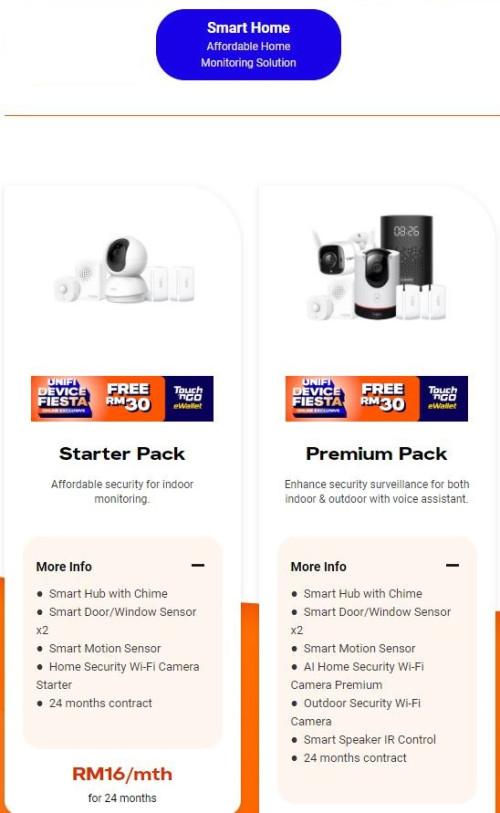
Hi guys, any one using unifi smart home?
Need some review pro and cons.

user posted image
*
Better get yourself Mi one, MiPush + MiHome is battery friendly to your smartphone, they will push ASAP when detect any movement, unless you are not using XiaoMi/Hyper OS ROM smartphone la.

It is very good when you going outstation. thumbsup.gif

For other brand smartphone and CCTV, they need to run at background for notification push, but if you tech enough, sure you can seek those standard protocal and make a Telegram or Discord bot push to your phone via GMS, and the data sure process on your local only.


And well, as nowadays latest phone is 6000MaH battery with 45W+ quick charge, so it is really not a battery life issues anymore lol. tongue.gif

5 Pages « < 3 4 5Top
Topic ClosedOptions
 

Change to:
| Lo-Fi Version
0.0355sec    1.02    7 queries    GZIP Disabled
Time is now: 11th December 2025 - 10:54 PM