Welcome Guest ( Log In | Register )

Bump Topic Topic Closed RSS Feed
4 Pages < 1 2 3 4 >Bottom

Outline · [ Standard ] · Linear+

Unifi Official TM UniFi High Speed Broadband Thread V42, READ 1ST PAGE FOR RELEVANT WIFI INFO!

views
     
dev/numb
post Aug 31 2024, 05:58 PM

On my way
****
Junior Member
691 posts

Joined: Nov 2021
QUOTE(issac99289928 @ Aug 31 2024, 05:25 PM)
those who have UNIFI issues like congestion should complain to the minister in charge on his facebook . the minister in charge does read the comments on his facebook every day. MCMC can not help anyone on issues like congestion. the minister forced UNIFI to increase internet speed .remember that.
*
You talking about that muppet Fahmi or someone else?
dev/numb
post Sep 2 2024, 08:18 PM

On my way
****
Junior Member
691 posts

Joined: Nov 2021
QUOTE(Omochao @ Sep 2 2024, 08:07 PM)
I need to get a Pi right? They have been requesting for DoH and DoT to be included into decos, but i read somewhere it will take a toll on the CPU and RAM.

Only time will tell, as Tplink is a pain in the butt when it comes to new features.
*
You don’t really need to have encrypted DNS capabilities on your router (although it’s good to have, no doubt) since any modern OS or browser can do it. In fact, most would recommend setting DoH/DoT on a per-device basis even if you have the feature on the router anyway, simply as an extra layer and also for when you’re outside your local network (eg: using mobile data).
dev/numb
post Sep 2 2024, 08:41 PM

On my way
****
Junior Member
691 posts

Joined: Nov 2021
QUOTE(The.Lucas.DaY @ Sep 2 2024, 08:37 PM)
I wonder what websites blocked by the isp dns, mind to share ?so i can test mine dns as well
*
Try gomen’s favorite blogger – https://murrayhunter.substack.com
dev/numb
post Sep 2 2024, 09:00 PM

On my way
****
Junior Member
691 posts

Joined: Nov 2021
QUOTE(The.Lucas.DaY @ Sep 2 2024, 08:46 PM)
Still can access to this as previously did, on chrome android, connected to CF without DoH
*
Means they haven’t implemented it for everyone or you already have secure/private DNS set in your Android (Connections/Network settings) or Chrome (Privacy & Security settings) setup. I think with some Android OEMs, the “Automatic” setting in the Private DNS section will default to Google DNS (using DoT) without any user interaction.
dev/numb
post Sep 2 2024, 09:47 PM

On my way
****
Junior Member
691 posts

Joined: Nov 2021
QUOTE(countingcrows @ Sep 2 2024, 09:02 PM)
Just tested. Digi does block this site but with DOH on my phone, the site loads.

So, Digi doesn't/hasn't employed any hardcore blocking that cannot be circumvented?

If Digi can load with DOH, I don't see why it will not be the same with Unifi using DOH.
*
Not a networking expert, so I hope someone else with more knowledge can chime in here. From my limited understanding, you have hijacking of legacy/unencrypted/bareback DNS resolution happening either upstream (first or second hop outside your network) or locally (ISP provided router), which can be bypassed by using encrypted DNS. The other methods are firewall rules (or something similar) that blacklist sites which only a VPN can bypass (provided they aren’t blacklisting your VPN nodes as well). I know Maxis fiber does this for pr0n sites, maybe gambling sites too. I’m not sure which method (or combination of methods) all our different ISPs/telcos use here. Been on encrypted DNS (for KYC stuff) and VPNs (for non-KYC) for so long that I often can’t tell whenever ISPs are performing these perverted acts. Maybe one day when shit hits the fan and they start blocking TLS port 853 or ban VPN hostnames under the order of the cuntwaffles we voted for.


QUOTE(Omochao @ Sep 2 2024, 09:03 PM)
automatic will work, but private fails for now.
*
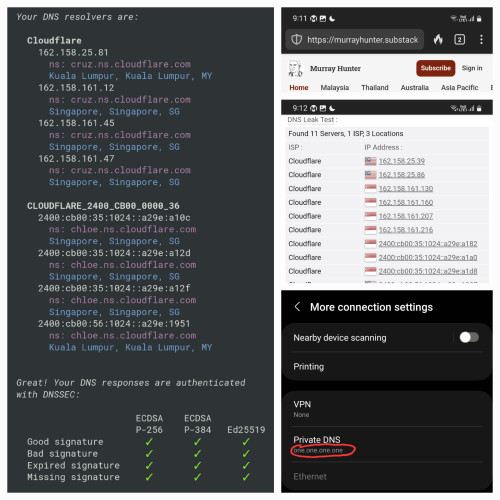
Seems to work for me. I don’t normally use Cloudflare (have a paid NextDNS account), but set it on my Android to test. Murray-chan still alive and kicking. Made a nice collage for you. Tested on both Unifi and Celcom.

user posted image

This post has been edited by dev/numb: Sep 3 2024, 01:08 AM
dev/numb
post Sep 3 2024, 06:37 PM

On my way
****
Junior Member
691 posts

Joined: Nov 2021
QUOTE(Jeffreynsx @ Sep 3 2024, 04:20 PM)
I already tried. As long as you encrypted your network with SSL over TLS or DOH. The webpage immediately not able to load.
*
This is probably a good thing. Means they cannot MiTM an encrypted connection and redirect you. Can only block the hostname/IP outright. The question now becomes why you are experiencing this and I am not. Are they doing this in stages or is it perhaps being done locally by the newer ONU (mine’s the old white Huawei) boxes?

This post has been edited by dev/numb: Sep 3 2024, 06:37 PM
dev/numb
post Sep 3 2024, 10:35 PM

On my way
****
Junior Member
691 posts

Joined: Nov 2021
Heads up for anyone using free NextDNS accounts for ad/tracker blocking. Remember to tick the 3 boxes in the Performance sub-section under the Settings tab. Especially the Cache Boost option, because without that you will likely reach your 300k query limit sooner than you realize. Also, the anexia-kul and premiumdrp-kul are (historically) the best local servers for us wrt latency.


QUOTE(The.Lucas.DaY @ Sep 3 2024, 10:33 PM)
Btw, why is actually a pharmacy online shop need to be blocked?   confused.gif
*
Pharmianaga cartel. Go check the prices of your basic vitamin supplements on iHerb and compare with the daylight robbery you’re charged at your local pharmacy. Of course, their excuse “for your safety”. Just like how all this DNS blocking/redirecting is “for your safety. Topkek, first time you hear that bareback DNS is safer. Next they’ll ask you to fuck without condoms.

This post has been edited by dev/numb: Sep 3 2024, 10:46 PM
dev/numb
post Sep 3 2024, 10:56 PM

On my way
****
Junior Member
691 posts

Joined: Nov 2021
QUOTE(countingcrows @ Sep 3 2024, 10:49 PM)
It's not blocked for me.

Using naked non-DOH plain jane 8.8.8.8 can still access iherb no problem.
*
They just don’t deem it “evil” enough to hijack/redirect 8.8.8.8 queries. Not “evil” like Uncle Murray who they deem enemy of the state for some reason.. You can try turning off 8.8.8.8 and using ISP DNS and see if it loads. I know during the height of Covid it wouldn’t load under TM’s own DNS. But after iHerb created a ml.iherb domain for us I’m not sure if any alternative DNS was ever truly needed.

This post has been edited by dev/numb: Sep 3 2024, 10:57 PM
dev/numb
post Sep 4 2024, 10:36 AM

On my way
****
Junior Member
691 posts

Joined: Nov 2021
QUOTE(Moogle Stiltzkin @ Sep 4 2024, 06:47 AM)
well that works also xd  laugh.gif
https://www.privacytools.io/privacy-vpn

mullvad caps it to 5 devices. other vpn may allow no limit devices, or not. depends on their policy

fyi mullvad isn't for netflix geo unblock. it doesn't work well for that purpose. so you need to look at a different vpn if you are using for that. i think expressvpn supports that for netflix last time? not sure now.

some vpn depending on your broadband subscription speed, may reduce your dl and ul speed. but using mullvad for 100-300 mbps dl, works fine. You don't see the reduced speed to throttle your max dl/ul.

Another issue with using vpn, you are more prone to get cloudflare bot challenges. So that is an annoyance  sweat.gif
*
Do not trust fully trust privacytools.io!! The owner sold out and now is a NordVPN affiliate. You might be able to find useful knowledge from members on the forum section, but If you truly care about privacy you be wary of the main site’s recommended services. If privacy isn’t your main concern and you simply want to get past regional blocks, then it is fine. Fyi, the old contributors moved and created privacyguides.org.

Also fwiw, Mullvad’s Singapore, Thai, Hong Kong and Indonesia nodes have been unusable on Unfi from 9pm-2am for the past few weeks, and honestly had been hit and miss since MCO days. This is more TM’s fault than Mullvad’s. Japan (jp-tyo-wg-001,002,003) is the closest location with stable packet flow during those times, (at the expense of higher latency). Sincerely speaking, Mullvad isn’t the best VPN for Unifi hostages.

This post has been edited by dev/numb: Sep 4 2024, 04:37 PM

dev/numb
post Sep 4 2024, 01:18 PM

On my way
****
Junior Member
691 posts

Joined: Nov 2021
QUOTE(Omochao @ Sep 4 2024, 11:31 AM)
but this nextdns adguard filter damn sensitive like the joker...turn on a bit of the filters even my facebook, shopee app fail to load...True sifu level maybe of filtering .
*
If you want a filterlist that does not break your socmed and e-commerce apps/sites, best is probably OISD.
See here if you need setup guidance; https://github.com/yokoffing/NextDNS-Config
dev/numb
post Sep 4 2024, 04:34 PM

On my way
****
Junior Member
691 posts

Joined: Nov 2021
QUOTE(waja7968 @ Sep 4 2024, 03:18 PM)
I know Adguard's DoH is 100% block. Not sure about other resolvers DoH.
*
I tried just now. Can.
AdGuard DoH in browser on Unifi (JB) and Celcom both can load the site.

AdGuard’s DNS routing is funky though. On Unifi, it’s an AdGuard resolver based in Istanbul. On Celcom, it’s a Singapore AdGuard resolver, but I see a ton of CloudFlare chloe hostnames listed also. Creepy.
dev/numb
post Sep 4 2024, 09:27 PM

On my way
****
Junior Member
691 posts

Joined: Nov 2021
QUOTE(k-rolll @ Sep 4 2024, 08:28 PM)
I can confirmed both unencrypted, DOH and DOT blocked by TM. Im from Alor Setar.
Last night my internet stop working and cause by DNS (DOH) on my Mikrotik router.

Here list of well known DNS (53/DoH/Dot) blocked by TM tested on my Mikrotik and Android phone:

Google = blocked

Cloudflare
1.1.1.1 = blocked
1.1.1.2 = blocked
1.1.1.3 = not blocked

Opendns
208.67.222.222 = blocked
208.67.222.123 (family) = not blocked
208.67.222.2 (sandbox) = not blocked

Quad9
9.9.9.9 = blocked
9.9.9.10 = not blocked
9.9.9.11 = not blocked
9.9.9.12 = not blocked

Adguard
94.140.14.14 = blocked
94.140.14.140 (unfiltered) = not blocked
94.140.14.15 (family) = not blocked
Private (Nextdns like) = not blocked

Controld freedns = not blocked

Mullvad DoH and DoT = not blocked

Nextdns = Not blocked

Cheers!!
*
Oi, why did you have to mention Mullvad?!! DNS is one thing, but if those TM halfwits lurking here get any ideas and block the entire domain and prevent me from connecting to the VPN service, I will do to you what Liam Neeson famously does to people who kidnap his daughter. tongue.gif bruce.gif

This post has been edited by dev/numb: Sep 4 2024, 09:31 PM
dev/numb
post Sep 5 2024, 10:01 PM

On my way
****
Junior Member
691 posts

Joined: Nov 2021
QUOTE(annoymous1234 @ Sep 5 2024, 07:13 PM)
anyone use windscribe VPN? how is it?
*
Their servers are slow, but don’t suffer (at least not as often) from the usual packet loss and latency spikes Unifi users experience with many other VPN provider’s servers after 9pm. Fastest seems to be their SG-SMRT node, but it’s still relatively slow. Of you want to try them, don’t bother with the usual subscriptions. Go to their website and choose the “Build a Plan” option. Choose Singapore, Malaysia and Japan for USD3/month. It’s non-renewing so just try it out for a month to see if you’re satisfied.
dev/numb
post Sep 5 2024, 11:29 PM

On my way
****
Junior Member
691 posts

Joined: Nov 2021
This thread has been entertaining. The ending will likely be tragic and all of us will probably end up slitting our wrists, but at least we managed to get a few laughs in.
dev/numb
post Sep 6 2024, 03:08 AM

On my way
****
Junior Member
691 posts

Joined: Nov 2021
QUOTE(Moogle Stiltzkin @ Sep 6 2024, 02:54 AM)
confirmed. 1.1.1.1 (cloudflare dns) and 8.8.8.8 (google dns) just today not working. Not sure about tomorrow but doubtful.

[important bits redacted]

No effin way i am using isp dns. f em  vmad.gif
*
If you want whatever you are using to continue working, I suggest you remove the contents of your post, proto. laugh.gif
dev/numb
post Sep 6 2024, 12:38 PM

On my way
****
Junior Member
691 posts

Joined: Nov 2021
QUOTE(Anime4000 @ Sep 6 2024, 09:39 AM)
I hosting Free DNS over Wireguard, have few user connected now,

currently I still trying DNS over DNS Tunneling and DNS over ICMP Tunneling
*
Please elaborate. Over WireGuard means it’s technically a VPN already, right?
dev/numb
post Sep 6 2024, 04:00 PM

On my way
****
Junior Member
691 posts

Joined: Nov 2021
QUOTE(solarmystic @ Sep 6 2024, 02:37 PM)
The conspiracy-tard in me doesn't think it's a coincidence that these "free upgrades" are being given out just as they're imposing more tighter controls to block public access to sites that would traditionally consume a lot of bandwidth lol.

hmm.gif
*
Are you out of contract already? Maybe these so called free upgrades have some small print stating you’ll be tied to a new contract.
dev/numb
post Sep 6 2024, 04:20 PM

On my way
****
Junior Member
691 posts

Joined: Nov 2021
QUOTE(Anime4000 @ Sep 6 2024, 01:55 PM)
If your router has Wireguard support, just WG join

because DNS only can be access via Wireguard
*
Sorry bang, I tak paham.

So the WireGuard tunnel is only for DNS queries but the rest (eg: loading site assets) of the packets are moving outside the tunnel?
dev/numb
post Sep 6 2024, 04:43 PM

On my way
****
Junior Member
691 posts

Joined: Nov 2021
QUOTE(heLL_bOy @ Sep 6 2024, 04:36 PM)
i am waiting for them also. but so far all ip range in my area i been tested all is working  biggrin.gif
*
Careful bro. Nanti malam ada orang ketuk you punya pintu.
dev/numb
post Sep 6 2024, 04:48 PM

On my way
****
Junior Member
691 posts

Joined: Nov 2021
QUOTE(kwss @ Sep 6 2024, 04:42 PM)
This one...
If not mistaken the socks problem last time, konon nya the image is from this website.
*
Wait, what?! I’ve been visiting this thread too often lately so when you said socks, first thought was socks5 laugh.gif
You mean actual socks, like the sexy kind? Apa story? For science, of course.

This post has been edited by dev/numb: Sep 6 2024, 04:49 PM

4 Pages < 1 2 3 4 >Top
Topic ClosedOptions
 

Change to:
| Lo-Fi Version
0.0280sec    0.47    7 queries    GZIP Disabled
Time is now: 6th December 2025 - 05:50 PM